
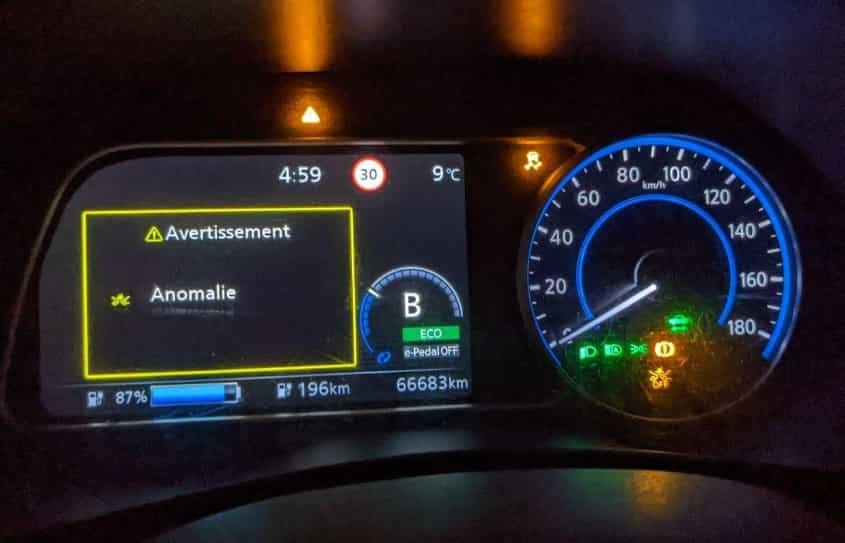
Electric vehicles are designed to make driving simpler, quieter, and more efficient. However, seeing an unfamiliar warning light appear on your Nissan Leaf dashboard can quickly replace confidence with uncertainty. Whether it is a yellow triangle, a battery symbol, or an EV system alert, many drivers immediately wonder if the vehicle is still safe to drive or if an expensive repair is about to follow. In many cases, the warning may indicate nothing more than a maintenance reminder or a temporary condition. In other situations, it can signal a problem that requires immediate attention to protect both the vehicle and its occupants.
Understanding Nissan Leaf warning lights is essential because every dashboard symbol communicates important information about the condition of your vehicle. Some indicators simply confirm that a system is operating normally, while others alert you to issues involving the high voltage battery, charging system, brakes, tires, steering, or advanced driver assistance features. Recognizing the difference between these alerts allows you to respond appropriately and avoid unnecessary stress or costly damage caused by ignoring an early warning.
This comprehensive guide explains the meaning of every major Nissan Leaf warning light, the most common reasons each indicator appears, and the practical steps you should take to resolve the problem. You will also learn when it is safe to continue driving, when you should stop immediately, and which warning lights require professional diagnosis. By the end of this guide, you will have the knowledge needed to identify dashboard symbols with confidence and keep your Nissan Leaf operating safely and efficiently.
What Do Nissan Leaf Warning Light Colors Mean?
Your Nissan Leaf uses different warning light colors to help you understand the condition of the vehicle. Each color represents a different level of urgency. If you understand these colors, you can react quickly and avoid unnecessary damage or safety risks.
Many drivers focus on the symbol itself. However, the color often tells you how serious the problem is before you read the dashboard message. For that reason, learning the color system is the first step in understanding Nissan Leaf warning lights.
Red Warning Lights
Red warning lights require your immediate attention. They warn you about serious safety issues or major system faults. In many cases, you should stop driving as soon as it is safe to do so.
A red warning light may indicate a brake system problem, an EV system fault, or another critical issue. If the warning appears with unusual noises, reduced power, or a burning smell, pull over immediately. Turn off the vehicle and inspect the situation before continuing your trip.
If the warning remains on after restarting the vehicle, contact a qualified technician. Ignoring a red warning light can increase repair costs and put your safety at risk.
Yellow or Amber Warning Lights
Yellow or amber warning lights tell you that the vehicle has detected a problem that needs attention. The issue is often less urgent than a red warning, but you should not ignore it.
In many situations, you can continue driving if the Nissan Leaf performs normally. Even so, you should identify the cause as soon as possible. A small problem can become much more expensive if you delay repairs.
These warning lights often relate to tire pressure, the anti lock braking system, battery management, charging functions, or electronic sensors. Check the dashboard message for additional details. Then arrange a diagnostic inspection if the warning stays on.
Green, Blue, and White Indicator Lights
Green, blue, and white lights usually provide information instead of warning you about a fault. They confirm that a feature or vehicle system is working as expected.
For example, a green light may show that ECO mode, cruise control, or the turn signals are active. A blue light usually indicates that the high beam headlights are on. White indicators often display status information for driver assistance systems.
Most of these indicators do not require any action. However, read the dashboard message if an indicator flashes unexpectedly or appears with another warning light.
Quick Reference Guide to Nissan Leaf Warning Light Colors
| Warning Light Color | Meaning | Recommended Action |
|---|---|---|
| Red | Serious safety issue or critical system fault | Stop the vehicle safely and inspect the problem immediately |
| Yellow or Amber | System fault or maintenance reminder | Drive carefully and schedule a diagnostic inspection |
| Green | Vehicle function is operating normally | Continue driving as usual |
| Blue | High beam headlights or another feature is active | Continue driving while using the feature correctly |
| White | Information or system status message | Read the dashboard message if one appears |
Understanding these color categories makes it much easier to diagnose Nissan Leaf warning lights. Once you know the level of urgency, you can focus on the specific dashboard symbol and choose the right solution. The following sections explain every major warning light, its possible causes, and the best way to fix the problem.
Nissan Leaf Master Warning Light
The Nissan Leaf master warning light appears as a yellow triangle with an exclamation mark. It is one of the most important dashboard alerts because it does not point to a single fault. Instead, it tells you that the vehicle has detected a condition that needs your attention. In most cases, the instrument cluster also displays a message that explains the problem. Always read this message first because it provides valuable information about the affected system.
Several conditions can trigger the master warning light. Common causes include a low Intelligent Key battery, an open door or charging port, low windshield washer fluid, low tire pressure, or a weak 12 volt battery. The warning may also appear when the EV system, charging system, or a driver assistance feature detects an abnormal condition. Some alerts are minor, while others require immediate inspection.
Your next step depends on how the Nissan Leaf performs. If the vehicle drives normally and no other warning lights appear, you can usually continue driving with caution. However, you should inspect the vehicle as soon as possible. If the master warning light appears with a red warning light, reduced power, or an EV system warning, stop the vehicle in a safe location. Continuing to drive could increase the risk of further damage.
To clear the warning, identify and fix the underlying cause instead of simply resetting the dashboard. Check the information display, inspect the most common problem areas, and restart the vehicle after completing the inspection. If the warning returns, use a compatible diagnostic scanner or visit a qualified Nissan technician for a complete diagnosis. This approach helps you solve the problem correctly and prevents unnecessary repairs.
Nissan Leaf EV System Warning Light
The EV system warning light alerts you to a problem within the electric drive system. This warning is more serious than many other dashboard indicators because it may affect how the Nissan Leaf starts, charges, or delivers power. In some cases, the vehicle continues to operate normally. In other situations, you may notice reduced performance or the vehicle may not enter READY mode at all.
Several components can trigger this warning. Common causes include a high voltage battery fault, an inverter problem, a malfunctioning electric motor, or an issue with the battery cooling system. A weak 12 volt battery can also generate an EV system warning because many electronic control modules rely on a stable power supply. Communication errors between control units may produce the same alert, even when the high voltage battery remains healthy.
Pay close attention to any changes in vehicle performance. Slow acceleration, limited driving power, charging failure, or warning messages on the instrument cluster often indicate that the system requires immediate inspection. If the warning appears together with reduced power or additional red warning lights, stop driving as soon as it is safe. Continuing your journey could place extra stress on critical electrical components.
Start your inspection by reading the message displayed on the dashboard. Check whether the vehicle charges normally and confirm that the 12 volt battery remains in good condition. If the warning disappears after restarting the vehicle, continue to monitor its behavior. However, if the warning returns or the Nissan Leaf refuses to enter READY mode, arrange a professional diagnostic inspection. A qualified technician can identify the exact fault and repair the system before the problem becomes more expensive.
Nissan Leaf Battery Warning Lights
The Nissan Leaf uses several battery warning lights to help you monitor the condition of its electrical systems. Some alerts relate to the high voltage traction battery, while others involve the 12 volt battery that powers the vehicle’s electronics. Understanding the difference helps you respond correctly and avoid unexpected breakdowns.
A low traction battery warning usually appears when the remaining charge reaches a critical level. This alert reminds you to find a charging station before the battery becomes fully depleted. If you ignore the warning, the available driving range continues to decrease. Eventually, the vehicle may enter a reduced power mode to protect the battery.
The battery temperature warning indicates that the traction battery has become too hot or too cold. Extreme temperatures can reduce driving range, slow the charging process, and affect overall performance. If this warning appears, move the vehicle to a suitable location and allow the battery temperature to return to its normal operating range before charging or driving long distances.
The 12 volt battery warning deserves equal attention. Although the traction battery may still hold plenty of energy, a weak 12 volt battery can cause multiple dashboard warnings, charging problems, and difficulty starting the vehicle. Many owners replace expensive parts before discovering that a failing 12 volt battery caused the issue.
When any battery warning light appears, check the dashboard message first. Charge the traction battery if the state of charge is low. Inspect the 12 volt battery for signs of age or corrosion around the terminals. If the warning remains after charging or restarting the vehicle, schedule a professional inspection. Early diagnosis protects the battery system, improves reliability, and helps prevent more expensive repairs in the future.
Nissan Leaf Charging Warning Lights
Nissan Leaf charging warning lights help you identify problems before they interrupt your daily driving routine. Some indicators simply show the charging status, while others warn you that the vehicle cannot charge correctly. Understanding these lights allows you to solve simple issues quickly and determine when professional service is necessary.
A charging warning may appear for several reasons. The charging connector may not lock into place, the charging cable may have a fault, or the charging station may not supply power. In some cases, the charging timer prevents the session from starting because of the selected schedule. Battery temperature can also affect charging performance. If the battery becomes extremely hot or cold, the Nissan Leaf may delay or reduce the charging rate to protect the battery pack.
Start by checking the charging cable and connector. Make sure the plug is fully inserted and securely locked. Next, inspect the charging port for dirt, moisture, or visible damage. If everything appears normal, try another charging station. This simple step helps you determine whether the problem comes from the vehicle or the charger.
You should also review the charging timer settings on the infotainment display. An incorrect schedule may prevent charging even though the equipment works properly. If the warning remains, restart the vehicle and reconnect the charging cable. Many temporary communication errors disappear after a fresh connection.
Persistent charging warnings require further diagnosis. A damaged charging port, a faulty onboard charger, or an electrical communication fault may prevent the battery from charging correctly. If the Nissan Leaf repeatedly fails to charge at different locations, contact a qualified technician for a complete inspection. Early diagnosis reduces the risk of battery damage and helps keep your electric vehicle ready for everyday use.
Nissan Leaf Brake Warning Light
The Nissan Leaf brake warning light alerts you to a problem that could affect your ability to stop the vehicle safely. You should never ignore this warning because the braking system plays a critical role in protecting you and your passengers. Although some causes are simple, others require immediate attention.
The brake warning light may appear when the parking brake remains engaged. It can also indicate low brake fluid, a fault in the hydraulic brake system, or a problem with the electronic brake control system. In some situations, the warning appears together with the ABS warning light or other dashboard alerts. When several brake related warnings appear at the same time, the vehicle needs a professional inspection as soon as possible.
Pay attention to how the Nissan Leaf responds while driving. A soft brake pedal, longer stopping distance, unusual noises, or warning messages on the instrument cluster often suggest a more serious issue. If you notice any of these symptoms, stop the vehicle in a safe location and avoid driving until you identify the cause.
Begin your inspection by confirming that you have fully released the parking brake. Next, check the brake fluid level if you can do so safely. If the fluid level is low, do not continue driving until you find the reason. Low brake fluid may indicate a leak or excessive brake wear. If the warning light remains on after these checks, arrange a complete diagnostic inspection without delay.
Never assume that the warning will disappear on its own. A small brake problem can develop into a major safety risk if you ignore it. Taking action early helps maintain reliable braking performance and reduces the chance of expensive repairs later.
Nissan Leaf ABS Warning Light
The Nissan Leaf ABS warning light indicates that the Anti Lock Braking System has detected a fault. This system helps prevent the wheels from locking during hard braking, allowing you to maintain better steering control on wet, icy, or uneven roads. When the ABS warning light stays on, the standard braking system may still work, but the anti lock function may no longer provide assistance during emergency stops.
Several issues can trigger the ABS warning light. A faulty wheel speed sensor is one of the most common causes because the system relies on accurate wheel speed data. Damaged wiring, a weak 12 volt battery, or a malfunctioning ABS control module can also activate the warning. Dirt or debris around a wheel speed sensor may interrupt the signal and cause the system to report a fault.
If the ABS warning light appears by itself, drive carefully and leave extra space between your vehicle and the traffic ahead. Avoid sudden or aggressive braking whenever possible. Although you can often continue driving for a short distance, you should schedule a diagnostic inspection as soon as you can. Prompt repairs help restore full braking performance and reduce the risk of losing control on slippery roads.
Take the warning more seriously if the ABS light appears with the brake warning light or another red dashboard indicator. This combination may point to a larger problem within the braking system. Stop the vehicle in a safe place and arrange professional assistance before continuing your journey. Addressing the problem early improves safety, protects important brake components, and helps prevent more expensive repairs in the future.
Nissan Leaf Tire Pressure Warning Light
The Nissan Leaf tire pressure warning light alerts you when one or more tires no longer meet the recommended pressure. The Tire Pressure Monitoring System continuously checks each tire and helps you maintain safe driving conditions. Proper tire pressure improves handling, increases driving range, and reduces tire wear. It also supports better braking performance and overall vehicle stability.
A solid tire pressure warning light usually means that at least one tire has low air pressure. This often happens after a sudden drop in temperature because cold weather reduces tire pressure naturally. A slow air leak, a puncture, or normal pressure loss over time can also trigger the warning. If the light flashes before remaining on, the monitoring system may have detected a fault with a sensor or another electronic component.
When the warning light appears, inspect all four tires as soon as possible. Use a reliable tire pressure gauge instead of relying on a visual inspection. Inflate each tire to the pressure listed on the driver’s door label, not the maximum pressure printed on the tire sidewall. After adjusting the pressure, drive for several minutes so the monitoring system can update its readings.
If the warning light remains on after correcting the tire pressure, inspect the tires for damage or slow leaks. A damaged TPMS sensor or a recently replaced tire may also prevent the system from operating correctly. Schedule a professional inspection if the warning continues to appear. Maintaining the correct tire pressure improves safety, extends tire life, and helps your Nissan Leaf deliver the driving range you expect.
Nissan Leaf Turtle Warning Light
The Nissan Leaf turtle warning light is one of the most recognizable symbols on the dashboard. This indicator tells you that the vehicle has entered a power reduction mode to protect important electrical components. Although you can often continue driving for a short distance, the vehicle will respond much more slowly than usual. You should treat this warning as a sign to reach a safe location as soon as possible.
The turtle warning light usually appears when the traction battery reaches a very low state of charge. It may also activate if the battery temperature becomes too high or too low. In some cases, the warning points to an EV system fault that limits power to prevent additional damage. Regardless of the cause, the Nissan Leaf reduces acceleration and overall performance to protect the battery and the electric drive system.
You will probably notice several changes while driving. The vehicle may accelerate slowly, climb hills with difficulty, or struggle to maintain highway speeds. These symptoms become more noticeable if the battery charge continues to decrease. Ignoring the warning can leave you without enough power to reach your destination or the nearest charging station.
Begin by checking the battery charge level on the instrument cluster. If the battery is low, drive carefully to the nearest compatible charging station. Avoid rapid acceleration because it increases energy consumption and shortens the remaining driving range. If the warning appears even though the battery has enough charge, restart the vehicle and monitor its performance. When the turtle warning light stays on or appears repeatedly, arrange a professional inspection. Early diagnosis helps protect the battery system and prevents more serious electrical problems from developing.
Nissan Leaf Power Steering Warning Light
The Nissan Leaf power steering warning light indicates that the Electric Power Steering system has detected a fault. This system reduces the effort needed to turn the steering wheel and helps you maintain precise control in different driving conditions. When the warning light appears, the vehicle may continue to operate, but steering often becomes noticeably heavier.
Several problems can trigger this warning. A weak 12 volt battery is one of the most common causes because the steering system depends on a stable electrical supply. Low battery voltage can interrupt communication between control modules and activate the warning light. Other possible causes include damaged wiring, a faulty steering control module, or an internal sensor failure.
You may notice that the steering wheel requires much more effort, especially at low speeds or while parking. Some drivers also experience an intermittent warning that disappears after restarting the vehicle. Although a temporary fault may clear itself, you should never assume that the problem has been solved. A recurring warning usually points to an electrical issue that requires further diagnosis.
If the power steering warning light comes on, reduce your speed and pay close attention to how the vehicle responds. Drive only if you can control the steering safely. After stopping, restart the Nissan Leaf and check whether the warning returns. If the steering remains heavy or the warning light stays on, arrange a professional inspection as soon as possible. Driving with limited steering assistance can increase driver fatigue and reduce your ability to react quickly during emergency situations. Prompt repairs restore normal steering performance and help keep every journey safe and comfortable.
Nissan Leaf Airbag Warning Light
The Nissan Leaf airbag warning light indicates that the Supplemental Restraint System has detected a fault. This system protects the driver and passengers during a collision by controlling the airbags and seat belt pretensioners. When the warning light remains on, flashes continuously, or appears while driving, the system may not provide full protection during an accident. For this reason, you should never ignore this warning.
Several issues can activate the airbag warning light. A faulty seat occupancy sensor is one of the most common causes. Loose electrical connectors under the front seats can also interrupt communication with the control module. In some cases, damaged wiring, a defective airbag control unit, or previous collision repairs may trigger the warning. Even a weak 12 volt battery can generate temporary SRS faults because the system depends on stable electrical power.
Start by checking whether the warning appeared after moving a front seat or storing items underneath it. Loose connectors can sometimes cause an intermittent fault. Remove any objects that may interfere with the wiring, then restart the vehicle. If the warning light remains on, avoid attempting to repair the airbag system yourself. Airbag components require specialized equipment and safe handling procedures.
Arrange a professional inspection as soon as possible if the warning does not disappear. A diagnostic scan can identify the exact fault code and help technicians repair the correct component. Restoring the Supplemental Restraint System ensures that the airbags and seat belt pretensioners work as designed when you need them most. Early diagnosis also prevents minor electrical faults from developing into more complex safety related problems.
Nissan Leaf Vehicle Dynamic Control Warning Light
The Nissan Leaf Vehicle Dynamic Control warning light monitors the electronic stability system that helps you maintain control during challenging driving conditions. This technology works with the Anti Lock Braking System and traction control to reduce wheel slip and improve vehicle stability. When the warning light appears, the system may not provide full assistance during sharp turns, sudden braking, or slippery road conditions.
A flashing Vehicle Dynamic Control warning light usually indicates normal operation. The system actively reduces wheel spin when it detects a loss of traction. You may notice this while driving on wet roads, loose gravel, snow, or ice. The light should turn off once the tires regain proper grip.
A solid warning light tells a different story. It usually means the system has detected a fault that requires attention. Common causes include a faulty wheel speed sensor, a damaged steering angle sensor, low 12 volt battery voltage, or an issue within the Anti Lock Braking System. Since these systems share information, a fault in one component can trigger multiple dashboard warnings at the same time.
If the warning light remains on, drive carefully and avoid sudden steering or aggressive acceleration until you identify the problem. Check whether the Vehicle Dynamic Control system has been switched off manually through the vehicle settings. If the system remains enabled and the warning continues to appear, arrange a diagnostic inspection. Repairing the fault restores the stability system and helps the Nissan Leaf maintain better control during emergency maneuvers and poor road conditions. Early diagnosis also reduces the risk of additional electronic system failures.
Nissan Leaf Automatic Emergency Braking Warning Light
The Nissan Leaf Automatic Emergency Braking warning light indicates that the collision avoidance system cannot operate correctly. This safety feature uses a forward facing camera and other sensors to monitor traffic ahead. When the system detects a possible collision, it warns the driver and may apply the brakes automatically. If the warning light stays on, the system may not respond when you need it most.
Several conditions can trigger this warning. Dirt, mud, snow, or heavy rain can block the front camera and prevent it from detecting vehicles accurately. Bright sunlight, thick fog, or poor visibility may also reduce system performance. In other cases, the warning may result from a damaged sensor, incorrect camera alignment, or a software related issue.
Start by inspecting the area around the front camera and any visible sensors. Remove dirt, ice, or debris that could block the system. If weather conditions reduce visibility, continue driving carefully until conditions improve. The warning light may turn off automatically after the camera regains a clear view of the road.
If the warning remains after cleaning the sensors and restarting the vehicle, arrange a professional inspection. The camera may require calibration after a windshield replacement or a front end repair. A qualified technician can also check for fault codes that identify electrical or communication problems within the system.
Although you can usually continue driving when this warning appears, never rely on driver assistance features alone. Stay alert, keep a safe following distance, and remain prepared to brake manually at all times. Restoring the Automatic Emergency Braking system ensures that your Nissan Leaf can provide the additional safety support it was designed to deliver.
Nissan Leaf Lane Departure Warning and Blind Spot Warning Lights
The Nissan Leaf uses advanced driver assistance systems to improve safety and increase driver awareness. Two of the most important features are the Lane Departure Warning system and the Blind Spot Warning system. These technologies monitor the road and surrounding traffic, then alert you when they detect a potential risk. If either warning light remains on or displays an error message, the system may not operate as expected.
The Lane Departure Warning system uses a forward facing camera to monitor lane markings. When the vehicle begins to drift out of its lane without using the turn signal, the system warns the driver through visual and audible alerts. If the warning light stays on continuously, the camera may have lost sight of the lane markings or detected a system fault. Dirty windshields, poor weather, faded road markings, or a camera calibration issue often cause this problem.
The Blind Spot Warning system monitors the areas beside and behind the vehicle. It alerts you when another vehicle enters your blind spot during normal driving or while changing lanes. A warning light may appear if the radar sensors become blocked by dirt, snow, or heavy rain. Electrical faults or damaged sensors can also prevent the system from working correctly.
When either warning light appears, inspect the camera and sensor areas for dirt or debris. Clean them carefully and restart the vehicle. If the warning remains after cleaning the sensors, schedule a professional inspection. Modern driver assistance systems rely on precise calibration, so even a small misalignment can reduce their accuracy.
These safety features support the driver, but they cannot replace careful observation. Always check your mirrors, monitor surrounding traffic, and look over your shoulder before changing lanes. Using these habits together with properly functioning safety systems helps you drive your Nissan Leaf with greater confidence and safety.
Nissan Leaf Check Engine Light
Many drivers are surprised to see the check engine light on a Nissan Leaf because the vehicle does not have a conventional gasoline engine. However, the warning light still plays an important role. It monitors the vehicle’s electronic control systems and detects faults that could affect performance, charging, or overall reliability. Although the name remains the same, the warning often relates to electrical components rather than an internal combustion engine.
Several issues can trigger the check engine light. A faulty sensor is one of the most common causes. Communication errors between electronic control modules can also activate the warning. Problems with the charging system, battery management system, onboard charger, or power control module may produce the same alert. In some cases, a weak 12 volt battery creates unstable voltage and causes multiple warning lights to appear, including the check engine light.
Pay attention to the way your Nissan Leaf behaves after the warning appears. If the vehicle starts normally, charges without difficulty, and drives as expected, the problem may not require immediate action. Even so, you should perform a diagnostic scan as soon as possible. Reading the stored fault codes helps identify the exact cause and prevents unnecessary parts replacement.
Take immediate action if the check engine light appears with reduced power, charging failure, or additional red warning lights. These symptoms may indicate a more serious electrical problem that requires professional attention. Continuing to drive under these conditions can increase the risk of component damage.
The best way to resolve a check engine warning is to diagnose the root cause instead of clearing the fault code. Once you repair the underlying problem, the warning light usually turns off automatically or after the control system completes a successful self check. Early diagnosis saves time, reduces repair costs, and helps keep your Nissan Leaf operating safely and efficiently.
Can You Drive With a Nissan Leaf Warning Light On?
The answer depends on the type of warning light and how the vehicle behaves. Some dashboard lights only provide information, while others warn you about a problem that could affect safety or damage important components. Understanding the difference helps you make the right decision and avoid unnecessary risks.
You can usually continue driving when a green, blue, or white indicator appears. These lights normally confirm that a feature is active or provide general vehicle information. They do not indicate a system failure and rarely require immediate action.
A yellow or amber warning light deserves more attention. In many cases, the Nissan Leaf remains safe to drive if it performs normally and no unusual symptoms appear. Even so, you should identify the cause as soon as possible. Ignoring an early warning can allow a minor fault to become a more expensive repair. Monitor the dashboard carefully and arrange a diagnostic inspection if the warning stays on.
Red warning lights require immediate action. Stop the vehicle as soon as you can do so safely and inspect the problem before continuing your journey. A red brake warning, an EV system warning with reduced power, or several warning lights appearing together may indicate a serious fault. Continuing to drive under these conditions could damage the vehicle or reduce your ability to control it safely.
Always pay attention to changes in vehicle performance. Slow acceleration, unusual noises, steering problems, charging failure, or warning messages on the instrument cluster often provide important clues. If you notice any of these symptoms, do not ignore them. A professional diagnosis can identify the root cause before the problem becomes more serious.
The safest approach is to treat every warning light as useful information rather than an inconvenience. Quick action protects your Nissan Leaf, reduces repair costs, and helps ensure every journey remains safe and reliable.
| Warning Light | Can You Drive? | Recommended Action |
|---|---|---|
| Green, Blue, or White | Yes | Continue driving normally |
| Yellow or Amber | Usually yes | Drive carefully and schedule an inspection |
| Red Brake Warning | No | Stop the vehicle immediately |
| EV System Warning with Reduced Power | No | Pull over safely and request assistance |
| Turtle Warning Light | Only if necessary | Drive slowly to the nearest safe location or charging station |
| Multiple Warning Lights | Not recommended | Perform a diagnostic scan as soon as possible |
How to Reset Nissan Leaf Warning Lights
Many drivers want to reset Nissan Leaf warning lights as soon as they appear. However, resetting a warning light without fixing the underlying problem only hides the symptom. The warning usually returns after the vehicle completes another system check. For this reason, you should always identify the cause before attempting any reset procedure.
Start by reading the message displayed on the instrument cluster. The Nissan Leaf often provides additional information that helps you understand which system has detected a fault. This message can save time and guide your inspection in the right direction.
Next, check the most common causes. Confirm that every door, the rear hatch, and the charging port are fully closed. Inspect the tire pressure if the Tire Pressure Monitoring System warning is active. Check the brake fluid level if the brake warning light appears. You should also inspect the 12 volt battery because low voltage can trigger several dashboard warnings at the same time.
After completing these checks, switch the vehicle off for a few minutes and restart it. Some temporary communication errors clear automatically after the control modules complete a new self check. If the warning light disappears and does not return, the problem may have been temporary. Continue to monitor the vehicle during your next few trips.
If the warning remains, connect a compatible diagnostic scanner and read the stored fault codes. Record the codes before clearing them because they provide valuable information for future repairs. Clear the codes only after correcting the underlying problem. Otherwise, the warning light will most likely return.
Never disconnect the high voltage battery or attempt to repair high voltage components yourself. These systems operate at dangerous voltage levels and require specialized training and equipment. If the warning involves the battery pack, inverter, or EV system, contact a qualified Nissan technician for a complete diagnosis. Proper repairs restore normal vehicle operation and help prevent repeated warning lights in the future.
Frequently Asked Questions
What does the yellow triangle mean on a Nissan Leaf?
The yellow triangle is the Nissan Leaf master warning light. It tells you that the vehicle has detected a condition that requires your attention. Read the message on the instrument cluster because it identifies the affected system and explains the next step.
Can I drive with the Nissan Leaf master warning light on?
In many cases, yes. You can usually continue driving if the vehicle operates normally and no red warning lights appear. However, you should inspect the vehicle as soon as possible. Stop driving immediately if the warning appears with reduced power or another critical alert.
Why does my Nissan Leaf show multiple warning lights at the same time?
A weak 12 volt battery is one of the most common causes. Communication errors between control modules can also trigger several dashboard warnings. A diagnostic scan helps identify the exact problem and prevents unnecessary repairs.
What does the turtle warning light mean?
The turtle symbol indicates that the Nissan Leaf has reduced its power output to protect the battery or electric drive system. This warning often appears when the traction battery is nearly empty or the battery temperature moves outside its normal operating range.
Why will my Nissan Leaf not enter READY mode?
The vehicle may fail to enter READY mode because of a weak 12 volt battery, an EV system fault, or a communication error between electronic control modules. A professional diagnostic scan can identify the exact cause.
Can a weak 12 volt battery cause warning lights?
Yes. A weak 12 volt battery can trigger several dashboard warnings because many electronic systems depend on stable voltage. Replacing the battery often resolves multiple warning lights at the same time.
Why is my Nissan Leaf not charging?
Charging problems may result from a faulty charging cable, a damaged charging port, incorrect charging timer settings, or an issue with the onboard charger. Battery temperature can also affect charging performance.
Should I reset Nissan Leaf warning lights myself?
You should only reset a warning light after fixing the underlying problem. Clearing fault codes without completing the repair may cause the warning to return during the next system check.
Do warning lights differ between Nissan Leaf model years?
Most warning lights remain similar across different model years. However, newer models may include additional symbols for advanced driver assistance features and updated safety technologies.
When should I visit a Nissan technician?
Arrange a professional inspection if a warning light stays on after restarting the vehicle, appears repeatedly, or affects charging, braking, steering, or driving performance. Immediate diagnosis helps prevent more serious damage and improves long term reliability.
Conclusion
Understanding Nissan Leaf warning lights helps you respond quickly and make informed decisions whenever a dashboard symbol appears. Some indicators simply provide information, while others warn you about problems that require immediate attention. Learning the difference can improve your safety, protect important vehicle components, and reduce unexpected repair costs.
Always read the message on the instrument cluster before taking action. The additional information often explains the cause of the warning and points you toward the correct solution. You should also pay close attention to changes in vehicle performance. Reduced power, charging problems, unusual noises, or steering and braking issues often indicate that the warning requires prompt inspection.
Many dashboard alerts result from simple issues such as low tire pressure, a weak 12 volt battery, or an open charging port. However, warnings related to the EV system, braking system, or high voltage battery should never be ignored. Early diagnosis helps prevent small problems from developing into expensive repairs and keeps your Nissan Leaf operating safely and efficiently.
If you cannot identify the cause of a warning light, use a compatible diagnostic scanner or contact a qualified Nissan technician. Professional testing provides accurate fault codes and ensures that the correct repair is completed.
Have you experienced a warning light that is not covered in this guide? Share your Nissan Leaf model year, the dashboard symbol, and the symptoms you noticed. Your experience may help other owners find the right solution more quickly.