
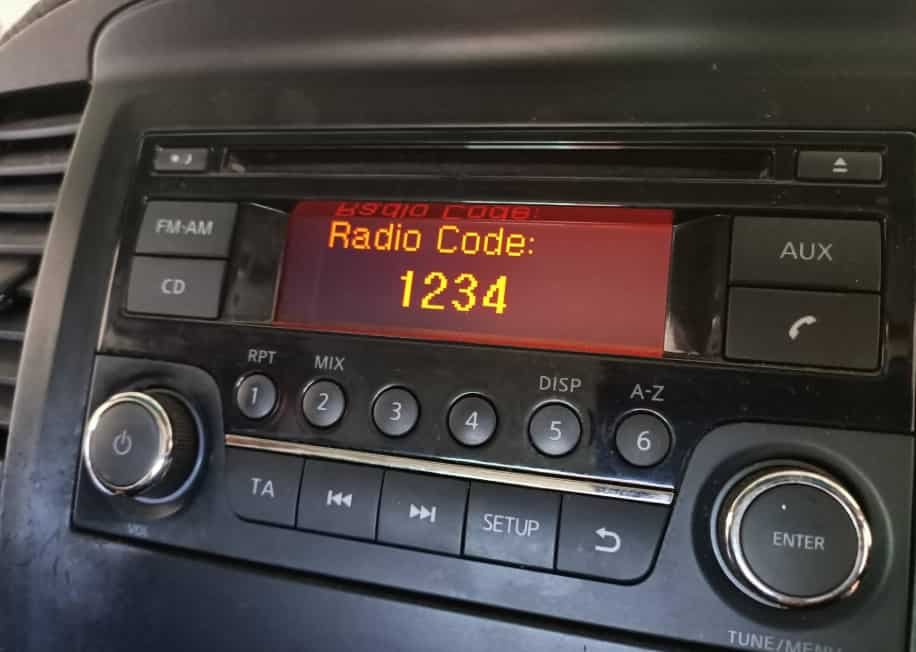
A Nissan radio asks for a security code after a reset because the system activates its anti theft protection. The radio loses access when it loses stored power. You need the original Nissan radio code to restore normal operation.
Nissan designed this security feature to protect factory audio systems from unauthorized use. The system connects the radio unit with the vehicle information. This connection helps prevent stolen radios from working in another vehicle.
Many Nissan owners face this issue after replacing a dead battery or disconnecting the battery during repairs. Some owners also experience this problem after replacing the factory radio. The display may show a code request message until the correct security code is entered.
This guide explains how to get a Nissan radio code and unlock your radio after reset. You will learn why the radio enters security mode, where to find the required information, and how to restore the audio system. The article also explains common problems that prevent successful unlocking and how to solve them.
Using the correct recovery method helps you avoid unreliable solutions. Nissan owners can restore their radio function by verifying the vehicle details and entering the correct security code.
Why Does a Nissan Radio Ask for a Code After Reset?
A Nissan radio asks for a code after reset because the anti theft system detects that the radio has lost its stored power connection. The security feature activates when the radio cannot confirm its connection with the original vehicle. This process protects the OEM audio system from unauthorized installation or theft.
The most common reason for this issue is a battery replacement. When the vehicle battery dies or someone disconnects the battery during maintenance, the radio loses its saved settings. After power returns, the Nissan radio may request a security code before it allows normal operation. For example, a Nissan Altima owner may see a code screen after replacing an old battery even though the radio worked correctly before the replacement.
The Nissan radio code system uses specific vehicle information to verify ownership. The radio unit, vehicle identification number, and security code work together as part of the protection process. The system does not recognize a power loss as a problem with the radio itself. Instead, it treats the event as a security check that requires verification.
Other situations can also trigger the Nissan radio security mode. These include replacing the factory radio, removing the head unit for repairs, or installing an OEM radio from another vehicle. Each radio unit has its own security information, so the correct code must match the specific radio and vehicle combination.
Understanding why Nissan radios request a code helps owners choose the right recovery method. The solution is not to remove the security feature but to recover the correct Nissan radio code and restore the connection between the radio and the vehicle.
How Can You Find Your Nissan Radio Code?
Finding your Nissan radio code requires the correct vehicle information because each radio unit uses a unique security code. The fastest recovery method is to check the original vehicle documents, use the VIN number, or contact Nissan support with proof of ownership. These methods help you recover the correct code without replacing the radio or modifying the security system.
The first place to check is the vehicle documentation. Some Nissan vehicles include the radio security code on a card, owner manual, or service record. Previous owners may also have saved the code after purchasing the vehicle. Checking these records can save time because the information is already linked to the original Nissan radio.
The VIN number is another important identifier for Nissan radio code recovery. The VIN is a 17 character vehicle identification number that connects the vehicle with its factory information. Nissan dealers can use this information to verify the vehicle details and help locate the correct security code. However, the VIN alone may not always provide the answer because some systems also require the radio serial number.
The radio serial number provides additional information about the specific audio unit installed in the vehicle. Owners may find this number on a label attached to the radio housing. In some cases, accessing the label requires removing the head unit from the dashboard. The serial number allows Nissan support or authorized technicians to match the radio with the correct security code.
If you cannot find the Nissan radio code through your documents or vehicle information, a Nissan dealership can provide assistance. The dealership usually requires the VIN, radio details, and ownership verification before providing the security information. This process protects vehicle owners and prevents unauthorized access to protected audio systems.
How Do You Unlock a Nissan Radio After Getting the Code?
Unlocking a Nissan radio after getting the correct security code requires entering the code through the radio controls. The process restores access to the factory audio system and removes the security lock. Most Nissan vehicles allow owners to complete this process without replacing any parts or visiting a repair shop.
Start by turning the vehicle ignition to the accessory position. The radio screen should display the code entry area if the system remains locked. Enter each number of the Nissan radio code using the preset buttons or control panel. The correct button sequence depends on the specific Nissan radio model installed in the vehicle.
After entering the complete code, confirm the entry using the radio control button. A successful code entry allows the radio to restart and return to normal operation. The display should change from the security message to the standard radio interface, allowing you to use features such as AM/FM audio, Bluetooth connection, or NissanConnect functions.
Incorrect code attempts can create additional problems. Nissan radio systems may temporarily lock after multiple failed entries to prevent repeated guessing. If this happens, the owner usually needs to wait before trying again. Entering random codes repeatedly can delay the recovery process and make the radio harder to access.
If the correct Nissan radio code does not unlock the system, the issue may come from a mismatch between the code and the installed radio unit. This situation often occurs when a previous owner replaced the original radio or installed a different OEM head unit. Checking the radio serial number again helps confirm that the code matches the current device.
Using the correct security code is the safest method to unlock a Nissan radio. The code restores the connection between the vehicle and the audio system without affecting other electrical components.
Can You Reset a Nissan Radio Without the Security Code?
You cannot fully reset a Nissan radio and remove the security lock without the correct security code. The Nissan anti theft system stores the code as part of the radio protection process. Disconnecting the battery or restarting the vehicle does not erase this requirement because the radio keeps the security information inside its internal memory.
Many Nissan owners believe that removing battery power will unlock the radio. This method only resets the electrical connection. It does not remove the security verification. When the power returns, the radio checks its stored protection settings and requests the original code again. For example, replacing the battery in a Nissan Rogue may restart the radio system, but the display can still show a code request screen.
A factory reset and a security unlock are two different processes. A factory reset restores certain settings, such as saved preferences or system configurations. A security unlock confirms that the radio belongs to the correct vehicle. The radio requires the security code because the system needs to verify ownership before restoring access.
Many online sources promote Nissan radio bypass methods, but these solutions are often unreliable. They may provide incorrect information, damage the audio system, or create additional electrical problems. The safest approach is to recover the original code through Nissan documentation, vehicle information, or authorized support.
If you no longer have the Nissan radio code, focus on finding the correct security information instead of trying to remove the protection. The VIN number, radio serial number, and ownership details provide the necessary information to recover access properly.
Understanding this difference helps Nissan owners avoid unnecessary repairs. The security system is not a malfunction. It is a protection feature designed to keep the factory radio connected to the correct vehicle.
How Do You Fix Common Nissan Radio Code Problems?
Common Nissan radio code problems usually happen when the security information does not match the installed audio unit. The radio may display an error message, reject the entered code, or remain locked even after you enter the correct information. Identifying the exact cause helps you restore the system without replacing the radio.
One common issue is entering the wrong security code. Nissan radio codes are unique to specific radio units, so a code from another vehicle will not unlock the system. This problem often occurs when owners search for a code online without confirming the radio serial number. Checking the radio identification details before entering a code prevents incorrect attempts.
Another problem occurs when the radio has been replaced. Some Nissan vehicles have aftermarket units or replacement OEM radios installed by previous owners. In this situation, the original vehicle code may not match the current radio. The correct solution is to identify the serial number of the installed radio and recover the security code connected to that specific unit.
A Nissan radio may also display error messages such as “ERR” or “LOCK” after multiple failed attempts. These messages indicate that the security system has blocked additional code entries temporarily. Waiting for the lock period to end allows the owner to try again with the correct information.
Electrical issues can also affect the unlocking process. A weak battery, unstable power connection, or incorrect installation may prevent the radio from accepting the code. Checking the vehicle battery condition and ensuring a stable power supply can help eliminate these problems.
When a Nissan radio code does not work, avoid guessing multiple combinations. Verify the VIN, radio serial number, and radio model before trying again. Accurate information provides the fastest path to restoring the Nissan audio system.
Which Nissan Vehicles Use Radio Security Codes?
Most Nissan vehicles with factory-installed audio systems use radio security codes to protect the OEM head unit. The exact recovery process depends on the radio model, vehicle year, and installed audio system. However, the purpose remains the same across Nissan models: the security code confirms that the radio belongs to the correct vehicle.
Nissan Altima models commonly use radio security systems that require a code after battery replacement or power loss. Owners may need the VIN number and radio serial number to recover the correct code. The same process applies to other popular Nissan vehicles, including the Nissan Sentra, Nissan Rogue, Nissan Pathfinder, Nissan Frontier, and Nissan Versa.
Nissan Rogue owners may experience radio lock issues after replacing a battery because the audio system temporarily loses its stored power connection. The radio then activates the anti theft feature and requests verification. Recovering the original security code restores access without changing the factory audio unit.
Nissan vehicles equipped with NissanConnect systems may use additional features beyond traditional radio functions. These systems combine audio controls, Bluetooth connectivity, navigation features, and vehicle information services. When the system requests security verification, owners should confirm the exact model and software version before searching for a solution.
Different Nissan models can use different radio units, even within the same vehicle generation. A replacement radio from another Nissan vehicle may require a different security code because the code connects to the specific hardware unit. For example, a Nissan Sentra radio installed in another vehicle may not accept the original vehicle code.
Before requesting a Nissan radio code, owners should identify their vehicle model, production year, and radio details. Accurate information helps match the correct security code with the installed audio system and prevents unnecessary troubleshooting.
Conclusion
Getting a Nissan radio code is the correct way to unlock a radio after a reset. The security code protects the factory audio system and confirms that the radio belongs to the correct vehicle. Battery replacement, power loss, and radio replacement can activate this protection feature, but they do not mean the radio has a permanent problem.
The recovery process depends on accurate vehicle information. The VIN number, radio serial number, and ownership details help identify the correct Nissan radio code. Once you have the correct code, entering it through the radio controls restores normal operation and reconnects the audio system.
Avoid random code attempts or unreliable bypass solutions because they can create additional lock periods and unnecessary problems. Nissan owners can solve most radio lock issues by following the official recovery process and verifying the correct security information.
Keeping the radio code and vehicle records in a safe place can prevent future problems. If you need to perform battery maintenance or electrical repairs later, having this information available makes the recovery process faster and easier.
For Nissan owners who experience related system issues, learning how to reset NissanConnect after battery replacement can provide additional support for maintaining the vehicle’s electronic systems.