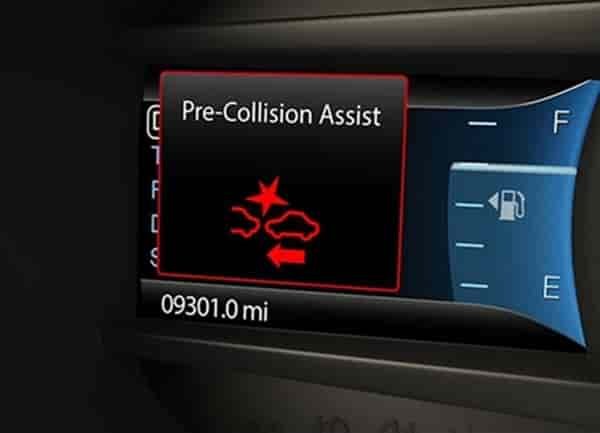
When the collision warning light appears on your dashboard, it often causes immediate concern. Many Nissan drivers face this issue without any recent accident or sudden braking. The vehicle feels normal, yet the warning remains visible. This situation creates stress and raises doubts about driving safety and repair costs.
The collision warning light connects directly to the forward collision safety system. This system monitors the road ahead and alerts the driver when it detects a potential frontal impact. In many cases, the light turns on due to simple reasons. Dirt on the radar sensor, heavy rain, fog, low battery voltage, or a temporary software error can all trigger the warning. These factors do not always indicate a serious mechanical failure, but they should never be ignored.
This guide focuses on Nissan Collision Warning Light Reset for all Nissan models. It explains each step clearly and uses simple language. Most drivers can follow these instructions without special tools or advanced technical knowledge. The guide also helps you decide when a reset solves the problem and when professional inspection becomes necessary. By understanding how the system works and how to respond correctly, you protect both your vehicle and your safety while driving a modern Nissan vehicle in everyday traffic conditions.
What Is the Nissan Collision Warning Light?
The Nissan collision warning light indicates activity within the vehicle’s forward collision safety system. This system continuously monitors the distance between your car and objects ahead. When it detects a potential risk of frontal impact, it alerts the driver through visual and audible warnings. The goal is to help reduce reaction time and support safer driving decisions in traffic.
The system relies on several key components to function correctly. A forward facing radar sensor and, in some models, a front camera work together to scan the road. These sensors measure distance, speed, and relative movement of other vehicles or obstacles. When the system senses abnormal data or loses accurate input, the collision warning light may appear even if no danger exists.
Drivers often confuse this warning with other dashboard alerts. The collision warning light differs from the brake warning light or the ABS indicator. While brake and ABS warnings relate to hydraulic or braking pressure issues, the collision warning light focuses on driver assistance and impact prevention. A triggered warning does not always mean a failure, but it does signal that the system needs attention.
Understanding the purpose of the collision warning light helps drivers respond calmly and correctly. Instead of assuming a serious malfunction, you can evaluate the situation logically. This knowledge forms the foundation for performing a proper reset on a Nissan vehicle and determining whether further inspection is required.
Common Reasons Why the Collision Warning Light Turns On
The collision warning light often turns on due to conditions that affect sensor accuracy rather than actual danger. One of the most common causes involves a dirty or blocked radar sensor. Dust, mud, snow, or road debris can cover the sensor and prevent it from reading distance correctly. When this happens, the system cannot evaluate the road ahead with confidence and triggers a warning.
Weather conditions also play a major role. Heavy rain, dense fog, or direct sunlight can interfere with radar and camera signals. These environments distort sensor input and cause the system to misinterpret surrounding objects. As a result, the collision warning light may appear during poor weather and turn off once conditions improve.
Low battery voltage represents another frequent trigger. When the battery weakens, electronic control units may not receive stable power. This instability can disrupt communication between safety modules and sensors. The system reacts by displaying a warning to inform the driver of reduced reliability.
Software related issues can also activate the light. Temporary glitches may occur after a battery replacement, system update, or sudden power interruption. In these cases, the warning does not reflect physical damage but indicates a need for system recalibration or reset. Even minor front end impacts, such as light parking contact, can shift sensor alignment and cause the warning to remain visible on a Nissan vehicle.
Safety Check Before Resetting the Nissan Collision Warning Light
Before attempting any reset, you should confirm that the vehicle does not face an active safety risk. The collision warning system supports accident prevention, so ignoring a real fault can reduce protection on the road. A quick safety check helps you avoid masking serious issues that require professional attention.
Start by observing how the vehicle behaves while driving. If you notice reduced braking assistance, unusual warning messages, or inconsistent alerts, you should avoid resetting the system. These signs may indicate a deeper problem within the safety modules or sensor network. Resetting under these conditions may disable important driver assistance functions.
Next, inspect the front of the vehicle visually. Look for visible damage near the grille, bumper, or sensor area. Even small impacts can affect sensor alignment and accuracy. If the radar housing appears cracked or misaligned, a reset will not solve the problem and may delay proper repair.
You should also consider recent vehicle history. If the warning light appeared after an accident, body repair, or windshield replacement, the system likely requires calibration. Modern safety systems depend on precise positioning, and only proper calibration can restore full functionality. Taking these precautions ensures that any reset performed on a Nissan vehicle supports safety rather than compromises it.Safety Check Before Resetting the Nissan Collision Warning Light
Before attempting any reset, you should confirm that the vehicle does not face an active safety risk. The collision warning system supports accident prevention, so ignoring a real fault can reduce protection on the road. A quick safety check helps you avoid masking serious issues that require professional attention.
Start by observing how the vehicle behaves while driving. If you notice reduced braking assistance, unusual warning messages, or inconsistent alerts, you should avoid resetting the system. These signs may indicate a deeper problem within the safety modules or sensor network. Resetting under these conditions may disable important driver assistance functions.
Next, inspect the front of the vehicle visually. Look for visible damage near the grille, bumper, or sensor area. Even small impacts can affect sensor alignment and accuracy. If the radar housing appears cracked or misaligned, a reset will not solve the problem and may delay proper repair.
You should also consider recent vehicle history. If the warning light appeared after an accident, body repair, or windshield replacement, the system likely requires calibration. Modern safety systems depend on precise positioning, and only proper calibration can restore full functionality. Taking these precautions ensures that any reset performed on a Nissan vehicle supports safety rather than compromises it.Safety Check Before Resetting the Nissan Collision Warning Light
Before attempting any reset, you should confirm that the vehicle does not face an active safety risk. The collision warning system supports accident prevention, so ignoring a real fault can reduce protection on the road. A quick safety check helps you avoid masking serious issues that require professional attention.
Start by observing how the vehicle behaves while driving. If you notice reduced braking assistance, unusual warning messages, or inconsistent alerts, you should avoid resetting the system. These signs may indicate a deeper problem within the safety modules or sensor network. Resetting under these conditions may disable important driver assistance functions.
Next, inspect the front of the vehicle visually. Look for visible damage near the grille, bumper, or sensor area. Even small impacts can affect sensor alignment and accuracy. If the radar housing appears cracked or misaligned, a reset will not solve the problem and may delay proper repair.
You should also consider recent vehicle history. If the warning light appeared after an accident, body repair, or windshield replacement, the system likely requires calibration. Modern safety systems depend on precise positioning, and only proper calibration can restore full functionality. Taking these precautions ensures that any reset performed on a Nissan vehicle supports safety rather than compromises it.
Nissan Collision Warning Light Reset Step by Step Guide
Follow these steps in order to reset the collision warning light safely. Perform each action carefully and do not skip steps. This process applies to most Nissan models.
Step 1 Turn Off the Engine Completely
Park the vehicle on a flat surface and place the transmission in Park. Turn off the engine and remove the key or key fob. Wait at least two minutes before continuing. This pause allows the electronic systems to shut down fully.
Step 2 Inspect and Clean the Front Radar Sensor
Locate the front radar sensor, usually behind the grille or emblem. Check for dirt, mud, snow, or debris. Clean the area gently with a soft cloth and water if needed. Avoid using strong chemicals or high pressure. A clean sensor restores accurate distance detection.
Step 3 Restart the Vehicle
Start the engine and observe the dashboard. In many cases, the collision warning light turns off after a clean restart. Drive the vehicle for a short distance at low speed. This test allows the system to recalibrate basic sensor input.
Step 4 Use the Battery Disconnect Method If Necessary
If the light remains on, turn off the engine again. Disconnect the negative battery terminal and wait ten to fifteen minutes. Reconnect the terminal securely and start the vehicle. This step clears temporary software faults and restores default system values.
Step 5 Check the Driver Information Menu
Some models allow system resets through the steering wheel controls. Access the driver assistance or safety settings menu. Look for collision warning or forward safety options. Toggle the setting off, then turn it back on. Restart the vehicle to confirm the change.
If the warning light disappears, the reset is complete. If it stays on, the system likely needs calibration or diagnostic inspection.
Reset Instructions by Nissan Model Type
Different Nissan vehicle types share the same collision warning system logic, but sensor placement and menu access may vary. Understanding these differences helps you apply the reset process more accurately and avoid unnecessary troubleshooting.
Sedan models often place the radar sensor behind the front emblem or grille. Vehicles such as the Altima, Sentra, and Maxima usually respond well to basic cleaning and restart procedures. Many of these models also include driver assistance settings within the steering wheel menu, which allows quick system toggling after a reset attempt.
SUV and crossover models feature larger front ends and higher sensor placement. Models like the Rogue, Murano, and Pathfinder may require extra attention to sensor alignment after minor impacts or bumper contact. Because of their size, dirt accumulation and road debris affect these sensors more frequently. A careful inspection improves reset success.
Trucks and vans use reinforced bumpers and wider sensor coverage. Vehicles such as the Frontier, Titan, and NV often need a short driving period after reset to recalibrate sensor input. Slow and steady driving helps the system regain accurate distance readings.
Newer models rely more heavily on software and camera integration. These vehicles may display persistent warnings after battery disconnection or system updates. In such cases, the reset process may complete successfully, but the system still requires calibration through diagnostic equipment. Knowing your model type helps you decide whether a simple reset solves the issue on a Nissan vehicle.
What If the Nissan Collision Warning Light Won’t Reset?
If the collision warning light remains on after completing all reset steps, the system likely faces a deeper issue. In this situation, repeated resets will not solve the problem and may waste time. Understanding the possible reasons helps you choose the correct next action.
Sensor misalignment stands as one of the most common causes. Even a small front end impact can shift the radar or camera slightly out of position. When this happens, the system cannot interpret distance correctly. Only proper calibration can restore accuracy, and manual resets will not change sensor alignment.
Software related faults can also prevent a successful reset. Control modules sometimes store error codes that persist after battery disconnection. These codes require a diagnostic scan to clear. Without this step, the warning light continues to appear even though no visible damage exists.
Electrical issues may also interfere with the system. Damaged wiring, loose connectors, or weak battery connections reduce signal stability. The system detects unreliable input and keeps the warning active as a safety precaution. Visual inspection helps, but diagnostic tools provide more accurate results.
When the light refuses to reset, professional inspection becomes the safest option. Continuing to drive without a functioning collision warning system increases risk, especially in traffic. Addressing the issue early protects both safety and system integrity on a Nissan vehicle.
Can You Drive with the Collision Warning Light On?
Driving with the collision warning light on is possible in some situations, but it is not always safe. The answer depends on why the warning appears and how the vehicle behaves during operation. Understanding the risks helps you make an informed decision.
If the light turns on due to temporary factors such as dirt or weather interference, the vehicle may still operate normally. In these cases, basic driving functions remain active. However, the forward collision warning system may not provide alerts or assistance. This limitation reduces your reaction support in sudden traffic situations.
When the warning remains on after multiple reset attempts, the risk increases. The system may disable certain driver assistance features to prevent incorrect alerts. This condition means the vehicle no longer offers full protection designed to help avoid frontal collisions. Relying only on manual driving skills may increase accident risk, especially in heavy traffic or poor visibility.
Short distance driving at low speed may be acceptable while seeking repair. Long trips or high speed driving should be avoided until the issue is resolved. Treat the warning as an important safety signal rather than a minor inconvenience. Addressing the problem promptly helps maintain safety and reliability in a modern Nissan vehicle.
When to Visit a Dealer or Repair Shop
Some collision warning light issues require professional attention. If the warning stays on after cleaning the sensor and completing all reset steps, a deeper system fault likely exists. In this situation, a trained technician can identify the exact cause through diagnostic scanning and calibration.
Sensor calibration is one of the most common services needed. Modern collision warning systems depend on precise sensor alignment. Even slight misalignment affects distance measurement and alert accuracy. Calibration restores correct positioning and ensures the system responds properly in real traffic conditions.
Software updates also play an important role. Outdated or corrupted software can cause persistent warnings that do not clear with a reset. A repair shop can update the system and remove stored fault codes safely. This process helps prevent repeated false alerts and improves long term reliability.
Cost varies depending on the issue. Simple calibration often costs less than sensor replacement. Visiting a professional early can reduce repair expenses and prevent further system damage. Choosing qualified service ensures the collision warning system functions as intended and continues to support safe driving.
Conclusion
The collision warning light serves as an important safety indicator rather than a simple dashboard alert. When it appears, understanding the cause allows you to respond calmly and correctly. In many cases, dirt, weather interference, or temporary software issues trigger the warning without indicating serious damage.
This Nissan Collision Warning Light Reset guide explains how to reset the system step by step for all models. By following the correct process, you can restore normal function without unnecessary stress or expense. Cleaning the sensor, restarting the vehicle, and checking system settings often resolve the issue quickly.
If the warning persists, the problem likely requires calibration or diagnostic inspection. Ignoring the light can reduce the effectiveness of driver assistance features and increase risk on the road. Taking timely action protects both your safety and your vehicle’s reliability. Proper care ensures that advanced safety systems in a modern Nissan vehicle continue to work as designed in everyday driving conditions.