
If you ask, how do I remote start my Nissan Armada, the process is simple. Most Nissan Armada models with Remote Engine Start let you start the engine by using the Intelligent Key or the MyNISSAN app. After the engine starts, the cabin begins to heat or cool before you get inside. This feature adds comfort during hot summers and cold winters.
Many drivers cannot use remote start because they miss one small step. They may leave a door unlocked, keep the hood open, or use a weak key fob battery. In other cases, the vehicle does not support remote start or the connected services are not active. These issues are common, but you can solve most of them in just a few minutes.
This guide explains how do I remote start my Nissan Armada with clear and simple instructions. You will learn how to use the key fob, how to start the vehicle with the MyNISSAN app, and how to check if your Armada supports this feature. You will also discover the most common remote start problems and the fastest ways to fix them. By the end of this guide, you will know how to remote start your Nissan Armada with confidence.
How Do I Remote Start My Nissan Armada?
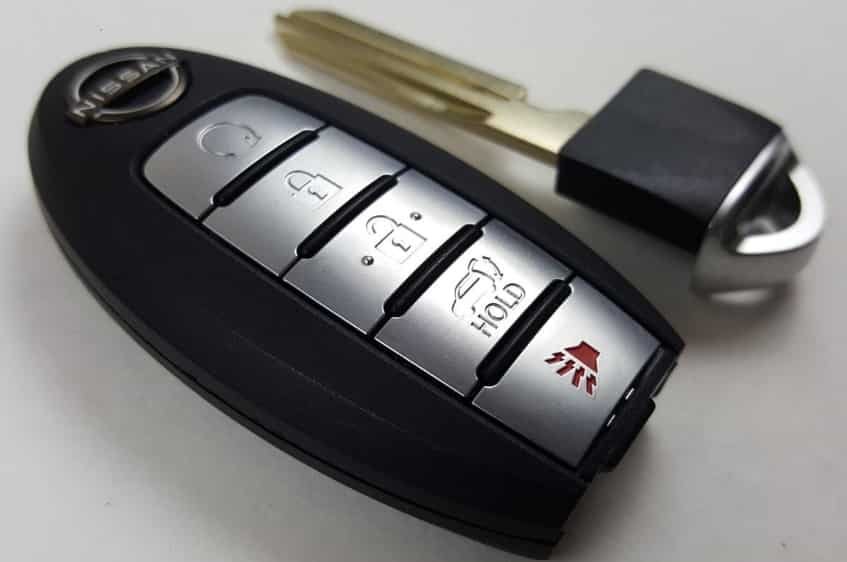
If you want to know how do I remote start my Nissan Armada, follow these simple steps. First, make sure all doors are closed and locked. Next, press the lock button on your Intelligent Key. Then press and hold the remote start button until the turn signal lights flash. The engine should start within a few seconds. If your Armada supports the MyNISSAN app, you can also start the engine from your smartphone by selecting the remote engine start option and confirming the command.
Your Nissan Armada must meet several safety requirements before remote start will work. The transmission must stay in Park. The hood and all doors must remain closed. The Intelligent Key should stay outside the vehicle. In addition, the vehicle battery must have enough power to support the system. If one of these conditions is not met, the engine will not start.
After the engine starts, your Nissan Armada will continue running for a limited time before it shuts off automatically. This feature helps improve safety and prevents unnecessary fuel consumption. During this time, the climate control system can begin heating or cooling the cabin, depending on the settings and equipment installed on your vehicle.
If the engine does not start, do not press the buttons repeatedly. Instead, check the key fob battery, confirm that every door is locked, and make sure the hood is fully closed. Most remote start issues happen because one of these basic requirements is not satisfied.
How to Remote Start a Nissan Armada With the Intelligent Key
Using the Intelligent Key is the fastest way to remote start your Nissan Armada. You do not need to enter the vehicle or open the MyNISSAN app. Instead, you only need the key fob and a clear signal between the key and the vehicle.
Before you begin, confirm that your Nissan Armada supports the factory Remote Engine Start feature. Next, park the vehicle in a safe location and shift the transmission into Park. Close the hood completely and make sure every door is fully closed. Then lock the vehicle with the Intelligent Key.
Press the lock button once. After that, press and hold the remote start button for about two seconds. Watch for the turn signal lights to flash. A few seconds later, the engine should start. If the lights do not flash or the engine does not start, release the button and check the vehicle conditions before trying again.
After the engine starts, the climate control system can prepare the cabin before you enter the vehicle. During cold weather, the heater can warm the interior. During hot weather, the air conditioner can help lower the cabin temperature. This feature makes daily driving more comfortable, especially when the vehicle has been parked outside for several hours.
When you reach your Nissan Armada, unlock the doors as usual and enter the vehicle. Press the brake pedal and then push the ignition switch to drive away. If you do not complete this step, the engine will shut off as part of the vehicle’s built in safety system.
Keep in mind that remote start has a limited operating range. Buildings, other vehicles, and electronic interference can reduce the signal strength. For the best results, stay within the recommended distance and point the Intelligent Key toward the vehicle when sending the command.
How to Remote Start a Nissan Armada With the MyNISSAN App
The MyNISSAN app gives you another convenient way to remote start your Nissan Armada. You can start the engine before leaving your home, office, or another nearby location. This option works well when you want a comfortable cabin before you begin your drive.
Before using the app, confirm that your Nissan Armada supports NissanConnect Services. Your vehicle must have an active subscription, and your smartphone must connect to the internet. You should also complete the account setup and link your vehicle to the app before using remote features.
Open the MyNISSAN app and sign in to your account. Select your Nissan Armada from the vehicle list if you manage more than one vehicle. Tap the Engine Start or Remote Engine Start option. Then confirm the request when the app asks for verification. The system will send the command to your vehicle. Within a few moments, you should receive a notification that the engine has started successfully.
If the request fails, do not send multiple commands right away. Instead, check your internet connection and make sure your vehicle has cellular coverage. You should also verify that all doors are locked and the hood is fully closed. These simple checks solve many remote start issues without additional troubleshooting.
The MyNISSAN app offers more than remote engine start. Depending on your Nissan Armada model and service plan, you may lock or unlock the doors, locate your vehicle, check its status, and receive maintenance alerts. These connected features make it easier to manage your vehicle, even when you are not nearby.
For the best experience, keep the app updated to the latest version and enable notifications. This allows you to receive confirmation when the engine starts or if the system detects a problem that prevents the command from completing.
Which Nissan Armada Models Have Remote Start?
Not every Nissan Armada includes remote start as a standard feature. Nissan has added this technology to many newer models, but availability depends on the model year, trim level, and factory equipment. Some vehicles include remote start from the factory, while others require an optional package or connected services.
If you own a newer Nissan Armada, there is a good chance your vehicle supports factory remote start. Higher trim levels often include this feature along with additional convenience technologies. However, some base models may not offer remote start or may require extra equipment before you can use it.
The easiest way to confirm whether your Nissan Armada has remote start is to inspect the Intelligent Key. Many factory key fobs include a dedicated remote start button with a circular arrow icon. If you do not see this button, your vehicle may not support factory remote start through the key fob.
You can also check the MyNISSAN app after linking your vehicle. If the app displays the Remote Engine Start option, your Nissan Armada supports the feature through NissanConnect Services. If the option does not appear, your vehicle may not qualify, or your connected services may not be active.
Another reliable method is to review your owner’s manual or enter your Vehicle Identification Number on Nissan’s owner website. This information helps you verify the exact equipment installed on your vehicle. It also prevents confusion between different trim levels that share the same model year.
If your Nissan Armada does not include factory remote start, you may still have options. Some owners choose an approved accessory or a high quality aftermarket remote start system. Before installing any upgrade, confirm that the system matches your vehicle and does not interfere with existing electronics or warranty coverage.
Why Won’t My Nissan Armada Remote Start?
If your Nissan Armada does not remote start, there is usually a simple reason behind the problem. The remote start system checks several safety conditions before it starts the engine. If one condition is missing, the system cancels the request to protect the vehicle.
Start by checking the doors and the hood. Every door must stay fully closed and locked before you use remote start. The hood must also close completely. Even a partially open hood can stop the system from starting the engine. Next, confirm that the transmission remains in Park. The vehicle will reject the command if the gear selector is in any other position.
The Intelligent Key also plays an important role. A weak key fob battery can reduce the signal strength and prevent the command from reaching the vehicle. If you notice that the buttons respond slowly or the operating range becomes shorter, replace the battery before trying again. You should also move closer to the vehicle because walls, large buildings, and other electronic devices can interfere with the signal.
The condition of your Nissan Armada also affects remote start performance. A low vehicle battery may not provide enough power for the system to operate correctly. Likewise, an illuminated check engine light can disable remote start until you resolve the underlying issue. If the warning light remains on, inspect the vehicle or scan it for diagnostic trouble codes before attempting another remote start.
If you use the MyNISSAN app instead of the Intelligent Key, verify that NissanConnect Services remain active. Your smartphone needs a stable internet connection, and the vehicle must also have cellular coverage. Without these connections, the app cannot communicate with your Nissan Armada, even if every other condition is correct.
In some situations, the remote start system may stop working because it has reached its safety limit. After several consecutive remote starts without driving the vehicle, the system can block another request. Simply enter the vehicle, start the engine normally, and complete a short drive before using remote start again.
You can solve most remote start problems by checking a few basic items. Confirm that every door is locked, close the hood securely, shift the transmission into Park, inspect both batteries, and verify your NissanConnect account if you use the mobile app. These simple steps resolve most issues without professional repairs. If remote start still fails after completing these checks, contact an authorized Nissan service center for a full inspection.
How Long Does Nissan Armada Remote Start Stay On?
The remote start feature on a Nissan Armada runs for a limited time to improve safety and reduce unnecessary fuel consumption. In most factory equipped models, the engine continues running for about 10 minutes after a successful remote start. If you need more time, many models allow one additional remote start cycle before you enter the vehicle.
When the timer expires, the engine shuts off automatically if you have not entered the vehicle and started it normally. This function helps prevent the engine from idling for an extended period while the vehicle remains unattended. It also reduces fuel waste and supports the built in safety features of the remote start system.
If you are ready to drive, unlock the vehicle, enter the cabin, press the brake pedal, and push the ignition switch. This action transfers control from the remote start system to the driver. Once you complete these steps, you can shift into gear and drive as usual without restarting the engine.
The exact running time may vary slightly depending on your Nissan Armada model year and equipment. For the most accurate information, check your owner’s manual or the features available through your MyNISSAN app.
Does Remote Start Turn On the Heat or Air Conditioning?
Yes. In many Nissan Armada models, the remote start system works with the climate control system to improve cabin comfort before you begin your trip. When the engine starts remotely, the vehicle can use the previous climate settings or automatic temperature control, depending on the model and equipment.
During cold weather, the system can begin warming the cabin and help clear light frost from the windows. During hot weather, it can start cooling the interior before you open the doors. This feature makes entering the vehicle much more comfortable after it has been parked outside for several hours.
To get the best results, leave the climate control system in the settings you want before turning off the engine. If your Nissan Armada includes automatic climate control, the system can adjust the airflow and cabin temperature based on current conditions. Some models also provide additional climate control options through the MyNISSAN app.
Although remote start can make the cabin more comfortable, it does not replace safe driving practices. Always check that the windows provide a clear view before driving, especially during freezing weather. Once you enter the vehicle, press the brake pedal and the ignition switch to take full control of the engine before shifting into gear.
Frequently Asked Questions
Can I remote start my Nissan Armada without the MyNISSAN app?
Yes. If your Nissan Armada includes a factory Remote Engine Start System, you can start the engine with the Intelligent Key. The MyNISSAN app is only required for vehicles that support NissanConnect Services and remote commands through a smartphone. Both methods offer the same basic function, but the app provides additional connected features.
Can I add remote start to an older Nissan Armada?
Yes. Some older Nissan Armada models can use an approved accessory or a compatible aftermarket remote start system. Before installing new equipment, confirm that the system supports your model year and does not interfere with factory electronics or security features. Professional installation is often the safest option.
Why does my Nissan Armada shut off after remote start?
This behavior is normal. The remote start system turns the engine off automatically after the allowed running time if you do not enter the vehicle. To continue driving, unlock the doors, press the brake pedal, and push the ignition switch before shifting into gear.
How far away can I remote start my Nissan Armada?
The operating range depends on the remote system, your model year, and the surrounding environment. Large buildings, heavy traffic, and electronic interference can reduce the signal. If you use the MyNISSAN app, the effective range depends on your smartphone’s internet connection and the vehicle’s cellular coverage rather than the distance between you and the vehicle.
Does remote start lock the doors?
Yes. The doors remain locked while the engine runs through remote start. This design helps protect the vehicle and prevents unauthorized access until you unlock the doors with the Intelligent Key or the MyNISSAN app.
Will remote start work if the fuel level is low?
The remote start system may not operate if the vehicle detects conditions that could affect safe operation. While a low fuel level does not always prevent remote start, you should keep enough fuel in the tank to avoid unexpected interruptions and maintain reliable vehicle performance.
Can I drive my Nissan Armada immediately after remote start?
Yes, but you must first enter the vehicle and complete the normal starting procedure. Unlock the doors, press the brake pedal, and push the ignition switch. This transfers control from the remote start system to the driver and allows you to shift into gear safely.
Does remote start drain the battery?
Normal use has very little effect on battery life. However, frequent short remote start cycles combined with limited driving can place additional demand on the battery. If your Nissan Armada sits unused for long periods, consider driving it regularly to keep the battery properly charged.
Conclusion
Now you know the answer to the question, how do I remote start my Nissan Armada. Whether you use the Intelligent Key or the MyNISSAN app, the process is straightforward once your vehicle meets the required conditions. Checking that the doors are locked, the hood is closed, and the transmission is in Park will solve many common problems before they become frustrating.
If remote start does not work, start with the simple checks covered in this guide. Inspect the key fob battery, verify your NissanConnect Services if you use the mobile app, and look for any warning lights on the dashboard. These steps often restore normal operation without the need for professional repairs.
Remote start is more than a convenient feature. It helps create a comfortable cabin before every drive and makes daily use of your Nissan Armada more enjoyable in every season. By understanding how the system works and following the recommended procedures, you can use remote start safely, confidently, and efficiently whenever you need it.