
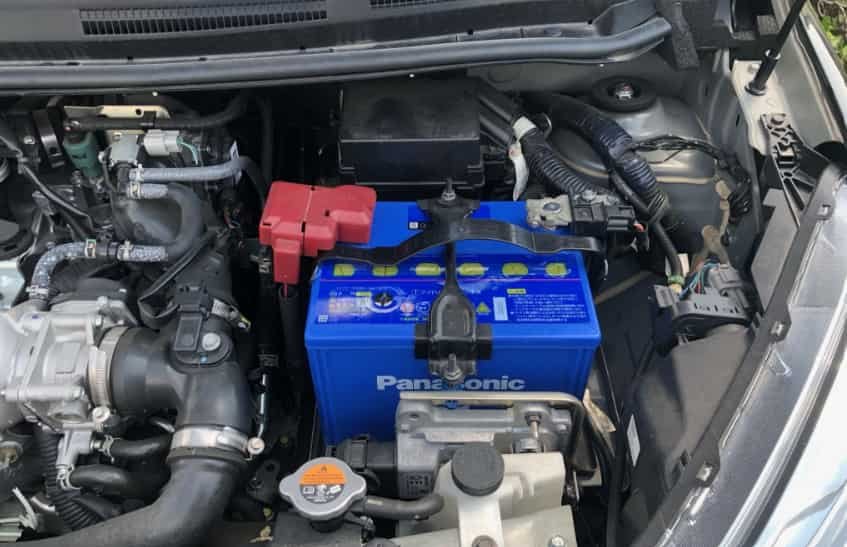
A healthy battery is essential for keeping your Nissan Note reliable every day. Whether you are driving to work, taking a road trip, or simply running errands, the battery provides the power needed to start the engine and support important electrical systems. However, every battery has a limited lifespan. Over time, it gradually loses its ability to hold a full charge, which can lead to slow engine cranking, dim headlights, dashboard warning lights, or even a vehicle that refuses to start.
Learning How To Replace Nissan Note Battery is a practical skill that can save both time and money. Instead of waiting for roadside assistance or paying unnecessary labor costs, many Nissan Note owners can complete the replacement themselves with a few basic tools and careful preparation. The process is straightforward, but following the correct sequence is essential to protect the vehicle’s electrical system and ensure the new battery performs as expected.
This comprehensive guide explains every stage of the replacement process in clear and simple language. You will learn how to recognize the signs of a failing battery, choose the correct replacement, prepare the necessary tools, remove the old battery safely, install the new one correctly, and test your vehicle before getting back on the road. You will also discover common mistakes that many drivers make during battery replacement and learn how to avoid them. By the end of this guide, you will have the confidence to replace your Nissan Note battery safely while helping extend the life of your vehicle’s electrical system.
When Should You Replace a Nissan Note Battery?
Knowing when to replace your Nissan Note battery can help you avoid unexpected breakdowns and expensive emergency repairs. Most car batteries last between three and five years, although their lifespan depends on driving habits, weather conditions, and maintenance. Frequent short trips, extreme temperatures, and long periods without driving can all shorten battery life.
One of the first signs of a weak battery is a slow engine crank. If the engine takes longer than usual to start, the battery may no longer provide enough power. Dim headlights, flickering interior lights, and electrical accessories that respond slowly are also common warning signs. In many cases, the battery warning light on the dashboard will illuminate, indicating that the charging system should be inspected.
Corrosion around the battery terminals is another issue that should never be ignored. A buildup of white or blue deposits can interfere with the electrical connection and reduce battery performance. Although cleaning the terminals may temporarily improve the connection, an aging battery will eventually need replacement.
If your Nissan Note battery is more than five years old, replacing it before it fails completely is often the safest decision. Preventive replacement reduces the risk of becoming stranded and helps maintain reliable engine starting throughout the year.
Tools You Need Before Replacing the Battery
Preparing the right tools before you begin makes the replacement process much easier and safer. Fortunately, replacing a Nissan Note battery does not require specialized equipment, making it an ideal DIY maintenance task for most vehicle owners.
Start by purchasing a replacement battery that matches the correct size, capacity, and terminal layout recommended for your Nissan Note model. Choosing the proper battery ensures reliable performance and prevents installation problems.
You will also need a socket wrench or spanner to loosen the battery terminals and remove the hold down bracket. Safety gloves protect your hands from dirt, corrosion, and accidental contact with battery acid, while safety glasses help protect your eyes during the removal process.
A battery terminal cleaning brush or wire brush is useful for removing corrosion from the cable clamps before installing the new battery. Cleaning the connections improves electrical conductivity and helps extend the life of the new battery.
Some vehicle owners also use a memory saver device. This optional tool supplies temporary power while the battery is disconnected, helping preserve radio presets, clock settings, and other electronic memory. Although it is not essential for every Nissan Note model, it can make the replacement process more convenient.
Finally, prepare a clean cloth to wipe away dust and debris from the battery tray before installing the new unit. A clean mounting surface helps keep the battery secure and reduces the risk of corrosion developing beneath the battery over time.
Safety Tips Before You Start
Safety should always be your first priority when replacing a Nissan Note battery. Although the procedure is simple, a car battery stores enough electrical energy to cause sparks or damage if handled incorrectly. Taking a few minutes to prepare will help protect both you and your vehicle.
Begin by parking the vehicle on a flat and stable surface. Turn off the engine completely and remove the key from the ignition. If your Nissan Note uses a smart key, keep it away from the vehicle to prevent any electrical systems from becoming active during the replacement.
Wear protective gloves and safety glasses before touching the battery. Even a sealed battery can develop corrosion around the terminals, and accidental contact with battery residue may irritate your skin or eyes. Avoid placing metal tools across both battery terminals because this can create a short circuit.
Always disconnect the negative terminal before removing the positive terminal. This simple step greatly reduces the chance of creating an electrical short while working around the battery. When installing the new battery, reverse the process by connecting the positive terminal first and the negative terminal last.
Before lifting the old battery from the engine compartment, make sure the retaining bracket has been completely removed. Car batteries are much heavier than they appear, so lift carefully with both hands while keeping the battery in an upright position. Tilting the battery unnecessarily may allow electrolyte to escape if the battery has been damaged.
Taking these precautions will make the replacement process safer and help prevent accidental damage to your Nissan Note’s electrical system.
How To Replace Nissan Note Battery Step by Step
Step 1: Locate the Battery
Open the hood and secure it with the support rod. In most Nissan Note models, the battery is located inside the engine compartment near one side of the engine bay, making it easy to access. If you are unsure about its exact location, consult the owner’s manual for your specific model year.
Before touching any cables, take a moment to inspect the battery. Identify the positive terminal, which is marked with a plus symbol, and the negative terminal, which is marked with a minus symbol. Understanding the terminal locations before disconnecting anything helps prevent accidental mistakes later in the process.
Step 2: Disconnect the Negative Terminal
Use the correct size socket or spanner to loosen the nut securing the negative battery clamp. Once it is loose, carefully lift the clamp away from the battery terminal. Position the cable away from the battery so it cannot accidentally spring back into contact while you continue working.
Disconnecting the negative terminal first breaks the electrical circuit and significantly reduces the risk of sparks or short circuits during battery removal.
Step 3: Disconnect the Positive Terminal
After the negative cable has been safely moved aside, loosen the positive terminal clamp using the same method. Carefully remove the cable from the battery and place it where it cannot touch any metal components.
Take your time during this step. Avoid forcing the clamp if corrosion has caused it to stick. A gentle twisting motion usually helps release the connection without damaging the terminal.
Step 4: Remove the Battery Hold Down Bracket
Most Nissan Note models use a metal retaining bracket or clamp to keep the battery firmly in place. Remove the bolts securing this bracket and place them somewhere safe to avoid losing them.
Once the bracket has been removed, gently check that the battery can move freely. If it still feels secure, inspect the tray carefully to ensure no additional retaining clips remain attached.
Step 5: Lift Out the Old Battery
Grip the battery firmly with both hands and lift it straight upward. Because automotive batteries are heavy, use proper lifting technique to avoid injury. Keep the battery upright throughout the removal process to minimize the risk of leaks.
After removing the battery, inspect the tray for dirt, moisture, rust, or corrosion. Cleaning the area before installing the new battery helps create a secure mounting surface and improves long term reliability.
Step 6: Clean the Battery Tray and Terminal Clamps
Before installing the new battery, take a few minutes to clean the battery tray and the cable clamps. Dirt, moisture, and corrosion can reduce electrical performance and shorten the life of the replacement battery.
Use a battery terminal cleaning brush or a wire brush to remove corrosion from both cable clamps. If the corrosion is stubborn, apply a battery terminal cleaner and gently scrub the affected areas until the metal surfaces are clean. Wipe away any remaining residue with a clean cloth and allow the area to dry completely.
While cleaning, inspect the battery cables for signs of wear, cracks, or loose connections. Replacing damaged cables now can prevent future electrical problems and improve the overall reliability of your Nissan Note.
Step 7: Install the New Battery
Carefully lower the new battery into the battery tray while keeping it upright. Make sure the positive and negative terminals face the same direction as the original battery. Incorrect positioning can make it impossible to reconnect the cables correctly.
Once the battery is seated properly, reinstall the retaining bracket and tighten the mounting bolts securely. The battery should remain firmly in place without excessive movement. A loose battery can vibrate while driving, which may damage the battery casing or electrical connections over time.
Double check that the battery sits flat inside the tray before moving on to the next step.
Step 8: Connect the Positive Terminal First
Reconnect the positive battery cable to the positive terminal and tighten the clamp until it is secure. The connection should feel firm without excessive force. Overtightening can damage the battery terminal, while a loose connection may cause starting problems or intermittent electrical faults.
After tightening the clamp, gently pull on the cable to confirm that it does not move.
Step 9: Connect the Negative Terminal
Attach the negative battery cable to the negative terminal and tighten the clamp securely. This completes the electrical circuit and restores power to the vehicle.
Inspect both battery terminals one final time. They should be clean, tight, and free from corrosion. If available, apply a thin layer of battery terminal protectant to help reduce future corrosion and extend the life of the connections.
Step 10: Test the New Battery
Close the hood and start the engine. The engine should crank quickly and start smoothly without hesitation. If the vehicle starts normally, allow it to idle for several minutes while observing the dashboard for any warning lights.
Next, test the headlights, interior lights, power windows, air conditioning, infotainment system, and other electrical accessories. Everything should operate normally without flickering or unusual behavior.
If the clock or radio settings have been reset, simply restore your preferred settings. Some Nissan Note models may require the automatic window function to be initialized again after battery replacement. Refer to the owner’s manual if necessary.
Finally, take the vehicle for a short drive to confirm that the charging system is operating correctly and that no warning lights appear during normal driving.
Common Mistakes to Avoid
Replacing a Nissan Note battery is a simple task, but a few common mistakes can lead to unnecessary problems. Understanding these mistakes before you begin can save time and prevent costly repairs.
One of the most common errors is installing a battery with the wrong specifications. Always verify the battery size, capacity, and terminal layout before purchasing a replacement. A battery that does not match the manufacturer’s recommendations may not fit properly or provide the correct level of performance.
Another mistake is connecting the battery terminals in the wrong order. Disconnecting the positive terminal first or reconnecting the negative terminal before the positive terminal increases the risk of creating a short circuit. Following the correct sequence helps protect the electrical system.
Loose battery clamps are another frequent issue. Even if the battery starts the engine, poor connections can cause intermittent electrical problems and charging issues. Check that both terminals are secure before closing the hood.
Many people also forget to secure the battery with the retaining bracket. A battery that moves while driving can damage the battery case, cables, or surrounding components.
Finally, never dispose of an old car battery with household waste. Automotive batteries contain lead and other materials that should be recycled responsibly. Most auto parts stores and recycling centers accept used batteries for safe disposal.
How Much Does Nissan Note Battery Replacement Cost?
The cost of replacing a Nissan Note battery depends on the battery type, brand, and whether you perform the work yourself or hire a professional.
A standard replacement battery is generally the most affordable option, while premium batteries with enhanced performance or longer warranties usually cost more. Vehicles equipped with advanced start stop technology may require AGM or EFB batteries, which are typically more expensive than conventional batteries.
Choosing the DIY approach eliminates labor charges and can significantly reduce the total replacement cost. The entire procedure usually takes less than thirty minutes for someone with basic mechanical knowledge and the proper tools.
If you prefer professional installation, labor costs will vary depending on the repair shop and your location. Many workshops also include a battery health inspection and charging system test as part of the service.
Can You Replace a Nissan Note Battery Yourself?
Yes. Most Nissan Note owners can replace the battery themselves without advanced mechanical experience. The procedure is straightforward when you follow the correct safety precautions and use the proper replacement battery.
Before beginning, make sure the engine is switched off and the correct tools are available. Carefully follow each step, disconnect the negative terminal first, and reconnect the positive terminal first during installation.
However, if you notice damaged battery cables, severe corrosion, electrical faults, or warning lights that remain illuminated after installation, professional diagnosis is recommended. These symptoms may indicate issues beyond a worn battery.
Replacing the battery yourself not only saves money but also gives you a better understanding of your vehicle’s basic maintenance requirements.
Frequently Asked Questions
What battery does a Nissan Note use?
The correct battery depends on the model year, engine type, and vehicle specification. Always check the owner’s manual or the label on the existing battery before purchasing a replacement.
How long does a Nissan Note battery last?
Most Nissan Note batteries last between three and five years under normal driving conditions. Extreme temperatures, frequent short trips, and poor maintenance may reduce battery life.
Will replacing the battery erase my radio settings?
Some Nissan Note models may lose saved radio stations, clock settings, and other stored preferences after the battery is disconnected. A memory saver device can help preserve these settings during replacement.
Why will my Nissan Note not start after installing a new battery?
Check that both battery terminals are connected securely and that the battery polarity is correct. If the problem continues, inspect the charging system, battery cables, and fuses to identify any underlying faults.
Should I replace the battery myself or visit a repair shop?
If you have basic tools and follow the correct procedure, replacing the battery yourself is a safe and practical option. If you are uncertain or encounter electrical problems, professional assistance is the better choice.
Conclusion
Knowing how to replace a Nissan Note battery is a valuable skill that can help you avoid unexpected breakdowns, reduce maintenance costs, and keep your vehicle operating reliably. By following the correct safety procedures, using the right replacement battery, and completing each installation step carefully, you can complete the job with confidence in a relatively short amount of time.
Regular battery inspections are just as important as replacing the battery itself. Checking the terminals for corrosion, ensuring the connections remain tight, and monitoring battery performance throughout the year can help extend battery life and improve overall vehicle reliability.
If your Nissan Note has started showing signs of a weak battery, do not wait until it fails completely. Replacing the battery at the right time helps prevent inconvenient breakdowns and ensures your vehicle is always ready for your next journey.