
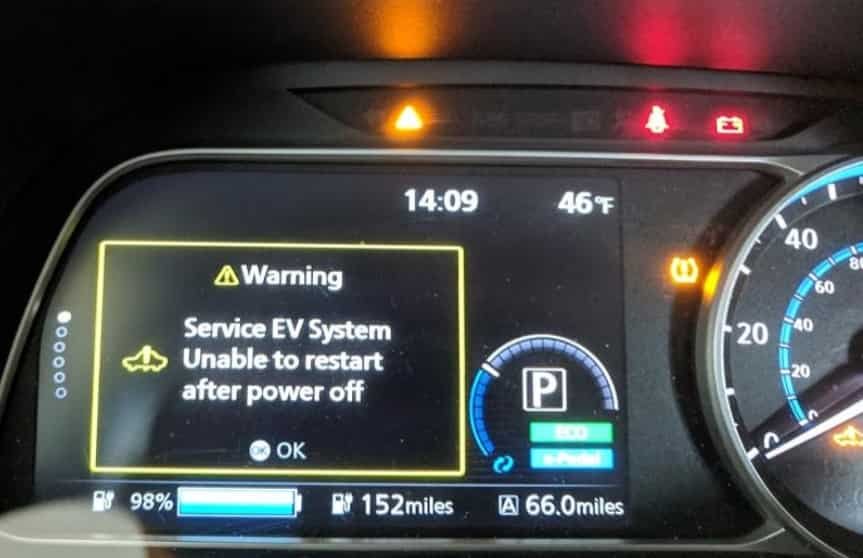
A Nissan Leaf that will not start can be frustrating. You press the brake pedal, push the power button, and expect the READY indicator to appear. Instead, the dashboard stays dark, warning lights flash, or nothing happens. Many owners immediately suspect the high voltage battery. However, the real cause is often much simpler.
The Nissan Leaf starts differently from a gasoline powered vehicle. It does not use a traditional starter motor or engine ignition system. Instead, several electronic systems must work together before the car enters READY mode. The 12 volt battery, Intelligent Key, brake switch, and control modules all play an important role. If one of these components stops working properly, the vehicle may not start.
A weak 12 volt battery is one of the most common reasons a Nissan Leaf won’t start. Many owners overlook this because the traction battery may still have plenty of charge. Other common causes include a discharged key fob battery, a faulty brake switch, a charging connector that remains plugged in, or an electrical system fault. Even a temporary communication error between control modules can prevent the vehicle from entering READY mode.
The good news is that many starting problems are easy to diagnose. You can often identify the cause without expensive equipment. Small details make a big difference. For example, check whether the dashboard lights turn on, whether the READY indicator appears, and whether warning messages are displayed. These clues help narrow the list of possible faults.
This guide explains the 12 most common reasons a Nissan Leaf won’t start. It also provides practical troubleshooting steps for each problem. You will learn how to separate simple issues from serious electrical faults. In addition, you will know when a quick repair is enough and when professional service is the safest choice. By the end of this guide, you will have a clear process to diagnose your Nissan Leaf and get it back on the road with confidence.
What Does “Nissan Leaf Won’t Start” Actually Mean?
Not every starting problem points to the same fault. The Nissan Leaf can fail to start in several different ways, and each symptom tells a different story. Before checking the battery or replacing parts, identify exactly what happens when you press the power button. This simple step helps you avoid unnecessary repairs and speeds up the troubleshooting process.
The Dashboard Stays Completely Dark
If the dashboard remains dark, the vehicle is not receiving enough low voltage power. In most cases, the 12 volt battery has discharged or failed. Loose battery terminals can create the same symptom because they interrupt the electrical connection. A blown main fuse can also prevent power from reaching the vehicle’s electronic systems. Start by checking the condition of the 12 volt battery before looking for more complex problems.
The Dashboard Lights Turn On but the READY Light Does Not Appear
This symptom usually means the vehicle has power but cannot complete the startup sequence. The Nissan Leaf checks several systems before it enters READY mode. It verifies the Intelligent Key, confirms the brake pedal is pressed, checks that the gear selector is in Park, and makes sure the charging connector is not attached. If any of these checks fail, the vehicle will stay on without becoming ready to drive.
The READY Light Appears but the Vehicle Will Not Move
When the READY indicator appears, the high voltage system has already activated. If the vehicle still refuses to move, the problem often involves the drive system instead of the startup process. A shift control issue, an electronic parking brake problem, or a drivetrain fault may prevent the vehicle from driving. Pay close attention to any warning messages because they often identify the affected system.
Warning Messages Appear During Startup
Warning messages provide valuable information about the source of the problem. For example, you may see messages such as Key Not Detected, I Key System Error, EV System Warning, or Service EV System. Do not ignore these alerts or clear them immediately. Instead, write them down or take a photo of the dashboard. This information can help you identify the fault much faster or assist a technician during diagnosis.
Understanding these startup symptoms is the first step toward fixing a Nissan Leaf that won’t start. Once you know how the vehicle behaves, you can focus on the most likely cause instead of guessing. In the next section, you will learn several quick checks that every owner should perform before moving on to detailed troubleshooting.
Quick Checks Before Troubleshooting
Before you begin detailed troubleshooting, take a few minutes to perform several basic checks. Many Nissan Leaf starting problems have simple causes that owners can identify without special tools. A careful inspection can save time, reduce repair costs, and prevent unnecessary parts replacement. It also helps you understand whether the problem involves the 12 volt battery, the Intelligent Key, the charging system, or another electronic component.
Start by checking the charging connector. The Nissan Leaf cannot enter READY mode while the charging cable remains connected. Make sure the charging session has finished and remove the connector completely. Next, confirm that the vehicle is in Park. Press the brake pedal firmly and push the power button again. If the vehicle still does not start, pay attention to the dashboard and look for the READY indicator. This light confirms that the electric drive system is active and ready to operate.
You should also inspect the Intelligent Key. A weak key fob battery can prevent the vehicle from recognizing the key. Hold the key close to the power button and try starting the vehicle again. If this works, replace the key fob battery as soon as possible. At the same time, observe every warning light or message on the instrument cluster. Even a small warning can provide an important clue about the source of the problem.
Finally, test the 12 volt battery before assuming the high voltage traction battery has failed. A weak 12 volt battery is one of the most common reasons a Nissan Leaf won’t start. Completing these quick checks gives you a clear starting point and makes the rest of the diagnostic process much more accurate.
The 12 Volt Battery Is Weak or Dead
A weak or dead 12 volt battery is the most common reason a Nissan Leaf won’t start. Many owners believe the high voltage traction battery controls every function in the vehicle. However, the startup process depends on the 12 volt battery first. This battery supplies power to the control modules, dashboard, Intelligent Key system, relays, and other electronic components. If it cannot provide enough voltage, the vehicle will never enter READY mode, even when the traction battery is fully charged.
Several warning signs can point to a failing 12 volt battery. The dashboard may remain completely dark, or the interior lights may appear much dimmer than usual. In some cases, the instrument cluster lights up for a few seconds before shutting off again. You may also hear clicking sounds after pressing the power button, while the READY indicator never appears. These symptoms often develop gradually, especially if the battery has been in service for several years.
You can verify the battery condition with a digital multimeter. A healthy battery usually measures around 12.6 volts when the vehicle is off. A reading below 12.2 volts often indicates a low state of charge, while a value below 12 volts usually suggests the battery requires charging or replacement. If you do not have a multimeter, many automotive parts stores offer free battery testing.
Inspect the battery terminals while checking the battery. Corrosion, loose connections, or damaged cables can interrupt the electrical supply and create the same symptoms as a discharged battery. Clean any visible corrosion and tighten the terminals if necessary. If the battery fails a load test or cannot hold a proper charge, replace it with a compatible 12 volt battery that meets Nissan’s specifications.
Always rule out the 12 volt battery before investigating more complex electrical faults. This simple step solves a large percentage of Nissan Leaf starting problems and prevents unnecessary repairs that can cost far more than a new battery.
Battery Terminals Are Loose or Corroded
Loose or corroded battery terminals can prevent your Nissan Leaf from starting, even if the 12 volt battery is in good condition. The battery must deliver a stable flow of electricity to the vehicle’s electronic systems. A poor connection creates resistance and interrupts that flow. As a result, the control modules may not receive enough power to complete the startup sequence.
This problem often develops over time. Moisture, dirt, and battery acid can build up around the terminals and reduce electrical contact. Vibration from daily driving may also loosen the battery clamps. Even a small gap between the terminal and the battery post can create starting problems that appear without warning.
Several symptoms may indicate a poor battery connection. The dashboard lights may flicker or reset when you press the power button. The instrument cluster may turn on briefly before going dark. Some owners notice that the vehicle starts after moving the battery cables by hand. Others experience random warning messages that disappear after restarting the vehicle. These signs often point to an unstable electrical connection rather than a failed battery.
Begin by turning the vehicle off completely. Open the hood and inspect both battery terminals carefully. Look for white, green, or blue corrosion around the battery posts. Check that each terminal fits tightly and does not move when you apply gentle pressure. If you find corrosion, disconnect the battery safely and clean the terminals with a battery terminal cleaning solution or a mixture recommended for automotive batteries. After cleaning, reconnect the terminals and tighten them securely.
If the terminals are cracked, heavily corroded, or the cables show signs of damage, replace the affected parts instead of trying to repair them. Damaged connections often return and continue causing electrical problems. After completing the inspection, start the vehicle again and check whether the READY indicator appears normally.
A secure electrical connection is essential for reliable operation. For this reason, inspecting the battery terminals should always be one of the first steps when a Nissan Leaf won’t start. Many owners replace a healthy battery when the real problem is only a loose or corroded connection.
The Intelligent Key Is Not Detected or the Key Fob Battery Is Dead
The Nissan Leaf relies on the Intelligent Key system to verify that an authorized key is inside or near the vehicle before it enters READY mode. If the system cannot detect the key, the startup process stops immediately. In many cases, the problem is not the key itself but a weak key fob battery or a temporary communication issue.
A failing key fob battery often gives warning signs before it stops working completely. You may need to stand closer to the vehicle to unlock the doors. The remote buttons may respond slowly or work only after several attempts. Eventually, the dashboard may display messages such as Key Not Detected or I Key System Error when you try to start the vehicle. At this point, the Nissan Leaf may power on partially, but it will not enter READY mode.
Start by using the spare key if one is available. If the vehicle starts normally, the original key fob likely has a weak battery. If you do not have a spare key, hold the Intelligent Key close to the power button while pressing the brake pedal. This method allows the vehicle to detect the key even when the battery is nearly depleted. If the vehicle starts successfully, replace the key fob battery as soon as possible to avoid future starting problems.
Electronic interference can also affect communication between the key and the vehicle. Keep the key away from mobile phones, wireless chargers, and other electronic devices while attempting to start the Nissan Leaf. In some situations, metal objects or signal blocking accessories may also reduce the detection range.
If replacing the key fob battery does not solve the problem, inspect the vehicle for additional warning messages. A damaged key, a faulty Intelligent Key antenna, or a malfunctioning control module may prevent proper communication. These issues require professional diagnosis because they involve the vehicle’s security system.
Although this problem is less common than a weak 12 volt battery, it remains one of the leading reasons a Nissan Leaf won’t start. Checking the Intelligent Key early in the troubleshooting process can save time and eliminate one of the simplest causes before moving on to more complex electrical faults.
The Brake Switch Is Faulty or the Brake Pedal Is Not Detected
Every time you start a Nissan Leaf, the vehicle checks whether the brake pedal is pressed. This safety feature prevents the car from entering READY mode by accident. If the system does not detect the brake pedal, the startup process stops even though the dashboard, key fob, and battery appear to work normally.
A faulty brake switch is one of the most overlooked causes of a Nissan Leaf that won’t start. The brake switch sits near the brake pedal and sends a signal to the vehicle’s electronic control system. If the switch fails or becomes misaligned, the control module assumes the brake pedal is not pressed. As a result, the READY indicator never appears, and the vehicle remains in accessory or ignition mode.
Several symptoms can help you identify this problem. The dashboard lights may turn on normally, but the vehicle refuses to enter READY mode. You may notice that the brake lights do not illuminate when someone presses the brake pedal. In some cases, the brake lights stay on continuously even when the pedal is released. These signs often indicate that the brake switch is no longer operating correctly.
Begin by pressing the brake pedal firmly and trying to start the vehicle again. If nothing changes, check whether the brake lights work. Ask another person to stand behind the vehicle, or park near a reflective surface so you can see the lights yourself. If the brake lights fail to turn on, inspect the related fuse and wiring if you are comfortable performing basic electrical checks.
Do not ignore an intermittent brake switch problem. The vehicle may start normally one day and refuse to start the next. This inconsistent behavior often makes the fault difficult to identify without careful observation. Replacing a worn brake switch is usually much less expensive than replacing electronic control modules, and it often restores normal operation immediately.
Before moving on to more advanced diagnostics, always confirm that the brake pedal signal reaches the vehicle correctly. This simple inspection can eliminate another common reason a Nissan Leaf won’t start and helps narrow the search for the real cause.
The Vehicle Is Not Fully in Park
The Nissan Leaf must confirm that the gear selector is in Park before it allows the startup sequence to finish. This safety feature prevents the vehicle from moving unexpectedly when you press the power button. If the transmission control system cannot verify the Park position, the READY indicator may never appear, even though every other system seems to function normally.
This issue can happen for several reasons. The electronic shifter may not complete the shift into Park, or the parking mechanism may not engage correctly. In some cases, the position sensor sends incorrect information to the control module. A temporary communication error between electronic components can also interrupt the startup process. Although these problems are less common than a weak 12 volt battery, they can produce very similar symptoms.
You may notice that the dashboard powers on normally, but the vehicle refuses to enter READY mode. Some drivers also see a transmission related warning message or hear a warning tone after pressing the power button. Others find that the Nissan Leaf starts successfully after selecting Park several times or restarting the vehicle. These clues often point to a problem with gear position recognition instead of a battery or key issue.
Begin by pressing the brake pedal firmly and selecting Park again. Wait a few seconds before turning the vehicle completely off. After the dashboard shuts down, press the brake pedal once more and restart the vehicle. If the Nissan Leaf starts normally, the problem may have resulted from a temporary communication error. Repeat the test several times to determine whether the issue returns.
If the vehicle continues to reject the Park position, inspect the dashboard for warning messages that relate to the transmission or drive system. A professional diagnostic scan can identify faults stored in the transmission control module and reveal whether the position sensor or another electronic component requires attention.
Checking the Park position takes only a few moments, yet it can prevent unnecessary repairs. Always confirm that the vehicle recognizes Park before assuming a more serious electrical failure. This simple step helps narrow the diagnosis and brings you one step closer to identifying why your Nissan Leaf won’t start.
The Charging Connector Is Still Plugged In or Charging Did Not Finish Properly
Many owners become concerned when their Nissan Leaf won’t start immediately after charging. In many cases, the vehicle is working exactly as designed. The Nissan Leaf will not enter READY mode while the charging connector remains attached. This safety feature prevents the vehicle from moving while it is still connected to a charging station or home charger.
Sometimes the problem is obvious because the charging cable is still connected. However, the issue is not always that simple. The charging connector may appear disconnected even though it has not fully released from the locking mechanism. Dirt, ice, or moisture inside the charging port can also interfere with the connection. In other situations, a charging session may stop unexpectedly because of a power outage, a faulty charging station, or an interrupted charging schedule.
Begin by checking that the charging session has ended completely. Remove the charging connector and inspect both the connector and the charging port for visible dirt or damage. If the connector does not release normally, avoid using excessive force because this may damage the locking mechanism. Once the connector has been removed, close the charge port door and wait a few seconds before attempting to start the vehicle again.
If the Nissan Leaf still will not start, connect it to another compatible charging station if one is available. This simple test helps determine whether the problem comes from the vehicle or the charging equipment. You should also review any charging timers that may delay or interrupt charging. Some owners accidentally activate a charging schedule and mistake the delayed charging process for a vehicle fault.
Pay attention to warning messages that appear after charging. Messages related to the charging system, EV system, or battery management system can provide valuable clues. If the vehicle repeatedly refuses to start after different charging sessions, professional diagnosis may be necessary to inspect the onboard charger, charging port, or related control modules.
Charging related issues are less common than a weak 12 volt battery, but they remain an important cause of startup problems. Confirming that the charging process has ended correctly is a quick and simple step that can save unnecessary troubleshooting and help explain why your Nissan Leaf won’t start.
The High Voltage Traction Battery Has a Critically Low Charge
Many people assume the high voltage traction battery is responsible whenever a Nissan Leaf won’t start. While this battery powers the electric motor, it is not the most common cause of startup problems. However, if the traction battery reaches a critically low charge level, the vehicle may no longer enter READY mode or operate normally. Understanding the difference between the traction battery and the 12 volt battery helps prevent confusion during troubleshooting.
The traction battery stores the energy needed to drive the vehicle. As the charge level drops, the Nissan Leaf displays several warnings to encourage the driver to recharge. Ignoring these warnings can eventually leave the battery with too little energy to activate the electric drive system. Once this happens, pressing the power button may produce warning messages instead of the READY indicator.
Several symptoms suggest that the traction battery has reached a very low state of charge. The driving range may have decreased rapidly before the vehicle stopped. Low battery warnings may have appeared during the last trip. In some situations, the vehicle limits power output before it refuses to drive. If the battery has remained nearly empty for an extended period, it may require additional time to recover after being connected to a charger.
Begin by connecting the Nissan Leaf to a reliable charging station or a properly functioning home charger. Confirm that charging starts successfully by checking the charging indicator lights or the display on the charging equipment. Allow the battery enough time to gain a sufficient charge before attempting to start the vehicle again. If charging does not begin or stops unexpectedly, inspect the charging equipment and try another compatible charger if possible.
If the traction battery still refuses to charge, the problem may involve the onboard charger, battery management system, or another high voltage component. These systems require specialized equipment and should only be inspected by qualified technicians. Avoid attempting repairs on high voltage components because they can present serious safety risks.
Although a critically discharged traction battery is less common than a weak 12 volt battery, it remains an important possibility. Always confirm the battery’s state of charge before moving to advanced diagnostics. This simple check helps determine whether the Nissan Leaf won’t start because it lacks driving energy or because another electrical system requires attention.
The Charging System Is Not Working Properly
A Nissan Leaf may fail to start because the charging system cannot supply enough energy to the traction battery. In this situation, the problem is not the battery itself. Instead, the fault prevents the battery from charging correctly. If the battery never reaches an adequate charge level, the vehicle cannot enter READY mode and remains unavailable for driving.
Charging system problems can develop for several reasons. A damaged charging cable, a faulty home charger, or a malfunctioning public charging station may interrupt the charging process. In some cases, the onboard charger inside the vehicle stops converting alternating current into direct current. Software errors, damaged connectors, or electrical faults can also prevent the battery from charging as expected.
The symptoms often appear before the vehicle refuses to start. Charging may stop long before the battery reaches full capacity. The charging indicator lights may flash in an unusual pattern or fail to illuminate completely. Some owners notice that the estimated driving range never increases after several hours of charging. Others receive warning messages related to the EV system or charging system immediately after connecting the charger.
Begin by checking the charging equipment. Inspect the charging cable for visible damage and confirm that the power source is working correctly. If you use a home charger, verify that the circuit breaker has not tripped. Next, connect the Nissan Leaf to another compatible charger. If the vehicle charges normally, the original charging equipment is likely responsible for the problem.
If the Nissan Leaf fails to charge with different chargers, inspect the charging port for dirt, moisture, or damaged pins. A contaminated charging port can interrupt communication between the vehicle and the charging equipment. Clean only visible debris and never insert metal objects into the charging connector.
When charging still fails after these basic checks, professional diagnosis becomes necessary. A technician can test the onboard charger, battery management system, and related electronic components using specialized diagnostic equipment. These systems operate with high voltage and should not be disassembled without proper training.
A charging system fault can easily be mistaken for a battery failure because both problems produce similar symptoms. Checking the charging equipment first helps eliminate simple causes and provides a clearer direction for the remaining diagnostic process. This approach also reduces the risk of replacing expensive components that are still functioning correctly.
A Blown Fuse or Electrical Relay Is Interrupting the Startup Process
Every Nissan Leaf relies on a network of fuses and relays to distribute electrical power throughout the vehicle. These components protect sensitive electronic systems from damage caused by overloads or short circuits. If a fuse blows or a relay stops working, the startup sequence may fail before the vehicle enters READY mode.
A blown fuse can affect many different systems. Depending on the failed circuit, the dashboard may remain dark, the power button may not respond correctly, or the Intelligent Key system may stop communicating with the vehicle. In some situations, only one function stops working. In others, several electronic systems fail at the same time because they share the same electrical circuit.
The symptoms often depend on which fuse has failed. You may notice that the interior lights work while the instrument cluster remains off. The brake lights may stop operating, or the charging system may fail to respond after connecting the charging cable. Warning messages can also appear without any obvious explanation because one control module has lost power while others continue operating normally.
Start by checking the fuse boxes listed in the owner’s manual. Most Nissan Leaf models have one fuse box inside the cabin and another under the hood. Carefully inspect the fuses related to the starting system, brake switch, Intelligent Key, and electronic control units. Replace a blown fuse only with another fuse that has the same amperage rating. Using a higher rated fuse can damage the electrical system and create more serious problems.
Relays can also fail after years of use. Unlike fuses, relay faults are often more difficult to identify during a visual inspection. If all related fuses appear normal but the Nissan Leaf still won’t start, a technician can perform electrical testing to confirm whether a relay or another component has failed.
Never replace the same fuse repeatedly without finding the underlying cause. A fuse usually blows because another electrical problem exists somewhere in the circuit. Identifying that root cause prevents repeated failures and protects the vehicle from further damage. Checking the fuses early in the diagnostic process is a simple step that can quickly explain why a Nissan Leaf won’t start.
The DC DC Converter Is Not Charging the 12 Volt Battery
The DC DC converter plays a vital role in every Nissan Leaf. It converts energy from the high voltage traction battery into low voltage power for the 12 volt electrical system. It also keeps the 12 volt battery charged while the vehicle operates. If the converter stops working correctly, the 12 volt battery slowly loses power until it can no longer support the startup process.
Many owners replace the 12 volt battery after experiencing repeated starting problems. However, the new battery may also become discharged within a short time if the DC DC converter has failed. This situation often leads to unnecessary repair costs because the real cause remains hidden.
Several symptoms may indicate a faulty DC DC converter. The Nissan Leaf may start after charging or jump starting the 12 volt battery but refuse to start again a few days later. The dashboard may display battery related warning lights, and electrical accessories may behave unpredictably. Some drivers also notice that interior lights become dim or electronic systems restart unexpectedly while driving.
Begin by testing the condition of the 12 volt battery. If the battery passes the test but repeatedly loses its charge, the charging system should be inspected. A technician can measure the charging voltage while the vehicle is in READY mode to determine whether the DC DC converter is supplying enough power. This test provides a much clearer answer than replacing parts based on guesswork.
A failed DC DC converter requires professional diagnosis and repair because it operates as part of the vehicle’s high voltage electrical system. Do not attempt to remove or repair this component yourself. High voltage equipment requires specialized tools and proper safety procedures.
Although this failure is less common than a weak 12 volt battery, it should never be overlooked. If the same battery problem keeps returning, the DC DC converter may be the hidden reason your Nissan Leaf won’t start.
An EV System or Inverter Fault Is Preventing READY Mode
If all basic checks have been completed and the Nissan Leaf still refuses to start, the problem may involve the EV control system or the inverter. These components control the flow of electrical energy between the traction battery and the electric motor. They also manage the communication required to activate READY mode. A fault in either system can stop the startup sequence before the vehicle becomes ready to drive.
An EV system fault often produces clear warning messages on the instrument cluster. You may see EV System Warning, Service EV System, or another message related to the electric drive system. The vehicle may power on normally, but the READY indicator never appears. In some cases, the Nissan Leaf enters a reduced power mode before refusing to start completely.
Several different faults can trigger these warnings. The inverter may overheat or develop an internal electrical problem. Communication between control modules may fail because of damaged wiring or a defective sensor. The battery management system can also prevent startup if it detects abnormal operating conditions that could affect vehicle safety.
When these warnings appear, avoid repeatedly pressing the power button or disconnecting the battery in an attempt to reset the system. Instead, record every warning message and scan the vehicle with an EV compatible diagnostic tool if one is available. The stored diagnostic trouble codes provide valuable information that helps identify the affected component.
Most EV system faults require professional diagnosis because they involve high voltage equipment and advanced electronic controls. Attempting to repair these systems without proper training can create serious safety risks. If warning messages continue to appear after restarting the vehicle, arrange professional service before driving again.
While these failures are less common than battery or key related problems, they remain an important reason a Nissan Leaf won’t start. Accurate diagnosis is essential because several different components can produce similar symptoms.
A Software or Control Module Error Is Blocking Startup
Modern electric vehicles depend on dozens of electronic control modules that communicate with each other every time the vehicle starts. If one module fails to respond or sends incorrect information, the Nissan Leaf may refuse to enter READY mode even though every major component appears to function normally.
Software related problems can occur after a low voltage event, an interrupted system update, or an unexpected communication error. In some cases, the issue appears only once and never returns. In other situations, the startup problem becomes more frequent until the fault is repaired. Because these errors do not always produce obvious symptoms, they can be difficult to identify without diagnostic equipment.
You may notice that the dashboard powers on normally, but the READY indicator never appears. Warning messages may disappear after restarting the vehicle, only to return later. Some owners also report that the Nissan Leaf starts normally after disconnecting and reconnecting the 12 volt battery, although the problem eventually returns because the underlying fault remains.
Start by turning the vehicle completely off and waiting several minutes before attempting another restart. If the problem continues, scan every available control module instead of checking only the engine or battery related systems. Communication faults often appear in modules that seem unrelated to the startup process. Reviewing all stored diagnostic trouble codes provides a much more complete picture of the vehicle’s condition.
If software updates are available for your Nissan Leaf, ask a qualified technician to confirm that every control module is running the latest approved version. Updated software can correct known communication issues and improve overall system reliability. However, software updates should never replace proper diagnosis because hardware faults can produce similar symptoms.
After ruling out the battery, charging system, brake switch, Intelligent Key, and other common causes, software related issues become a logical area to investigate. Completing the diagnostic process in this order reduces unnecessary repairs and provides the best chance of identifying why a Nissan Leaf won’t start.
Nissan Leaf Won’t Start Symptom Chart
The symptoms below can help you identify the most likely cause before replacing any parts. While these signs do not guarantee a specific fault, they provide a useful starting point for diagnosis and reduce unnecessary troubleshooting.
| Symptom | Most Likely Cause | First Action |
|---|---|---|
| Dashboard remains completely dark | Dead 12 volt battery or poor battery connection | Test the 12 volt battery and inspect the battery terminals |
| Dashboard lights turn on but READY indicator does not appear | Brake switch problem, Intelligent Key issue, or vehicle not in Park | Press the brake pedal firmly and verify the key is detected |
| Vehicle starts after a jump start but fails again later | Weak 12 volt battery or faulty DC DC converter | Test the battery and charging system |
| Key Not Detected message appears | Weak key fob battery or communication problem | Replace the key fob battery or try the spare key |
| Vehicle will not start after charging | Charging connector still attached or charging system fault | Disconnect the charger and inspect the charging equipment |
| EV System Warning appears | Inverter, battery management system, or EV control fault | Record the warning message and perform a diagnostic scan |
| Multiple warning lights appear at the same time | Low system voltage or electrical communication problem | Inspect the 12 volt battery before checking other components |
| Vehicle powers on but will not move | Drive system or transmission related fault | Check for warning messages and scan the control modules |
The symptom chart provides a quick overview, but every Nissan Leaf may respond differently depending on the model year and the condition of its electrical system. If more than one symptom appears at the same time, always begin with the simplest checks. Testing the 12 volt battery first remains the most effective approach because many electrical faults produce similar warning signs.
How to Diagnose a Nissan Leaf That Won’t Start
Following a logical inspection process saves time and reduces unnecessary repairs. Instead of replacing parts one by one, work through each step in order. This method helps identify the real cause while eliminating the most common problems first.
Step 1 Check the Dashboard
Press the power button and observe the instrument cluster carefully. Determine whether the dashboard remains dark, lights up normally, or displays warning messages. Every detail provides useful information for the next step.
Step 2 Confirm the READY Indicator
Look for the READY indicator after pressing the brake pedal and the power button. If the indicator never appears, the startup sequence has stopped before completion. This usually points to a battery, key, brake switch, or electronic control issue.
Step 3 Test the 12 Volt Battery
Measure the battery voltage with a digital multimeter whenever possible. A weak 12 volt battery remains the most common cause of startup problems. Also inspect the battery terminals for corrosion or loose connections.
Step 4 Check the Intelligent Key
Replace the key fob battery if it has not been changed for several years. Hold the key close to the power button and attempt another restart. If available, test the spare key to eliminate a key related problem.
Step 5 Inspect the Charging System
Confirm that the charging connector has been removed completely. If the vehicle recently finished charging, inspect the charging equipment for visible damage or interrupted charging sessions.
Step 6 Verify the Brake Pedal and Park Position
Press the brake pedal firmly and confirm that the brake lights operate correctly. Select Park again before attempting another restart. These simple checks eliminate two common causes of startup failure.
Step 7 Read Every Warning Message
Do not ignore dashboard warnings. Take a photo of every message before turning the vehicle off. These alerts often identify the affected system and make diagnosis much easier.
Step 8 Scan the Vehicle for Diagnostic Trouble Codes
If the Nissan Leaf still will not start, connect a compatible diagnostic scanner. Read every available control module instead of checking only one system. Stored fault codes provide valuable information that cannot be identified through a visual inspection alone.
By following these steps in order, you can identify many starting problems without replacing unnecessary parts. If the vehicle still refuses to enter READY mode after completing every inspection, professional diagnosis becomes the safest and most efficient solution.
Frequently Asked Questions
Can a dead 12 volt battery stop a Nissan Leaf from starting?
Yes. A weak or dead 12 volt battery is one of the most common reasons a Nissan Leaf won’t start. Without sufficient low voltage power, the vehicle cannot activate the electronic systems required to enter READY mode.
Why won’t my Nissan Leaf start even though the traction battery is charged?
The traction battery may still have plenty of energy, but the startup process also depends on the 12 volt battery, the Intelligent Key system, the brake switch, and several electronic control modules. A fault in any of these systems can prevent the vehicle from starting.
Can I jump start a Nissan Leaf?
Yes. You can jump start the 12 volt battery by following the procedure described in the owner’s manual. However, jump starting only restores the low voltage electrical system. It does not recharge the high voltage traction battery.
Why won’t my Nissan Leaf start after charging?
The charging connector may still be attached, the charging session may not have completed correctly, or the charging system may have developed a fault. Always inspect the charging equipment before assuming the battery has failed.
Does the Nissan Leaf have a starter motor?
No. The Nissan Leaf does not use a traditional starter motor because it has no gasoline engine. Instead, electronic control systems activate the high voltage battery and electric motor when the vehicle enters READY mode.
When should I call a professional technician?
Seek professional assistance if the Nissan Leaf displays repeated EV system warnings, refuses to enter READY mode after basic troubleshooting, or shows signs of a high voltage system fault. Professional diagnostic equipment is often required to identify these problems accurately.
Conclusion
A Nissan Leaf that won’t start does not always indicate a serious or expensive repair. In many cases, the problem begins with a weak 12 volt battery, loose battery terminals, or a discharged key fob battery. These issues are common, relatively inexpensive to fix, and often overlooked by owners who immediately suspect the traction battery.
The most effective approach is to follow a logical diagnostic process. Begin with the simplest checks, including the battery, brake pedal, Park position, and charging connector. Next, inspect the warning messages and test the charging system. Only after eliminating these common causes should you investigate more advanced faults involving the DC DC converter, EV control system, inverter, or software.
Avoid replacing expensive components without confirming the actual cause of the problem. A systematic inspection reduces repair costs, saves time, and improves the accuracy of every diagnosis. If the Nissan Leaf still refuses to enter READY mode after completing the recommended checks, arrange a professional inspection to protect both the vehicle and your safety.
Understanding how the Nissan Leaf starts is the first step toward solving the problem with confidence. By recognizing the symptoms early and following the correct troubleshooting sequence, you can identify the cause more quickly and return your vehicle to reliable operation.