
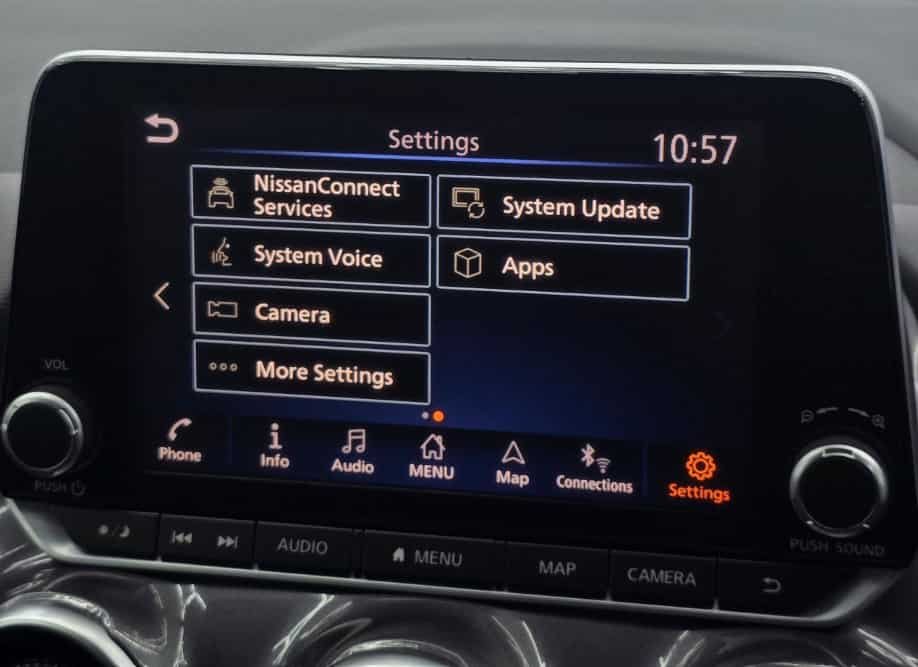
You can disable Nissan Connect Services by changing service settings, managing your Nissan account, or contacting Nissan support. The correct method depends on the specific feature you want to turn off. Nissan Connect Services connects your vehicle with online features such as remote access, vehicle information, navigation tools, and smartphone integration.
Many Nissan owners choose to disable these services for three main reasons. Some drivers want stronger control over personal data. Others no longer use connected features. Vehicle owners may also remove access before selling or transferring ownership.
A disabled Nissan Connect service does not affect basic vehicle operation. Your engine, safety systems, and standard controls continue to function normally. Only connected features that depend on Nissan’s online systems and communication networks stop working.
This guide explains the steps required to disable Nissan Connect Services and manage connected vehicle settings. It covers service deactivation, account control, personal data removal, and smartphone disconnection. These steps help Nissan owners protect privacy and maintain control over their connected features.
Before turning off the service, it is important to understand the difference between disabling a feature, canceling a subscription, and deleting Nissan Connect account information. Each option creates a different result and affects your connected services in a different way.
How Can You Disable Nissan Connect Services?
You can disable Nissan Connect Services by turning off connected features in your Nissan account, changing available vehicle settings, or requesting service deactivation through Nissan support. The exact process depends on your Nissan model, service package, and region. Nissan Connect Services uses a combination of the NissanConnect app, vehicle infotainment system, and connected service account to manage remote features.
The first step is to check your NissanConnect account and app settings. Some Nissan models allow owners to manage connected services directly through the mobile application. Users can review active services, adjust available preferences, and remove vehicle access from the account when necessary. This option works well for owners who want to stop specific connected features without affecting the entire infotainment system.
The vehicle infotainment system provides another control point for certain Nissan Connect features. Owners can access settings related to data sharing, smartphone connections, and connected service preferences through the touchscreen display. Available options vary between Nissan models because each vehicle generation uses different infotainment software and connected technology.
Contacting Nissan customer support is the most reliable option when you want to completely deactivate Nissan Connect Services. Support representatives can help verify ownership, review subscription status, and guide you through account-level changes. This method is especially useful when you sell your vehicle, transfer ownership, or want to remove all connected service access.
Before disabling Nissan Connect Services, identify which features you want to stop. Remote start, vehicle location services, emergency assistance, and smartphone integration may operate separately. Turning off one feature does not always deactivate every connected service linked to your Nissan account.
What Happens When You Disable Nissan Connect Services?
Disabling Nissan Connect Services stops connected features that depend on Nissan’s online communication system. The vehicle itself continues to operate normally because basic driving functions do not rely on Nissan Connect. The main changes affect remote access, mobile app features, and data-based services connected to your Nissan account.
Remote features usually stop working after you disable the service. Functions such as remote start, remote door locking, vehicle status checks, and location-based tools may no longer respond through the NissanConnect app. These features require an active connection between your vehicle, Nissan’s servers, and your account.
The NissanConnect app may also lose access to your vehicle information. For example, you may no longer see fuel level updates, maintenance information, driving reports, or vehicle notifications through the application. The exact changes depend on which Nissan Connect Services you deactivate and the service plan connected to your vehicle.
Disabling Nissan Connect Services does not remove every digital feature inside your vehicle. Your infotainment system can still support basic functions such as radio, offline settings, and some smartphone connections depending on your Nissan model. The difference is that online features requiring Nissan’s connected platform will no longer operate.
Many owners confuse disabling services with deleting their Nissan account. These actions create different results. Disabling services turns off connected features, while deleting account information removes the connection between your personal profile and the Nissan Connect platform. Understanding this difference helps you choose the correct option for your situation.
How Do You Remove Nissan Connect Information Before Selling Your Vehicle?
You should remove Nissan Connect information before selling your vehicle to protect personal data and prevent the next owner from accessing your connected services. A Nissan vehicle stores different types of user information through connected features, including account details, paired devices, navigation data, and saved locations.
The first step involves removing your vehicle from the NissanConnect account. This action disconnects your profile from the vehicle and prevents future access through the NissanConnect app. Vehicle owners should complete this step before handing over the keys because connected services can remain linked to the previous owner’s account.
Personal information inside the infotainment system also requires attention. Navigation history, saved destinations, Bluetooth devices, and user profiles can reveal private details about your daily activities. Removing these records reduces the risk of exposing personal information after ownership changes.
A factory reset may help clear stored information from the vehicle’s infotainment system. However, a reset does not always cancel Nissan Connect subscriptions or remove account-level connections. Owners should manage both the vehicle settings and Nissan account separately to complete the process.
Selling a Nissan vehicle requires more than transferring physical ownership. Connected car technology creates a digital connection between the driver and the vehicle. Removing Nissan Connect information ensures that the new owner starts with a clean system while protecting your previous account access and personal data.
How Do You Disconnect Your Phone From Nissan Connect?
You can disconnect your phone from Nissan Connect by removing the device from Bluetooth settings, deleting smartphone profiles, or disconnecting smartphone integration features. This process helps owners remove personal device access while keeping other Nissan Connect Services active. Disconnecting a phone is different from disabling the entire connected service system.
The first step is to open the Nissan infotainment system settings and access the connected devices menu. From this section, you can view smartphones currently paired with your vehicle. Removing a device deletes the connection between the phone and the vehicle’s communication system.
Bluetooth removal clears basic wireless connections, including phone calls and audio streaming. However, some Nissan models store additional smartphone information through features such as Apple CarPlay or Android Auto. These connections require separate removal steps to completely disconnect the device.
Apple CarPlay and Android Auto settings should also be checked before transferring ownership or removing a personal phone. These systems can store permission settings that allow a smartphone to connect automatically when it enters the vehicle. Deleting these permissions prevents unwanted automatic connections in the future.
Disconnecting your phone does not disable Nissan Connect Services because the two systems perform different functions. Nissan Connect manages online vehicle services, while Bluetooth and smartphone integration manage communication between your device and the infotainment system. Understanding this difference helps you choose the correct action based on your goal.
Does Disabling Nissan Connect Services Protect Your Privacy?
Disabling Nissan Connect Services can improve privacy control by limiting access to connected vehicle features and reducing the amount of information shared through the platform. Nissan Connect Services uses connected technology to provide functions such as remote access, vehicle status updates, and location-based services. These features require communication between your vehicle, Nissan systems, and your user account.
Vehicle location data is one of the main privacy concerns for connected car users. Nissan Connect Services may use location information to support features such as vehicle tracking, navigation assistance, and remote vehicle management. Turning off related services can prevent users from continuing to access these connected functions through the NissanConnect app.
Account management also plays an important role in protecting vehicle data. Disabling Nissan Connect Services alone may not remove all personal information linked to your account. Owners should review account settings, remove stored vehicle information, and disconnect unused devices to maintain better control over their digital information.
Privacy protection requires more than disabling one feature. Connected vehicles combine multiple systems, including infotainment software, mobile applications, and telematics technology. Each system may store different types of information, so owners should review available privacy options before selling a vehicle or stopping connected services.
Nissan owners who value data control should understand how connected features work before making changes. Disabling Nissan Connect Services can reduce unwanted access, but reviewing account permissions and removing personal data provides a more complete privacy solution.
Should You Disable Nissan Connect Services Permanently?
You should disable Nissan Connect Services permanently only when connected features no longer provide value or when you want stronger control over vehicle data. The decision depends on how you use your Nissan, which features you need, and whether privacy concerns outweigh the benefits of connected services.
Many owners choose permanent deactivation because they do not use remote vehicle functions. Features such as remote start, vehicle status updates, and app-based controls may have little value for drivers who prefer traditional vehicle operation. Removing these services can also eliminate unnecessary subscription costs for owners who do not use the available features.
Privacy concerns are another common reason to disable Nissan Connect Services permanently. Some drivers prefer to limit location sharing, connected data collection, and online vehicle access. This choice becomes especially relevant when owners sell their vehicle, share it with other users, or want to reduce their digital footprint.
However, keeping Nissan Connect Services active provides several advantages for certain drivers. Remote access features can improve daily convenience, especially for owners who use smartphone controls, vehicle notifications, or connected safety features. Drivers who depend on these tools may prefer managing individual settings instead of disabling the entire service.
The best decision depends on your personal needs. If you rarely use connected features, permanent deactivation may simplify vehicle management. If you rely on remote functions or safety services, adjusting specific settings may provide better control without losing useful features.
Conclusion
Disabling Nissan Connect Services gives Nissan owners more control over connected features, vehicle data, and account access. The correct process depends on the reason for turning off the service. Some owners only need to disconnect a smartphone, while others need to remove vehicle information or deactivate the entire connected service account.
Managing Nissan Connect Services requires attention to three main areas: service settings, personal data, and account connections. Turning off unwanted features can reduce connected access, while removing saved information helps protect privacy during ownership changes. These steps become especially important when selling a vehicle or transferring it to another driver.
Nissan Connect Services provides useful technology for owners who want remote access, vehicle updates, and smartphone-based controls. However, connected features should match your personal preferences and privacy expectations. Reviewing available settings allows you to keep useful functions while removing features you do not need.
Before completing the process, check your NissanConnect account, vehicle settings, and connected devices. A complete review ensures that your personal information remains protected and that the next user receives a properly prepared vehicle.
For more guidance, Nissan owners can also explore related topics such as NissanConnect app setup, Nissan infotainment system management, and connected vehicle privacy settings.