
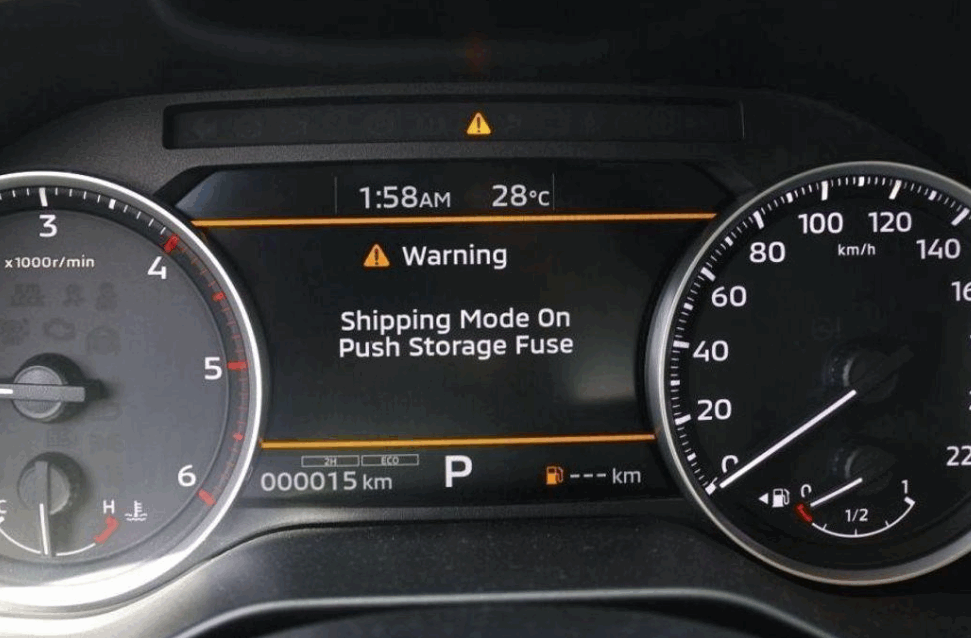
You can turn off Shipping Mode on a Nissan Altima by activating the Extended Storage Switch. Nissan uses this function to reduce battery drain during vehicle storage and transportation. The system limits selected electrical features until the vehicle enters normal operating mode. As a result, an Altima in Shipping Mode may show a warning message or limit some electrical functions.
The exact process depends on the Nissan Altima model year. Nissan has changed electrical layouts and component locations across different generations. Check the fuse box information and your Owner’s Manual before you adjust the Extended Storage Switch. This step helps you identify the correct component and avoid disturbing unrelated fuses.
This guide explains how to turn off Shipping Mode on a Nissan Altima and locate the relevant switch. You will also learn how to confirm that Shipping Mode is off. The later sections cover common causes when the mode stays active. They also explain its connection to the battery and electrical system. Finally, the guide shows when the problem requires professional diagnosis.
What Is Shipping Mode on a Nissan Altima?
Shipping Mode on a Nissan Altima reduces electrical power use while the vehicle remains in storage or transportation. This mode helps protect the battery before the owner starts using the car normally. Nissan can limit selected electrical functions during this period. The vehicle can then retain enough battery power during extended storage.
Shipping Mode mainly affects the Altima’s electrical system rather than its normal mechanical operation. Certain electrical accessories may remain limited while the mode stays active. The instrument cluster may also display a message that indicates the vehicle is still in Shipping Mode. These signs help drivers identify the condition before troubleshooting individual electrical components.
The Extended Storage Switch plays an important role in this system on applicable Nissan Altima models. Nissan uses the switch to control electrical power during storage and transportation. Moving or activating the correct switch allows the vehicle to return to its normal electrical state. However, the location and configuration can differ by model year. Drivers should identify the correct component before making any adjustment.
A Nissan Altima may remain in Shipping Mode after transportation, storage, service, or vehicle preparation. In this situation, the condition does not automatically indicate a damaged electrical system. The vehicle may simply need the correct storage switch procedure. If the mode remains active afterward, the battery, fuse, switch, or another electrical component may require inspection. Identifying Shipping Mode first helps separate a temporary storage setting from an actual electrical fault.
How Do You Turn Off Shipping Mode on a Nissan Altima?
You can turn off Shipping Mode on a Nissan Altima by activating the Extended Storage Switch. Start by parking the vehicle safely and turning off unnecessary electrical accessories. Check the instrument cluster for a Shipping Mode message. This message helps confirm that you are dealing with the correct vehicle setting.
Next, locate the Extended Storage Switch for your Nissan Altima. Nissan may place this component in or near a fuse panel on applicable models. Check the Owner’s Manual and fuse box information for your specific model year. Do not remove random fuses while searching for the switch. The electrical layout can differ between Altima generations.
Activate the Extended Storage Switch once you identify the correct component. Make sure the switch reaches its normal operating position. Then cycle the ignition and check the instrument cluster again. The Shipping Mode message should disappear after the system returns to normal operation. Test the electrical features that previously showed limited operation.
Do not assume that every Altima uses the same procedure. Nissan has used different electrical layouts across model years and vehicle configurations. A procedure for one Altima may not match another model year. Always verify the component location before making changes to the fuse panel.
Check the Extended Storage Switch again if Shipping Mode remains active. You may also need to inspect the related fuse and battery condition. Persistent warnings can indicate an electrical problem instead of an active storage setting. A Nissan technician or qualified mechanic can diagnose the system when the correct procedure does not restore normal operation.
Where Is the Shipping Mode or Extended Storage Switch on a Nissan Altima?
The Extended Storage Switch is located in the fuse panel area on Nissan Altima models that use this system. However, its exact position can vary by model year and electrical configuration. Check the fuse box diagram and Owner’s Manual for your Altima before touching any component. This information helps you identify the correct switch without disturbing another circuit.
The Extended Storage Switch differs from a standard fuse. A fuse protects an electrical circuit when excessive current creates a problem. The Extended Storage Switch controls selected electrical functions during vehicle storage and transportation. Nissan uses this system to help reduce unnecessary battery consumption before normal vehicle use begins.
Look for the fuse panel information that matches your exact Altima model year. The diagram can identify the relevant electrical components and their positions. Do not rely only on instructions for a different Altima generation. Nissan can change fuse panel layouts when it updates a vehicle’s electrical system.
Avoid pulling random fuses if you cannot find the Extended Storage Switch. Removing the wrong fuse can disable unrelated electrical features and make diagnosis more difficult. Instead, confirm the component through the correct vehicle documentation. You should also inspect the switch for an abnormal position or visible damage.
The correct location matters because activating an unrelated fuse or switch will not disable Shipping Mode. If your Owner’s Manual does not identify the component, use model specific service information. A Nissan dealer or qualified technician can also identify the correct control when the fuse panel layout remains unclear.
How Can You Tell If Shipping Mode Has Been Turned Off?
You can confirm that Shipping Mode is off when its message disappears and the affected electrical features return to normal operation. Check the instrument cluster first after you activate the Extended Storage Switch. The Shipping Mode message should no longer appear when the system enters its normal operating state.
Next, cycle the ignition and check the instrument cluster again. This step helps confirm that the change remains active after a restart. A message that returns after another ignition cycle may indicate that Shipping Mode is still active. It can also point to a problem with the switch or electrical system.
Test any electrical features that did not work correctly before you changed the switch position. Normal operation provides another sign that the vehicle has left its storage state. However, do not use one electrical accessory as the only test. A separate fuse or electrical fault can affect an individual feature.
Pay attention to other warning lights or messages on the dashboard. A battery warning or another electrical alert does not automatically mean Shipping Mode remains active. These warnings can identify separate problems that require their own diagnosis. Treat each warning according to the system it identifies.
Shipping Mode should remain off during normal vehicle use. Inspect the Extended Storage Switch and related electrical components if the message keeps returning. A persistent message after the correct procedure may indicate a switch, fuse, battery, or electrical system problem. Proper verification helps distinguish an active storage setting from a separate electrical fault.
Why Won’t Shipping Mode Turn Off on a Nissan Altima?
Shipping Mode may stay on because of five main issues involving the switch, fuse, battery, model specific procedure, or electrical system. Start with the Extended Storage Switch because it directly controls the storage function on applicable Altima models. The system may remain in Shipping Mode when the switch does not reach its normal operating position.
A fuse or electrical connection can also cause problems. Inspect the relevant circuit after you confirm the correct switch position. Do not replace or move unrelated fuses during this process. Use the fuse box information for your specific Nissan Altima model year to identify the correct components.
Battery condition also matters when diagnosing unusual electrical behavior. Low battery voltage can affect vehicle electronics and produce symptoms that resemble other electrical faults. Check the battery when Shipping Mode appears alongside starting problems, dim electrical features, or other power related symptoms. Do not assume that Shipping Mode itself caused the battery problem.
The wrong procedure can create another problem. Nissan Altima generations can use different electrical layouts and component locations. Instructions for another model year may therefore lead you to the wrong switch or fuse. Confirm the year specific procedure before changing additional components.
Finally, a persistent Shipping Mode message can indicate an electrical fault that requires further diagnosis. The problem may involve a switch, connection, circuit, or control system. A qualified technician can inspect the system when basic checks do not resolve the condition.
What Should You Check If Shipping Mode Stays On?
Check the Extended Storage Switch first, then inspect the relevant fuse, battery condition, and model specific procedure. This sequence starts with the components most closely connected to the original setting. Seek professional electrical diagnosis if these checks do not clear the Shipping Mode message.
Does Nissan Altima Shipping Mode Affect the Battery?
Nissan Altima Shipping Mode helps reduce electrical demand on the battery during vehicle storage and transportation. The system limits selected electrical functions before the vehicle enters normal use. This reduces unnecessary power consumption while the Altima remains parked for an extended period.
Shipping Mode and a weak battery are not the same problem. Shipping Mode changes how selected electrical features operate to conserve battery power. A weak battery lacks enough electrical capacity or voltage to support normal vehicle operation. Both conditions can affect electrical features, but they require different solutions.
Check the battery when the Altima shows other power related symptoms. Slow engine cranking, dim lights, or repeated starting problems can point toward a battery issue. Shipping Mode alone does not prove that the battery has failed. Battery testing can help separate low battery performance from a storage mode setting.
The Extended Storage Switch also connects this topic to the vehicle’s electrical power management. Returning the switch to its normal operating position restores the functions that the storage system controls. It does not repair a weak or damaged battery. A battery problem can therefore remain after you successfully turn off Shipping Mode.
Inspect both systems separately when electrical symptoms continue. First, confirm that the Shipping Mode message has disappeared. Then check battery condition if power related symptoms remain. This approach prevents you from treating every electrical problem as a Shipping Mode issue. It also creates a clearer diagnostic path when the Nissan Altima does not return to normal operation.
Does the Procedure for Turning Off Shipping Mode Vary by Nissan Altima Model Year?
The procedure for turning off Shipping Mode can vary between Nissan Altima model years. Nissan has changed vehicle generations, electrical layouts, and component configurations over time. These changes can affect the location of the Extended Storage Switch and related electrical components.
Always identify your Altima model year before following a Shipping Mode procedure. Then check the Owner’s Manual and fuse box information for that vehicle. These sources help you locate the correct electrical components. They also reduce the risk of confusing the Extended Storage Switch with an unrelated fuse or control.
Do not assume that instructions for one Altima generation apply to every model. A photo or diagram from another model year may show a different fuse panel layout. The component position can also differ when Nissan changes the vehicle’s electrical design. Using model specific information creates a safer and more accurate process.
The same rule applies when troubleshooting a Shipping Mode message that stays on. First, confirm that you followed the correct procedure for your model year. Then inspect the switch, relevant fuse, and battery condition. This order prevents unnecessary electrical work caused by incorrect instructions.
Use model specific service information when the Owner’s Manual does not provide enough detail. A Nissan dealer or qualified technician can also identify the correct component for the vehicle. Model year verification should come before further diagnosis when the available Shipping Mode instructions conflict with your Altima’s actual fuse panel.
When Should You Take a Nissan Altima to a Dealer or Mechanic for Shipping Mode?
Take your Nissan Altima to a dealer or qualified mechanic when the correct Shipping Mode procedure does not restore normal operation. A persistent message can indicate an electrical problem that requires more than a simple switch adjustment. Professional diagnosis becomes more important when other electrical symptoms appear at the same time.
Start by confirming that you used the correct procedure for your Altima model year. Check the Extended Storage Switch and the relevant fuse information again. You should also consider battery condition when the vehicle shows starting or power related problems. These basic checks can separate a simple Shipping Mode issue from a broader electrical fault.
Professional inspection becomes necessary when the switch appears damaged or cannot reach its normal position. You should also seek help when a relevant fuse fails repeatedly. Replacing a fuse without identifying the cause may leave the underlying electrical problem unresolved. Multiple dashboard warnings can also indicate that the vehicle needs further diagnosis.
A technician can inspect the electrical circuit when basic checks do not identify the cause. The technician can also determine whether the problem involves the switch, wiring, battery, or another electrical component. This approach avoids unnecessary replacement of unrelated parts.
You do not need professional service simply because Shipping Mode appears on the instrument cluster. First, follow the correct model specific procedure and verify the result. Seek professional diagnosis when the message remains active or other electrical problems continue. This sequence keeps the troubleshooting process focused on the actual fault.
What Should You Remember About Turning Off Shipping Mode on a Nissan Altima?
Turn off Shipping Mode by identifying the correct Extended Storage Switch and returning the vehicle to normal operation. Check the instrument cluster afterward to confirm that the Shipping Mode message has disappeared. Restart the vehicle and verify the affected electrical features before considering the process complete.
Always match the procedure to your Nissan Altima model year. Electrical layouts and component locations can differ between vehicle generations. Check the Owner’s Manual and fuse box information before moving a switch or touching a fuse. This step reduces the risk of changing an unrelated electrical component.
A Shipping Mode message that remains active requires further troubleshooting. Check the Extended Storage Switch, relevant fuse, battery condition, and model specific procedure. Treat other dashboard warnings as separate diagnostic clues rather than assuming Shipping Mode caused every electrical symptom.
Seek professional diagnosis when the correct procedure does not restore normal operation. A technician can inspect the switch, electrical circuit, battery, and related components. Following this sequence helps you solve a simple Shipping Mode condition without overlooking an actual electrical fault.