
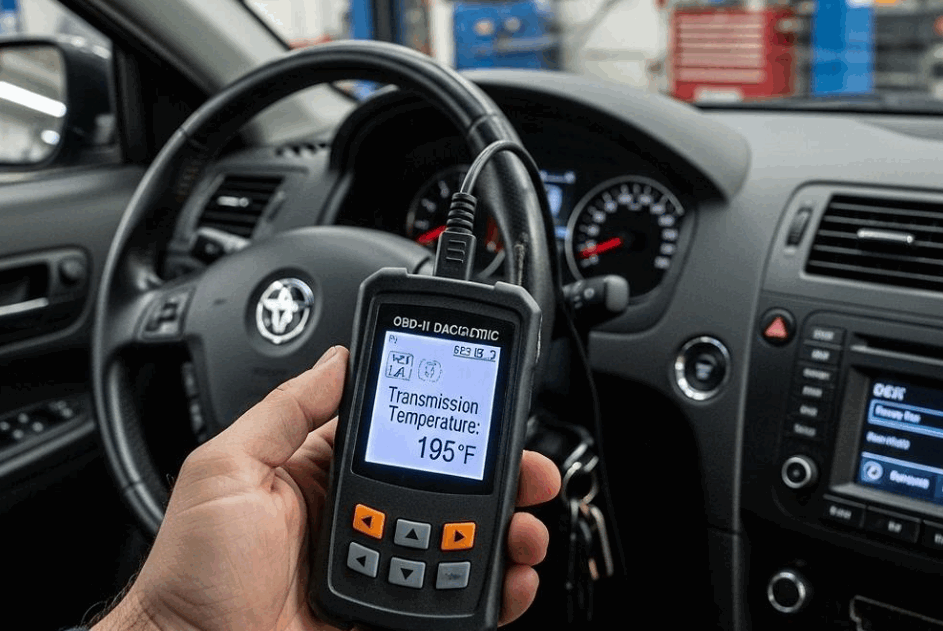
You can check CVT fluid temperature by connecting a compatible scan tool to the vehicle’s OBD II port, accessing the transmission control module or live data menu, and locating the CVT fluid temperature reading. The scan tool displays temperature data reported by the vehicle’s transmission control system, allowing you to monitor the fluid as it warms up.
Checking the correct temperature is important when servicing CVT fluid because fluid volume changes as temperature changes. A fluid level checked outside the manufacturer’s specified temperature range can produce an inaccurate result. This can lead to an incorrect fluid adjustment, particularly on CVTs that use an overflow or check plug instead of a conventional dipstick.
Not every diagnostic scanner can display this information. Basic OBD II code readers may provide engine fault codes and generic data without access to transmission specific live data. A suitable scan tool must communicate with the transmission system and display the relevant temperature parameter. The exact parameter name, required temperature range, and checking procedure also vary by vehicle and CVT design. This guide explains how to access the temperature reading, determine which scan tool functions you need, interpret the displayed temperature, and troubleshoot situations where CVT fluid temperature does not appear.
How Do You Check CVT Fluid Temperature With a Scan Tool?
To check CVT fluid temperature with a scan tool, connect a compatible scanner to the OBD II port, access the transmission control module, open live data, and locate the CVT fluid temperature parameter. Keep the scanner connected while the transmission fluid warms to the temperature specified by the vehicle manufacturer.
Park the vehicle on a level surface and apply the parking brake before starting the procedure. Locate the OBD II port, which is typically positioned under the dashboard on the driver’s side, then connect the scan tool. Turn the ignition on and follow the scanner prompts to select the correct vehicle. Start the engine when required by the manufacturer’s service procedure.
Open the transmission control module, commonly identified as the TCM, and select the live data or data stream function. Look for a parameter labeled CVT Fluid Temperature, Transmission Fluid Temperature, TFT, CVTF Temperature, or a similar term. The exact name depends on the vehicle and scan tool. A basic code reader may not display this parameter because transmission data can require enhanced diagnostic access.
Monitor the temperature reading while the engine and transmission reach the required service condition. Some CVT procedures require the brake pedal to remain applied while the selector is moved through specific gear positions. This circulates fluid through the transmission before the level is checked. Follow the sequence specified in the vehicle service manual because the required selector positions and operating conditions differ between CVT designs.
Once the displayed temperature enters the manufacturer’s specified range, perform the required fluid level inspection or adjustment without unnecessary delay. Continue monitoring the scanner because CVT fluid temperature can keep rising while the engine is running. Using the live reading instead of estimating temperature from warm up time provides a more reliable reference for temperature dependent CVT service.
What CVT Fluid Temperature Should You Look for on a Scan Tool?
Use the CVT fluid temperature range that the vehicle manufacturer specifies for the service procedure. No single temperature works for every CVT. Each transmission can use a different design, fluid type, and fluid level checking method.
The correct temperature also depends on the purpose of the check. Cold fluid means the transmission has not reached its required service condition. The fluid level checking range defines when you should inspect or adjust the fluid level. Normal operating temperature refers to the temperature during regular driving. A much higher reading may point to excessive transmission heat.
Always check the service information for your specific vehicle before adjusting the CVT fluid level. This step matters on CVTs that use an overflow or check plug. CVT fluid expands as its temperature rises. This change in volume affects how much fluid reaches or exits the check opening. As a result, checking the level at the wrong temperature can produce an inaccurate result.
Do not apply a temperature specification from one vehicle to another. Two vehicles can both use CVTs but require different service temperatures. Check the manufacturer’s service manual for the correct model and transmission.
Keep the scan tool connected while you check the fluid level. Watch the live temperature reading throughout the procedure. The fluid can continue to heat up while the engine runs. Complete the level check within the specified temperature range. Follow the manufacturer’s procedure if the reading moves outside that range.
Why Does CVT Fluid Temperature Matter When Checking the Fluid Level?
CVT fluid temperature matters because the fluid changes volume as its temperature changes. Heat causes the fluid to expand, while lower temperatures reduce its volume. This change affects the fluid level during an inspection.
The relationship follows a simple process. The CVT fluid absorbs heat while the transmission operates. Its temperature rises and its volume increases. The change in volume can affect the amount of fluid at the check point. For this reason, manufacturers may specify a temperature range for checking or adjusting the fluid level.
Temperature becomes especially important on CVTs that use an overflow or check plug. These systems rely on fluid reaching a specific level inside the transmission. Excess fluid can flow from the check opening during the procedure. The temperature must remain within the specified range for this method to give a reliable result.
Checking the fluid when it is too cold can produce a different result from checking it at the required temperature. The same problem occurs when the fluid becomes too hot. An incorrect reading can lead you to add or remove the wrong amount of CVT fluid.
A scan tool helps prevent this problem by showing live temperature data. You can monitor the fluid instead of estimating its temperature from engine warm up time. Check the manufacturer’s service information before starting the procedure. Then use the scan tool to confirm the required temperature before you make any fluid level adjustment.
Can Every OBD II Scan Tool Read CVT Fluid Temperature?
No, not every OBD II scan tool can read CVT fluid temperature. Basic code readers often focus on generic engine data and diagnostic trouble codes. Reading CVT temperature may require access to transmission specific live data.
A scan tool must communicate with the transmission control system to display this information. The transmission control module receives data from sensors that monitor transmission operation. A compatible scanner can access the relevant data stream and show the temperature on its screen.
Scanner capability varies by model and software. One scanner may display CVT temperature on a specific vehicle, while another may not support that vehicle’s transmission data. Vehicle coverage also matters. A tool that supports enhanced diagnostics for one manufacturer may offer fewer functions for another.
Before buying or using a scanner, check its compatibility with your exact vehicle. Confirm the model year, make, model, and transmission when possible. The scanner documentation should state whether the tool supports transmission live data or enhanced diagnostics.
What Scan Tool Features Do You Need to Read CVT Temperature?
A suitable scan tool needs live data access, transmission module support, and compatibility with your vehicle. Enhanced diagnostic functions can also provide access to manufacturer specific data that basic readers cannot display.
Look for transmission or TCM access in the scanner specifications. The tool should also provide a live data menu for transmission parameters. Some scanners offer graphing, which can make temperature changes easier to track. However, graphing is not essential for a basic temperature check.
Confirm vehicle coverage before relying on any scanner for CVT service. This step reduces the risk of connecting a tool that reads engine data but cannot display the CVT temperature you need.
Why Is CVT Fluid Temperature Not Showing on the Scan Tool?
There are 5 main reasons a scan tool may not show CVT fluid temperature. The scanner may lack transmission support, use the wrong module, lack the correct data parameter, have limited vehicle coverage, or face a communication problem.
First, check whether the scanner supports transmission live data. Basic OBD II readers often focus on generic engine information. They may read powertrain trouble codes without providing access to CVT temperature data. Use a scanner with transmission or TCM support when your current tool lacks this function.
Second, make sure you selected the correct control module. CVT temperature may appear under the transmission control module instead of the engine control module. Open the TCM menu and check its live data list.
Third, look for different parameter names. Scan tools do not always use the term CVT Fluid Temperature. The same reading may appear as Transmission Fluid Temperature, TFT, CVTF Temperature, or another manufacturer specific label. Review all relevant transmission data before assuming the parameter is unavailable.
Fourth, confirm that the scanner supports your exact vehicle. Diagnostic coverage can vary by manufacturer, model, model year, and transmission. Updating the scanner software may add missing vehicle data when the tool manufacturer provides newer coverage.
Finally, investigate a communication or vehicle fault if a compatible scanner still cannot retrieve valid temperature data. A sensor, wiring, connector, control module, or communication network problem may interrupt the data. Check for related diagnostic trouble codes and other missing transmission parameters. These clues can help separate a scanner compatibility problem from a fault within the vehicle.
Can You Check CVT Fluid Temperature Without a Scan Tool?
You may check CVT fluid temperature without a scan tool only when the vehicle manufacturer provides another approved procedure. Without diagnostic temperature data, you usually cannot confirm the exact sensor reading in the same way.
Some service procedures use specific operating conditions to prepare the CVT for a fluid level check. These instructions may include engine operation, gear selection, or another vehicle specific process. Follow the service information for your exact vehicle when the manufacturer provides such a method.
Do not rely on warm up time alone to determine an exact CVT fluid temperature. The fluid does not heat at the same rate in every situation. Ambient temperature affects the starting condition. Driving conditions, engine operation, transmission load, and previous vehicle use can also change how quickly the fluid warms.
For example, two identical vehicles may run for the same amount of time but reach different fluid temperatures. One may start after sitting overnight in cold weather. The other may have completed a recent trip. A fixed warm up period cannot account for this difference.
An external temperature measurement also may not represent the temperature that the transmission sensor detects. The transmission case and internal fluid do not always share the same temperature at every moment. For this reason, avoid treating an external surface reading as a direct replacement for live CVT temperature data.
Use a compatible scan tool when the service procedure requires a specific temperature reading. Follow an alternative method only when the manufacturer provides one for that vehicle. This approach reduces guesswork and helps maintain the correct conditions for CVT fluid service.
What Happens if You Check CVT Fluid Level at the Wrong Temperature?
Checking CVT fluid level at the wrong temperature can produce an inaccurate reading and lead to overfilling or underfilling. CVT fluid changes volume as its temperature changes. The manufacturer accounts for this change when setting the correct conditions for a fluid level check.
Cold fluid has a lower volume than warmer fluid. If you check the level before the fluid reaches the required range, the result may not represent the intended service condition. You may add fluid when the transmission does not need it. This can result in an overfilled transmission after the fluid reaches a higher temperature.
Excessive temperature can create the opposite problem. Hot CVT fluid expands and occupies more volume. A level check at this point may cause you to remove fluid that the transmission needs under the specified service conditions. The CVT may then contain too little fluid after its temperature changes.
Temperature accuracy becomes especially important with an overflow or check plug system. This design uses the height of the check opening to establish the fluid level under specific conditions. Fluid temperature directly affects the volume inside the transmission. A temperature outside the required range can therefore change the result of the procedure.
Do not use temperature as the only service condition. Vehicle position, engine operation, gear selector position, and the fluid level procedure can also affect the result. Follow the manufacturer’s instructions for all required conditions. Use the scan tool throughout the process to monitor CVT fluid temperature. Complete the level adjustment only when the reading falls within the specified range.
What Is the Most Accurate Way to Check CVT Fluid Temperature?
The most accurate practical method is to use a compatible scan tool that can access transmission live data. Connect the tool to the OBD II port and open the transmission control module. Find the CVT fluid temperature parameter and monitor the reading during the service procedure.
Always compare the reading with the manufacturer’s specification for your vehicle. CVT designs use different fluids, service methods, and temperature requirements. For this reason, one temperature range does not apply to every CVT.
Temperature becomes especially important when you check or adjust the CVT fluid level. The fluid changes volume as it heats and cools. Checking it outside the specified range can affect the level reading. This may lead to an incorrect fluid adjustment.
Use a scan tool that supports your vehicle and provides transmission live data. Keep it connected while the fluid reaches the required temperature. Follow the manufacturer’s instructions for engine operation, gear selector position, and fluid level inspection. These steps provide a more reliable result than estimating CVT fluid temperature from warm up time alone.