
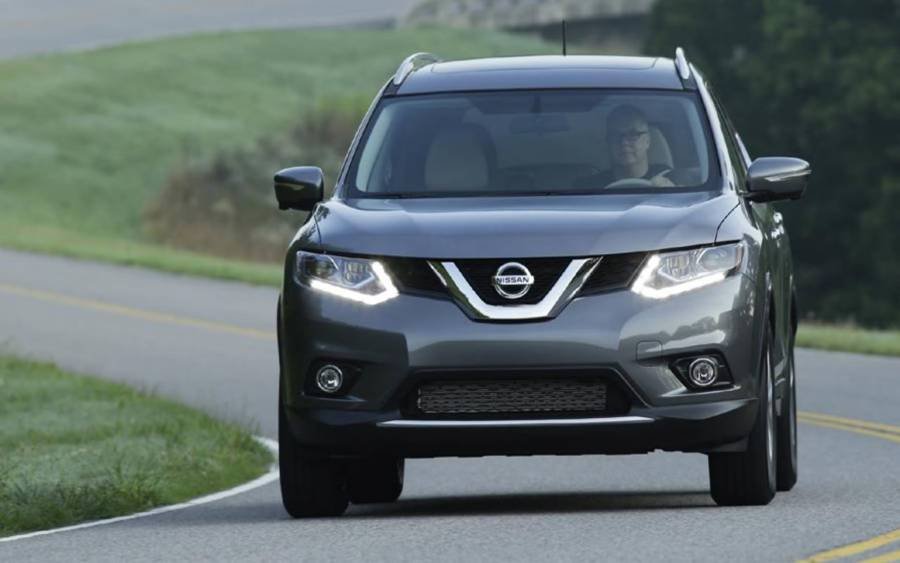
Nissan Rogue drive modes adjust how the vehicle responds to different driving conditions, helping the driver prioritize everyday comfort, fuel efficiency, responsiveness, or traction. Depending on the model year and drivetrain configuration, a Nissan Rogue can offer Auto, Eco, Sport, Snow, and Off-Road modes. Each mode serves a specific purpose rather than simply changing how the vehicle feels to drive.
Auto Mode is the general choice for normal city and highway driving, while Eco Mode prioritizes efficient operation. Sport Mode provides a more responsive driving feel when quicker acceleration response is useful. Snow Mode is intended for slippery, snow-covered roads, while Off-Road Mode helps manage traction on appropriate loose or uneven surfaces. The available modes are not identical across every Nissan Rogue because drivetrain configuration and model year can affect which settings the vehicle provides.
Choosing the right mode therefore depends on road conditions and the type of vehicle response you need. This guide explains what each Nissan Rogue drive mode does, when to use it, how the modes differ, and how to select the appropriate setting for everyday driving.
What Drive Modes Does the Nissan Rogue Have?
The Nissan Rogue can have five main drive modes: Auto, Eco, Sport, Snow, and Off-Road. These modes change how the vehicle responds to driver input and road conditions, with each setting prioritizing a different combination of everyday drivability, efficiency, responsiveness, and traction. The exact modes available depend on the Rogue’s model year and drivetrain configuration, so not every Nissan Rogue has all five settings.
Auto Mode provides balanced vehicle behavior for normal paved roads and is the general-purpose setting for everyday driving. Eco Mode prioritizes efficient operation by moderating vehicle response when strong acceleration is unnecessary. Sport Mode shifts the priority toward responsiveness, making the vehicle react more readily to accelerator input. Snow Mode is designed for low-traction winter conditions, while Off-Road Mode is intended for appropriate loose or uneven surfaces where traction management becomes more important.
The main difference between these modes is therefore the type of driving condition or vehicle behavior each one prioritizes.
| Drive Mode | Primary Purpose | Best Used For |
|---|---|---|
| Auto | Balanced vehicle operation | Normal city and highway driving |
| Eco | Fuel-efficient operation | Commuting and steady cruising |
| Sport | More responsive driving | Situations requiring quicker response |
| Snow | Traction on slippery surfaces | Snow-covered and slippery roads |
| Off-Road | Traction on loose surfaces | Appropriate loose or uneven terrain |
Drive mode availability should be confirmed for the specific Nissan Rogue rather than assumed from this list. AWD-equipped versions can provide traction-oriented settings that are not necessarily available on every FWD configuration, and Nissan can change drive-mode features between model years.
What Does Auto Mode Do on a Nissan Rogue?
Auto Mode provides balanced vehicle behavior and is the Nissan Rogue drive mode intended for normal everyday driving conditions. Instead of emphasizing maximum fuel efficiency, increased responsiveness, or a specific low-traction surface, Auto Mode allows the vehicle’s control systems to operate with settings suited to routine driving.
This balance makes Auto Mode appropriate for paved roads when weather and traction conditions do not require a specialized setting. Examples include commuting through city streets, driving through suburban areas, and cruising on a dry highway. The driver does not need to switch repeatedly between specialized modes when road conditions remain normal.
Auto Mode also differs from Eco and Sport modes in its priority. Eco Mode places greater emphasis on efficient operation, while Sport Mode places greater emphasis on responsiveness. Auto Mode sits between these objectives, making it the practical general-purpose option when neither fuel-saving behavior nor a more aggressive response is the primary goal.
Use Auto Mode for everyday driving on normal roads, including most routine city and highway trips. Switch to another available mode when the driving context changes: Eco when efficiency is the priority, Sport when a more responsive driving feel is needed, or a traction-oriented mode when road conditions require it.
What Does Eco Mode Do on a Nissan Rogue?
Eco Mode on a Nissan Rogue prioritizes fuel-efficient driving by making the vehicle respond more gradually to driver input. The mode is designed for situations where smooth, economical operation matters more than immediate acceleration response, such as routine commuting, steady city driving, and highway cruising.
The main difference becomes noticeable when the driver presses the accelerator. Eco-oriented vehicle settings reduce the tendency to respond aggressively to small accelerator inputs, helping the driver accelerate more progressively. This smoother response can support efficient driving because rapid acceleration generally requires more energy than maintaining a steady speed. Eco Mode should therefore be viewed as a driving aid that encourages economical vehicle operation rather than a setting that guarantees a fixed improvement in fuel economy.
Eco Mode works best when traffic and road conditions allow the driver to maintain relatively consistent speeds. A daily commute on paved roads or a long highway trip provides a more suitable context than a situation requiring frequent, immediate acceleration. Actual fuel consumption still depends on factors such as driving speed, acceleration habits, traffic, vehicle load, tire condition, terrain, and weather.
Use Eco Mode when fuel efficiency is the priority and strong accelerator response is unnecessary. Switch to Auto Mode when you want more balanced everyday behavior or Sport Mode when quicker response becomes more important. Eco Mode does not increase the Rogue’s fuel tank capacity or mechanically reduce engine size; it changes how the vehicle manages driver inputs and related operating behavior to favor efficiency.
What Does Sport Mode Do on a Nissan Rogue?
Sport Mode on a Nissan Rogue prioritizes responsiveness, allowing the vehicle to react more readily when the driver presses the accelerator. It is useful when a more immediate response is desirable rather than the efficiency-focused behavior associated with Eco Mode.
Sport Mode changes the character of the vehicle by adjusting how its operating systems respond to driver input. The objective is not to create additional engine horsepower simply by selecting the mode. Instead, the driver experiences a more responsive relationship between accelerator input and vehicle behavior. Transmission-related operation can also contribute to this more responsive driving feel, depending on the specific Rogue model and powertrain.
This behavior is useful in situations where quicker response helps the driver control speed more deliberately. For example, Sport Mode can be appropriate when accelerating onto a highway or when additional responsiveness is useful for a passing maneuver. The driver must still determine whether there is enough distance and visibility to perform these maneuvers safely; selecting Sport Mode does not increase available road space or vehicle traction.
The trade-off is efficiency. A mode that encourages stronger or more immediate response does not prioritize economical operation in the same way as Eco Mode. Frequent aggressive acceleration can also increase fuel consumption regardless of the selected drive mode.
Use Sport Mode when you specifically want a more responsive driving feel. Use Auto Mode for balanced everyday operation and Eco Mode when fuel-efficient driving is the priority. This distinction makes the three modes easier to choose: Auto prioritizes balance, Eco prioritizes efficiency, and Sport prioritizes response.
What Does Snow Mode Do on a Nissan Rogue?
Snow Mode on a Nissan Rogue adjusts vehicle behavior to improve control on snow-covered and other slippery road surfaces. The mode prioritizes traction management rather than fuel efficiency or quicker acceleration response, making it appropriate when available grip is lower than it would be on dry pavement.
Low-traction conditions create a specific problem: the amount of power requested by the driver can exceed the grip available between the tires and road surface. When this happens, a driven wheel can begin to slip. Snow Mode helps the Rogue manage vehicle response for these conditions so that power can be applied more appropriately on slippery surfaces. On compatible AWD configurations, this function works alongside the vehicle’s drivetrain and traction-related systems rather than replacing them.
Use Snow Mode when driving on snow-covered or similarly slippery roads where traction is reduced. For example, the mode is more appropriate for a snow-covered winter road than for a dry highway during normal weather. Once road conditions return to normal, Auto Mode provides the more suitable general-purpose setting.
Snow Mode does not make a Nissan Rogue immune to skidding or eliminate the physical limits of tire traction. Tire type and condition, vehicle speed, braking input, steering input, snow depth, ice, and available road grip still determine how much control the vehicle can maintain. The driver should therefore reduce speed and increase following distance when conditions are slippery even when Snow Mode is active.
What Does Off-Road Mode Do on a Nissan Rogue?
Off-Road Mode on a Nissan Rogue is a traction-oriented setting designed for appropriate loose or uneven surfaces on models equipped with this mode. It changes how the vehicle manages available traction when the surface beneath the tires provides less consistent grip than a normal paved road.
Loose surfaces can cause individual wheels to encounter different levels of resistance and traction. A wheel traveling over a low-grip section can begin to slip while another wheel has more usable grip. Off-Road Mode helps the vehicle’s drivetrain and related control systems respond to these conditions, allowing the Rogue to manage traction more appropriately for the selected surface.
Use Off-Road Mode when the vehicle is traveling on a suitable loose or uneven surface for which the mode is intended. It should not be selected simply because a paved road has a few bumps or because the driver wants stronger acceleration. Auto Mode remains the appropriate general-purpose choice for normal paved-road driving, while Snow Mode serves a different purpose by addressing snow-covered and slippery winter conditions.
The presence of Off-Road Mode also does not make the Nissan Rogue a dedicated off-road vehicle. A drive mode cannot change physical limitations such as ground clearance, tire capability, approach and departure geometry, water-fording limits, or available traction. Drivers should keep the vehicle within the operating conditions specified for their particular Rogue and avoid treating the drive-mode selector as a substitute for appropriate tires, road assessment, and safe driving technique.
What Is the Difference Between Nissan Rogue Drive Modes?
The main difference between Nissan Rogue drive modes is the vehicle behavior each mode prioritizes: Auto balances everyday operation, Eco prioritizes efficiency, Sport prioritizes responsiveness, Snow focuses on slippery-road traction, and Off-Road manages traction on appropriate loose or uneven surfaces. Selecting the right mode therefore depends primarily on the road conditions and the response the driver needs.
| Drive Mode | Response Priority | Efficiency Priority | Traction Priority | Best Used For |
|---|---|---|---|---|
| Auto | Balanced | Balanced | Normal | Everyday city and highway driving |
| Eco | Gradual | High | Normal | Fuel-efficient commuting and cruising |
| Sport | More responsive | Lower | Normal | Driving that requires quicker response |
| Snow | Controlled for slippery conditions | Secondary | High | Snow-covered and slippery roads |
| Off-Road | Surface-specific | Secondary | High | Appropriate loose or uneven surfaces |
Auto, Eco, and Sport primarily differ in how they prioritize everyday vehicle response. Auto provides a balance between responsiveness and efficiency, making it the general-purpose choice. Eco shifts that balance toward economical operation, while Sport shifts it toward a more immediate response. Snow and Off-Road serve a different purpose because they address situations where available tire traction becomes a primary concern.
The modes should not be viewed as upgrades that progressively increase vehicle capability. Sport is not inherently “better” than Auto, and Off-Road is not a higher-performance version of Snow. Each setting addresses a different operating context. The correct mode is the one that matches the current driving condition.
What Is the Difference Between Auto and Eco Mode?
Auto Mode provides balanced everyday operation, while Eco Mode places greater priority on fuel-efficient vehicle behavior. Auto is appropriate when the driver wants the Rogue to operate normally without emphasizing either efficiency or responsiveness. Eco is more suitable when economical driving is the primary objective.
The difference becomes most relevant in how the vehicle responds to driver input. Eco-oriented operation favors smoother, more gradual response, which can discourage unnecessary aggressive acceleration. Auto maintains a more general-purpose response suitable for changing everyday traffic conditions.
For example, Auto Mode is a practical choice for a commute involving city streets, changing traffic speeds, and highway sections. Eco Mode becomes more useful during steady cruising or routine driving where strong acceleration is rarely required. Actual fuel consumption still depends on driving behavior and operating conditions, so selecting Eco Mode does not guarantee a specific fuel-economy improvement.
What Is the Difference Between Snow and Off-Road Mode?
Snow Mode is intended for snow-covered and slippery road conditions, while Off-Road Mode is intended for appropriate loose or uneven surfaces. Both are traction-oriented modes, but the surface context that triggers their use is different.
Snow creates reduced and potentially inconsistent tire grip on roads that would otherwise function as normal driving surfaces. Snow Mode addresses this low-traction winter-driving context by helping the vehicle manage its response when wheel slip is more likely.
Off-Road Mode addresses a different surface environment. Loose or uneven terrain can create significant differences in available grip from one wheel to another, requiring the vehicle’s traction and drivetrain systems to respond accordingly. The mode is therefore selected according to the type of surface rather than simply because traction is lower than normal.
For example, a snow-covered paved road calls for Snow Mode when the vehicle is equipped with it, while an appropriate loose surface can call for Off-Road Mode. Neither setting overrides the limits imposed by tires, speed, ground clearance, available grip, or the vehicle’s physical capabilities.
How Do You Change Drive Modes on a Nissan Rogue?
To change drive modes on a Nissan Rogue, use the drive mode selector to choose the setting that matches the current driving conditions, then confirm the selected mode on the vehicle information display. The exact selector design, available settings, and displayed indicators can differ by model year and drivetrain configuration.
Start by locating the drive mode control in the vehicle. Select Auto, Eco, Sport, Snow, or Off-Road Mode as appropriate for the conditions and if that mode is available on your Rogue. The vehicle information display provides visual confirmation of the selected setting, allowing you to verify that the intended mode is active before relying on its operating characteristics.
Choose the mode according to the driving situation rather than switching modes simply to change how the vehicle feels. Auto is the general-purpose setting for normal paved roads. Eco prioritizes efficient operation, while Sport provides a more responsive driving feel. Snow and Off-Road modes should be reserved for the road or surface conditions they are designed to address.
The operating procedure should always be confirmed in the owner’s manual for the specific Nissan Rogue model year. Nissan has used different configurations across the Rogue lineup, so the location and operation of the selector should not be assumed to be identical on every vehicle.
Read more: How to Keep Nissan Rogue in Eco Mode for Maximum Fuel Efficiency
Does the Nissan Rogue Stay in the Same Drive Mode After You Restart It?
A Nissan Rogue should not be assumed to remain in the previously selected drive mode after the vehicle is turned off and restarted. Drive-mode retention and reset behavior can depend on the model year, drivetrain configuration, and mode that was selected.
This distinction matters because a driver may finish a trip using Eco, Sport, Snow, or another specialized setting and expect the same mode to remain active on the next trip. The vehicle may instead return to a default operating mode or handle the previous selection according to the logic specified for that particular model.
Check the vehicle information display after restarting the Rogue rather than relying on the previous drive-mode selection. The displayed indicator provides the most immediate way to determine which setting is currently active. If a specialized mode is required for the current conditions, select it again according to the operating procedure for the vehicle.
For exact reset or retention behavior, consult the owner’s manual for the specific Nissan Rogue model year. A universal restart rule should not be applied across all Rogue generations because drive-mode systems and available configurations have changed over time.
Do All Nissan Rogue Models Have the Same Drive Modes?
No, not all Nissan Rogue models have the same drive modes. The available settings can differ according to model year, drivetrain configuration, and vehicle specification, so drivers should not assume that every Rogue includes Auto, Eco, Sport, Snow, and Off-Road modes.
Drivetrain configuration is an important distinction because traction-oriented drive modes are connected to how the vehicle manages power and available grip. A Rogue equipped with an AWD system can therefore have a different set of selectable driving modes from a FWD configuration. This is why a list of five Nissan Rogue drive modes should be treated as a description of configurations that offer those settings rather than a universal feature list for every Rogue.
Model year also matters. Nissan has changed the Rogue’s powertrain, drivetrain technology, controls, and vehicle features across different generations and updates. As a result, instructions or drive-mode information for one model year should not automatically be applied to another. Even when two Rogue models use drive modes with similar names, their available settings or operating behavior may differ.
Check the drive mode selector and vehicle information display to identify the modes available in a specific Rogue. For model-specific operating details, use the owner’s manual corresponding to the vehicle’s model year. This is particularly important before relying on instructions for Snow or Off-Road Mode because these settings should only be used when the vehicle is actually equipped with them.
Which Nissan Rogue Drive Mode Should You Use for Everyday Driving?
Auto Mode is the general choice for everyday Nissan Rogue driving under normal road and weather conditions. It provides balanced vehicle behavior without placing the same emphasis on efficiency as Eco Mode, responsiveness as Sport Mode, or low-traction operation as Snow and Off-Road modes.
Use Auto Mode for routine trips on normal paved roads, including city commuting, suburban driving, and highway travel. These conditions generally do not require a specialized traction setting, and Auto provides the balance needed for changes in speed and traffic during a typical trip.
Choose another drive mode when the driving objective or road condition changes. Use Eco Mode when fuel-efficient operation is the priority, Sport Mode when you want a more responsive driving feel, Snow Mode for appropriate snow-covered or slippery roads, and Off-Road Mode for appropriate loose or uneven surfaces. The available choices still depend on the specific Rogue configuration.
A simple way to select a Nissan Rogue drive mode is to match the setting to the current driving condition:
| Driving Condition or Priority | Drive Mode |
|---|---|
| Normal everyday driving | Auto |
| Fuel-efficient driving | Eco |
| More responsive driving | Sport |
| Snow-covered or slippery roads | Snow |
| Appropriate loose or uneven surfaces | Off-Road |
Drive mode selection does not replace safe driving practices. Snow and Off-Road modes cannot create traction where the tires have insufficient grip, while Sport Mode does not increase the amount of safe space available for acceleration or passing. Vehicle speed, tires, visibility, weather, road surface, and driver input remain important regardless of the selected mode.
For most normal trips, leave the Rogue in Auto Mode and select a specialized mode when its specific operating purpose matches the driving conditions. This approach makes drive-mode selection straightforward: choose the setting according to the road and required vehicle behavior rather than treating one mode as universally better than the others.