Many Nissan drivers do not realize that learning how to turn O/D on Nissan can improve both comfort and fuel efficiency. Overdrive or O/D reduces engine strain and ensures smoother rides on highways. Using it incorrectly can lead to higher fuel consumption and extra wear on your transmission. If you have noticed your car struggling on long drives or your fuel drops faster than expected, managing O/D properly can save money and prevent stress.
This guide shows you the step-by-step process to turn O/D on Nissan vehicles. You will learn how to locate the O/D button and when to use it for the best results. By controlling O/D correctly, you can enjoy a smoother drive, protect your transmission, and maximize fuel efficiency. Whether you are a new Nissan owner or an experienced driver, understanding O/D makes every trip safer and more comfortable. Learning how to turn O/D on Nissan is practical, simple, and immediately useful for any driver.
Understanding O/D on Nissan
Overdrive, or O/D, is a transmission feature that helps reduce engine speed and improve fuel efficiency at higher speeds. On Nissan vehicles, O/D lowers engine RPM on highways, which saves fuel and protects the transmission. Many drivers do not know when to use O/D or when to turn it off. Using it incorrectly can cause engine strain or reduce efficiency. O/D works best on long highway drives with steady speed and is less effective in city traffic or while climbing hills, where the engine needs more torque.
Activating O/D allows the engine to run smoothly and quietly, giving a more comfortable ride. Most Nissan models have an indicator light on the dashboard that shows whether O/D is on or off. Knowing how to manage O/D prevents common mistakes, such as leaving it off on long trips, which wastes fuel, or leaving it on while towing heavy loads, which stresses the engine. Drivers who understand O/D enjoy a safer, more efficient, and more comfortable driving experience. Learning how to turn O/D on Nissan directly improves performance and extends the life of your vehicle.
How to Locate the O/D Button
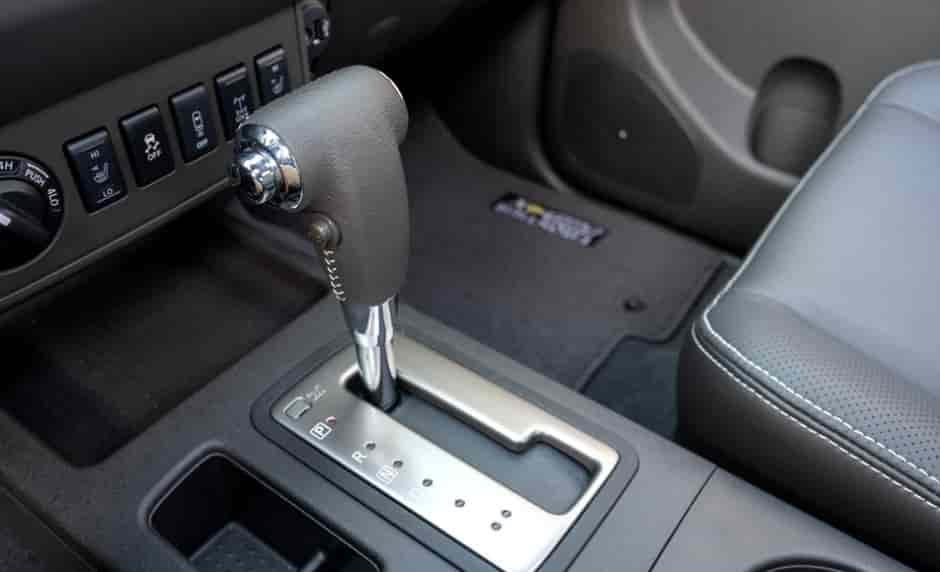
Finding the O/D button on your Nissan is the first step to using overdrive correctly. The button is usually located on or near the gear shift, but its exact position can vary depending on your model. For example, in Nissan Altima and Sentra models, the O/D button is often on the side of the gear lever. In Rogue and X-Trail models, it may appear as a small button on the dashboard or the center console. Knowing the location helps you quickly engage or disengage O/D when driving conditions change.
Most Nissan vehicles also have an indicator light on the dashboard that turns on when O/D is active. This visual confirmation ensures that you know whether the feature is on or off. When you start driving, check the dashboard light to verify the O/D status. It is important to become familiar with this button to prevent mistakes, such as leaving O/D off during long highway drives or keeping it on when towing heavy loads. Learning how to locate and monitor the O/D button allows you to take full advantage of your Nissan’s transmission features. Mastering this simple step ensures smoother driving, better fuel efficiency, and less wear on your engine. By understanding where the O/D button is and how it works, you gain greater control over your driving experience and vehicle performance.
Step-by-Step Guide to Turn O/D On/Off
Turning O/D on or off in your Nissan is a simple process once you know where the button is. Start by locating the O/D button on your gear shift or dashboard depending on your model. Before engaging O/D, ensure your vehicle is running at a stable speed, preferably on a highway or open road. Press the O/D button once to activate it. You will see the indicator light on your dashboard illuminate, confirming that O/D is now on. This helps your car maintain lower engine RPM, save fuel, and provide a smoother ride.
To turn O/D off, simply press the button again. The indicator light will turn off, signaling that the feature is disabled. Turning O/D off is useful in situations where you need more torque, such as climbing hills, towing, or driving in stop-and-go city traffic. Always monitor the dashboard light to make sure O/D is in the correct mode for your driving conditions. Practicing these steps will help you use O/D efficiently, protect your transmission, and improve overall vehicle performance. Learning how to turn O/D on Nissan and knowing when to turn it off ensures safer, more comfortable, and fuel-efficient driving for every trip.
Common Mistakes and Troubleshooting
Many Nissan drivers make simple mistakes when using O/D, which can affect fuel efficiency and vehicle performance. One common error is leaving O/D off during long highway drives. This can increase engine RPM, waste fuel, and cause unnecessary wear on the transmission. Another mistake is keeping O/D on while towing heavy loads or climbing steep hills, which can overwork the engine and reduce vehicle control. Being aware of these situations helps prevent damage and ensures optimal performance.
If you notice that your O/D indicator light does not turn on or off as expected, it may indicate a problem with the button or the transmission system. In such cases, consult your Nissan owner’s manual for guidance. Sometimes, cleaning the button or restarting the vehicle can fix minor issues. For persistent problems, visiting a certified Nissan service center is the safest option. Understanding common mistakes and knowing how to troubleshoot ensures that you use O/D correctly, protect your car, and enjoy smoother, safer drives. Learning how to turn O/D on Nissan properly prevents unnecessary maintenance costs and helps maintain your car’s fuel efficiency and reliability.
Benefits of Using O/D Correctly
Using O/D correctly on your Nissan provides several important benefits for both your car and your driving experience. One of the main advantages is fuel efficiency. When O/D is activated on highways, your engine runs at a lower RPM, which consumes less fuel and reduces the number of trips to the gas station. Another benefit is smoother driving. O/D allows your car to maintain a steady speed without straining the engine, giving you a more comfortable ride on long trips. Proper use of O/D also protects your transmission. By preventing unnecessary engine stress, you reduce wear and tear on transmission components, which can extend the lifespan of your vehicle and lower maintenance costs.
Drivers who understand how to turn O/D on Nissan can also improve overall performance. For example, engaging O/D at the right time ensures that your engine operates efficiently while minimizing vibrations and noise. Using O/D incorrectly, such as leaving it off on long highway drives, can increase fuel consumption and cause the engine to work harder than necessary. Mastering O/D is a simple step that delivers practical results. Learning when and how to use O/D not only saves money but also makes every drive more enjoyable. This feature is easy to use and offers immediate benefits, making it an essential skill for all Nissan drivers.
When Not to Use O/D
While O/D is very useful, there are situations when you should turn it off. Driving on steep hills or inclines is one example. O/D reduces engine RPM, which can limit the torque needed to climb safely. Using O/D in this case may overwork your engine and reduce vehicle control. Another situation is towing heavy loads. O/D is not designed for extra weight, so leaving it on can cause strain on your transmission and decrease performance. City driving with frequent stop-and-go traffic is another scenario where O/D may not help. It is more efficient to turn O/D off in these conditions to maintain proper power and responsiveness.
Always monitor the O/D indicator light on your dashboard. This ensures that the feature matches the driving conditions. Knowing when not to use O/D helps prevent unnecessary engine stress and reduces the risk of costly repairs. It also improves safety, as your vehicle will respond better in situations that require more torque. Learning how to turn O/D on Nissan and when to turn it off gives you complete control over your vehicle. Applying this knowledge consistently ensures smoother, safer, and more efficient driving under all conditions.
Tips for Maximizing Fuel Efficiency with O/D
Using O/D correctly can help you save fuel, but combining it with smart driving habits makes a bigger difference. On highways, keep a steady speed while O/D is active. Avoid sudden acceleration or hard braking, as these actions increase fuel consumption and reduce the benefit of overdrive. Maintaining a constant pace allows the engine to run efficiently at lower RPM, which saves gas and reduces wear on the transmission.
Another tip is to plan your routes. Using O/D on long, open roads is more efficient than in city traffic. For stop-and-go driving, turn O/D off to maintain proper torque and responsiveness. Check your dashboard indicator regularly to ensure O/D is in the correct mode. Lightening your load can also improve fuel efficiency. Remove unnecessary items from the vehicle, as extra weight requires more engine power, which diminishes the benefits of O/D. Learning how to turn O/D on Nissan and combining it with these fuel-saving techniques can significantly lower fuel costs, extend engine life, and make your rides smoother. Applying these tips consistently helps you get the most out of your vehicle’s transmission and enjoy a more efficient driving experience.
Conclusion: How to Turn O/D on Nissan for Better Driving
Knowing how to turn O/D on Nissan can make a noticeable difference in your driving experience. By using O/D correctly, you can reduce engine strain, save fuel, and enjoy smoother rides on highways. Understanding when to activate or deactivate O/D is essential, especially during city traffic, steep climbs, or towing. Paying attention to the O/D button and dashboard indicator ensures that your vehicle operates efficiently and safely.
By following the step-by-step guide and avoiding common mistakes, you can protect your transmission, lower maintenance costs, and maximize fuel efficiency. Every Nissan driver can benefit from mastering this simple feature, as it directly improves performance and comfort. Taking a few moments to learn how to turn O/D on Nissan allows you to take full control of your vehicle and enjoy every trip with confidence. Try using O/D on your next drive and notice the smoother, more efficient performance. Sharing this knowledge with other Nissan drivers can also help them improve their driving experience.