
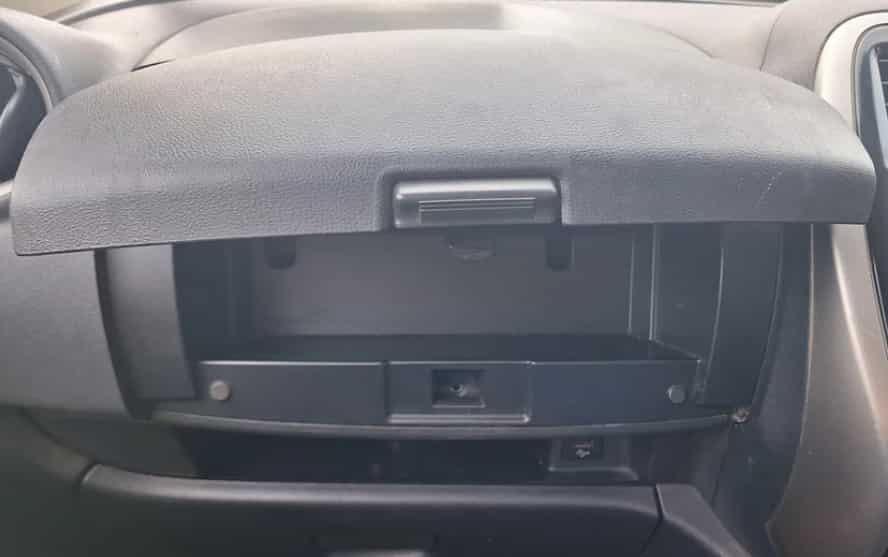
Have you ever needed to access the area behind your Nissan Note glove box but did not know where to start? Many owners face this problem when they need to replace the cabin air filter, repair the glove box latch, or check dashboard components.
Removing a Nissan Note glove box may seem difficult at first. Some drivers worry about breaking clips or damaging interior panels. Others think they need professional tools or mechanic experience. However, the process becomes much easier when you follow the correct steps.
This guide shows you how to remove Nissan Note glove box safely and efficiently. You will learn which tools you need, how to remove each part, and how to avoid common mistakes during the process.
A careful approach can help you protect the dashboard area and prevent unnecessary repair costs. Whether you perform regular maintenance or fix a specific problem, understanding the removal process gives you more control over your vehicle.
Before you begin, take time to prepare your workspace and identify the glove box mounting points. A few simple precautions can make the entire process smoother.
By following this step by step guide, you can remove your Nissan Note glove box with confidence and complete the task correctly.
Why You May Need To Remove A Nissan Note Glove Box
The Nissan Note glove box is more than a simple storage area. It also provides access to important components behind the dashboard. Many Nissan Note owners need to remove the glove box when they perform maintenance or repair tasks.
One of the most common reasons is cabin air filter replacement. The cabin filter helps clean the air that enters the vehicle through the air conditioning system. Over time, dust, pollen, and other particles can build up on the filter. A dirty filter can reduce airflow and affect air quality inside the cabin.
Another reason to remove the Nissan Note glove box is to repair problems with the glove compartment itself. Some owners experience issues such as a loose handle, damaged latch, broken hinge, or difficulty opening and closing the compartment. Removing the glove box allows better access to inspect and fix these problems.
The glove box removal process can also help when you need to access dashboard wiring or nearby components. This may include checking electrical connections, installing accessories, or diagnosing interior issues.
Understanding why you need to remove the glove box helps you prepare for the task. It also allows you to use the correct tools and follow the right procedure. A careful removal process protects the interior and helps you complete your Nissan Note maintenance work successfully.
Tools Required Before Removing Nissan Note Glove Box
Before you remove the Nissan Note glove box, prepare the right tools for the job. Having everything ready will make the process faster and reduce the risk of damaging interior parts.
You do not need expensive equipment for this task. Most Nissan Note glove box removal jobs require only a few basic tools that many car owners already have at home.
Phillips Screwdriver
A Phillips screwdriver is one of the most important tools for removing screws that hold the glove box assembly in place. Choose a screwdriver that fits the screws properly. A poor fit can damage the screw head and make removal more difficult.
Flat Head Screwdriver
A flat head screwdriver can help release small clips or covers. However, use it carefully because metal tools can scratch plastic surfaces. Apply gentle pressure and avoid forcing the tool into tight areas.
Plastic Trim Removal Tools
Plastic trim removal tools are highly recommended for Nissan Note interior work. They help you remove clips and panels without leaving marks or scratches. These tools are safer than using metal objects on dashboard components.
Flashlight
Good visibility makes the removal process easier. Some screws and clips may sit in dark areas behind the glove box. A flashlight helps you identify each connection before you remove it.
Protective Gloves
Wearing gloves protects your hands from sharp edges and helps you maintain a better grip. They also prevent dirt and grease from transferring onto the interior surfaces.
Preparing these tools before starting saves time and keeps the removal process organized. When you use the correct equipment, you can remove the Nissan Note glove box more safely and avoid unnecessary damage.
How To Remove Nissan Note Glove Box Step by Step
Removing a Nissan Note glove box requires patience and careful handling. The process does not require advanced mechanical skills, but you should follow each step correctly to avoid damaging clips, screws, or dashboard parts.
Step 1: Prepare Your Nissan Note Before Removal
Start by parking your Nissan Note on a flat surface. Turn off the engine and remove the key from the ignition. This creates a safe working environment and prevents accidental electrical issues.
Remove all items from the glove box before starting. Books, documents, and other objects can make the compartment heavier and harder to handle.
If you plan to access electrical components behind the glove box, consider disconnecting the vehicle battery. This extra step helps protect sensitive electrical systems.
Before removing any parts, inspect the glove box area carefully. Look for visible screws, clips, and connection points. Understanding the layout helps you avoid using unnecessary force.
Step 2: Open The Glove Box And Remove Contents
Open the Nissan Note glove box completely. Check the inside edges and side areas for mounting points that connect the compartment to the dashboard.
Remove any remaining items and clean the area if needed. A clear workspace allows you to see the screws and clips more easily.
Take a photo of the original position before removing anything. This reference can help you during reinstallation.
Step 3: Release The Glove Box Stopper Mechanism
The glove box uses stopper mechanisms to control how far it opens. You need to release these parts carefully before removing the complete assembly.
Apply gentle pressure when releasing the side supports. Avoid pulling too hard because older plastic components may become brittle over time.
Use a plastic trim tool if the clips feel difficult to remove. This reduces the chance of scratches or broken parts.
Step 4: Remove Screws And Mounting Clips
Locate all screws that secure the glove box assembly. Remove each screw carefully and place them in a safe location.
Keep the screws organized because different fasteners may have different sizes. Mixing them together can make reinstallation more difficult.
After removing the screws, check for remaining clips or hidden attachments. The glove box should move freely once all mounting points are released.
Step 5: Detach The Nissan Note Glove Box Assembly
Hold the glove box with both hands and slowly lower the assembly. Check for any remaining connections before pulling it away from the dashboard.
If you feel resistance, stop and inspect the area again. A hidden clip or attachment may still be connected.
Once all connections are released, remove the Nissan Note glove box completely. Place it in a safe area to prevent scratches or damage.
Following these steps allows you to remove the Nissan Note glove box safely. Taking your time is the best way to protect the interior and avoid unnecessary repair costs.
Common Problems When Removing Nissan Note Glove Box
Removing a Nissan Note glove box is usually a simple DIY task, but some problems can appear during the process. Knowing these common issues helps you avoid damage and complete the job safely.
One common problem is broken plastic clips. These clips hold the glove box and interior panels in place. Older vehicles may have weaker plastic parts, which can break if you apply too much force. Always use gentle pressure and consider using plastic trim removal tools to protect the clips.
Another issue is a glove box that will not come out. This often happens when a hidden screw, clip, or stopper remains attached. Do not pull the glove box aggressively because you may damage the dashboard or surrounding components. Check all connection points carefully before trying again.
Some owners also experience problems when reinstalling the glove box. Incorrect alignment can cause the compartment to open unevenly or create unwanted noise. Make sure the hinges, screws, and clips return to their original positions.
Damaged screws can create additional difficulties during removal. Use the correct screwdriver size and avoid forcing tight screws. Careful handling prevents unnecessary repairs and keeps the Nissan Note interior in good condition.
By understanding these common problems, you can remove and reinstall your Nissan Note glove box with greater confidence. A slow and careful approach always produces better results.
Nissan Note Glove Box Removal For Cabin Air Filter Replacement
One of the main reasons people search for Nissan Note glove box removal is to replace the cabin air filter. This filter plays an important role in maintaining clean air inside the vehicle.
The cabin air filter removes dust, pollen, and other small particles before air enters the passenger area. Over time, the filter becomes dirty and can reduce the performance of the air conditioning system.
A blocked or dirty filter may cause weak airflow, unpleasant smells, or poor air quality inside the Nissan Note. Replacing the filter regularly helps the ventilation system work more effectively.
In many Nissan Note models, removing the glove box provides easier access to the cabin filter area. The glove compartment blocks the access point, so careful removal is necessary before replacing the filter.
During this process, avoid damaging the glove box clips or surrounding dashboard panels. These parts are designed to fit together precisely, and rough handling can create unwanted noise after reinstallation.
Before installing a new cabin air filter, check the filter direction and clean any dust around the filter housing. This helps maintain better airflow and improves the overall condition of the air conditioning system.
Learning how to remove Nissan Note glove box correctly allows you to complete cabin air filter replacement as a DIY maintenance task. It can save time, reduce service costs, and help you understand your vehicle better.
Tips For Safely Removing Nissan Note Interior Components
Removing interior components from a Nissan Note requires patience and careful handling. Small mistakes can damage plastic panels, clips, or connecting parts. Following a few simple tips can make the process safer and easier.
Always use the correct tools for interior work. Plastic trim removal tools help protect dashboard surfaces and reduce the risk of scratches. Avoid using sharp metal objects because they can leave marks on the interior.
Take your time when removing clips and panels. Many Nissan Note interior parts use small plastic fasteners that need gentle pressure. Pulling too hard can break the clips and create additional repair costs.
Keep all screws and small parts organized during the removal process. Place them in a container or label them based on their location. This makes reinstallation faster and prevents missing important components.
Taking photos before removing parts can also help. Pictures provide a useful reference when you need to reconnect components or return panels to their original position.
Work in a suitable environment whenever possible. Cold temperatures can make plastic parts more fragile, while poor lighting can make it harder to identify clips and screws.
Finally, test all functions after reinstalling the parts. Check that the glove box opens correctly, panels fit securely, and no unusual sounds appear.
These simple practices help protect your Nissan Note interior and make DIY maintenance more successful. Careful preparation is the key to completing interior repairs without unnecessary problems.
Frequently Asked Questions About Nissan Note Glove Box Removal
How long does it take to remove a Nissan Note glove box?
Removing a Nissan Note glove box usually takes around 20 to 30 minutes for most DIY users. The exact time depends on your experience and the condition of the clips and screws. Taking extra time to inspect each connection can help prevent damage.
Do I need special tools to remove the Nissan Note glove box?
You do not need professional equipment for this task. A Phillips screwdriver, plastic trim removal tools, and a flashlight are usually enough. Using the correct tools makes the process safer and reduces the chance of damaging interior parts.
Can I remove the Nissan Note glove box myself?
Yes, many owners can complete Nissan Note glove box removal at home. The process does not require advanced mechanical skills. However, you should follow each step carefully and avoid forcing any parts.
Why is my Nissan Note glove box stuck?
A stuck glove box usually means a screw, clip, or stopper is still connected. Check all mounting points before applying more pressure. Forcing the compartment can damage the dashboard or plastic components.
Will removing the glove box damage the dashboard?
Removing the glove box will not damage the dashboard when you use the correct method. The key is to remove clips and screws carefully. Avoid using excessive force and always check for hidden connections.
Should I disconnect the battery before removing the glove box?
Disconnecting the battery is not always necessary for basic glove box removal. However, it is recommended if you plan to access electrical components behind the glove box. This extra step helps protect the vehicle’s electrical system.
Understanding these common questions makes the removal process easier. With proper preparation and careful handling, Nissan Note owners can complete this maintenance task safely.
Conclusion
Learning how to remove Nissan Note glove box does not have to be a difficult task. With the right tools, proper preparation, and careful steps, most owners can complete the process safely at home.
The key to successful Nissan Note glove box removal is patience. Taking time to identify screws, clips, and mounting points helps prevent damage to the interior. Using suitable tools also protects the plastic components and keeps the dashboard area in good condition.
Whether you need to replace the cabin air filter, repair the glove compartment, or access components behind the dashboard, understanding the correct removal method gives you more confidence. A careful DIY approach can also help reduce maintenance costs and save time.
Always remember to inspect each connection before removing parts and check everything after reinstallation. A properly fitted glove box should open smoothly without noise or movement.
Have you removed a Nissan Note glove box before? Share your experience, the model year of your vehicle, or any problems you encountered during the process. Your tips may help other Nissan Note owners complete their maintenance work more easily.