
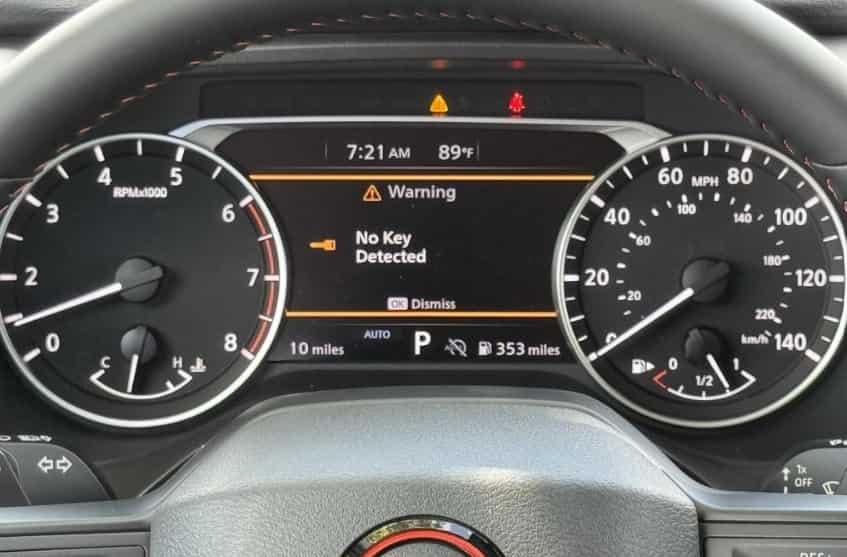
Seeing the Nissan Rogue No Key Detected warning can quickly turn an ordinary drive into a frustrating experience. You press the brake pedal, push the ignition button, and expect the engine to start. Instead, the dashboard displays a message that suggests your vehicle cannot find the key, even though it is sitting in your pocket, your purse, or the center console. This situation often leaves drivers wondering whether the key fob has failed, the vehicle battery is dying, or an expensive repair is just around the corner.
The good news is that this warning does not always indicate a serious problem. In many cases, the cause is surprisingly simple. A weak key fob battery, radio frequency interference, an incorrectly installed replacement battery, or even the position of the key inside the cabin can prevent the Intelligent Key system from recognizing the signal. More complex electrical issues are possible, but they are far less common than many drivers assume.
Understanding how the Nissan Intelligent Key system communicates with your Rogue is the first step toward solving the problem. Once you know what interrupts that communication, it becomes much easier to identify the real cause instead of replacing parts that are still working perfectly. Following a logical troubleshooting process can also save time, reduce repair costs, and help you avoid being stranded when you need your vehicle the most.
What Does “No Key Detected” Mean on a Nissan Rogue?
The Nissan Rogue No Key Detected warning appears when your vehicle cannot recognize a valid Intelligent Key. The key may still be inside the cabin. However, the system cannot verify it, so the engine will not start.
Every time you press the Start button, the Intelligent Key communicates with several vehicle components. The antennas receive the signal, and the Body Control Module verifies the key. The engine starts only after the system completes this process successfully.
Several issues can interrupt this communication. A weak key fob battery often causes the problem. Signal interference can also block communication. In some cases, a weak 12 volt battery or an electrical fault prevents the system from recognizing the key.
Many drivers think the key fob has failed because the engine will not start. However, that is not always true. In many cases, the key works correctly. Another component prevents the vehicle from completing the authentication process.
You may still unlock the doors even when the engine refuses to start. The door locking system does not always require the same level of communication as the starting system. Because of this difference, the vehicle may unlock normally while the engine remains disabled.
You may also see messages such as Key System Error, Intelligent Key Warning, Key ID Incorrect, or Place Key Near Start Switch. Although the wording changes, these messages point to the same problem. The vehicle cannot verify the Intelligent Key during startup.
How to Start a Nissan Rogue When It Says No Key Detected
Do not panic if your Nissan Rogue displays the No Key Detected warning. Nissan built an emergency recognition feature into the Intelligent Key system. This feature allows the vehicle to read the key even when the battery becomes weak.
First, shift the transmission into Park. Next, press and hold the brake pedal. Place the Intelligent Key directly against the Push Button Ignition switch. Then press the Start button while keeping the key in place.
Wait a few seconds for the system to verify the key. If a weak key fob battery caused the problem, the engine should start normally. Replace the battery as soon as possible to prevent the warning from returning.
If the engine does not start, try your spare Intelligent Key. A working spare usually confirms that the original key needs attention. If neither key works, inspect the vehicle instead of replacing another key fob.
Finally, move mobile phones, wireless chargers, and other electronic devices away from the key. These devices sometimes interfere with the signal. Also check the dashboard lights. Dim lights often indicate a weak 12 volt battery that can affect the Intelligent Key system.
10 Common Causes of Nissan Rogue No Key Detected
The Key Is Too Far from the Detection Area
The Intelligent Key must stay within the vehicle’s detection range before the engine can start. If the key sits in the cargo area, a packed backpack, or a deep pocket, the antennas may not receive a strong signal. As a result, the system displays the Nissan Rogue No Key Detected warning.
This problem often appears when drivers place the key in a large bag or leave it near the rear of the vehicle. The warning may disappear after moving the key closer to the front seats. This behavior usually points to a positioning issue instead of a faulty key.
Move the key into the front cabin and hold it in your hand. Then press the brake pedal and start the engine again. If the vehicle starts normally, no additional repair is necessary.
To avoid this issue, keep the Intelligent Key in an easy to reach location. Avoid placing it under heavy objects or inside containers that may weaken the signal.
Signal Interference Blocks Communication
The Intelligent Key uses radio signals to communicate with your Nissan Rogue. Strong electronic devices can interrupt those signals and prevent the system from recognizing the key.
Mobile phones, wireless chargers, laptop computers, and some security systems may create interference. The problem usually disappears after moving away from the source. Because of this, many drivers notice that the warning appears only in specific parking lots or buildings.
Move electronic devices away from the key fob before trying to start the vehicle again. If possible, move the vehicle to another location and repeat the test. A successful start confirms that interference caused the warning.
Keep the key away from devices that constantly transmit wireless signals. This simple habit reduces the chance of communication problems.
The Key Fob Battery Is Weak
A weak battery is one of the most common reasons for the Nissan Rogue No Key Detected warning. As battery power drops, the key transmits a weaker signal. Eventually, the vehicle cannot recognize it during startup.
You may notice several early signs before the warning appears. The remote buttons may respond slowly, and the locking distance may become shorter. In cold weather, these symptoms often become more noticeable because low temperatures reduce battery performance.
Replace the key fob battery with the correct battery type for your specific key. After installing the new battery, test the lock, unlock, and engine start functions. If everything works normally, the battery was the source of the problem.
Replacing the battery before it becomes completely discharged helps prevent unexpected starting issues. It also protects you from getting stranded when the warning appears without notice.
The New Key Fob Battery Was Installed Incorrectly
Installing a new battery does not always solve the problem. If the battery sits in the wrong position or does not touch the terminals correctly, the key fob cannot send a stable signal. The vehicle may continue to display the Nissan Rogue No Key Detected warning even though the battery is brand new.
This issue often appears immediately after a battery replacement. The lock and unlock buttons may stop working, or they may respond only once in a while. Many drivers assume the new battery is defective, but the real problem is usually an installation mistake.
Open the key fob carefully and inspect the battery. Make sure it matches the original battery type and faces the correct direction. Check that the metal contacts hold the battery firmly. Then close the key fob completely before testing it again.
Take your time when replacing the battery. Even a small alignment error can interrupt communication between the key and the vehicle.
The Key Fob Has Physical Damage
The Intelligent Key contains a small circuit board, a battery, and several electronic components. A hard impact or water exposure can damage these parts and prevent the key from working correctly.
You may notice the warning after dropping the key on a hard surface or after exposing it to moisture. Sometimes the lock button still works while the engine refuses to start. In other cases, none of the buttons respond at all.
Inspect the key fob for cracks, loose buttons, or signs of water damage. Test the spare key if you have one. If the spare key starts the vehicle without any problems, the original key likely requires repair or replacement.
Avoid carrying the key without protection. A simple protective case can reduce damage from daily use and accidental drops.
The Vehicle Battery Is Weak
The Intelligent Key system depends on the vehicle’s electrical system. If the 12 volt battery cannot provide stable power, the vehicle may fail to recognize the key even when the key fob works normally.
A weak battery usually causes more than one symptom. You may notice dim dashboard lights, slow engine cranking, weak interior lighting, or other electrical problems. These signs often appear before the Nissan Rogue No Key Detected warning becomes frequent.
Check the battery voltage if you have access to a battery tester. Also inspect the battery terminals for corrosion or loose connections. Cleaning the terminals and tightening the connections may restore normal operation. If the battery no longer holds a charge, replace it according to the manufacturer’s recommendations.
Most vehicle batteries last between three and five years under normal driving conditions. Testing the battery during routine maintenance helps prevent unexpected starting problems and protects the Intelligent Key system from low voltage issues.
The Intelligent Key Needs Reprogramming
The Intelligent Key and the vehicle must recognize each other before the engine can start. If that connection is lost, the system cannot verify the key. As a result, your Nissan Rogue may display the No Key Detected warning every time you press the Start button.
This issue is less common than a weak battery, but it can happen after replacing a key fob, repairing electrical components, or programming a new key. In some cases, only one key stops working while the spare key continues to operate normally.
Try the spare Intelligent Key first. If the spare starts the vehicle without any issues, the original key may have lost its programming. A qualified automotive locksmith or Nissan dealer can test the key and restore the correct programming if necessary.
Remember that replacing the key fob battery does not erase the key’s programming. If the warning appears immediately after a battery replacement, inspect the battery installation before assuming the key needs reprogramming.
A Faulty Antenna Cannot Detect the Key
Your Nissan Rogue uses several antennas to detect the Intelligent Key inside the cabin. These antennas receive the signal from the key and send the information to the vehicle’s control system. If one of them stops working, the system may fail to recognize the key.
A faulty antenna often causes inconsistent symptoms. The vehicle may detect the key in one location but not another. Sometimes the engine starts only after several attempts. In other situations, both registered keys produce the same warning.
Because the antennas are part of the vehicle’s electrical system, they require proper diagnostic equipment for testing. Replacing the key fob will not solve the problem if the antenna has failed. A technician should inspect the antenna circuits and verify that they receive and transmit signals correctly.
Early diagnosis can prevent unnecessary expenses. Many drivers replace batteries and key fobs before discovering that the real problem is inside the vehicle.
The Push Button Ignition System Has an Electrical Fault
The Push Button Ignition system works together with the Intelligent Key to authorize engine startup. If the ignition switch or its electrical circuit develops a fault, the vehicle may fail to complete the authentication process.
You may notice additional symptoms besides the Nissan Rogue No Key Detected warning. The Start button may respond slowly, the dashboard may display multiple warning messages, or the engine may not react when you press the button.
Inspect the vehicle for other electrical problems before replacing any parts. If both key fobs produce the same warning and the emergency starting procedure does not work, the ignition system should be tested. A professional technician can scan the vehicle for diagnostic trouble codes and identify the failed component.
Repairing the correct component saves both time and money. Replacing the key fob will not solve an ignition system fault.
The Body Control Module Has a System Failure
The Body Control Module manages communication between many electronic systems, including the Intelligent Key system. If this module cannot process or verify the key signal, the vehicle may display the Nissan Rogue No Key Detected warning and refuse to start.
Although this is the least common cause, it is also one of the most serious. The warning often appears together with other electrical issues. Power door locks, interior lighting, or security functions may also behave unexpectedly. In some cases, the dashboard displays additional messages such as Key System Error.
A complete diagnostic scan is the most effective way to confirm this problem. The technician can inspect the module, check related wiring, and identify communication faults between electronic control units. Replacing the Body Control Module should always be the final step because many other issues can produce similar symptoms.
Fortunately, most drivers never experience this type of failure. In the majority of cases, a weak key fob battery, poor signal reception, or a low vehicle battery causes the warning instead. Following the troubleshooting steps in this guide allows you to eliminate the simple causes before considering more complex repairs.
Quick Diagnostic Checklist
If your Nissan Rogue displays the No Key Detected warning, avoid replacing parts right away. A systematic inspection can help you identify the real cause in just a few minutes. Most cases involve simple issues that you can resolve without professional tools.
Begin by checking the location of the Intelligent Key. Make sure it is inside the front cabin and not hidden inside a backpack, metal container, or the cargo area. Move the key closer to the Push Button Ignition switch and try starting the engine again. If the warning disappears, poor signal reception was likely the cause.
Next, inspect the key fob itself. Press the lock and unlock buttons to confirm that they respond normally. If the remote works only at a short distance or responds inconsistently, replace the key fob battery before investigating more complex problems. If you have a spare key, test it as well. A working spare usually indicates that the original key fob requires repair or reprogramming.
Continue by checking the vehicle’s electrical system. Turn on the headlights and observe the dashboard lights. If they appear dim or flicker, the 12 volt battery may not provide enough power for the Intelligent Key system. Inspect the battery terminals for corrosion or loose connections, as poor electrical contact can also trigger the warning.
Finally, remove possible sources of signal interference. Keep mobile phones, wireless chargers, laptops, and other electronic devices away from the key fob while testing the vehicle. If the warning remains after completing each step, the problem may involve the Intelligent Key antenna, the Push Button Ignition system, or the Body Control Module. At this stage, a professional diagnostic inspection is the safest and most accurate way to identify the faulty component.
When Should You Contact a Nissan Dealer or an Automotive Locksmith?
Most Nissan Rogue No Key Detected problems have simple solutions. Replacing a weak key fob battery or moving the key away from electronic devices often restores normal operation. However, some situations require professional diagnosis because the fault involves the vehicle instead of the key.
Contact a qualified automotive locksmith if only one key fob stops working. A locksmith can test the key, verify its programming, and create a replacement if necessary. This option is often faster and less expensive than replacing the entire system.
A Nissan dealer is usually the better choice when both registered keys fail at the same time. The same recommendation applies if your vehicle displays Key System Error or other electrical warning messages. These symptoms often point to a problem with the Intelligent Key system, the Push Button Ignition system, or the Body Control Module.
You should also seek professional help if the emergency starting procedure does not work. This result suggests that the issue goes beyond a weak key fob battery. A trained technician can scan the vehicle, read diagnostic trouble codes, and test each related component before replacing any parts.
Professional diagnosis also makes sense after accident damage, flood exposure, or major electrical repairs. Wiring damage and poor connections can interrupt communication between the key and the vehicle. These faults are difficult to identify without specialized equipment.
Avoid replacing expensive components before confirming the actual cause. A complete diagnostic inspection often reveals a simple problem that costs much less to repair. An accurate diagnosis also prevents unnecessary repairs and helps restore your Nissan Rogue safely and efficiently.
How to Prevent the Nissan Rogue No Key Detected Warning
Preventing the Nissan Rogue No Key Detected warning is much easier than dealing with it after your vehicle refuses to start. A few simple maintenance habits can improve the reliability of the Intelligent Key system and reduce the risk of unexpected problems.
Replace the key fob battery before it becomes completely discharged. Most key fob batteries last several years, but their performance gradually declines over time. If you notice a shorter remote operating range or delayed button response, install a new battery instead of waiting for the warning to appear.
Protect the Intelligent Key from physical damage. Avoid dropping it on hard surfaces or exposing it to water and extreme temperatures. Even minor damage inside the key fob can weaken the signal and affect communication with the vehicle.
Keep the key away from strong electronic devices whenever possible. Mobile phones, wireless chargers, portable routers, and other wireless equipment can interfere with the signal under certain conditions. Storing the key separately helps maintain a stable connection with the vehicle.
Regularly inspect the condition of your vehicle’s 12 volt battery. A weak battery affects more than engine starting. It also reduces the performance of electronic systems, including the Intelligent Key system. Testing the battery during routine maintenance can help you detect problems before they become serious.
Always keep a spare registered Intelligent Key in a safe place. If the primary key stops working, the spare key can help you determine whether the problem comes from the key fob or the vehicle. This simple test can save valuable time during troubleshooting.
Finally, pay attention to early warning signs instead of ignoring them. If the Nissan Rogue No Key Detected message appears only once or twice, investigate the cause as soon as possible. Fixing a small problem early often prevents a complete starting failure and reduces future repair costs.
Frequently Asked Questions
Why does my Nissan Rogue say No Key Detected when the key is inside?
The warning usually appears because the vehicle cannot communicate with the Intelligent Key. A weak key fob battery, signal interference, poor key placement, or a low 12 volt battery can all interrupt communication even when the key is inside the cabin.
Can I start my Nissan Rogue with a dead key fob battery?
Yes. Nissan includes an emergency starting feature for this situation. Hold the Intelligent Key against the Push Button Ignition switch while pressing the brake pedal and the Start button. If the key is still programmed correctly, the engine should start.
Does replacing the key fob battery erase the key programming?
No. Replacing the battery does not erase the programming stored inside the Intelligent Key. If the warning appears after installing a new battery, check the battery orientation and confirm that the key fob is fully assembled.
Why does my Nissan Rogue detect the key only when I hold it near the Start button?
This symptom often indicates a weak key fob battery. The emergency recognition feature can detect the key at a very short distance even when the wireless signal is too weak for normal operation.
Can a weak vehicle battery trigger the No Key Detected warning?
Yes. The Intelligent Key system relies on stable electrical power. A weak 12 volt battery can interrupt communication between the key and the vehicle, especially during engine startup.
Why do both key fobs stop working at the same time?
If both registered keys fail, the problem usually involves the vehicle instead of the keys. Common causes include a weak vehicle battery, a faulty Intelligent Key antenna, or an electrical fault in the starting system.
Do I need to reprogram my Intelligent Key after replacing the battery?
In most cases, no. The key should continue to work after a battery replacement. Reprogramming is necessary only if the key loses communication with the vehicle or if a technician confirms a programming issue.
How much does it cost to fix the No Key Detected warning?
The cost depends on the root cause. Replacing a key fob battery is inexpensive, while programming a new key, replacing the vehicle battery, or repairing electrical components costs more. A proper diagnosis helps you avoid unnecessary repairs.
Should I call a locksmith or visit a Nissan dealer?
Choose an automotive locksmith if you need a replacement key or key programming. Visit a Nissan dealer if both keys fail, the vehicle displays multiple electrical warnings, or the problem involves the Intelligent Key system or control modules.
Can I continue driving after the warning disappears?
Yes, but you should not ignore the warning. Even if the vehicle starts normally, an intermittent communication problem may become worse over time. Identifying the cause early can help prevent a complete starting failure.
Conclusion
The Nissan Rogue No Key Detected warning does not always indicate a major mechanical failure. In many cases, the solution is straightforward. A weak key fob battery, poor key placement, signal interference, or a low 12 volt battery often causes the warning and can usually be resolved without replacing expensive components.
The best approach is to follow a logical troubleshooting process. Start by checking the location of the Intelligent Key, then inspect the key fob battery and test the spare key if one is available. Next, examine the condition of the vehicle battery and remove nearby electronic devices that could interfere with the signal. These simple checks solve many problems before professional repairs become necessary.
If the warning remains after completing these steps, schedule a professional inspection. A qualified technician can test the Intelligent Key system, scan for diagnostic trouble codes, and identify faults in the antennas, Push Button Ignition system, or Body Control Module. Accurate diagnosis saves time, reduces repair costs, and prevents unnecessary part replacements.
Have you experienced the Nissan Rogue No Key Detected warning on your vehicle? Share your Nissan Rogue model year, the symptoms you noticed, and the solution that fixed the problem. Your experience may help other owners diagnose the same issue more quickly.