
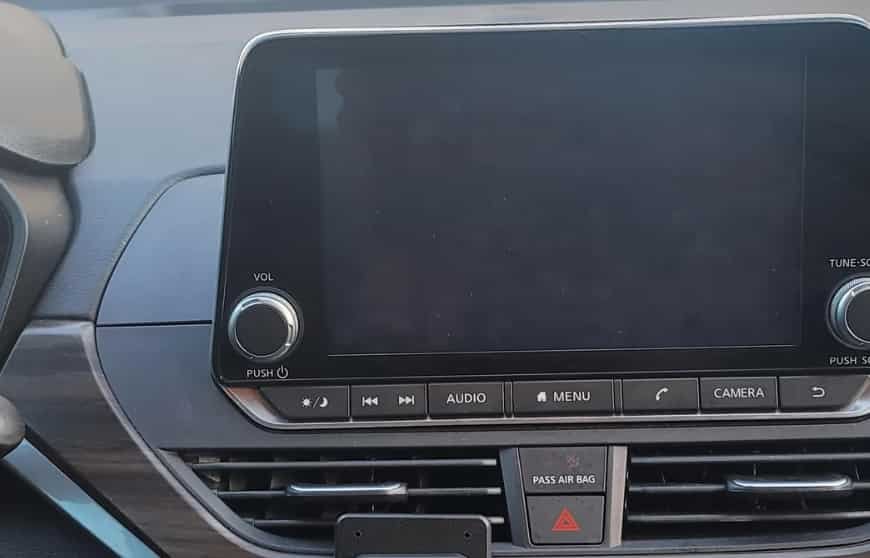
A Nissan Altima screen black issue can be frustrating. It often appears without warning and limits access to important vehicle features. Many owners first notice the problem when the infotainment display stays completely dark after starting the engine. In some cases, the radio continues to play even though the touchscreen no longer responds.
A black display can affect much more than entertainment. Drivers may lose access to navigation, Bluetooth, Apple CarPlay, Android Auto, and the backup camera. These features make everyday driving safer and more convenient. When the screen stops working, even simple tasks become more difficult.
Fortunately, a black screen does not always mean the infotainment system has failed. Several electronic components work together to power the display. A software glitch can interrupt the startup process. Low battery voltage may also prevent the system from loading correctly. In other situations, the problem may come from a blown fuse, loose wiring, or a faulty display module.
The symptoms often provide valuable clues. For example, a Nissan Altima screen black issue after a battery replacement may have a different cause than a display that suddenly turns off while driving. Likewise, a screen that remains black while the radio still works usually points to a display related problem instead of a complete power failure. Identifying these patterns makes troubleshooting much easier.
This guide explains the most common causes of a Nissan Altima screen black issue. It also covers simple inspections, safe reset methods, and practical repair options. You will learn how to identify electrical problems, inspect important components, and decide when professional service is necessary. By following the correct troubleshooting steps, you can often restore the display while avoiding unnecessary repair costs.
Why Is the Nissan Altima Screen Black?
A Nissan Altima screen black issue can have several causes. Some problems are simple and easy to fix. Others require professional diagnosis or replacement parts. Understanding the possible causes helps you avoid unnecessary repairs and saves valuable time.
The infotainment system depends on several components working together. The display, head unit, battery, wiring, software, and electrical circuits all play an important role. If one component stops working, the screen may remain black even though the vehicle continues to operate normally.
The symptoms can also point toward a specific problem. For example, a screen that stays black while the radio still works usually indicates a display related issue. A completely unresponsive system may suggest a power supply problem instead. Paying attention to these details makes troubleshooting more accurate.
Below are the most common reasons why a Nissan Altima screen becomes black.
Temporary Infotainment Software Glitch
Software errors are one of the most common causes of a black infotainment screen. Modern Nissan Altima models rely on complex software to control the display and multimedia functions. If the system freezes during startup, the screen may never load properly.
Drivers often notice this problem after starting the engine or connecting a mobile phone. The Nissan logo may appear briefly before disappearing. In some cases, the screen remains black while music continues to play through the speakers. The touchscreen may also stop responding to any input.
A temporary software glitch usually does not indicate permanent damage. Restarting the infotainment system often restores normal operation. If the problem returns frequently, the system may require a software update or further diagnosis.
Weak or Disconnected Battery
The infotainment system requires stable battery voltage to start correctly. If the battery is weak, recently replaced, or temporarily disconnected, the display may fail to initialize. This situation is common after jump starting the vehicle or installing a new battery.
Low voltage can interrupt communication between electronic control modules. As a result, the screen may stay black even though the engine starts normally. Other electronic features may also behave unexpectedly during this time.
Checking the battery condition should always be one of the first diagnostic steps. Loose battery terminals, corrosion, or an aging battery can all contribute to intermittent display problems.
Blown Infotainment Fuse
A damaged fuse can interrupt power to the infotainment system. When this happens, the display may remain completely black or fail to turn on after starting the vehicle. In some cases, other electronic accessories may also stop working.
Every Nissan Altima model uses several fuses to protect different electrical circuits. Depending on the model year, separate fuses may supply power to the display, audio system, navigation unit, or accessory electronics.
Replacing a blown fuse is usually inexpensive. However, a fuse that fails repeatedly often indicates a deeper electrical problem. In that situation, further inspection is necessary before installing another replacement.
Loose or Damaged Wiring Connection
A loose wiring connection can also cause a Nissan Altima screen black issue. The infotainment system depends on several wiring harnesses to deliver power and data. If one connector becomes loose, the display may lose communication with the head unit.
This problem sometimes appears after dashboard repairs or aftermarket stereo installations. Vibration from daily driving may also loosen electrical connectors over time. Moisture and corrosion can make the situation even worse.
Common signs include a screen that works intermittently or turns on after hitting a bump. Some drivers also notice flickering before the display goes completely black. If these symptoms appear, the wiring should be inspected carefully before replacing expensive components.
Failed Display or Head Unit
A failed display or head unit is one of the more serious causes of a black screen. Although it is less common than software or battery problems, it becomes more likely as the vehicle ages. Internal electronic components wear out after years of daily use.
The display panel may stop producing an image even though the system continues running in the background. In other cases, the head unit may fail completely and prevent the screen from starting. Physical damage, overheating, and water intrusion can all shorten the lifespan of these components.
Professional testing is usually required to confirm a hardware failure. Replacing the wrong component can increase repair costs without solving the problem. For this reason, proper diagnosis is always recommended before purchasing replacement parts.
Outdated or Corrupted Software
Software plays an important role in every modern infotainment system. If the operating software becomes outdated or corrupted, the display may freeze during startup or remain black. The problem may appear randomly or become more frequent over time.
Many drivers notice additional symptoms before the screen fails completely. The system may restart without warning, respond slowly, or disconnect from Apple CarPlay and Android Auto. Bluetooth pairing problems may also occur because the software is no longer functioning correctly.
Installing the latest software version can resolve many of these issues. If the update does not restore normal operation, the infotainment system may require professional reprogramming.
Extreme Temperature
Extreme weather can temporarily affect the infotainment display. Very high temperatures may cause electronic components to overheat, while freezing conditions can slow the startup process. These situations usually improve after the cabin reaches a normal operating temperature.
Drivers often notice the problem after the vehicle has been parked outside for several hours. The screen may stay black for a short time before returning to normal. In most cases, this behavior does not indicate permanent damage.
However, repeated temperature related failures should not be ignored. Frequent overheating or moisture exposure can eventually damage the display or internal electronics. Addressing the problem early can help prevent more expensive repairs later.
Quick Checks Before Resetting the Screen
Before resetting the infotainment system, take a few minutes to perform several basic inspections. These simple checks often identify the real cause of a Nissan Altima screen black issue. They also reduce the risk of resetting the system when another component is responsible. In many cases, drivers restore the display without replacing any parts.
Start by checking whether the radio still works. If you can hear music or switch between stations, the head unit is likely receiving power. This usually means the problem is limited to the display, its internal connection, or the infotainment software. If both the screen and the radio remain off, the issue is more likely related to the battery, fuse, or power supply.
Next, restart the vehicle completely. Turn the engine off and wait for the electronic modules to shut down before starting the car again. A full restart allows the infotainment system to complete a fresh boot sequence. Temporary software glitches often disappear after this simple step.
You should also inspect the screen brightness settings. In some situations, the display appears black because the brightness level has been reduced accidentally. Increasing the brightness takes only a few seconds and may solve the problem immediately.
Finally, disconnect all external devices before testing the system again. Remove USB cables, smartphones, wireless adapters, and any aftermarket accessories connected to the infotainment unit. A faulty device can interrupt the startup process or cause the software to freeze. After removing these accessories, restart the vehicle and check whether the display returns to normal. If the screen works correctly, reconnect each device one at a time to identify the source of the problem.
How to Reset a Nissan Altima Black Screen
Resetting the infotainment system is often the fastest way to resolve a Nissan Altima screen black issue. A reset can clear temporary software errors, restore communication between electronic modules, and restart the display without replacing any parts. However, it is important to follow the correct procedure. Resetting the system should only be attempted after completing the basic inspections described above.
Begin with a soft reset because it is the safest option. Turn the ignition on and press the audio power or volume button for several seconds until the infotainment system restarts. The exact button and reset process may vary depending on the model year and infotainment system installed in your Nissan Altima. After the display reboots, check whether the touchscreen responds normally and all functions operate as expected.
If the screen remains black, perform a complete power cycle. Turn off the engine and remove the key if your vehicle uses a traditional ignition. Leave the vehicle and close the driver’s door. Wait several minutes so the electronic control modules can shut down completely. Restart the engine and allow the infotainment system to load without connecting any external devices.
If these methods do not solve the problem, disconnecting the negative battery terminal may reset the infotainment system. This procedure can erase saved settings, radio presets, and the clock. Always consult the owner’s manual before disconnecting the battery, especially if your vehicle has additional security features.
A reset can resolve many software related problems, but it cannot repair damaged hardware. If the display remains black after several reset attempts, the issue may involve the fuse, wiring, display panel, or the infotainment head unit. At that point, a detailed electrical diagnosis becomes the next logical step.
Nissan Altima Screen Black but Radio Still Works
Many Nissan Altima owners report that the radio continues to play even though the screen remains completely black. This symptom often causes confusion because the infotainment system appears to be working only partially. In most cases, it also provides an important clue about the source of the problem. Since the audio system still functions, the head unit is usually receiving power and processing commands.
A black display with a working radio often points to a problem with the screen itself rather than the entire infotainment system. The display panel may have failed, the internal video signal may have been interrupted, or the software may have frozen during startup. A loose connector behind the dashboard can also prevent the screen from displaying an image while allowing other functions to operate normally.
Begin by performing a soft reset of the infotainment system. If the display does not return, increase the screen brightness to rule out an incorrect setting. Next, shift the vehicle into reverse to check whether the backup camera appears. If the camera image is also missing, the issue may involve the display module or an internal hardware failure. If the camera works but the main screen remains black, the problem is more likely related to the infotainment software or display interface.
If the screen continues to stay black after these checks, inspect the related fuses and verify that the battery voltage is stable. Repeated failures usually require a professional inspection because specialized equipment may be needed to test the display, wiring, and head unit. Identifying the exact cause before replacing any components can prevent unnecessary expenses and ensure that the correct repair is performed the first time.
Nissan Altima Screen Black After Battery Replacement
A Nissan Altima screen black issue may appear shortly after replacing the battery. Although this situation can be alarming, it does not always indicate a failed infotainment system. In many cases, the problem occurs because the electronic modules need time to complete their startup sequence. A temporary loss of power can also interrupt communication between the display and the head unit.
The first step is to inspect the battery installation. Make sure both battery terminals are clean, secure, and free from corrosion. Even a slightly loose connection can cause unstable voltage and prevent electronic components from operating correctly. If the battery was replaced with the wrong size or an incorrect specification, the infotainment system may also behave unexpectedly.
After confirming the battery connections, restart the vehicle and allow the system to boot normally. Avoid connecting mobile phones or USB devices during the first startup. If the screen remains black, perform a soft reset of the infotainment system. A complete power cycle may also help restore communication between the electronic control modules.
If the problem continues, inspect the infotainment and accessory fuses. A voltage surge during battery replacement can occasionally damage a fuse or interrupt power to the display. It is also a good idea to check whether other electronic features, such as the backup camera, Bluetooth, or steering wheel controls, are working correctly. These details can help identify whether the issue affects only the display or the entire infotainment system.
When the screen does not recover after these steps, a software update or professional diagnostic inspection may be required. A qualified technician can verify system voltage, scan for diagnostic trouble codes, and determine whether the problem is related to the display, wiring, or the infotainment control unit.
Nissan Altima Screen Black After a Jump Start
A Nissan Altima screen black issue may also occur after a jump start. While a jump start restores power to the vehicle, it can sometimes affect sensitive electronic systems. The infotainment unit depends on stable voltage during startup. If the voltage fluctuates, the display may fail to initialize correctly.
This problem is more common when the battery is weak or close to the end of its service life. An unstable power supply can interrupt communication between the infotainment system and other control modules. As a result, the screen may remain black even though the engine starts and the vehicle drives normally.
Begin by checking the battery condition. A battery that cannot maintain the correct voltage may continue to cause electronic problems after the jump start. Next, inspect the battery terminals to ensure they are tight and free from corrosion. Loose connections can reduce voltage and affect the performance of several electrical components.
If the battery appears to be in good condition, perform a soft reset of the infotainment system. Then restart the vehicle without connecting any external devices. If the display still does not turn on, inspect the infotainment and accessory fuses for signs of damage. A blown fuse can interrupt power to the display even when other systems continue to operate.
Persistent problems may indicate a deeper electrical issue. The alternator, battery management system, or infotainment control module could require additional testing. A professional diagnostic scan can identify stored fault codes and verify whether every module is communicating correctly. This step helps confirm the root cause before any expensive parts are replaced.
How to Check the Nissan Altima Infotainment Fuse
A blown fuse is one of the most common electrical causes of a Nissan Altima screen black issue. The fuse protects the infotainment system from electrical overload. When it fails, the display may lose power and remain completely black. Fortunately, checking a fuse is simple and only takes a few minutes.
Before inspecting the fuse, turn off the engine and remove the key if your vehicle uses a traditional ignition. Allow the electrical system to power down completely before opening the fuse box. This step helps protect sensitive electronic components during the inspection.
The exact fuse location depends on the model year and trim level. Some Nissan Altima models place infotainment related fuses inside the passenger compartment, while others include additional fuses in the engine bay. Always refer to the owner’s manual or the fuse box diagram to identify the correct fuse for the display, audio system, or navigation unit.
Remove the suspected fuse with a fuse puller or a pair of plastic fuse pliers. Hold the fuse up to the light and inspect the metal strip inside. If the strip is broken or burned, replace the fuse with a new one that has the same amperage rating. Never install a higher rated fuse because it can damage the electrical system and create a serious safety risk.
After replacing the fuse, restart the vehicle and check whether the display operates normally. If the new fuse blows again, do not continue replacing it. Repeated fuse failure usually indicates an underlying electrical fault, such as damaged wiring or a defective component. In this situation, a professional inspection is the safest and most effective solution.
Software Update and Infotainment Reprogramming
Software problems can cause the infotainment screen to remain black even when the hardware is working properly. Modern Nissan Altima models rely on software to control the display, touchscreen, navigation, Bluetooth, and smartphone integration. If the software becomes outdated or corrupted, the system may fail to start correctly.
Several warning signs may appear before the screen goes completely black. The infotainment system may restart without warning, respond slowly, or freeze on the Nissan logo. Some drivers also experience frequent Bluetooth disconnections or problems with Apple CarPlay and Android Auto. These symptoms often indicate that the software is no longer operating as expected.
Start by checking whether a software update is available for your vehicle. Updated software can improve system stability, fix known bugs, and resolve compatibility issues with newer mobile devices. If an update is available, follow the recommended installation procedure to reduce the risk of data corruption. Do not interrupt the update process because an incomplete installation can create additional problems.
If the latest software does not restore the display, the infotainment system may require professional reprogramming. This process uses specialized diagnostic equipment to reinstall or restore the factory software. Reprogramming can correct communication errors between electronic control modules and recover functions that a standard reset cannot repair.
A software update is often the least expensive solution for a Nissan Altima screen black issue. However, if the display remains blank after updating and reprogramming, the problem is more likely related to the wiring, display panel, or infotainment head unit. A complete diagnostic inspection is the best way to identify the failed component and avoid replacing parts that are still functioning correctly.
DIY Fixes for a Nissan Altima Screen Black Issue
A Nissan Altima screen black issue does not always require professional repair. In many cases, you can restore the display by following a few simple troubleshooting steps. Starting with basic checks can save both time and money while helping you identify the source of the problem.
Begin with a soft reset of the infotainment system. Press and hold the audio power or volume button until the system restarts. Once the display reloads, check whether the touchscreen responds normally. If the screen remains black, turn off the engine and perform a complete power cycle before testing the system again.
Next, inspect the battery and its connections. Loose or corroded battery terminals can reduce voltage and prevent the infotainment system from starting correctly. You should also check the infotainment fuse for signs of damage. If the fuse is blown, replace it with one that has the same amperage rating.
Another simple step is to disconnect all external devices. Remove USB cables, smartphones, wireless adapters, and other accessories before restarting the vehicle. A faulty device can interfere with the startup process and cause the display to freeze.
Finally, check for available software updates if the screen turns on occasionally. Installing the latest software may improve system stability and resolve known bugs. If the display stays black after completing these steps, the problem is likely related to the wiring, display panel, or infotainment head unit. At that point, a professional inspection is the safest and most effective solution.
When the Screen Needs Professional Repair
Some Nissan Altima screen black problems cannot be resolved with a reset or basic troubleshooting. If the display remains blank after checking the battery, fuses, and software, the issue may involve a failed display, damaged wiring, or a faulty infotainment head unit. In these situations, professional diagnosis is usually the best option.
Certain warning signs should never be ignored. A burning smell, excessive heat from the dashboard, or repeated fuse failures may indicate an electrical fault. Flickering images, colored lines, or a screen that turns black repeatedly can also point to internal hardware damage. These problems often require specialized tools to identify the exact cause.
Professional service is also recommended when several electronic features stop working together. For example, the backup camera, steering wheel controls, or Bluetooth may fail along with the display. This type of symptom often indicates a communication problem between electronic control modules rather than a simple screen failure.
A qualified technician can perform a complete diagnostic scan, inspect the electrical system, and confirm whether the display, wiring, or infotainment unit needs repair. Accurate testing helps avoid unnecessary part replacement and ensures the correct repair is completed the first time.
Nissan Altima Screen Repair Cost
The cost to repair a Nissan Altima screen black issue depends on the actual cause of the failure. Simple repairs are usually inexpensive, while hardware replacement can cost significantly more. Labor rates, model year, and the type of infotainment system also affect the final price.
A software reset or system update is often the most affordable solution. Replacing a blown fuse or cleaning battery terminals also costs very little. If the problem is caused by damaged wiring, the repair cost increases because technicians must inspect and repair the electrical circuit.
Replacing the display panel is more expensive than fixing software or electrical issues. If the infotainment head unit has failed, replacing the entire unit can become the most costly repair. Additional programming may also be required to ensure the new unit communicates correctly with the vehicle.
Before approving any repair, ask the technician to perform a complete diagnostic inspection. Identifying the exact cause first can prevent unnecessary part replacement and reduce overall repair costs.
| Repair Type | Typical Cost |
|---|---|
| Software reset or update | $50 to $150 |
| Fuse replacement | $10 to $50 |
| Battery service | $20 to $100 |
| Wiring repair | $100 to $300 |
| Display replacement | $300 to $800 |
| Infotainment head unit replacement | $800 to $2,000+ |
Actual repair costs vary by vehicle model year, trim level, labor rates, and your location. Requesting a detailed estimate before authorizing repairs is the best way to avoid unexpected expenses.
Should You Repair or Replace the Infotainment Unit?
Choosing between repair and replacement depends on the cause of the problem. Minor issues, such as software errors, blown fuses, or loose wiring, can usually be repaired at a reasonable cost. These repairs are often completed quickly and restore normal system operation without replacing the entire unit.
A replacement becomes a better option when the display or infotainment head unit has suffered permanent damage. Cracked screens, failed circuit boards, or repeated hardware failures may make repairs less practical. Although a new unit costs more, it often provides better long term reliability.
Some owners consider installing a used factory unit to reduce repair costs. While this option can save money, compatibility should be confirmed before purchase. Certain units may require programming to work correctly with your Nissan Altima. A used system may also have a limited warranty or unknown service history.
An aftermarket infotainment system is another alternative. Many aftermarket units include larger touchscreens, wireless Apple CarPlay, Android Auto, and additional multimedia features. However, installation may require extra adapters to maintain factory functions such as steering wheel controls or the backup camera.
Comparing repair costs with replacement costs is the best way to make an informed decision. A professional diagnosis can identify the failed component and help you choose the most cost effective solution for your vehicle.
How to Prevent a Nissan Altima Screen Black Issue
Preventive maintenance is the best way to reduce the risk of a Nissan Altima screen black issue. While some hardware failures cannot be avoided, many common problems are linked to battery condition, software, or electrical components. Regular inspections can help keep the infotainment system operating reliably.
Keep the battery in good condition and replace it when it no longer holds a stable charge. Low voltage is a common cause of infotainment problems and can affect other electronic systems as well. Clean battery terminals regularly to prevent corrosion and ensure a secure connection.
Install software updates whenever they become available for your vehicle. Updated software often improves system stability and fixes known issues that may cause the display to freeze or remain black. Following the recommended update procedure also helps prevent software corruption.
Use high quality USB cables and compatible mobile devices when connecting to the infotainment system. Faulty accessories or damaged cables can create communication problems and affect system performance. Removing unnecessary devices when they are not in use can also improve reliability.
Finally, protect the dashboard from excessive heat and moisture whenever possible. Parking in shaded areas or using a windshield sunshade can reduce heat exposure during the summer. If the screen begins to freeze, flicker, or restart unexpectedly, inspect the system early. Addressing minor problems before they become more serious can help extend the life of the infotainment system and reduce future repair costs.
Conclusion
A Nissan Altima screen black issue can result from several different causes, including software glitches, low battery voltage, blown fuses, damaged wiring, or a failed infotainment display. While the problem may seem serious at first, many cases can be resolved with simple troubleshooting before expensive repairs become necessary.
Start by checking the battery, restarting the infotainment system, inspecting the fuse, and disconnecting external devices. If the screen remains black after these steps, a software update or professional diagnostic inspection may be required. Identifying the exact cause before replacing parts can save both time and money.
When basic troubleshooting does not restore the display, professional testing is the safest approach. A qualified technician can determine whether the issue involves the display panel, wiring, or the infotainment head unit. Accurate diagnosis also helps prevent unnecessary repairs and ensures the correct solution is applied.
If you have experienced a Nissan Altima screen black issue, share your model year, symptoms, and repair experience in the comments. Your feedback may help other Nissan Altima owners identify the problem more quickly and find the most effective solution.