
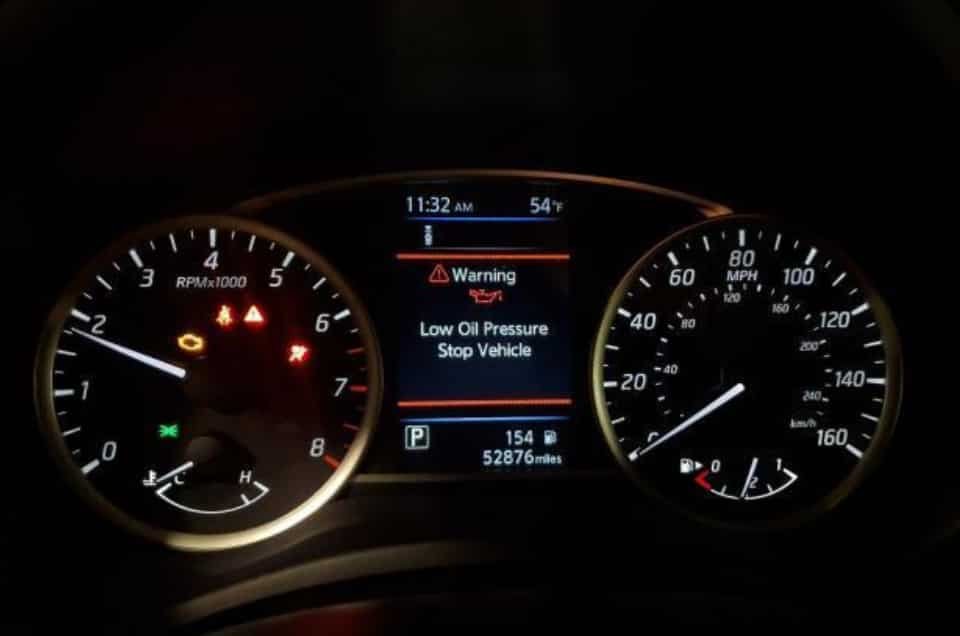
The Nissan Sentra lets you reset the oil change light through the maintenance menu after you change the engine oil and oil filter. Most models do not require a scan tool. Instead, you can complete the reset with the dashboard controls or the steering wheel buttons. The exact steps depend on the model year and the instrument cluster.
The oil change light is a maintenance reminder. It does not indicate an engine fault. Nissan uses this reminder to track the oil service interval. After you finish the oil change, you should reset the reminder so the system can start a new maintenance cycle. If you reset the light before servicing the engine, the maintenance record will no longer reflect the actual condition of the oil.
This guide explains how to reset the oil change light on different Nissan Sentra models. You will learn the correct steps for newer and older dashboards. You will also discover how to verify the reset and fix common reset problems. Finally, the guide explains the difference between the oil change reminder, the oil pressure warning light, and the check engine light.
How Do You Reset the Oil Change Light on a Nissan Sentra?
You can reset the oil change light on a Nissan Sentra through the maintenance menu after completing an oil and filter change. Most recent models include this function in the Vehicle Information Display. Older models may use different dashboard controls, but the goal remains the same. The reset starts a new maintenance interval and removes the service reminder from the instrument cluster.
First, park the vehicle on a level surface and switch the engine off. Turn the ignition to the ON position without starting the engine. If your Sentra has a push button start, press the start button once or twice without pressing the brake pedal. Wait until the instrument cluster finishes loading before opening the settings menu.
Next, use the steering wheel controls or dashboard buttons to open the Maintenance menu. Select Oil and Filter or the equivalent maintenance option shown on your display. Choose Reset, then confirm your selection when the confirmation message appears. After that, switch the ignition off and restart the vehicle. The oil change reminder should disappear, and the maintenance interval should begin a new cycle.
Although the overall process is similar across many Nissan Sentra models, the menu layout can vary by model year and trim level. Some vehicles display a Maintenance menu, while others use a Settings menu with different labels. For that reason, always follow the procedure that matches your instrument cluster. Using the correct menu helps prevent an incomplete reset and saves time during routine maintenance.
What Should You Check Before Resetting the Nissan Sentra Oil Change Light?
You should complete the oil service before resetting the maintenance reminder. The reset only updates the maintenance counter. It does not improve engine oil quality or repair mechanical problems. Performing the reset after proper service keeps the maintenance history accurate and helps you track the next scheduled oil change.
Start by confirming that you replaced both the engine oil and the oil filter. Then check that the correct oil specification and quantity match Nissan’s recommendation for your model year. Allow the engine to sit for a few minutes before checking the dipstick. This step gives the oil enough time to return to the oil pan and provides a more accurate reading.
After checking the oil level, inspect the drain plug and oil filter for leaks. Even a small leak can lower the oil level over time and increase engine wear. If you notice fresh oil around the filter housing or drain plug, correct the problem before resetting the reminder. A quick inspection takes only a few minutes and helps prevent expensive repairs later.
Finally, confirm that the engine runs smoothly and that no warning lights remain on the dashboard. The oil change reminder should be the only indicator you plan to clear. If the red oil pressure warning light or the check engine light stays illuminated, diagnose the cause before performing any maintenance reset. Resetting the reminder will not solve those problems or make the warning disappear.
How Do You Reset the Oil Change Light on a 2020 or Newer Nissan Sentra?
Resetting the oil change light on a 2020 or newer Nissan Sentra takes only a few minutes when you follow the correct menu path. Nissan places the maintenance settings inside the Vehicle Information Display, which you can control with the buttons on the steering wheel. After changing the engine oil and oil filter, you should reset the maintenance reminder so the system can begin tracking the next service interval.
Start by parking the vehicle and turning the engine off. Press the start button without pressing the brake pedal to switch the ignition to the ON position. Wait until the instrument cluster finishes loading. Then use the left or right arrow buttons on the steering wheel to open the Settings menu. Scroll down until you find Maintenance, then select Oil and Filter or the equivalent maintenance option displayed on your vehicle.
Select Reset and confirm the action when the confirmation message appears. The display will immediately restart the oil maintenance interval. Turn the ignition off after the reset finishes, then start the engine normally. Check the instrument cluster to confirm that the oil change reminder no longer appears. If the message remains on the screen, repeat the procedure and make sure you confirmed the reset before leaving the menu.
Some trims use different menu names, but the reset process follows the same logic. Nissan may update icons or screen layouts between model years without changing the basic procedure. Always compare the dashboard menus with your owner’s manual if the display looks different from the instructions. Using the correct menu for your vehicle helps ensure the reset completes successfully on the first attempt.
How Do You Reset the Oil Change Light on a 2013–2019 Nissan Sentra?
Resetting the oil change light on a 2013–2019 Nissan Sentra follows a similar process, although the dashboard controls may differ from newer models. Some vehicles use steering wheel buttons, while others rely on instrument cluster controls or a trip reset button. Identifying your dashboard layout before starting the procedure makes the reset much easier.
Turn the ignition to the ON position without starting the engine. Allow the dashboard to finish its startup sequence before pressing any buttons. Open the maintenance or settings screen if your vehicle includes a digital display. Locate the oil maintenance reminder, then choose the reset option or press and hold the appropriate reset button until the interval returns to its default value.
Once the reset finishes, switch the ignition off and wait a few seconds. Restart the vehicle and check the instrument cluster again. The oil change reminder should no longer appear during startup. If the reminder remains active, repeat the procedure carefully and verify that you selected the correct maintenance item instead of another service interval.
Keep in mind that Nissan changed the instrument cluster several times during this generation. Two vehicles from different model years may not display the same menus even though they share the same body style. If your dashboard does not match these instructions, consult the owner’s manual for your exact model year. Following the correct procedure prevents unnecessary troubleshooting and ensures the maintenance reminder resets correctly.
How Do You Reset the Nissan Sentra Oil Light With Push Button Start?
Resetting the oil change light on a Nissan Sentra with a push button start system requires the ignition to remain on while the engine stays off. This ignition mode allows you to access the Vehicle Information Display without starting the engine. Following the correct sequence prevents interruptions during the reset process and helps the system save the new maintenance interval.
Begin by parking the vehicle and applying the parking brake. Keep your foot away from the brake pedal before pressing the start button. Press the button once or twice until the instrument cluster lights up completely. Wait a few seconds for the display to finish loading, then use the steering wheel controls to open the Settings menu. Continue to the Maintenance section and select Oil and Filter or the equivalent option shown on the screen.
Choose Reset, then confirm the action when the confirmation message appears. After the display finishes updating, turn the ignition off and wait a few seconds. Start the engine normally and check the instrument cluster. The oil change reminder should no longer appear, and the maintenance interval should display the new service cycle.
Many drivers accidentally press the brake pedal while turning the ignition on. This action starts the engine instead of activating the accessory mode. Although the engine may continue to run normally, the maintenance menu may not work as expected. Keeping the engine off throughout the procedure makes the reset faster and reduces the chance of repeating the process.
Why Is the Nissan Sentra Oil Change Light Still On After a Reset?
The Nissan Sentra oil change light usually stays on because the reset procedure did not finish correctly or the vehicle is displaying a different warning. In most cases, the problem comes from selecting the wrong menu, skipping the confirmation step, or using instructions for another model year. Identifying the exact cause allows you to complete the reset without replacing any parts.
First, reopen the Maintenance menu and check the current oil service interval. If the previous mileage or reminder still appears, the system did not save the reset. Repeat the procedure carefully and confirm the reset before leaving the menu. Restart the vehicle and verify the display again after the instrument cluster finishes loading.
Another common cause involves selecting the wrong maintenance item. Some Nissan Sentra models store separate reminders for oil service, tire rotation, and other scheduled maintenance. Resetting one interval does not affect the others. Make sure you choose Oil and Filter or the equivalent oil maintenance option before confirming the reset.
You should also identify the warning symbol that remains on the dashboard. The oil change reminder differs from the red oil pressure warning light and the check engine light. A maintenance reminder indicates that scheduled service is due. In contrast, the red oil pressure warning light may signal a lubrication problem that requires immediate attention. The check engine light points to an engine or emissions fault and often requires diagnostic testing. If either warning remains on after completing the reset, inspect the vehicle before driving any farther.
What Is the Difference Between the Oil Change Reminder and the Oil Pressure Warning Light?
The oil change reminder and the oil pressure warning light serve two completely different purposes. The oil change reminder tells you that the scheduled maintenance interval has been reached. The oil pressure warning light alerts you to a possible lubrication problem that can damage the engine. Understanding this difference helps you respond correctly and avoid unnecessary repairs.
The oil change reminder appears after the vehicle reaches a preset mileage or service interval. It reminds you to replace the engine oil and oil filter before resetting the maintenance counter. Once you complete the service, you can clear the reminder through the maintenance menu. This process simply starts a new service interval and does not affect the engine or its performance.
The red oil pressure warning light requires immediate attention because it indicates that the engine may not receive enough oil pressure. Low oil pressure can result from insufficient engine oil, a failing oil pump, a clogged oil filter, or an internal engine problem. Continuing to drive under these conditions can cause severe engine damage within a short period. If the red warning light stays on while the engine is running, stop the vehicle as soon as it is safe and inspect the cause before driving again.
The check engine light represents another type of warning. Unlike the oil change reminder, it points to an engine or emissions system fault stored by the vehicle’s computer. Resetting the oil maintenance interval will not clear this warning. If the check engine light remains illuminated, diagnose the fault with the proper equipment before replacing parts or resetting any maintenance items.
When Should You Reset the Oil Change Light on a Nissan Sentra?
You should reset the oil change light immediately after replacing the engine oil and oil filter. Following this order keeps the maintenance history accurate and allows the system to calculate the next service interval correctly. Resetting the reminder too early can create confusion and increase the risk of missing future maintenance.
After completing the oil change, start the engine and let it idle for a short time. Check around the drain plug and oil filter for signs of leakage. Turn the engine off and allow the oil to settle before checking the oil level again. Once the oil reaches the correct level and no leaks are present, complete the reset through the maintenance menu.
Many drivers reset the reminder simply to remove the dashboard message. Although this action clears the notification, it does not improve the condition of the engine oil. Old or contaminated oil continues to circulate through the engine and loses its ability to lubricate and protect internal components. Performing the oil change before resetting the reminder ensures the maintenance record reflects the actual service history.
Keeping a record of each oil change also makes future maintenance easier. Record the service date, mileage, oil specification, and filter replacement after every oil change. These details help you monitor maintenance intervals, support resale value, and simplify future servicing. A complete maintenance history also helps technicians diagnose engine problems more efficiently.
Conclusion
Resetting the oil change light on a Nissan Sentra is a straightforward task when you follow the correct procedure for your model year. Most vehicles allow you to complete the reset through the Vehicle Information Display after replacing the engine oil and oil filter. Taking a few extra minutes to verify the reset ensures that the next maintenance interval begins at the correct mileage.
Although the procedure is simple, it is important to understand what the maintenance reminder actually does. The oil change light tracks scheduled service, while the red oil pressure warning light signals a potential lubrication problem that requires immediate inspection. Knowing the difference helps you respond appropriately and protects the engine from unnecessary damage.
Regular oil changes remain one of the most effective ways to extend engine life and maintain reliable performance. Always use the oil specification recommended for your Nissan Sentra, replace the oil filter during every service, and reset the maintenance reminder only after completing the work. Following this routine keeps the maintenance schedule accurate and helps your vehicle perform at its best for years to come.