
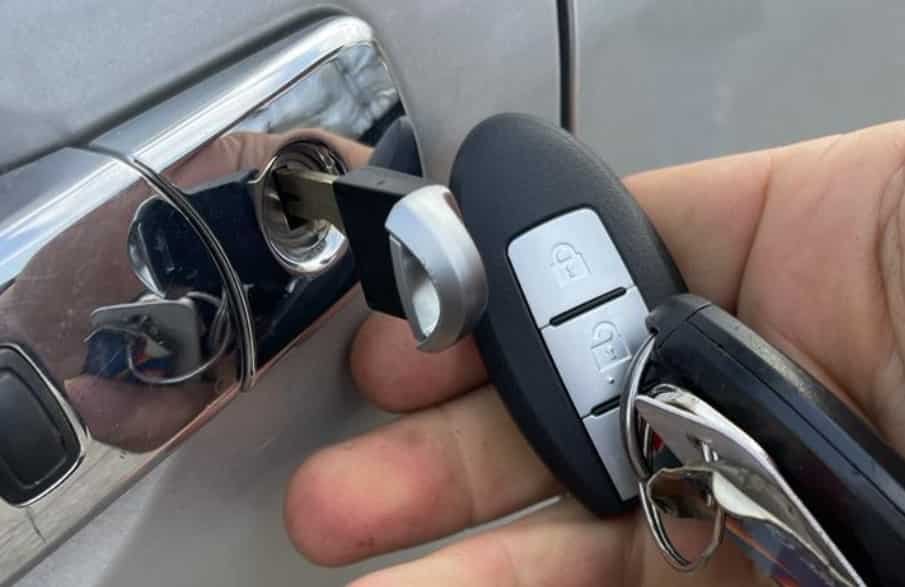
Getting locked out of your Nissan Navara because the battery is flat can be stressful. It often happens when you least expect it. Many drivers think the key fob is the only way to unlock the vehicle. However, every Nissan Navara includes an emergency method that lets you open the door even when the vehicle battery has no power.
If you are looking for how to unlock Nissan Navara when battery is flat, you are in the right place. In most cases, you do not need special tools or expensive roadside assistance. You only need to use the hidden mechanical key and follow the correct steps. This method helps you unlock the vehicle safely without damaging the lock or the door.
This guide explains the entire process from start to finish. You will learn how to locate the emergency key, unlock the driver’s door manually, and restore power to the vehicle. You will also discover why the doors may stay locked, how to deal with a stuck lock cylinder, and what to do after you regain access. By the end of this guide, you will know exactly how to handle a flat battery situation with confidence and avoid the same problem in the future.
How To Unlock Nissan Navara When Battery Is Flat
You can unlock a Nissan Navara with a flat battery by using the hidden mechanical key inside the key fob. Remove the emergency key, insert it into the driver’s door lock, and turn it to unlock the door manually. Once you open the door, check the battery condition and recharge or jump start the vehicle if necessary.
This method works because the mechanical door lock operates independently from the electronic central locking system. Even if the vehicle battery has completely lost power, the manual lock still allows you to access the cabin. However, some Nissan Navara models hide the key cylinder behind a small plastic cover. You may need to remove this cover before inserting the mechanical key.
Step 1: Remove the Hidden Mechanical Key
Take your Nissan Intelligent Key or standard key fob and look for the small release button. Press the button firmly while pulling the emergency key from the remote. The mechanical key slides out easily and does not require any tools.
Keep the key in a safe place while you complete the remaining steps. Avoid forcing it out because excessive pressure may damage the key fob housing.
Step 2: Locate the Driver’s Door Lock
Walk to the driver’s door and inspect the exterior handle carefully. Some Nissan Navara models expose the key cylinder, while others protect it with a plastic cover. If you cannot see the lock immediately, check the rear section of the door handle.
Remove the cover gently if your vehicle has one. Use the tip of the mechanical key to release the cover without scratching the paint.
Step 3: Unlock the Door Manually
Insert the mechanical key fully into the lock cylinder. Turn the key slowly until you feel the lock release. Then pull the door handle and open the door.
Do not force the key if it feels tight. Instead, remove it and insert it again to make sure it sits correctly inside the lock. A smooth and controlled movement reduces the risk of damaging the lock cylinder.
Step 4: Check the Vehicle Battery
After you enter the vehicle, confirm that the battery is flat. If the dashboard does not light up or the electrical systems do not respond, the battery has likely lost power.
Open the bonnet and inspect the battery terminals for corrosion or loose connections. If everything looks normal, connect a battery charger or use jumper cables to restore power. Once the battery has enough charge, the central locking system and other electrical functions should operate normally again.
Why Your Nissan Navara Will Not Unlock When the Battery Is Flat
A flat battery is one of the most common reasons a Nissan Navara refuses to unlock with the key fob. The remote relies on electrical power to communicate with the vehicle. When the battery loses power, the central locking system cannot receive the signal. As a result, pressing the unlock button does not open the doors.
In some situations, the problem is not the vehicle battery. The key fob battery may have reached the end of its life. A weak key fob battery often reduces the operating range before it stops working completely. If the remote only works at a very short distance, replace the key fob battery as soon as possible.
A worn or damaged mechanical lock can also prevent the door from opening. Many drivers use the remote every day and rarely insert the emergency key into the door lock. Over time, dirt, moisture, or corrosion may build up inside the lock cylinder. This buildup can make the key difficult to turn even when you insert it correctly.
Cold weather may create another problem. Low temperatures can cause moisture inside the lock to freeze. When this happens, the key may enter the cylinder but refuse to turn. Allow the lock to warm naturally or use a lock deicer that is suitable for automotive locks. Never force the key because you could damage both the key and the lock.
Some owners also experience faults in the central locking system. A damaged fuse, faulty actuator, or electrical issue can stop the doors from responding even after the battery regains power. If the mechanical key unlocks the door but the central locking system still fails to operate, inspect the related electrical components before replacing any parts.
Understanding the real cause helps you choose the correct solution. Many drivers assume the vehicle battery is always responsible, but the issue may involve the key fob, the door lock, or another part of the locking system. A careful inspection saves time and reduces the risk of unnecessary repairs.
How to Find the Hidden Mechanical Key
Every Nissan Navara with a smart key includes a hidden mechanical key. Nissan designed this feature to help drivers access the vehicle when the battery is flat or the key fob stops working. Many owners never use the emergency key, so they may not know it is inside the remote.
Hold the key fob in your hand and look for the small release button on the back or the side. Press the button with your thumb and pull the mechanical key out of the key fob. The key should slide out smoothly without the need for extra force.
Take a moment to inspect the mechanical key before you use it. Make sure it is clean and free from damage. A bent or worn key may not turn the lock properly and could make the situation more difficult.
After removing the mechanical key, keep the key fob with you. You will need it later if your Nissan Navara uses a push button start system. Once the vehicle battery has enough power, the key fob will communicate with the vehicle again and restore normal operation.
If you cannot remove the emergency key, check the release button again. Press it fully while pulling the key in a straight line. Avoid twisting the key because this may damage the locking mechanism inside the key fob.
Some Nissan Navara models have a visible key cylinder on the driver’s door. Others hide it behind a small plastic cover to improve the appearance of the door handle. If you do not see the keyhole immediately, inspect the handle carefully before assuming your vehicle does not have one.
It is also a good idea to test the mechanical key before an emergency happens. Many drivers only discover a damaged key or a stiff lock when they are already locked out. A quick inspection during routine maintenance can help you avoid unnecessary stress and save valuable time when you need to access your vehicle quickly.
How to Unlock the Driver’s Door Manually
Once you have the mechanical key, you can unlock the driver’s door without using the electronic locking system. Follow each step carefully to avoid damaging the lock or the key.
Insert the Mechanical Key Correctly
Locate the key cylinder on the driver’s door. If a plastic cover hides the lock, remove it carefully before inserting the key.
Slide the mechanical key all the way into the cylinder. Make sure the key sits fully inside the lock. An incomplete insertion may prevent the lock from turning.
Turn the Key Gently
Turn the key in the direction that unlocks the door. Use steady pressure instead of forcing the key. You should feel the locking mechanism release after a smooth turn.
If the key does not move, stop immediately. Pull it out, inspect it for dirt or damage, and insert it again. Forcing the key may damage the lock cylinder or bend the key.
Open the Door
Pull the driver’s door handle after the lock releases. The door should open normally even if the vehicle battery has no power.
In some cases, the security alarm may sound when you open the door manually. This is normal because the vehicle cannot detect the electronic key through the central locking system. The alarm usually stops after you restore power or start the vehicle with the correct key.
Check the Interior
Sit inside the vehicle and check the instrument panel. If the dashboard remains dark, the battery has likely lost all electrical power. You should also test the interior lights and other electrical accessories to confirm the battery condition.
If the dashboard lights appear but the engine does not start, inspect the battery terminals and the key fob before assuming the battery has failed completely.
Restore Battery Power
Open the bonnet and examine the battery. Look for loose terminals, corrosion, or other visible damage. Tighten any loose connections before attempting to recharge the battery.
Use a battery charger if one is available. If you need to start the vehicle immediately, connect jumper cables to another vehicle or use a portable jump starter. Follow the manufacturer’s instructions to avoid damaging the electrical system.
After the battery regains enough power, test the central locking system. Press the unlock and lock buttons on the key fob to confirm that the system operates correctly. If everything works as expected, reinstall the mechanical key inside the key fob and store it for future emergencies.
What to Do If the Mechanical Key Does Not Turn
If the mechanical key does not turn, stay calm and avoid using excessive force. Forcing the key can damage the lock cylinder or even break the key inside the door. A careful inspection often reveals the cause and helps you solve the problem safely.
First, remove the key and check it for dirt, damage, or signs of wear. Wipe the blade with a clean cloth before inserting it again. Push the key fully into the lock cylinder and turn it gently. A key that is not fully inserted may fail to engage the locking mechanism.
Next, inspect the lock cylinder. Dirt, dust, and moisture can build up inside the lock over time. These contaminants may prevent the internal components from moving freely. Apply a small amount of automotive lock lubricant and insert the key several times to distribute the lubricant evenly. Avoid using excessive oil because it can attract more dirt.
Cold weather can also create problems. Water inside the lock may freeze and stop the key from turning. If you suspect ice is blocking the mechanism, use a lock deicer or wait until the lock warms naturally. Do not pour hot water onto the lock because the water can freeze again later.
You should also examine the mechanical key for bends or cracks. Even minor damage can prevent the key from operating correctly. If you have a spare key, compare both keys to identify any visible differences.
If the key still does not turn after these steps, the lock cylinder may have an internal fault. Contact a qualified locksmith or a Nissan service center for a professional inspection. This approach protects the locking system and helps prevent more expensive repairs.
How to Start a Nissan Navara After Unlocking It
After you unlock the driver’s door, the next step is to restore power to your Nissan Navara. A flat battery prevents the electrical system from operating normally, so you need to recharge the battery or jump start the vehicle before driving.
Begin by checking the instrument panel. If the dashboard remains dark and no warning lights appear, the battery has likely lost all power. Open the bonnet and inspect the battery terminals. Make sure the connections are clean and secure. Corrosion or loose terminals can interrupt the electrical supply and create the same symptoms as a flat battery.
If the battery appears to be in good condition, connect a battery charger and allow it to charge according to the manufacturer’s instructions. This is the safest option because it restores power gradually and helps protect the battery.
If you need to drive immediately, use jumper cables or a portable jump starter. Connect the positive terminal first, then attach the negative connection to the recommended grounding point. Once everything is connected correctly, start the donor vehicle or switch on the jump starter before attempting to start your Nissan Navara.
When the engine starts, let it idle for several minutes. This gives the charging system time to restore power to the battery. After that, disconnect the jumper cables in the correct order and confirm that the dashboard warning lights have turned off.
If the engine still does not start, the battery may no longer hold a charge. A faulty alternator, damaged battery, or electrical fault may also prevent the vehicle from starting. In this situation, a professional inspection is the safest solution.
After the engine is running, test the central locking system and the key fob. If both operate normally, return the mechanical key to the key fob and keep it ready for future emergencies.
Common Mistakes to Avoid
Many drivers make simple mistakes when trying to unlock a Nissan Navara with a flat battery. These actions may seem harmless at first, but they can damage the lock, the key, or the vehicle. Understanding what to avoid can save both time and money.
One common mistake is forcing the mechanical key. If the key does not turn, applying more pressure is not the right solution. Excessive force can bend the key or damage the lock cylinder. Instead, remove the key, inspect it, and try again after checking the lock for dirt or corrosion.
Another mistake is using sharp tools to pry open the door. Screwdrivers, metal bars, and similar objects can scratch the paint, damage the weather seals, and bend the door frame. These repairs often cost far more than fixing the original battery problem.
Some owners also confuse a flat vehicle battery with a dead key fob battery. Although both problems can prevent the remote from unlocking the vehicle, they require different solutions. Always identify the actual cause before replacing parts or calling for assistance.
Ignoring battery maintenance is another common issue. A weak battery usually gives warning signs before it fails completely. Slow engine cranking, dim headlights, and repeated electrical problems often indicate that the battery needs attention. Regular inspections can help you avoid unexpected breakdowns.
Finally, never ignore unusual symptoms after restoring power. If the central locking system, dashboard, or electrical accessories continue to malfunction, arrange a professional inspection. Solving a small problem early is usually faster, safer, and less expensive than dealing with a major electrical repair later.
Prevention Tips
A few simple habits can help you avoid getting locked out of your Nissan Navara because of a flat battery. Regular maintenance reduces the risk of unexpected problems and keeps the locking system working as expected.
Test the vehicle battery during routine servicing and replace it if it no longer holds a reliable charge. Most car batteries show warning signs before they fail completely, so do not ignore slow engine starts or dim lights.
Replace the key fob battery every few years or whenever you notice a shorter operating range. A fresh battery ensures the remote communicates with the vehicle consistently.
Use the mechanical key occasionally to make sure it still works smoothly. This simple check also helps prevent the lock cylinder from becoming stiff after long periods of inactivity.
Keep the battery terminals clean and free from corrosion. If you often travel long distances or drive in remote areas, consider carrying a portable jump starter. It can save valuable time during an emergency and may eliminate the need for roadside assistance.
Frequently Asked Questions
Can I unlock a Nissan Navara if the battery is completely flat?
Yes. You can use the hidden mechanical key inside the key fob to unlock the driver’s door manually, even when the vehicle battery has no power.
Where is the mechanical key located?
The mechanical key is stored inside the Nissan Intelligent Key or key fob. Press the release button and pull the key straight out.
Will the alarm sound after I unlock the door manually?
It may. The security system can trigger the alarm because the vehicle does not receive an electronic unlock signal. The alarm normally stops after you restore power and start the vehicle with the correct key.
Why does my key turn but the door will not open?
The locking mechanism may be damaged, frozen, or affected by dirt and corrosion. Inspect the lock carefully before applying additional force.
Can I jump start my Nissan Navara after unlocking it?
Yes. After opening the door, inspect the battery and connect jumper cables or a portable jump starter according to the manufacturer’s recommendations.
Should I replace the battery after a flat battery incident?
Not always. Recharge the battery first and test its condition. If it cannot hold a charge or repeatedly goes flat, replacing the battery is the best solution.
Conclusion
Knowing how to unlock Nissan Navara when battery is flat can save you time, reduce stress, and prevent unnecessary damage to your vehicle. The hidden mechanical key provides a simple and reliable way to access the cabin when the electronic locking system stops working.
After unlocking the door, inspect the battery carefully and restore power using a charger or a jump starter if necessary. Avoid forcing the key or using improvised tools because these actions can damage the lock and increase repair costs.
Regular battery maintenance, a healthy key fob battery, and occasional checks of the mechanical key can help you avoid similar situations in the future. By following the steps in this guide, you can handle a flat battery with confidence and return your Nissan Navara to normal operation safely and efficiently.