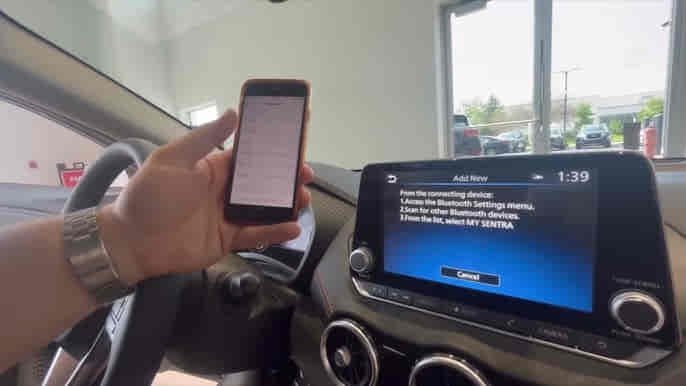
Bluetooth problems in a Nissan Sentra can affect phone calls, music streaming, voice commands, and smartphone connectivity. Some drivers cannot pair their phones with the vehicle, while others experience random disconnections, missing audio, or repeated connection failures. In many cases, the issue appears suddenly after a phone update, software change, or system reset.
The Nissan Sentra Bluetooth system relies on communication between the vehicle’s infotainment platform and the connected smartphone. When either side experiences software conflicts, corrupted pairing data, outdated firmware, or communication errors, Bluetooth functionality can become unreliable or stop working entirely.
Although Bluetooth failures can be frustrating, most issues do not require hardware replacement. Problems involving device pairing, connection stability, audio transmission, and smartphone recognition can often be resolved through troubleshooting procedures that restore communication between the vehicle and the phone.
This guide explains the 10 most common reasons Nissan Sentra Bluetooth stops working and the solutions that restore reliable wireless connectivity.
What Are the Signs That Nissan Sentra Bluetooth Is Not Working?
The most common signs that Nissan Sentra Bluetooth is not working include pairing failures, inability to detect devices, audio playback problems, missing phone contacts, and unexpected connection interruptions. These symptoms indicate that communication between the infotainment system and the smartphone has been disrupted.
Some drivers are unable to pair a device at all. The vehicle searches for nearby phones but never detects them, or the pairing process fails before completion. Others successfully pair their devices but cannot stream audio or place hands-free calls.
Intermittent disconnections are another common symptom. The phone may connect normally when the vehicle starts but disconnect unexpectedly during the drive. In more severe cases, the system repeatedly connects and disconnects without maintaining a stable communication session.
Performance-related symptoms may also appear. Delayed device recognition, slow connection times, and inconsistent audio quality often indicate underlying software or communication issues. Recognizing these symptoms helps identify the stage at which the Bluetooth communication process is failing.
Why Is Bluetooth Turned Off on Either the Vehicle or the Phone?
Bluetooth frequently stops working because the feature has been disabled on either the Nissan Sentra infotainment system or the connected smartphone. Although this appears simple, it remains one of the most common causes of connectivity failures.
The vehicle must continuously broadcast Bluetooth availability to nearby devices. If Bluetooth is disabled within NissanConnect settings, smartphones cannot detect the vehicle. Likewise, if Bluetooth is disabled on the phone, the Nissan Sentra cannot establish or restore a connection.
Software updates occasionally alter Bluetooth permissions without the user’s knowledge. Smartphones may disable Bluetooth access for vehicle-related services, remove location permissions required for discovery, or reset connectivity preferences after operating system updates.
Power-saving features can create additional complications. Many devices automatically restrict Bluetooth activity when battery optimization settings become aggressive. This can prevent automatic reconnection even when Bluetooth appears enabled.
Because Bluetooth communication requires both devices to remain discoverable and authorized, verifying settings on both the vehicle and smartphone should always be the first troubleshooting step.
Why Is Your Phone Already Connected to Another Device?
A smartphone may fail to connect to Nissan Sentra Bluetooth because it is actively maintaining communication with another Bluetooth device. Modern phones often connect simultaneously to smartwatches, earbuds, speakers, laptops, and other vehicles.
When multiple Bluetooth connections compete for resources, communication conflicts can occur. Audio streaming profiles are particularly susceptible because many devices attempt to become the primary audio destination. The phone may remain connected to wireless earbuds while preventing the Nissan Sentra from establishing an audio connection.
Previously paired devices can also interfere with automatic reconnection. Smartphones prioritize recently used devices and may reconnect to them before attempting to communicate with the vehicle. This behavior often causes drivers to assume the vehicle’s Bluetooth system has failed when the phone is directing communication elsewhere.
Removing unused Bluetooth devices and disconnecting unnecessary wireless accessories often restores normal operation. A simplified Bluetooth environment reduces communication conflicts and improves connection reliability.
Why Is Nissan Sentra Bluetooth Memory Full?
Nissan Sentra Bluetooth problems may occur when the infotainment system reaches its storage capacity for paired devices. Every paired smartphone generates stored connection records that remain in memory until manually removed.
Over time, drivers often accumulate multiple entries from previous phones, family members’ devices, and temporary connections. Even though these devices are no longer used, their information continues occupying system resources.
A crowded Bluetooth database increases processing requirements during device discovery and connection attempts. The infotainment system must evaluate stored records before establishing communication with the current device. This additional workload can lead to slower connections, failed pairing attempts, and intermittent communication issues.
Memory-related problems become more noticeable as vehicles age and accumulate years of Bluetooth history. Clearing unused devices often improves performance immediately by reducing unnecessary system overhead.
Why Has the Bluetooth Connection Become Corrupted?
A corrupted Bluetooth connection occurs when stored communication data between the Nissan Sentra and the smartphone becomes damaged or outdated. The devices may still recognize each other, but authentication, profile synchronization, or media transmission can fail.
Bluetooth pairing stores multiple layers of information, including security credentials, communication profiles, permissions, and device preferences. If any portion of this data becomes inconsistent, the connection may operate unpredictably or stop functioning altogether.
Operating system updates frequently contribute to pairing corruption. A smartphone update may change security requirements or communication protocols while the vehicle continues relying on outdated stored information. The mismatch creates connection failures despite apparent compatibility.
Interrupted updates, system crashes, and unexpected power loss can also damage Bluetooth records. Once corruption occurs, the most effective solution is usually deleting the existing connection and creating a completely new pairing relationship.
Why Is NissanConnect Software Outdated?
Outdated NissanConnect software can cause Bluetooth failures because smartphone operating systems evolve continuously while vehicle software may remain unchanged for years. Compatibility issues emerge when newer devices attempt to communicate with older infotainment platforms.
Bluetooth communication standards, security protocols, and media transmission requirements regularly change through software updates. If NissanConnect lacks support for these changes, pairing and communication problems become more likely.
Outdated software may also contain unresolved bugs that affect connection stability. Manufacturers frequently release updates to improve Bluetooth reliability, fix compatibility issues, and optimize infotainment performance.
Keeping NissanConnect updated helps maintain compatibility with current smartphones and reduces the likelihood of recurring Bluetooth problems. Software updates often improve device recognition, connection speed, and overall system stability.
Why Did an iPhone or Android Update Break the Bluetooth Connection?
An iPhone or Android update can disrupt a Nissan Sentra Bluetooth connection because operating system upgrades often modify Bluetooth protocols, security settings, and device permissions. Even when the update improves smartphone functionality, it may introduce compatibility changes that affect communication with the vehicle.
Bluetooth connections rely on stored authentication credentials exchanged between the smartphone and NissanConnect. When a new operating system version changes security requirements, the vehicle may continue using outdated authentication data while the phone expects a newer communication standard. This mismatch can prevent successful pairing or cause an existing connection to fail.
Permission changes are another common cause. Many software updates modify how Bluetooth, contacts, microphone access, and location services operate. If the smartphone revokes one of these permissions during the update process, Nissan Sentra Bluetooth features such as hands-free calling, contact synchronization, or media streaming may stop working.
Network settings may also be affected. Some operating system updates reset wireless communication preferences in the background. When Bluetooth cache files or saved connection records become inconsistent, communication between the smartphone and the vehicle becomes unreliable.
Re-establishing the Bluetooth connection usually resolves these issues. Removing the vehicle from the phone’s Bluetooth settings and pairing the devices again allows both systems to exchange updated security credentials and restore compatibility.
Why Is Bluetooth Connected but No Audio Is Playing?
A Nissan Sentra Bluetooth connection may appear active while audio playback fails because Bluetooth connectivity and audio streaming are separate functions. A phone can successfully connect to the vehicle while the media transmission profile remains inactive or incorrectly configured.
Bluetooth communication uses different profiles for different tasks. One profile manages phone calls, another controls music streaming, and others handle contacts and messaging features. If the audio profile encounters a problem, the phone may display a successful connection while no sound reaches the vehicle speakers.
Incorrect audio source selection is one of the most common causes. Nissan Sentra infotainment systems support multiple media inputs including radio, USB devices, Apple CarPlay, Android Auto, and Bluetooth Audio. If the system is currently using another source, Bluetooth audio cannot be heard despite an active connection.
Smartphone media settings can create similar symptoms. Music applications occasionally direct audio output toward another connected device rather than the vehicle. Wireless earbuds, smart speakers, and previously connected accessories can unexpectedly become the preferred playback destination.
Software conflicts may also interrupt media transmission. Corrupted Bluetooth profiles, outdated infotainment software, and application-level communication errors can prevent the audio channel from functioning correctly.
Because the connection itself remains active, audio-related issues often require media-specific troubleshooting rather than complete Bluetooth diagnostics.
Why Does Nissan Sentra Bluetooth Keep Disconnecting?
Repeated Bluetooth disconnections usually indicate an unstable communication environment rather than a complete system failure. A properly functioning Bluetooth connection should remain active throughout the entire drive without interruption.
Signal interference is a leading cause of intermittent disconnections. Smartphones frequently communicate with multiple wireless devices simultaneously, including smartwatches, earbuds, vehicle accessories, and mobile networks. When communication priorities shift unexpectedly, Bluetooth stability may suffer.
Software inconsistencies also contribute to connection instability. Outdated NissanConnect software, smartphone firmware conflicts, and corrupted pairing records can interrupt communication sessions. Instead of maintaining a continuous connection, the system repeatedly disconnects and reconnects while attempting to recover.
Battery optimization features on smartphones often create similar symptoms. Many devices aggressively manage background applications and wireless services to conserve power. If Bluetooth services are temporarily restricted, the connection to the Nissan Sentra may be interrupted.
System overload within the infotainment platform can also affect reliability. Vehicles storing excessive Bluetooth records, processing multiple communication requests, or operating with outdated software may struggle to maintain long-term connection stability.
Persistent disconnections typically indicate that communication quality is degrading rather than failing completely. Addressing the underlying software, memory, or interference issue usually restores stable operation.
Why Does NissanConnect Need a System Reset?
A NissanConnect reset is often necessary because temporary software errors can accumulate over time and interfere with Bluetooth communication. Like any computer-based system, the infotainment platform continuously stores data, manages active connections, and processes multiple communication requests simultaneously.
As temporary files and cached information accumulate, system responsiveness may decline. Bluetooth pairing, device recognition, and media transmission can become unstable when the software environment becomes overloaded with outdated or corrupted information.
Temporary glitches frequently affect connection reliability. The system may stop detecting previously paired devices, refuse new pairing requests, or freeze during Bluetooth operations. In many cases, these problems originate from software conflicts rather than hardware failures.
A reset clears temporary memory and forces the infotainment system to restart communication services. This process refreshes Bluetooth functions, reloads operating processes, and removes unstable background tasks that may be affecting connectivity.
Factory resets provide an even deeper level of recovery. By removing stored devices, connection preferences, and user settings, a factory reset eliminates corrupted Bluetooth records that may continue causing problems after standard troubleshooting attempts.
Resetting NissanConnect often resolves issues that appear serious but are actually caused by temporary software instability.
Why Could the Bluetooth Module Be Failing?
A failing Bluetooth module is one of the less common but more significant causes of Nissan Sentra Bluetooth problems. Unlike software-related issues, hardware failures cannot usually be corrected through updates, resets, or pairing procedures.
The Bluetooth module is responsible for managing wireless communication between the vehicle and external devices. It processes pairing requests, handles authentication procedures, maintains active connections, and manages data transmission. When this component begins to fail, communication reliability deteriorates.
Early symptoms often include inconsistent device detection, failed pairing attempts, and random communication interruptions. As the condition worsens, the infotainment system may stop recognizing Bluetooth devices entirely or remove Bluetooth functionality from system menus.
Electronic components naturally experience wear over time. Exposure to heat, vibration, moisture, and electrical fluctuations can gradually affect module performance. Although Bluetooth modules are designed for long-term durability, no electronic component lasts indefinitely.
A defective Bluetooth module should only be considered after software updates, device re-pairing, memory clearing, and system resets have failed to resolve the issue. Professional diagnostic testing is often required to confirm hardware failure because module-related symptoms can resemble software problems.
What Should You Do If Nissan Sentra Bluetooth Still Does Not Work?
If Nissan Sentra Bluetooth continues to malfunction after basic troubleshooting, a structured diagnostic approach becomes necessary. Randomly replacing components rarely resolves communication problems and often increases repair costs unnecessarily.
The first priority is verifying software compatibility. Both the smartphone and NissanConnect system should operate on current software versions. Compatibility issues become increasingly likely when one device receives updates while the other remains unchanged.
Creating a completely new Bluetooth relationship is another important step. Removing all stored connections from both the vehicle and the smartphone eliminates corrupted authentication data and allows fresh communication credentials to be generated.
Testing a second smartphone can significantly simplify diagnosis. If another device connects successfully, the problem likely originates from the original phone. If both devices fail, attention should shift toward the vehicle’s infotainment system or Bluetooth hardware.
Professional diagnostics become appropriate when software, settings, and pairing procedures fail to restore functionality. Advanced diagnostic tools can identify communication faults, module failures, and infotainment system issues that are not visible through standard user controls.
Which Nissan Sentra Model Years Report Bluetooth Problems Most Often?
Bluetooth issues can affect any Nissan Sentra model year, but reports are generally more common among vehicles equipped with older infotainment systems. As smartphone technology advances, compatibility challenges become more noticeable in systems designed around earlier Bluetooth standards.
Older Sentra models often experience pairing failures, contact synchronization issues, audio streaming problems, and delayed device recognition. These issues are frequently linked to software limitations rather than hardware defects.
Vehicles produced during major infotainment transitions may encounter unique compatibility challenges because smartphone technology evolves faster than vehicle software. As a result, some model years require software updates to maintain reliable communication with newer devices.
Newer Nissan Sentra models benefit from updated NissanConnect platforms, improved processing power, and stronger Bluetooth compatibility. However, software bugs, smartphone updates, and corrupted pairing records can still affect even the latest systems.
The condition and software status of the infotainment system often influence Bluetooth reliability more than the model year itself.
How Can You Prevent Future Nissan Sentra Bluetooth Problems?
Preventing Bluetooth problems requires maintaining compatibility between the smartphone and the NissanConnect system. Because Bluetooth communication depends on both devices working together, preventative maintenance significantly improves reliability.
Keeping software updated is one of the most effective strategies. NissanConnect updates frequently improve compatibility, address communication bugs, and enhance connection stability. Smartphone updates often provide similar benefits.
Managing Bluetooth memory is equally important. Removing unused devices prevents the infotainment system from becoming overloaded with outdated connection records. A cleaner database allows faster and more reliable communication.
Re-pairing devices after major software updates can also prevent future problems. Establishing a fresh connection ensures both systems use current authentication credentials and communication settings.
Monitoring battery optimization settings on smartphones further improves stability. Restrictive power management features may interrupt Bluetooth services and contribute to random disconnections.
Consistent maintenance reduces the likelihood of connectivity failures and helps ensure reliable hands-free calling, audio streaming, and smartphone integration.
Read more: Nissan Key Fob Battery Not Working
Conclusion
Nissan Sentra Bluetooth problems are typically caused by software conflicts, pairing issues, outdated NissanConnect versions, overloaded Bluetooth memory, smartphone updates, or communication errors. While these issues can disrupt hands-free calling and media streaming, most do not require hardware replacement.
Successful troubleshooting begins by identifying the specific symptom. Pairing failures, audio problems, connection drops, and device detection issues often point toward different causes. Understanding where communication breaks down allows drivers to apply the correct solution more efficiently.
Most Bluetooth issues can be resolved by updating software, clearing stored devices, creating new pairings, adjusting smartphone settings, or resetting NissanConnect. Only a small percentage of cases involve hardware-related failures such as a defective Bluetooth module.
By maintaining software compatibility, managing Bluetooth memory, and addressing communication issues early, Nissan Sentra owners can enjoy reliable wireless connectivity and avoid recurring Bluetooth problems.