
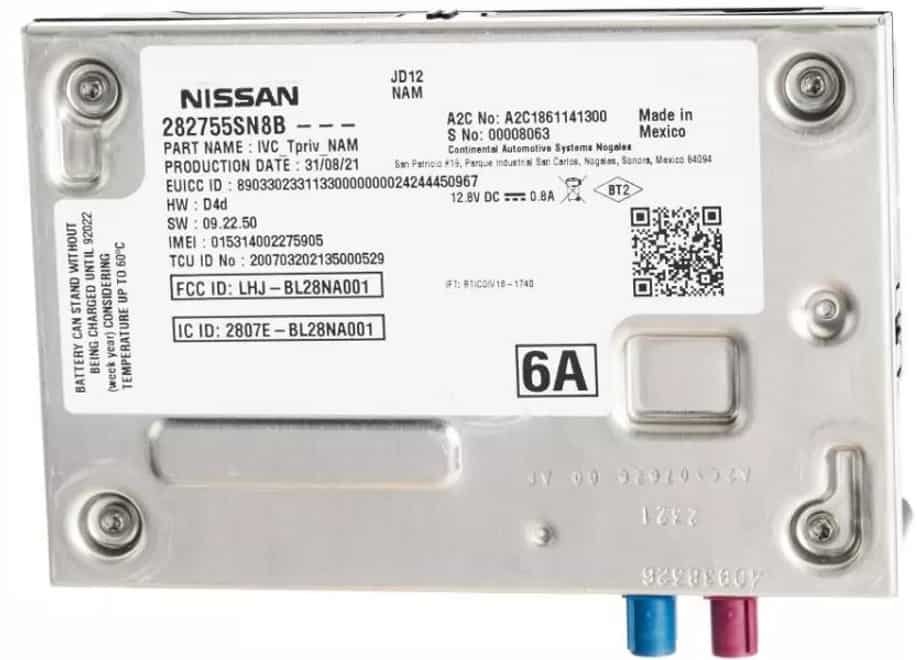
If you want to learn how to disable Nissan VTRS, start with the official method. Contact the VTRS service provider or the Nissan dealer that installed the system. This approach protects your vehicle and prevents unnecessary electrical problems.
Nissan Vehicle Theft Recovery System (VTRS) helps owners recover stolen vehicles through GPS tracking and monitoring services. Many people confuse it with the Nissan Anti Theft System or the factory immobilizer. However, these systems serve different purposes. The factory security system prevents unauthorized engine starts, while VTRS focuses on vehicle tracking and recovery.
Vehicle owners choose to disable Nissan VTRS for several reasons. Some sell their vehicles and no longer need the service. Others cancel the subscription or replace VTRS with another tracking solution. In some cases, a technician recommends removal because the tracking hardware has developed a fault. Whatever the reason, owners should avoid disconnecting wires or removing hardware without professional guidance. Those actions can damage aftermarket wiring or create unexpected electrical issues.
This guide explains every stage of the process. You will learn how to confirm whether your vehicle has Nissan VTRS, prepare the required information, contact the correct service provider, and complete the deactivation safely. You will also discover what happens after the system is disabled, which mistakes to avoid, and when professional assistance is the safest option.
What Is Nissan VTRS and How Does It Work?
Nissan VTRS is a vehicle tracking and recovery service that helps locate a registered Nissan vehicle after a theft event. The system uses tracking technology and a support network to provide recovery assistance when an enrolled vehicle goes missing. Unlike Nissan’s factory security features, VTRS does not prevent the engine from starting or replace the vehicle immobilizer. It works as an additional security layer that focuses on vehicle location and recovery.
Many Nissan owners confuse VTRS with the Nissan Anti-Theft System because both relate to vehicle security. However, these systems have different functions. The Nissan Anti-Theft System uses components such as the registered key, immobilizer, and vehicle control modules to prevent unauthorized vehicle operation. VTRS focuses on tracking information and recovery support after a vehicle leaves its expected location.
The system usually connects a vehicle with a tracking device, an account, and a monitoring service. When an owner activates the service, the provider links the vehicle identification information with the tracking system. If the vehicle becomes stolen, the owner can report the incident and provide the required details to begin the recovery process.
Nissan VTRS can appear in different forms depending on the vehicle model, dealership package, installation partner, and service agreement. Some vehicles receive the system as part of an aftermarket protection package rather than a standard factory feature. For this reason, owners should confirm the exact equipment installed in their vehicle before attempting any changes.
Understanding how Nissan VTRS works is important before disabling it. The system may involve subscription records, dealer documentation, and installed hardware. Removing or cancelling one part does not always deactivate the entire service. A proper deactivation process requires owners to identify the system, confirm ownership, and follow the correct service procedure.
Why Would Someone Disable Nissan VTRS?
Vehicle owners disable Nissan VTRS for several practical reasons, including selling the vehicle, ending a subscription, protecting privacy, replacing the service, or resolving system-related problems. The decision usually depends on the owner’s situation, the vehicle history, and the agreement connected to the tracking service.
One common reason is a change in vehicle ownership. When a person sells a Nissan vehicle, the previous owner may no longer want the tracking account connected to the vehicle. Keeping an active VTRS account after a sale can create confusion because the new owner may operate the vehicle while the previous owner still has access to service information. Proper deactivation helps separate the previous owner’s account from the vehicle.
Another reason involves subscription management. Some Nissan VTRS users may decide that they no longer need a vehicle recovery service after the original subscription period ends. For example, an owner may already use another approved tracking solution or may not want to continue paying for an additional security service. Cancelling the subscription allows the owner to stop future charges while managing the vehicle security options independently.
Privacy concerns also influence some owners’ decisions. A vehicle tracking system collects location-related information, and some people prefer to limit the number of connected services associated with their vehicle. In this situation, disabling VTRS becomes a personal data management choice rather than a mechanical repair issue.
Technical problems can also lead owners to request VTRS deactivation. A faulty tracking module, incorrect installation, or electrical issue may affect vehicle performance. Symptoms such as unusual battery drain or unexpected system behavior require proper diagnosis because the tracking system may not always be the actual cause.
Before disabling Nissan VTRS, owners should review their service agreement, ownership status, and vehicle documentation. Some leased vehicles, financed vehicles, fleet vehicles, or insurance-related programs may require the system to remain active. Checking these details prevents unexpected problems and ensures the deactivation process follows the correct requirements.
What Should You Check Before Disabling Nissan VTRS?
Before disabling Nissan VTRS, you should verify the vehicle ownership status, service agreement, installation details, and possible effects on other vehicle services. These checks help you avoid cancelling the wrong system, creating ownership problems, or affecting security features that you still need.
The first step is confirming that your Nissan actually uses VTRS. Some owners confuse VTRS with Nissan Anti-Theft System, NissanConnect Services, or other vehicle security technologies. These systems perform different functions. Checking purchase documents, dealer records, service invoices, or previous protection-package information helps identify the exact system installed on the vehicle.
You should also review the VTRS service agreement before requesting deactivation. Some vehicles include tracking services through dealer-installed protection plans, finance agreements, or aftermarket security packages. Cancelling the service without understanding the contract may create issues with a lender, leasing company, dealership, or insurance provider.
Ownership verification is another important step. Service providers usually require information that proves you have permission to manage the system. This information may include the vehicle identification number, registration documents, owner details, and account information. The verification process protects vehicle owners and prevents unauthorized changes to tracking services.
Insurance and security benefits also require attention. Some vehicle owners receive security-related benefits because their vehicle includes a recovery system. Removing or disabling VTRS may affect those benefits depending on the insurance policy and local requirements. Contacting your insurance provider before deactivation helps you understand whether the change affects your coverage.
Finally, check the installation type and service history. Some VTRS units come from dealership packages, while others come from third-party installers. Knowing who installed the system makes the deactivation process easier because the correct technician can access the right information and follow the proper procedure.
Completing these checks creates a clear starting point. It ensures that you disable Nissan VTRS for the correct reason while protecting your vehicle, account information, and security settings.
How to Disable Nissan VTRS Safely
The safest way to disable Nissan VTRS is to cancel the service through the authorized provider and arrange professional assistance for any required hardware changes. Nissan VTRS connects vehicle information, tracking equipment, and account services. Because of this connection, disabling the system requires more than deleting an application or disconnecting a power source.
The first step is to confirm the active VTRS service information. Check your vehicle documents, dealer records, or previous service agreements to identify the provider that manages the system. This step prevents confusion between VTRS and other Nissan security technologies, such as the factory immobilizer or Nissan Anti-Theft System.
The next step is contacting the authorized VTRS provider or Nissan dealership. Provide the required ownership details, such as your vehicle identification number, registration information, and account details. The service representative can confirm the current status of the system and explain the correct deactivation process for your vehicle.
After account verification, request the appropriate service action. Some owners only need to cancel the subscription, while others may require professional removal of installed tracking equipment. These actions are different because cancelling the service affects the account, while hardware removal affects the physical device installed in the vehicle.
If your vehicle requires hardware removal, use an authorized technician or qualified automotive professional. The technician can identify the VTRS components, remove the equipment correctly, and inspect the vehicle afterward. This process helps protect factory wiring, electrical systems, and other connected components.
After the service is complete, confirm that the deactivation has finished. Check that billing has stopped, account access has ended, and the vehicle no longer sends tracking information through the VTRS platform. Keeping written confirmation from the provider creates a record of the completed process.
Owners should avoid quick solutions such as cutting wires, removing unknown fuses, or disconnecting vehicle components without technical knowledge. These actions may create electrical faults and may affect other vehicle functions. A controlled deactivation process keeps the vehicle secure while ensuring Nissan VTRS is disabled correctly.
Can You Disable Nissan VTRS Yourself?
You can manage some Nissan VTRS account settings yourself, but you should not attempt physical system removal without proper technical knowledge. Nissan VTRS combines service information with installed vehicle equipment, so the correct deactivation method depends on how the system was added to your vehicle.
Some owners assume that they can disable Nissan VTRS by deleting the mobile application, disconnecting the vehicle battery, or removing an unknown component. These actions do not guarantee that the tracking service has stopped. The account may remain active, and the installed hardware may continue to exist inside the vehicle.
The easiest tasks usually involve account management. A vehicle owner can review service information, update account details, or request cancellation through the appropriate support channel. These steps do not require mechanical work because they only affect the service relationship between the owner and the provider.
Physical changes require a different approach. VTRS equipment may connect with the vehicle’s electrical system, depending on the installation method. Removing components without knowing the installation design can damage wiring, create warning lights, or affect other aftermarket accessories. A technician can identify the correct equipment and restore the vehicle properly after removal.
There is also an important difference between disabling VTRS and disabling Nissan security systems. The factory immobilizer, key recognition system, and anti-theft functions operate separately from VTRS. An owner who attempts an incorrect removal process may accidentally affect systems that were not related to the tracking service.
DIY solutions may appear faster, but they often create additional problems. A professional deactivation process provides confirmation that the service ended and that the vehicle continues to operate normally. For most owners, the safest option is to handle account cancellation personally and leave hardware-related work to a qualified technician.
What Happens After Nissan VTRS Is Disabled?
After Nissan VTRS is disabled, the vehicle stops using the VTRS tracking service, but the vehicle’s factory security features continue to operate normally. Many owners worry that disabling VTRS will affect basic vehicle functions, such as starting the engine, locking doors, or using the key fob. However, VTRS usually works separately from Nissan’s built-in security systems.
The first noticeable change is the loss of VTRS-related services. The owner may no longer receive location updates, recovery assistance, alerts, or account notifications connected to the tracking platform. These changes occur because the service provider no longer manages the vehicle through the VTRS system.
The vehicle itself should continue operating as expected after proper deactivation. Functions such as engine starting, key recognition, door locking, and standard alarm operation depend on different vehicle systems. Nissan’s immobilizer and anti-theft components use separate hardware and software that do not rely on VTRS tracking services.
The result can be different if someone removes hardware incorrectly. An improper removal process may affect electrical connections, especially when the VTRS equipment connects with aftermarket wiring. In this situation, owners may notice warning lights, battery issues, or unusual electrical behavior. These problems usually indicate an installation or removal issue rather than a normal result of disabling the service.
Owners should also keep records after completing the deactivation process. Written confirmation from the service provider proves that the account ended and protects the owner during future vehicle transfers. This documentation becomes especially useful when selling the vehicle or explaining the vehicle history to a new owner.
A successful Nissan VTRS deactivation should create a simple outcome: the tracking service ends, the account no longer connects to the vehicle, and the vehicle continues normal operation. A professional verification step helps confirm that every part of the process finished correctly.
What Problems Can Occur After Disabling Nissan VTRS?
Most Nissan VTRS deactivations do not create vehicle problems when the process follows the correct procedure. However, issues can appear when someone removes equipment incorrectly, interrupts electrical connections, or cancels the service without understanding how the system works. Identifying these problems early helps prevent unnecessary repairs.
One common issue involves electrical problems. Some VTRS installations use connections to the vehicle’s power system. If a technician removes the equipment without restoring the original wiring correctly, the vehicle may experience unusual electrical behavior. Owners may notice warning lights, inconsistent accessory operation, or other signs that require a professional inspection.
Battery-related problems can also appear after incorrect VTRS removal. A damaged connection, faulty installation, or remaining electrical component may create abnormal power consumption. However, battery drain does not always come from VTRS. A proper diagnosis can determine whether the tracking system, another accessory, or the vehicle battery itself causes the problem.
Another possible issue is confusion between VTRS and other security systems. Some owners believe disabling VTRS affects the Nissan immobilizer or factory alarm. These systems operate separately. If the vehicle develops a starting problem after deactivation, the cause may involve wiring damage, another electrical fault, or an unrelated security component.
Account-related problems can also occur. A cancelled subscription does not always mean that every record has been updated immediately. Owners should confirm that billing has stopped and that the provider removed the vehicle from the active service account.
The best way to avoid these problems is to complete the deactivation process carefully. Keep service records, confirm the account status, and inspect the vehicle after any hardware-related work. A proper Nissan VTRS deactivation should remove the tracking service without affecting normal vehicle operation.
Is It Legal to Disable Nissan VTRS?
Disabling Nissan VTRS is generally allowed when the vehicle owner has the legal right to manage the tracking service and follows the correct cancellation process. However, the requirements can change depending on the vehicle ownership status, service agreement, and reason for deactivation.
Vehicle owners usually have control over security services connected to their own vehicles. If a person owns the Nissan vehicle and manages the VTRS account, they can request service cancellation or deactivation through the appropriate provider. The process confirms ownership and prevents unauthorized users from changing vehicle security settings.
The situation becomes different with financed, leased, or company-owned vehicles. Some lenders, leasing companies, rental companies, or fleet operators may require tracking systems as part of their agreements. In these cases, removing or disabling Nissan VTRS without permission may violate contract terms. Owners should review their agreement before requesting deactivation.
Insurance policies can also affect the decision. Some insurance providers offer benefits for vehicles equipped with recovery systems because these systems improve the chances of locating stolen vehicles. Removing VTRS may change the conditions of those benefits. Contacting the insurance company before disabling the service helps owners understand any possible impact.
Vehicle transfers require additional attention. When selling a Nissan vehicle, the previous owner should remove personal account access and complete the correct transfer or cancellation process. This protects both parties because the previous owner should not continue receiving vehicle-related information after ownership changes.
The safest approach is to treat Nissan VTRS deactivation as a service management process rather than a simple mechanical modification. Confirm ownership, review agreements, and use authorized support channels. This method ensures that the vehicle owner completes the process legally while maintaining accurate records.
Frequently Asked Questions About Nissan VTRS
Can Nissan VTRS be disabled permanently?
Nissan VTRS can be permanently deactivated when the owner completes the correct cancellation process and removes any required hardware through an authorized method. Permanent deactivation usually involves two separate actions: ending the service account and handling the installed tracking equipment.
Cancelling the subscription stops the connection between the vehicle and the VTRS service platform. However, cancellation does not always remove the physical device from the vehicle. If the owner wants complete removal, a qualified technician should inspect the installation and complete the required work.
Does disabling Nissan VTRS affect the factory alarm system?
Disabling Nissan VTRS does not normally affect the factory alarm system because both systems perform different security functions. VTRS focuses on vehicle tracking and recovery, while the factory alarm and immobilizer systems protect against unauthorized vehicle operation.
The Nissan Anti-Theft System uses components such as the registered key and vehicle security modules. These systems continue working after proper VTRS deactivation.
Can I remove the Nissan VTRS device myself?
You should avoid removing Nissan VTRS hardware yourself unless you understand the installation and vehicle electrical system. The device may connect with vehicle wiring, and incorrect removal can create electrical problems.
A professional technician can identify the correct components, remove the equipment safely, and confirm that the vehicle operates normally afterward.
Does Nissan charge for VTRS removal?
The cost of Nissan VTRS removal depends on the installation type, service provider, vehicle model, and required work. Some owners only need account cancellation, while others need professional hardware removal.
The best approach is to contact the original dealer, installer, or VTRS service provider for accurate pricing information.
Can Nissan VTRS be activated again after disabling it?
Nissan VTRS may be reactivated in some situations if the hardware remains installed and the service provider supports account restoration. Reactivation depends on the vehicle information, device condition, subscription availability, and ownership verification.
Owners should ask the provider about reactivation options before requesting permanent hardware removal.
Will disabling Nissan VTRS affect vehicle resale value?
Disabling Nissan VTRS may affect vehicle security features, but the impact on resale value depends on the buyer, market conditions, and remaining security equipment. Some buyers prefer connected recovery services, while others prioritize privacy or lower service costs.
When selling a Nissan vehicle, provide accurate information about the VTRS status and keep documentation showing that the service was properly cancelled or transferred.
Conclusion
Disabling Nissan VTRS safely requires more than simply turning off a feature or disconnecting a device. The correct process starts with identifying the system, confirming ownership, reviewing the service agreement, and contacting the appropriate provider or Nissan dealership. This approach helps protect the vehicle’s electrical system and prevents unnecessary problems.
Nissan VTRS works as a vehicle recovery and tracking service, which means it operates differently from Nissan’s factory security technologies. The immobilizer, key system, and anti-theft functions continue to serve their own purposes after proper VTRS deactivation. Understanding this difference helps owners avoid mistakes during the process.
Vehicle owners should also consider their reason for disabling the system. Selling a vehicle, ending a subscription, changing security solutions, or resolving service issues may require different actions. Some situations only require account cancellation, while others may require professional hardware removal.
The safest solution is to use authorized channels and keep documentation after completing the process. A confirmed deactivation record protects the owner during future ownership transfers and ensures that the vehicle no longer connects to the previous account.
By following the correct steps, owners can disable Nissan VTRS without affecting normal vehicle operation. Careful planning, proper verification, and professional support create a smoother experience while maintaining vehicle security and reliability.