
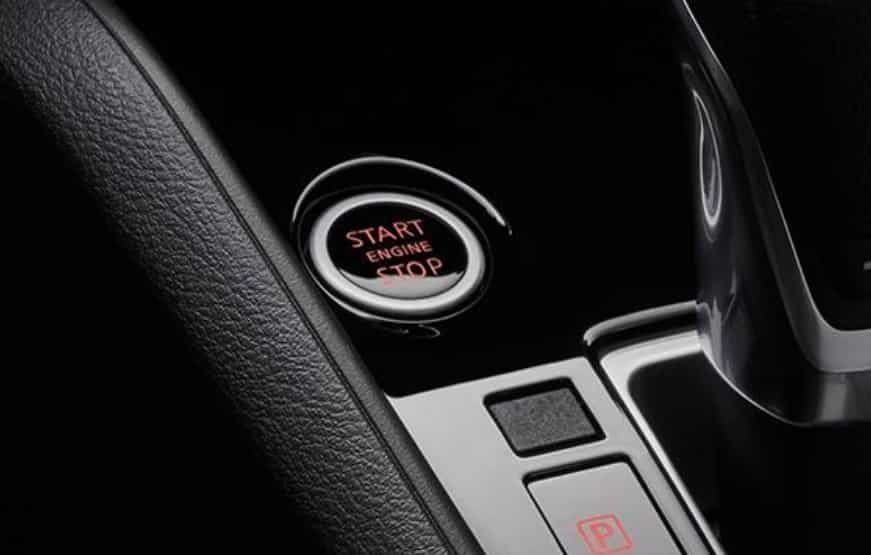
Have you ever pressed the start button on your Nissan Kicks and seen a “Key Not Detected” message? This warning can be frustrating. It becomes even more stressful when your vehicle refuses to start.
Many drivers assume this problem requires expensive repairs. However, several common issues can trigger the Nissan Kicks Key Not Detected warning. In many cases, you can solve the problem with a few simple checks.
The Nissan Kicks uses an Intelligent Key system to provide keyless entry and push button starting. The system allows your vehicle to communicate with the key fob through wireless signals. When this communication fails, the car cannot confirm the key’s presence.
Several factors can cause this issue. A weak key fob battery, signal interference, a low vehicle battery, or a damaged key fob can prevent proper detection. Some problems may also involve the vehicle’s electronic control system.
This complete troubleshooting guide explains why your Nissan Kicks cannot detect the key. You will learn how to identify the cause, try quick fixes, start the vehicle in an emergency, and understand when you need professional help.
By following the right steps, you can diagnose the problem faster and get your Nissan Kicks working normally again.
What Does “Nissan Kicks Key Not Detected” Mean?
The “Nissan Kicks Key Not Detected” warning means that your vehicle cannot recognize the signal from the key fob. The car expects to find an authorized key nearby before allowing the engine to start. When the system cannot confirm the key, it blocks the ignition process as a security measure.
The Nissan Kicks uses an Intelligent Key system that communicates with the vehicle through wireless signals. The key fob sends a unique identification code to the vehicle. Sensors inside the car receive this signal and verify whether the key belongs to the vehicle.
Several electronic components work together during this process. The key fob, antennas, Body Control Module, and immobilizer system all play important roles. If one part fails to communicate correctly, the vehicle may display a key detection warning.
A key detection problem does not always mean the key itself has failed. Many cases happen because of a weak key fob battery or temporary signal interference. Other situations may involve a low vehicle battery, damaged electronic components, or a programming issue.
Understanding how the Nissan Kicks smart key system works can help you find the right solution. Instead of replacing parts immediately, you can check the most common causes first and avoid unnecessary repair costs.
Common Causes of Nissan Kicks Key Not Detected Warning
The Nissan Kicks Key Not Detected warning can happen for several reasons. Some causes are simple and easy to fix. Others may require professional diagnosis. Identifying the exact cause helps you avoid unnecessary repairs and restore your vehicle quickly.
Weak or Dead Key Fob Battery
A weak key fob battery is one of the most common reasons for a Nissan Kicks Key Not Detected message. The key fob needs enough power to send a clear signal to the vehicle. When the battery becomes weak, the signal range decreases and the car may fail to recognize the key.
Many drivers notice warning signs before complete failure. The remote buttons may work inconsistently. The vehicle may detect the key only when it is very close to the car. In some cases, the warning appears randomly during normal use.
Most Nissan Kicks key fobs use a small coin battery, such as a CR2032. Replacing the battery often solves the problem immediately. Make sure you install the new battery correctly and check the positive and negative sides before testing the key.
A battery replacement is usually the first step you should try because it is affordable, simple, and does not require special tools. If the warning continues after replacing the battery, you should check other possible causes.
Signal Interference Between the Key Fob and Vehicle
The Nissan Kicks Key Not Detected warning can also appear when something interferes with the key fob signal. The Intelligent Key system depends on wireless communication between the key and the vehicle. Any disruption can prevent successful detection.
Electronic devices are common sources of interference. Smartphones, wireless chargers, tablets, and other smart devices may affect the key signal in some situations. Keeping the key fob close to other electronic items can reduce communication quality.
Metal objects can also block or weaken the signal. A key stored inside a metal container, wallet, or bag with strong materials may not communicate properly with the vehicle. Moving the key away from these objects can help restore normal operation.
To test for signal interference, place the key fob in a different location. Remove it from your bag or separate it from other electronic devices. Then try starting the Nissan Kicks again. If the vehicle recognizes the key, interference was likely the cause.
Low Vehicle Battery Voltage
A weak vehicle battery can create unexpected smart key problems. Many drivers focus only on the key fob battery and overlook the car’s 12 volt battery. However, the Nissan Kicks needs stable electrical power to operate its electronic systems correctly.
A low battery can affect the Body Control Module, key receiver, and push button start system. When these components do not receive enough power, the vehicle may fail to communicate with the key fob.
Common signs of a weak vehicle battery include slow engine cranking, dim interior lights, unusual warning messages, and electrical features that work inconsistently. If you notice these symptoms together with a Nissan Kicks Key Not Detected warning, check the vehicle battery condition.
Testing the battery voltage can help confirm the problem. If the battery shows low voltage or has reached the end of its service life, replacing it may solve the key detection issue.
Damaged Key Fob and Intelligent Key System Failures
A damaged key fob can also cause a Nissan Kicks Key Not Detected warning. While battery problems are more common, physical damage can affect the internal components of the key. A damaged circuit board or broken connection may stop the key fob from sending a proper signal.
Water exposure is another common reason for key fob failure. Moisture can damage electronic parts inside the key and reduce its performance. Dropping the key fob several times can also create internal damage that is difficult to see from the outside.
Testing a spare key can help identify whether the key fob is the problem. If the spare key works normally, the original key likely needs repair or replacement. If both keys fail, the issue may come from the vehicle system instead.
The Nissan Intelligent Key system depends on several electronic components to communicate with the key fob. These components include antennas, the key receiver, the Body Control Module, and the immobilizer system. A failure in any of these parts can prevent the vehicle from recognizing an authorized key.
A faulty antenna may stop the vehicle from receiving the key signal. A communication problem with the Body Control Module may also create key detection errors. In some cases, the key may need programming before the vehicle can recognize it again.
These advanced problems usually require proper diagnosis. A technician can use specialized tools to check system errors and identify the failed component. This approach helps avoid replacing parts that still work correctly.
How To Fix Nissan Kicks Key Not Detected Problem
Finding the cause of a Nissan Kicks Key Not Detected warning is important before trying repairs. In many cases, you can solve the issue with simple troubleshooting steps. Start with the easiest solutions and move to more advanced checks if the problem continues.
Replace the Key Fob Battery
Replacing the key fob battery is the first solution you should try. A weak battery can prevent the key from sending a strong signal to the vehicle. This simple replacement can often restore normal key detection.
Open the key fob carefully and remove the old battery. Install a new battery with the correct orientation. Most Nissan Kicks key fobs use a CR2032 coin battery, but you should confirm the correct battery type for your specific model year.
After replacing the battery, test the key fob near the vehicle. Try locking and unlocking the doors before starting the engine. If the Nissan Kicks recognizes the key normally, the weak battery caused the problem.
Move the Key Away From Signal Interference
If a new battery does not solve the issue, check for possible signal interference. Keep the key fob away from smartphones, wireless devices, and other electronic items.
Remove the key from bags or containers that contain metal materials. Then try starting the vehicle again. A stronger connection between the key and vehicle may restore normal operation.
Check the Vehicle Battery Condition
The vehicle battery also affects the Nissan Kicks smart key system. A weak 12 volt battery can interrupt communication between electronic components.
Check for signs of battery problems, such as slow starting, dim lights, or unusual warning messages. If the battery has low voltage, charging or replacing it may fix the key detection issue.
Following these basic steps can solve many Nissan Kicks Key Not Detected problems without expensive repairs. If the warning remains, you should continue with deeper troubleshooting methods.
Nissan Kicks Key Not Detected But Key Is Inside Car
Seeing a Nissan Kicks Key Not Detected warning while the key fob is inside the vehicle can be confusing. Many drivers expect the car to recognize the key immediately. However, the Intelligent Key system may fail to detect the signal in certain situations.
A weak key fob battery is one of the most common reasons for this issue. The key may still be inside the car, but it may not send a strong enough signal for the vehicle to recognize it. Replacing the battery can often solve this problem.
Signal interference can also prevent proper key detection. Electronic devices, metal objects, or other wireless signals may interrupt communication between the key fob and the vehicle. Try moving the key away from other items and place it closer to the center area of the cabin.
The position of the key fob can also affect detection. If the key is stored in a bag, pocket, or container with other objects, the signal may become weaker. Remove unnecessary items and test the key again.
If the problem continues, try using the spare key if you have one. If the spare key works normally, the original key fob may need a battery replacement, repair, or reprogramming.
How To Start Nissan Kicks When Key Is Not Detected
The Nissan Kicks provides an emergency starting method for situations where the vehicle cannot detect the key fob normally. This feature helps drivers start the vehicle when the key battery becomes weak.
First, sit inside the vehicle and press the brake pedal firmly. Then place the key fob directly near the push button start switch. While keeping the key close to the button, press the START button.
This method allows the vehicle to read the key signal through a backup detection process. If the key battery is weak, the Nissan Kicks may recognize the key and allow the engine to start.
However, this is only a temporary solution. It does not fix the main cause of the problem. After starting the vehicle, check the key fob battery and inspect other possible causes if the warning appears again.
If the Nissan Kicks still cannot detect the key after these steps, the issue may involve the Intelligent Key system, vehicle battery, or another electronic component that requires further diagnosis.
Nissan Kicks Key Not Detected After Battery Change
Some Nissan Kicks owners replace the key fob battery but still see a Key Not Detected warning. This situation can be confusing because the most common solution does not always fix the problem. When the warning remains, you need to check other possible causes.
The first thing to verify is the battery installation. A key fob battery must sit in the correct position to provide power. If the battery faces the wrong direction or does not make proper contact, the key may still fail to communicate with the vehicle.
Battery quality can also affect performance. A low quality or partially discharged battery may not provide enough power for reliable signal transmission. Using a new and compatible battery from a trusted source can prevent this issue.
Another possible cause involves key fob synchronization. In some situations, the vehicle may not recognize the key after a battery replacement. The key itself may work correctly, but the Nissan Intelligent Key system may require additional diagnosis or programming.
You should also test the spare key if available. If another key works normally, the problem likely comes from the original key fob. If both keys show the same warning, the vehicle system may need inspection.
A Nissan Kicks Key Not Detected problem after battery replacement can also point to deeper issues. Faulty antennas, electrical problems, or communication errors with the Body Control Module may prevent proper key recognition.
Before replacing expensive components, check the battery installation, test another key, and inspect the vehicle battery condition. These simple steps can help identify the real cause and avoid unnecessary repair costs.
Nissan Kicks Key Not Detected Repair Cost
The repair cost for a Nissan Kicks Key Not Detected problem depends on the actual cause. Some solutions require only a small replacement part, while others may involve professional diagnosis or electronic repairs.
A key fob battery replacement is usually the least expensive solution. Many owners can replace the battery themselves without professional help. The cost remains low because it only requires a compatible coin battery.
Replacing a damaged key fob costs more than changing the battery. The final price depends on the key type, vehicle model year, and whether the new key requires programming. A replacement key from a dealership usually costs more than services from an automotive locksmith.
Key programming is another possible expense. The Nissan Kicks must recognize the new key before you can use it. A locksmith or dealership may need specialized equipment to complete the programming process.
If the problem comes from the vehicle itself, repair costs can increase. Issues with the key receiver, antenna system, Body Control Module, or electrical system may require advanced diagnosis. The final cost depends on the failed component and labor time.
Before paying for repairs, confirm the actual cause of the warning. Many Nissan Kicks Key Not Detected problems come from simple issues like a weak battery or signal interference. Proper diagnosis can help you avoid replacing parts that do not need replacement.
When comparing repair options, consider both cost and reliability. A qualified technician can provide accurate testing and recommend the most effective solution for your Nissan Kicks.
When Should You Visit a Nissan Dealer or Locksmith?
Many Nissan Kicks Key Not Detected problems can be solved with basic troubleshooting. However, some situations require professional support. Knowing when to ask for help can save time and prevent unnecessary repairs.
You should contact a Nissan dealer or automotive locksmith if the vehicle cannot recognize any key fob. Testing a spare key can help you determine whether the problem comes from the key or the vehicle system. If both keys fail, the issue may involve the Intelligent Key system or another electronic component.
Professional assistance is also recommended when replacing or programming a new key. Modern Nissan vehicles use advanced security systems that require specific tools to register a new key. A qualified technician can complete the process correctly and ensure the vehicle recognizes the replacement key.
You should also seek help if the warning continues after replacing the key fob battery. A repeated warning may indicate a problem with the vehicle battery, key receiver, antenna, or Body Control Module.
Avoid replacing expensive components without proper testing. A professional diagnosis can identify the exact cause of the problem and prevent unnecessary costs.
Before visiting a repair facility, prepare useful information about your Nissan Kicks. Note the vehicle model year, when the problem started, whether the spare key works, and any other warning messages on the dashboard. This information helps technicians find the solution faster.
Getting professional help at the right time can restore your Nissan Kicks key system and prevent the problem from becoming more complicated.
Frequently Asked Questions About Nissan Kicks Key Not Detected
Why does my Nissan Kicks say Key Not Detected?
Your Nissan Kicks may display a Key Not Detected warning because the vehicle cannot communicate with the key fob. The most common causes include a weak key fob battery, signal interference, a low vehicle battery, or a damaged key.
Can I start my Nissan Kicks when the key is not detected?
Yes, you may be able to start your Nissan Kicks using the emergency detection method. Place the key fob close to the push button start switch, press the brake pedal, and press the START button. This method can work when the key battery is weak.
What battery does the Nissan Kicks key fob use?
Many Nissan Kicks key fobs use a CR2032 coin battery. However, the correct battery type may vary depending on the model year. Always check your owner’s manual before replacing the battery.
How do I reset my Nissan Kicks key fob?
A simple reset may involve replacing the battery and testing the key again. Some key recognition problems may require professional programming if the vehicle does not recognize the key after replacement.
Why is my Nissan Kicks key not detected after changing the battery?
If the warning remains after changing the battery, check the battery installation and make sure it has proper contact. Other possible causes include a damaged key fob, signal interference, vehicle battery problems, or a programming issue.
How much does a Nissan Kicks key replacement cost?
The cost depends on the key type, programming requirements, and service provider. A basic battery replacement costs much less than replacing and programming a new key fob.
Why does my Nissan Kicks detect the key sometimes but not always?
Intermittent detection usually points to a weak key fob battery, signal interference, or an inconsistent connection inside the key system. Replacing the battery and removing possible interference sources are good first steps.
Conclusion
A Nissan Kicks Key Not Detected warning can interrupt your driving experience and create unnecessary stress. However, this problem does not always mean you need expensive repairs. Many key detection issues come from simple causes, such as a weak key fob battery, signal interference, or a low vehicle battery.
Following a proper troubleshooting process can help you identify the cause faster. Start with basic checks, including replacing the key fob battery, moving the key away from electronic devices, and checking the vehicle battery condition. If these steps do not solve the problem, the issue may involve the Intelligent Key system, key programming, or another electronic component.
Understanding how the Nissan Kicks smart key system works helps you make better repair decisions. It also prevents you from replacing parts before confirming the actual problem.
If your Nissan Kicks still shows a Key Not Detected warning, professional diagnosis can help identify the exact cause and provide the right solution.
Have you experienced a Nissan Kicks key detection problem before? Share your vehicle model year and the symptoms you noticed. Your experience may help other Nissan Kicks owners find a faster solution.