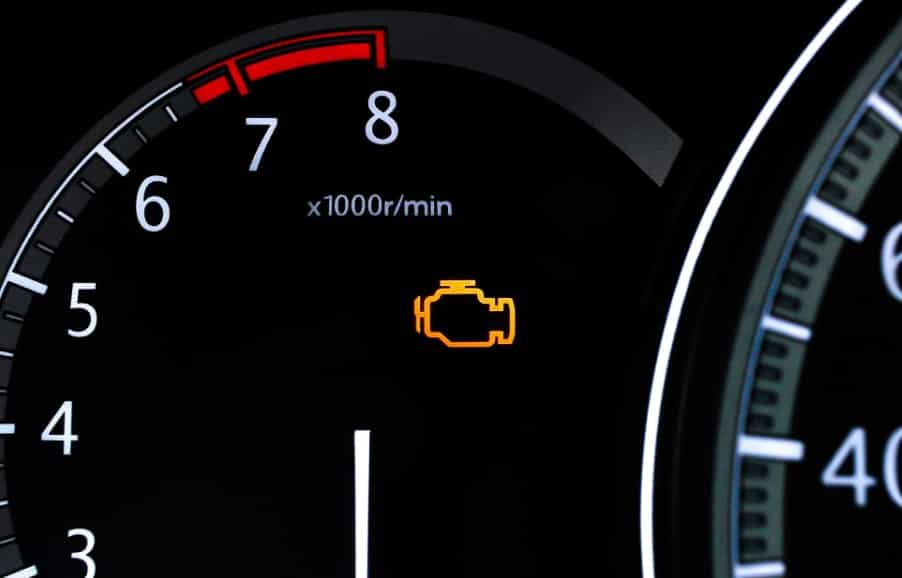
Few dashboard warnings cause as much concern as a Check Engine Light that suddenly appears while driving. For many Nissan owners, the first instinct is to visit a repair shop or purchase an OBD2 scanner. However, what many drivers do not realize is that certain Nissan models include built in self diagnostic capabilities that allow you to retrieve trouble codes without using a scanner. This feature can provide valuable information about potential engine, emissions, or sensor related issues before you spend money on professional diagnostics.
Understanding how to read Nissan Check Engine Light codes without a scanner can help you identify the source of a problem faster and make more informed repair decisions. Whether the issue involves a faulty oxygen sensor, a malfunctioning mass air flow sensor, or an ignition related fault, retrieving diagnostic codes is often the first step toward an accurate diagnosis.
In this complete DIY diagnostic guide, you will learn how Nissan self diagnosis systems work, how to access diagnostic mode, how to interpret flashing fault codes, and what actions to take after identifying a trouble code. By the end of this guide, you will have a clearer understanding of your vehicle’s warning system and the confidence to perform basic diagnostics on your own.
What Does the Nissan Check Engine Light Mean?
The Nissan Check Engine Light is one of the most important warning indicators on your dashboard because it serves as the vehicle’s primary way of communicating potential engine and emissions related problems. When this light appears, it means the Engine Control Unit has detected abnormal data from one or more systems that affect vehicle performance. Modern Nissan vehicles continuously monitor components such as oxygen sensors, mass air flow sensors, ignition systems, fuel injectors, and emissions control equipment. If any of these components operate outside their expected range, the ECU stores a Diagnostic Trouble Code and activates the warning light to alert the driver. Although the light itself does not identify the exact fault, it signals that further diagnosis is necessary to determine the root cause.
There are many reasons why the Check Engine Light may turn on. Some issues are relatively minor, such as a faulty sensor or an emissions related malfunction, while others can indicate more serious engine problems. Common causes include failing oxygen sensors, malfunctioning mass air flow sensors, ignition misfires, fuel delivery issues, and evaporative emissions system leaks. In many cases, drivers may not notice immediate changes in vehicle performance, which is why retrieving the stored fault code is essential for accurate troubleshooting.
The severity of the warning often depends on how the light behaves. A steady Check Engine Light usually indicates a fault that should be diagnosed soon, while a flashing light often signals an active misfire capable of damaging critical components such as the catalytic converter. Understanding the meaning behind this warning is the first step toward reading Nissan Check Engine Light codes without a scanner and identifying the problem before it becomes a costly repair.
Can You Read Nissan Check Engine Light Codes Without a Scanner?
Many Nissan owners ask if they can read Check Engine Light codes without a scanner. The answer depends on the vehicle model and its diagnostic system. Some older Nissan vehicles support a built in self diagnostic mode. This system lets drivers check fault codes without special tools. However, most modern Nissan models require an OBD2 scanner for full access.
The Nissan self diagnostic system sends data directly from the Engine Control Unit. The ECU stores Diagnostic Trouble Codes when it detects a problem. In older models, you can trigger the system with a simple ignition sequence or by using a diagnostic connector near the ECU. Once activated, the Check Engine Light flashes in a specific pattern. Each flash sequence represents a number that matches a fault code. These codes point to issues like sensor failures, ignition errors, or emissions system faults.
Newer Nissan vehicles work differently. They rely on advanced OBD2 systems that need a scanner to read full data. These systems provide deeper information such as live sensor readings and freeze frame data. You cannot access this level of detail using flash codes. Because of this, manual code reading only works well on older vehicles or as a basic first step in diagnosis.
Reading Nissan Check Engine Light codes without a scanner can still help in basic troubleshooting. It gives you a quick idea of where the problem starts. But it does not replace a full diagnostic scan. You must still confirm the issue with proper testing, especially if the vehicle shows performance problems or repeated warning lights.
How to Access Nissan Self-Diagnostic Mode
Accessing the Nissan self diagnostic mode is the key step when you want to read Check Engine Light codes without a scanner. Some older Nissan models allow you to enter this mode using simple ignition actions or an ECU adjustment process. This built in function helps you communicate directly with the Engine Control Unit and retrieve stored fault codes.
Before you start, make sure the ignition key is available and the vehicle is in a safe stationary position. You should also locate the ECU or diagnostic connector depending on your Nissan model. In many older vehicles, the ECU sits near the driver side footwell or behind interior panels. The goal is to prepare the system so it can enter diagnostic mode without interruption.
To activate self diagnostic mode, turn the ignition key to the ON position without starting the engine. In some Nissan models, you may need to perform a specific sequence such as switching the key on and off within a set time. This action signals the ECU to enter diagnostic mode. Once activated, the Check Engine Light begins to flash in a controlled pattern.
Each flash sequence represents a stored Diagnostic Trouble Code. Long flashes show the first digit of the code and short flashes show the second digit. The ECU repeats each code to help you record it correctly. If no faults exist, the system may display a code that indicates normal operation.
Newer Nissan models do not always support this method. In these vehicles, the ECU relies on OBD2 communication and requires a scanner for full access. However, for older systems, this method remains a simple and effective way to retrieve basic engine fault information without extra tools.
How to Read Nissan Check Engine Light Flash Codes
Once the Nissan self diagnostic mode is active, the Check Engine Light begins to flash in a specific pattern. These flashes represent Diagnostic Trouble Codes stored in the Engine Control Unit. You need to observe the pattern carefully because each sequence corresponds to a different engine or system issue.
The system uses two types of flashes to form a code. Long flashes represent the first digit, and short flashes represent the second digit. For example, if you see two long flashes followed by three short flashes, the code becomes 23. The ECU repeats each code several times to make it easier to record. You should count each sequence carefully to avoid mistakes.
You may notice a pause between different codes. This pause helps separate one fault code from another. If the system detects multiple issues, it will cycle through all stored codes. You must write them down in the exact order to understand the full diagnostic picture.
Reading flash codes requires attention because small counting errors can lead to incorrect interpretation. It is important to focus on timing and repetition. If you miss a sequence, you should wait for the cycle to repeat before recording again.
In many cases, a Nissan will display a code 55 when no faults exist. This indicates that the system did not detect any problems in monitored components. However, if multiple codes appear, each one points to a specific system such as ignition, fuel delivery, or sensors.
Understanding how to read Nissan Check Engine Light flash codes gives you a basic but powerful way to identify engine problems without a scanner. It helps you narrow down issues before moving to more advanced diagnostics or repairs.
Common Nissan Check Engine Light Codes and Their Meanings
Nissan vehicles use Diagnostic Trouble Codes to identify specific engine or system problems. Each code points to a particular component that the Engine Control Unit has detected as faulty or operating outside normal range. Understanding these common codes helps you quickly narrow down the cause of the Check Engine Light.
Code 11 usually relates to the crankshaft position sensor. This sensor helps the ECU track engine timing. When it fails, the engine may struggle to start or run smoothly. Code 12 often refers to the mass air flow sensor. This sensor measures the amount of air entering the engine. A faulty reading can lead to poor fuel economy and rough idling.
Code 13 points to the engine coolant temperature sensor. When this sensor sends incorrect data, the engine may run too rich or too lean. Code 21 is linked to the ignition signal circuit. This issue can cause engine misfires or starting problems.
Code 33 is commonly associated with the oxygen sensor. This sensor controls fuel mixture and emissions. When it fails, fuel efficiency drops and emissions increase. Code 34 refers to the knock sensor. This sensor detects abnormal combustion inside the engine. A failure can reduce engine performance and increase the risk of damage.
Code 43 relates to the throttle position sensor. This sensor controls how much air enters the engine based on pedal input. When it fails, acceleration becomes unstable. Code 45 may indicate a fuel injector leak, which can affect combustion and engine stability.
Finally, code 55 means the system did not detect any faults. This is often a normal reading when the engine operates correctly.
Knowing these common Nissan Check Engine Light codes helps you understand what the ECU is reporting. It also allows you to decide whether the issue is minor or requires professional repair.
What to Do After Retrieving the Trouble Code
After you retrieve a Nissan Check Engine Light code, the next step is to understand what the vehicle is telling you and decide the right action. Each Diagnostic Trouble Code points to a specific system, but you should never replace parts immediately without further confirmation. The goal is to connect the code with real symptoms in the vehicle.
Start by checking how the engine behaves during normal driving. Pay attention to idle stability, acceleration response, fuel consumption, and unusual noises. These symptoms often help confirm whether the code matches an actual mechanical problem. For example, a mass air flow sensor code usually comes with poor acceleration or rough idle.
Next, inspect the related components linked to the fault code. Look for loose connectors, damaged wiring, or visible wear on sensors. Many Nissan engine issues come from simple electrical connection problems rather than full component failure. Fixing these basic issues can sometimes clear the Check Engine Light without replacing expensive parts.
After inspection, decide whether the problem is something you can fix yourself or if it requires professional attention. Simple issues like a loose gas cap, dirty sensors, or minor wiring faults can often be handled at home. More complex issues such as ignition system failures or internal engine problems require proper diagnostic tools and experienced technicians.
You should also avoid clearing the code before identifying the root cause. Resetting the system without repair can hide the problem temporarily, but the Check Engine Light will likely return. In some cases, it may even delay proper diagnosis and lead to more serious damage.
Taking the right steps after reading the code helps you avoid unnecessary repairs and reduces long term maintenance costs. It also ensures that you address the real issue instead of just clearing the warning light.
How to Clear Nissan Check Engine Light Codes Without a Scanner
After diagnosing and repairing the issue, you may want to clear the Nissan Check Engine Light without using a scanner. Some older Nissan models allow you to reset the Engine Control Unit using simple manual methods. This process removes stored Diagnostic Trouble Codes and turns off the warning light if the problem has been fixed correctly.
One common method is the battery disconnect procedure. You can disconnect the negative terminal of the battery and leave it unplugged for about 10 to 15 minutes. This allows the ECU to reset and clear temporary memory. After reconnecting the battery, the system restarts and the Check Engine Light may turn off if no active faults remain.
Another method involves using the ignition cycle reset technique. In some Nissan models, turning the ignition key on and off in a specific sequence can trigger a system reset. This method varies by model and may not work on all vehicles. It is mainly used in older Nissan systems with basic ECU configurations.
It is important to understand that clearing codes does not fix the underlying problem. If the root cause is not repaired, the Check Engine Light will return after a short driving period. The ECU will continue to monitor the system and store the fault again if it detects the same issue.
Resetting codes before proper repair can also make diagnosis more difficult. It removes valuable data that helps identify the cause of the problem. For this reason, you should always fix the issue first and only clear the code as a final step.
Using these manual reset methods can help you manage basic warning lights, but they should be used carefully and only when you are confident that the problem has been resolved.