
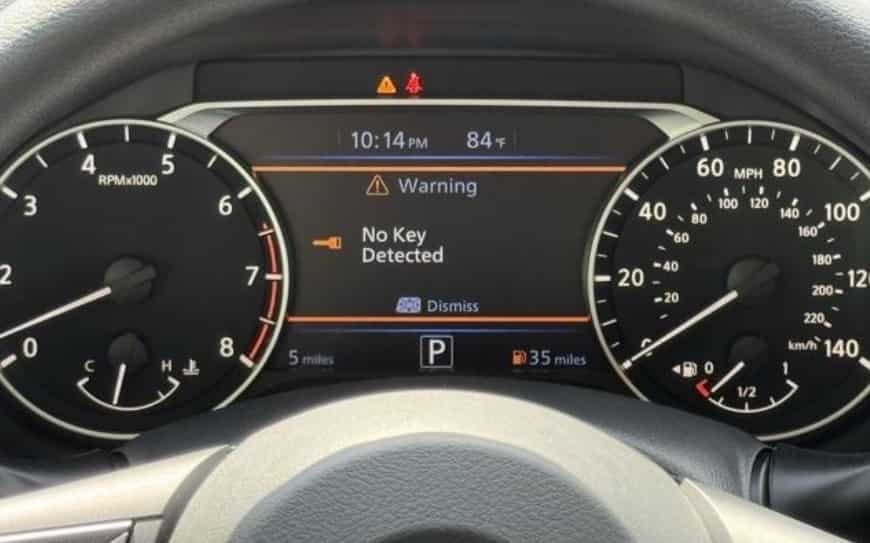
You press the push-start button, expect your Nissan Altima to come alive, but nothing happens. Instead, the dashboard displays a frustrating message: “Key Not Detected.” Even when the key fob is inside the vehicle, your car may refuse to start, leaving you wondering whether the problem comes from the key, the battery, or the vehicle’s electronic system.
The Nissan Altima Key Not Detected warning usually means that the vehicle cannot communicate properly with the Nissan Intelligent Key system. While a dead key fob battery is one of the most common causes, several other issues can trigger this message, including a weak vehicle battery, signal interference, damaged key components, or problems with key programming.
Understanding the exact cause is important because replacing the key fob is not always the solution. Many drivers spend unnecessary money on new keys when a simple battery replacement or system reset could solve the problem.
This complete troubleshooting guide explains why your Nissan Altima shows a Key Not Detected warning, the most common causes behind the issue, practical fixes you can try at home, and when professional repair may be necessary. Whether your Altima suddenly refuses to start or the problem happens intermittently, this guide will help you identify the right solution.
What Does “Key Not Detected” Mean on a Nissan Altima?
When your Nissan Altima shows a “Key Not Detected” message, the vehicle cannot recognize the key fob signal. The key may be inside the car, but the system cannot confirm that it belongs to the vehicle. Because of this, the push button start system may stop the engine from starting.
The Nissan Altima uses the Nissan Intelligent Key system for keyless entry and engine starting. This system replaces the need for a traditional ignition key. Instead, it uses wireless communication between the key fob and the vehicle.
The key fob contains a small chip with a unique identification code. The vehicle uses sensors and control modules to read this code. When you press the brake pedal and push the start button, the vehicle checks the key information.
The Nissan Intelligent Key system compares the key signal with the information stored in the vehicle. If the signals match, the immobilizer system allows the engine to start. If the system cannot verify the key, the dashboard displays the Key Not Detected warning.
Many drivers think this warning means they need a new key fob. However, that is not always true. A weak key fob battery causes many key detection problems. Other possible causes include a weak car battery, signal interference, damaged key components, or key programming issues.
Understanding the system helps you avoid unnecessary repairs. You may not need to replace the entire key fob. A simple battery replacement or system check may solve the problem.
How the Nissan Intelligent Key System Works
The Nissan Intelligent Key system gives drivers a convenient way to access and start their vehicle. Unlike older cars, the Nissan Altima does not require a physical key to start the engine. The system uses electronic signals instead.
When you approach the vehicle, sensors detect the key fob nearby. The system then allows functions such as door unlocking and keyless entry. When you try to start the car, the vehicle performs a security check.
The system uses several components during this process. These include the key fob battery, vehicle antennas, Body Control Module, immobilizer system, and push button ignition system.
Each component plays an important role. The key fob sends a signal to the vehicle. The antennas receive the signal. The control modules verify the information. The immobilizer system then decides whether the engine can start.
A failure in any part of this process can cause a Nissan Altima Key Not Detected warning. For example, a weak key fob battery can reduce signal strength. A weak vehicle battery can affect electronic systems. A programming issue can prevent the car from recognizing the key.
For this reason, you should check the complete system before replacing expensive parts. The key fob may work correctly while another component creates the problem.
Common Symptoms of Nissan Altima Key Detection Problems
A Nissan Altima key detection problem can appear in different ways. Some drivers experience sudden failure. Others notice small warning signs before the vehicle stops recognizing the key completely.
The most common symptom is a Key Not Detected message on the dashboard. The vehicle may have working lights and accessories, but the engine will not start. The security system blocks ignition because it cannot confirm the key.
Other symptoms include inconsistent door locking, slow key fob response, and repeated starting attempts. Some drivers notice that the vehicle detects the key only when they place the fob close to the start button.
The timing of the problem can also provide useful information. If the issue appears after the key fob battery becomes old, a battery replacement may solve it. If the problem happens with multiple keys, the vehicle may have a deeper electrical or programming issue.
Signal interference can also affect key detection. Other electronic devices near the key fob may interrupt communication with the vehicle. This problem usually happens in specific locations and disappears when the vehicle moves away.
Learning these symptoms helps you find the right solution faster. Instead of replacing parts immediately, you can identify the most likely cause and choose the correct repair method.
Common Causes of Nissan Altima Key Not Detected Error
A Nissan Altima Key Not Detected warning usually appears when the vehicle cannot communicate properly with the key fob. The problem may come from a simple battery issue or a more complex electronic failure. Understanding the most common causes can help you find the right solution without replacing expensive parts unnecessarily.
The most common cause is a weak or dead key fob battery. The Nissan Intelligent Key system needs enough power to send a clear signal to the vehicle. When the battery becomes weak, the key may work inconsistently or stop communicating with the car completely. Replacing the key fob battery, such as a CR2032 battery in many models, can often restore normal operation.
A weak vehicle battery can also trigger key detection problems. The Nissan Altima depends on electronic modules, including the Body Control Module and immobilizer system, to verify the key before starting the engine. Low battery voltage can interrupt this process and prevent the vehicle from recognizing the key.
Other possible causes include a damaged key fob, signal interference from nearby electronic devices, or programming issues. Water damage, broken internal circuits, or worn components can affect the key fob’s ability to transmit the correct signal. In some cases, the key may need reprogramming if the vehicle no longer recognizes its security code.
By identifying whether the issue comes from the key fob, vehicle battery, signal environment, or programming system, you can diagnose the Nissan Altima Key Not Detected problem more accurately and choose the most effective repair method.
How to Fix Nissan Altima Key Not Detected Problem
Fixing a Nissan Altima Key Not Detected problem starts with identifying the source of the communication failure. In many cases, you can solve the issue with simple troubleshooting steps before visiting a repair shop or replacing the key fob.
The first step is checking the key fob battery. A weak battery can reduce the signal strength and prevent the Nissan Intelligent Key system from recognizing the key. Replacing the old battery with a new CR2032 battery can often restore normal function. After replacement, test the lock, unlock, and push button start features to confirm the repair.
If the key fob battery does not solve the problem, try the emergency starting method. Place the key fob close to the push button start area and press the brake pedal while pressing the start button. Nissan designed this backup method to help drivers start the vehicle when the key fob signal becomes weak.
You should also check the vehicle battery condition. A weak Nissan Altima battery can affect electronic systems and prevent proper communication between the vehicle and key fob. Look for signs such as slow engine cranking, dim lights, or other electrical problems.
If the issue continues, the key fob may have damage or require programming. A damaged key circuit, failed security chip, or lost synchronization between the key and vehicle can prevent detection. In these situations, a Nissan dealer or automotive locksmith may need to diagnose the Intelligent Key system and reprogram the key.
Following these troubleshooting steps can help you fix many Nissan Altima Key Not Detected issues without unnecessary repairs.
Nissan Altima Key Not Detected After Battery Replacement: Why?
Replacing the key fob battery is one of the first solutions many drivers try when they see a Nissan Altima Key Not Detected warning. However, some owners still experience the same problem even after installing a new battery. This usually means the issue comes from another part of the key detection system.
One common reason is incorrect battery installation. The new battery must sit in the correct position and make proper contact with the internal terminals. If the battery is installed upside down or the contacts are loose, the key fob may not send a signal to the vehicle.
Another possibility is a damaged key fob. A new battery can restore power, but it cannot repair broken circuits, damaged buttons, or a faulty security chip inside the key. Water damage or physical impact can affect the key fob’s ability to communicate with the Nissan Intelligent Key system.
The vehicle may also need key synchronization or programming. The Nissan Altima stores specific security information that allows it to recognize an authorized key. If the key loses communication with the vehicle or the programming information becomes invalid, the system may continue showing the Key Not Detected message.
In some cases, the problem does not come from the key fob at all. A weak vehicle battery, faulty antenna, or issue with the immobilizer system can prevent successful key detection. If a new key fob battery does not solve the problem, checking the entire Intelligent Key system is the best approach.
Understanding these possible causes helps you avoid replacing the key fob unnecessarily and guides you toward the correct repair solution.
Nissan Altima Key Not Detected But Key Fob Works: What Does It Mean?
A confusing situation for many Nissan Altima owners is when the key fob appears to work normally, but the vehicle still shows a Key Not Detected warning. The remote buttons may lock and unlock the doors, yet the engine refuses to start. This happens because the key fob uses different systems for remote functions and vehicle authentication.
The lock and unlock buttons only need to send a basic signal to operate the door system. However, starting the engine requires a more advanced security process. The Nissan Intelligent Key system must verify the unique code stored inside the key fob before the immobilizer system allows the engine to start.
If the remote functions work but the vehicle cannot detect the key, the problem may involve the key’s internal security chip, signal communication, or vehicle sensors. A weak key fob battery can also create this situation because the remote buttons may still work while the signal is not strong enough for engine authorization.
Other possible causes include a faulty key antenna, electronic interference, low vehicle battery voltage, or a programming issue between the key and the Nissan Altima. These problems can prevent the vehicle from completing the authentication process.
Testing with a spare key can help identify the source of the problem. If another key works correctly, the original key fob may need repair or replacement. If both keys fail, the issue may involve the vehicle’s Intelligent Key system or electrical components.
Understanding the difference between remote operation and engine authorization makes it easier to diagnose a Nissan Altima Key Not Detected problem and choose the right repair method.
Nissan Altima Key Not Detected Repair Cost
The cost to fix a Nissan Altima Key Not Detected problem depends on the actual cause of the failure. Some solutions require only a small expense, while others may involve replacing electronic components or programming a new key.
The most affordable fix is usually replacing the key fob battery. A new battery, such as a CR2032 coin battery, costs very little and can solve many key detection issues. If the problem comes from a weak vehicle battery, the repair cost will be higher because the battery replacement includes parts and installation.
Replacing a damaged Nissan Altima key fob usually costs more. The final price depends on the model year, key type, and whether you choose a Nissan dealer or an automotive locksmith. A new key fob also requires programming so the vehicle can recognize the new security code.
Key programming costs vary depending on the service provider and the complexity of the Intelligent Key system. Nissan dealers often charge more because they use factory equipment and follow manufacturer procedures. Automotive locksmiths may offer a more affordable option, especially for key replacement and programming services.
If the issue involves the Nissan Intelligent Key system, Body Control Module, antenna, or immobilizer system, the repair cost can increase because diagnosis and electronic repairs may require specialized tools.
Before paying for a complete key replacement, it is important to identify the actual cause of the Nissan Altima Key Not Detected warning. A proper diagnosis can prevent unnecessary expenses and help you choose the most cost-effective solution.
When Should You Contact a Nissan Dealer or Locksmith?
Many Nissan Altima Key Not Detected problems can be solved with basic troubleshooting, such as replacing the key fob battery or checking the vehicle battery. However, some situations require professional help because the problem involves advanced electronic systems or key programming.
You should consider contacting a professional when the key fob does not work after installing a new battery, the vehicle cannot recognize multiple keys, or the warning message continues after basic troubleshooting. These signs may indicate a deeper issue with the Nissan Intelligent Key system, immobilizer system, or vehicle electronics.
A Nissan dealer can provide factory-level diagnosis and programming services. Dealers have access to specialized equipment designed for Nissan vehicles. This option works well when you need an original replacement key or when the problem involves complex electronic components. However, dealer services are often more expensive and may require more waiting time.
An automotive locksmith can be another practical option for many key-related problems. Experienced locksmiths can replace key fobs, program new keys, and diagnose common Nissan Altima key issues. Their services are often faster and more affordable than dealership repairs.
Before choosing a repair option, consider the type of problem you have. A simple battery issue may not require professional service, while a failed key module or programming problem usually needs specialized equipment.
Getting the right diagnosis is the most important step. Instead of replacing parts without confirmation, identify whether the issue comes from the key fob, vehicle battery, programming, or the Intelligent Key system itself.
How to Prevent Future Nissan Altima Key Detection Problems
Preventing a Nissan Altima Key Not Detected problem starts with maintaining both the key fob and the vehicle’s electrical system. Many key detection failures happen because small issues are ignored until the vehicle can no longer recognize the key.
One of the easiest ways to prevent problems is replacing the key fob battery before it becomes completely weak. A low battery can reduce signal strength and create inconsistent communication with the Nissan Intelligent Key system. Keeping a spare battery available can also help you avoid unexpected starting problems.
You should also protect the key fob from physical damage. Avoid exposing it to water, extreme heat, or heavy impact. A damaged key fob may continue working for basic functions but fail during engine authentication. Keeping the key away from other electronic devices can also reduce possible signal interference.
Maintaining the Nissan Altima vehicle battery is equally important. The Intelligent Key system depends on stable electrical power to communicate with the key fob and authorize engine starting. Regular battery checks can help prevent low voltage problems that affect electronic systems.
If you use a spare key, test it occasionally to make sure it works correctly. A backup key can help you determine whether a problem comes from the key fob or the vehicle when a detection issue appears.
Final Thoughts About Nissan Altima Key Not Detected Problems
A Nissan Altima Key Not Detected warning can be frustrating, especially when your vehicle refuses to start unexpectedly. However, the problem does not always mean you need an expensive key replacement or major repair.
The most common causes include a weak key fob battery, low vehicle battery voltage, damaged key components, signal interference, and programming problems. Starting with simple troubleshooting steps can often help you identify the issue and restore normal operation.
The Nissan Intelligent Key system combines several technologies, including wireless communication, security authentication, and electronic control modules. Because of this, accurate diagnosis is important before replacing any parts.
If your Nissan Altima continues showing a Key Not Detected warning after basic fixes, professional diagnosis from a qualified technician, Nissan dealer, or automotive locksmith can help identify the real cause.
Have you experienced a Nissan Altima Key Not Detected problem before? Share your Nissan Altima model year and symptoms to help other drivers find the right solution.