
Have you ever pressed your Nissan Sentra key fob and received no response? The doors stay locked, the remote does not react, and you cannot figure out what went wrong. A Nissan Sentra Key Fob Not Working issue can quickly become stressful, especially when you need to access or start your vehicle.
Many drivers assume they need a new key fob when this problem appears. However, most key fob failures come from simple causes. A weak battery, programming issue, signal interference, or internal damage can stop the remote from working properly.
This troubleshooting guide explains the most common reasons behind a Nissan Sentra key fob not working. It also provides practical solutions that you can try before visiting a dealership or locksmith.
You will learn how to identify key fob symptoms, replace the battery, reset the remote, and check possible vehicle related problems. The guide also explains when a repair makes sense and when you may need a replacement.
Whether your Nissan Sentra key fob stopped unlocking the doors or your vehicle cannot detect the key, this article will help you find the right solution. With the correct steps, you can save time, reduce repair costs, and restore your key fob function.
What Does It Mean When Your Nissan Sentra Key Fob Is Not Working?
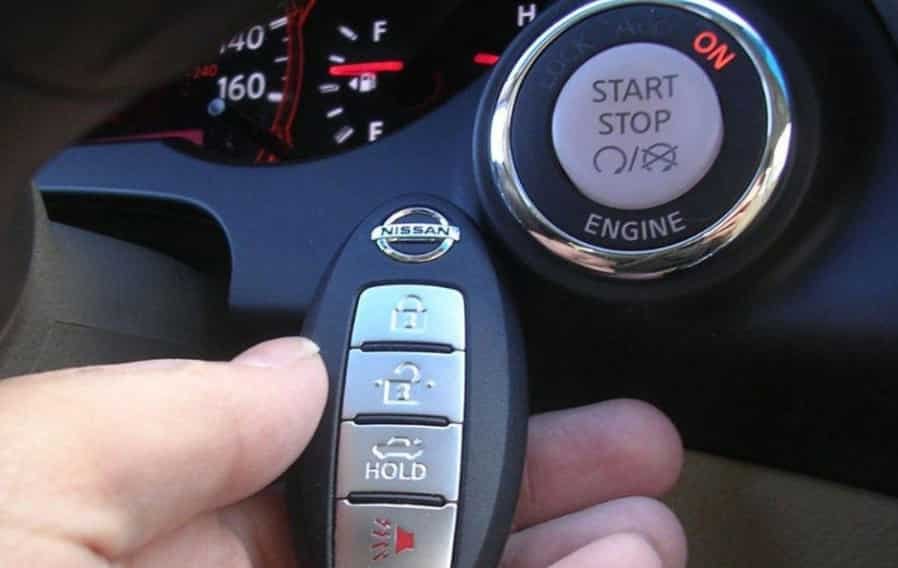
A Nissan Sentra key fob is a small electronic device that allows you to control several vehicle functions remotely. It sends a coded signal to your car’s receiver system. This signal allows you to lock or unlock the doors, open the trunk, and start the engine on models with Intelligent Key technology.
When your Nissan Sentra key fob is not working, it means the remote cannot communicate properly with your vehicle. The problem can happen because of a power issue, communication failure, physical damage, or a problem inside the vehicle’s security system.
Many key fob problems show similar symptoms. Your remote may stop responding completely. It may work only from a short distance. The buttons may respond slowly or fail randomly. In some cases, the vehicle may display a “No Key Detected” message when you try to start the engine.
Understanding these signs helps you identify the source of the problem faster. For example, a weak battery usually reduces the remote range before the key fob stops working completely. A programming issue may cause the vehicle to ignore the key even when the battery has enough power.
Before replacing your Nissan Sentra key fob, you should check the most common causes first. Simple solutions such as changing the battery or resetting the remote can often restore normal operation. A proper diagnosis can help you avoid unnecessary replacement costs and save time.
10 Common Reasons Why Nissan Sentra Key Fob Is Not Working
When your Nissan Sentra key fob stops responding, several factors can cause the problem. Some issues are simple and require only a few minutes to fix. Others may involve the vehicle’s electronic systems and need professional diagnosis.
Finding the correct cause is the first step toward a successful repair. Below are the most common reasons why your Nissan Sentra key fob is not working.
Dead or Weak Key Fob Battery
A weak battery is the most common reason behind a Nissan Sentra key fob not working. The key fob needs enough power to send a strong signal to your vehicle. When the battery loses power, the remote may become unreliable or stop working completely.
Many drivers notice warning signs before the battery dies. The key fob may work only when they stand closer to the vehicle. The buttons may respond slowly. The remote range may become shorter than usual.
Most Nissan Sentra key fobs use a small coin cell battery. Depending on the model year, the key may require a CR2025 or CR2032 battery. Replacing the battery is usually a simple process that takes only a few minutes.
After installing a new battery, test all key fob functions. Check the lock button, unlock button, trunk release, and remote start if your vehicle supports this feature. If the key fob still does not work, the problem may involve programming or another electronic component.
Key Fob Needs a Reset
Sometimes, a Nissan Sentra key fob loses communication with the vehicle. This issue can happen after a battery replacement, electrical problem, or temporary system error.
A reset can help restore the connection between the remote and the car. The process varies depending on the Nissan Sentra model year. Some vehicles allow simple manual reset steps, while others require special programming equipment.
Before seeking professional help, try basic troubleshooting. Remove the key fob battery, wait for a short period, and reinstall it correctly. Then test the remote near your vehicle.
If the Nissan Sentra key fob still does not respond after a reset attempt, the vehicle may have a deeper programming or receiver issue. At that point, further diagnosis can help identify the exact problem.
Key Fob Has Lost Its Programming
A Nissan Sentra key fob needs proper programming to communicate with your vehicle. When the programming connection fails, the car may not recognize the remote even when the battery works correctly.
This problem can happen after replacing the key fob battery, changing vehicle electronics, or using a damaged remote. In some cases, the key may still lock or unlock the doors but fail to start the engine because the security system does not recognize it.
A lost programming issue often appears with Intelligent Key models. You may see a “No Key Detected” message on the dashboard. The push button start system may also fail to respond.
Some Nissan Sentra models allow owners to complete basic key programming procedures at home. However, many newer models require specialized diagnostic tools. A professional locksmith or Nissan dealership can reprogram the key when manual methods do not work.
Before paying for a replacement key, confirm whether the problem comes from programming. A simple reprogramming service can often restore your existing key fob and cost less than buying a new one.
Damaged Internal Key Fob Components
Physical damage can also cause a Nissan Sentra key fob not working problem. Although the outer case may look normal, internal components can fail after repeated drops, water exposure, or heavy use.
Inside the key fob, a small circuit board controls the buttons and signal transmission. If this board becomes damaged, the remote may stop sending signals to your vehicle.
Common signs of internal damage include buttons that feel loose, random remote failures, or complete loss of function after the key fob gets wet. A cracked case can also allow moisture to enter and damage electronic parts.
Inspect your key fob carefully for visible damage. Check the buttons, battery area, and outer cover. If you find corrosion or broken components, repair or replacement may be necessary.
In some cases, you can replace only the damaged key fob shell and transfer the internal parts. This option can reduce costs when the electronics still work properly.
Signal Interference Blocks Key Fob Communication
Your Nissan Sentra key fob uses radio signals to communicate with your vehicle. When something interrupts this signal, the remote may not work correctly.
Signal interference can happen in areas with many electronic devices. Parking garages, airports, and locations with strong wireless activity may affect key fob performance. Other devices near your key, such as smartphones or electronic accessories, can also reduce signal strength.
A common sign of signal interference is a key fob that works normally in one location but fails in another area. The remote may respond when you move closer to the vehicle or change your position.
To test for interference, move away from the area and try using the key fob again. Keep the remote away from other electronic devices and avoid storing multiple keys or gadgets together.
If the Nissan Sentra key fob works normally after moving locations, interference may have caused the issue. However, repeated signal problems can indicate a weak battery or a damaged remote.
Vehicle Battery Problems Affect Key Recognition
Many drivers focus on the key fob when a remote problem appears. However, the vehicle battery can also cause Nissan Sentra key fob issues.
Your car needs enough electrical power to receive and process the key fob signal. A weak or failing vehicle battery can affect the door locking system, security system, and Intelligent Key functions.
Signs of a weak vehicle battery include slow engine cranking, dim interior lights, and electrical features that work inconsistently. The key fob may appear faulty when the actual problem comes from the vehicle’s power supply.
Check your car battery condition if the key fob stops working together with other electrical problems. A battery test can quickly show whether the vehicle has enough power.
If the vehicle battery is weak, replacing or charging it may restore normal key fob operation. Always check both the key fob battery and the vehicle battery before replacing expensive electronic components.
Faulty Key Fob Receiver in Your Nissan Sentra
Your Nissan Sentra key fob depends on a receiver inside the vehicle to receive and process remote signals. When this receiver has a problem, the car may not respond even when the key fob works correctly.
A receiver issue often affects more than one key. For example, your primary key and spare key may both fail at the same time. This situation helps separate a vehicle communication problem from a damaged key fob.
Common signs of a faulty receiver include unresponsive door locks, inconsistent key detection, and failure of multiple remote functions. The key fob battery may have full power, but the vehicle still cannot recognize the signal.
Diagnosing a receiver problem usually requires professional testing equipment. A technician can check the communication between the key fob and the vehicle system. They can also identify whether the issue comes from the receiver, wiring, or another electronic module.
Before replacing the receiver, test your spare key if you have one. This simple step can help confirm whether the problem comes from the key or the vehicle.
Immobilizer System Problems Prevent Vehicle Recognition
The Nissan Sentra immobilizer system protects your vehicle from unauthorized starting. It uses electronic communication between the key fob and the vehicle to confirm that the correct key is present.
When the immobilizer system cannot verify the key, your vehicle may refuse to start. The dashboard may display a warning message, or the push button start system may not respond.
Several factors can cause immobilizer problems. These include programming errors, damaged key components, or communication failures between electronic modules.
A Nissan Sentra key fob not working issue related to the immobilizer requires careful diagnosis. Replacing the battery alone will not fix this type of problem because the issue involves security communication rather than power.
If your vehicle detects the key but still does not start, check the owner’s manual for emergency starting instructions. If the problem continues, a qualified technician can scan the vehicle system and identify the exact cause.
Understanding the difference between a key fob issue and an immobilizer problem can help you choose the right repair solution and avoid unnecessary expenses.
Extreme Temperatures Affect Key Fob Performance
Temperature changes can affect how your Nissan Sentra key fob works. Both very cold and very hot conditions can reduce battery performance and affect electronic components inside the remote.
Cold weather can make the key fob battery lose power faster. You may notice a shorter operating range or delayed response during winter months. In some cases, the remote may work again after the temperature returns to normal.
High temperatures can also damage internal parts. Leaving your key fob inside a hot vehicle for long periods can affect the circuit board, battery, and plastic components.
If your Nissan Sentra key fob works differently depending on the weather, temperature may play a role. Try testing the remote in a normal environment before replacing it.
Protecting your key fob from extreme conditions can help extend its lifespan. Avoid leaving it in direct sunlight, near heaters, or in areas with excessive moisture.
The Key Fob Has Reached the End of Its Lifespan
Like any electronic device, a Nissan Sentra key fob can wear out over time. Daily use, repeated button presses, and years of exposure can eventually damage the internal components.
An old key fob may show several warning signs. The buttons may stop responding, the signal range may become very limited, or the remote may fail even after a battery replacement.
When repairs no longer solve the problem, replacing the key fob may become the best option. A replacement key can restore reliable access and prevent unexpected issues.
Before purchasing a new Nissan Sentra key fob, confirm that the original remote cannot be repaired. Check the battery, programming, and vehicle communication system first.
The replacement cost depends on several factors, including your Sentra model year, key type, and programming requirements. Comparing options from a dealership, automotive locksmith, and aftermarket supplier can help you find the most suitable solution.
How to Fix Nissan Sentra Key Fob Not Working: Step by Step Troubleshooting
When your Nissan Sentra key fob stops working, you do not always need an immediate replacement. Many problems come from simple issues that you can check at home. Following a clear troubleshooting process can help you identify the cause and restore your key fob function.
Step 1: Replace the Nissan Sentra Key Fob Battery
The first step is checking the key fob battery. A weak battery is the most common reason why a Nissan Sentra key fob stops responding.
Start by opening the key fob case carefully. Remove the old battery and check the battery type printed on it. Many Nissan Sentra models use a CR2025 or CR2032 coin cell battery.
Install the new battery with the correct positive and negative direction. A wrong battery position can prevent the remote from working. After replacing the battery, test each button near your vehicle.
Check the lock button, unlock button, trunk release, and remote start function if your model supports it. If the key fob works again, the problem came from a weak battery.
Step 2: Inspect the Key Fob for Physical Damage
If a new battery does not solve the problem, inspect the key fob carefully. Physical damage can affect the internal electronics and prevent proper communication with your Nissan Sentra.
Look for cracks, damaged buttons, moisture, or corrosion around the battery area. A key fob that has been dropped many times may have internal circuit damage even if the outside looks normal.
Clean any visible dirt or corrosion carefully. If the buttons feel loose or the remote shows signs of water damage, you may need professional repair or a replacement case.
A visual inspection only takes a few minutes and can help you avoid unnecessary programming or replacement costs.
Step 3: Try a Nissan Sentra Key Fob Reset
A reset can help when your Nissan Sentra key fob loses communication with the vehicle. This issue may happen after a battery change or a temporary electronic error.
Start by removing the key fob battery. Wait for a short time before installing the battery again. Make sure the new battery sits correctly inside the key fob.
After reinstalling the battery, stand close to your Nissan Sentra and test the remote functions. Press the lock and unlock buttons several times. Check whether the vehicle responds normally.
Some Nissan Sentra models use different reset procedures depending on the model year. Always check your vehicle owner’s manual for specific instructions.
If a reset does not restore the connection, the key fob may need reprogramming. A programming issue usually requires additional diagnostic steps.
Step 4: Test Your Spare Nissan Sentra Key Fob
Testing a spare key fob is one of the easiest ways to identify the source of the problem. If the spare key works normally, the original key fob likely has an issue.
Try unlocking the doors and starting the vehicle with the spare remote. Pay attention to how the vehicle responds.
If both key fobs fail at the same time, the problem may come from the vehicle instead. Possible causes include a weak car battery, receiver failure, or an issue with the Intelligent Key system.
This simple comparison can save time during troubleshooting. It helps you determine whether you need a key repair or a vehicle inspection.
Step 5: Reprogram the Nissan Sentra Key Fob
A Nissan Sentra key fob may need reprogramming when the vehicle no longer recognizes the remote. This can happen after electronic repairs, battery issues, or when using a replacement key.
Some older Nissan Sentra models may allow basic programming steps. However, many newer models require professional diagnostic equipment.
A locksmith or Nissan service center can connect specialized tools to program the key correctly. They can also check whether the problem comes from the key fob or the vehicle’s security system.
Before paying for a new key, consider reprogramming first. It may restore your existing key fob and reduce repair costs.
Nissan Sentra Key Fob Not Detected: What To Do?
When your Nissan Sentra displays a “No Key Detected” message, it means the vehicle cannot communicate correctly with your key fob. This problem can happen even when the remote still looks normal. Many drivers assume they need a replacement key, but the real cause is often much simpler.
The first thing to check is the Nissan Sentra key fob battery. A weak battery may still allow the buttons to work, but it may not provide enough power for the Intelligent Key system to recognize the remote. Replacing the battery with the correct type can often restore normal communication.
If the new battery does not solve the issue, try placing the key fob close to the push button start area. Many Nissan Sentra models can detect a weak key fob signal through this emergency method. Press the brake pedal and attempt to start the vehicle while keeping the key near the start button.
You should also check your vehicle battery because low voltage can affect the Nissan Sentra key detection system. Signs of a weak car battery include slow engine starting, dim lights, or inconsistent electrical functions.
If the key fob battery and vehicle battery work properly, the problem may involve key programming, the Intelligent Key system, or the vehicle receiver. In these cases, professional diagnosis can help identify the exact issue and prevent unnecessary replacement costs.
Nissan Sentra Key Fob Replacement Cost: What You Should Know
The cost of replacing a Nissan Sentra key fob depends on several factors, including your vehicle model year, key type, and programming requirements. Many drivers expect a simple remote replacement, but modern Nissan key fobs often include advanced technology that requires additional setup.
Replacing only the key fob battery is usually the most affordable solution. A new coin cell battery costs very little and can solve many common Nissan Sentra key fob problems. If the remote case is damaged but the internal electronics still work, replacing the outer shell can also reduce expenses.
A complete Nissan Sentra key fob replacement costs more because the new remote must communicate with your vehicle. Traditional keys may require basic cutting and programming, while Intelligent Key models often need specialized equipment.
You usually have three main replacement options. A dealership can provide an original Nissan key and professional programming, but this option often has the highest cost. An automotive locksmith may offer similar services at a lower price. Aftermarket key fobs can provide a more affordable alternative, but compatibility and quality can vary.
Before buying a replacement Nissan Sentra key fob, confirm that the original remote cannot be repaired. Many issues come from battery failure, programming errors, or minor damage that does not require a complete replacement.
Understanding the possible costs can help you choose the right solution. Proper diagnosis saves money and prevents you from replacing a key fob that still has usable components.
Nissan Sentra Key Fob Problems by Model Year
Nissan Sentra key fob problems can vary depending on the vehicle generation and technology features. Older models usually use simpler remote systems, while newer models often include Intelligent Key technology with push button start and advanced security functions.
Older Nissan Sentra models commonly experience basic key fob issues. The most frequent problems include weak batteries, worn buttons, and reduced remote range. These problems usually have simple solutions, such as replacing the battery or repairing the damaged remote case.
Newer Nissan Sentra models with Intelligent Key systems may experience different symptoms. Drivers may see a “No Key Detected” message, experience push button start problems, or notice that the vehicle does not unlock automatically. These issues can involve battery power, key programming, or communication between the key fob and vehicle receiver.
Some model years may also require specific programming procedures after replacing a key fob. A replacement remote may look identical to the original, but the vehicle will not recognize it until the correct programming process is completed.
When troubleshooting a Nissan Sentra key fob not working problem, always confirm your exact model year and key type. This information helps you choose the correct battery, replacement remote, and repair method.
Understanding the differences between Nissan Sentra generations can prevent incorrect repairs. Instead of replacing parts immediately, identify the technology used in your vehicle and follow the correct troubleshooting steps for better results.
How to Prevent Future Nissan Sentra Key Fob Problems
Taking care of your Nissan Sentra key fob can help prevent unexpected failures and extend its lifespan. Although key fobs are small devices, they contain sensitive electronic components that need proper maintenance.
The first step is replacing the battery before it completely loses power. A weak battery can reduce signal range and cause unreliable performance. Check your key fob regularly and replace the battery when you notice delayed responses or shorter operating distance.
Protect your key fob from physical damage and moisture. Avoid dropping the remote, placing heavy objects on it, or exposing it to water. Even small cracks can allow moisture to reach the internal circuit board and create long term problems.
You should also avoid storing your Nissan Sentra key fob near strong electronic devices. Other wireless devices may interfere with the signal and reduce communication between the remote and your vehicle.
Keeping a spare key fob available is another smart way to avoid emergencies. A backup remote allows you to test whether a problem comes from the key fob or the vehicle system.
Regular maintenance and careful handling can reduce the chance of a Nissan Sentra key fob not working when you need it most. Simple habits can save time, reduce repair expenses, and help your key fob perform reliably for years.
Frequently Asked Questions About Nissan Sentra Key Fob Problems
Why is my Nissan Sentra key fob not working after battery replacement?
If your Nissan Sentra key fob is not working after replacing the battery, the issue may come from incorrect battery installation, lost programming, or internal damage. First, check that the battery is installed in the correct direction. If the remote still does not respond, try resetting the key fob or checking whether the vehicle still recognizes the key.
How do I reset my Nissan Sentra key fob?
The reset process depends on your Nissan Sentra model year and key system. In some cases, removing the battery for a short period and reinstalling it can restore communication. Newer models may require professional programming equipment to reconnect the key fob with the vehicle.
How much does it cost to replace a Nissan Sentra key fob?
The cost depends on the key type, model year, and programming requirements. A simple battery replacement costs very little, while a complete replacement key fob with programming costs more. Dealerships, locksmiths, and aftermarket options may have different prices.
Why does my Nissan Sentra say “No Key Detected”?
A “No Key Detected” message usually means the vehicle cannot communicate with the key fob. Common causes include a weak key battery, low vehicle battery voltage, programming problems, or Intelligent Key system issues.
Can I program a Nissan Sentra key fob myself?
Some older Nissan Sentra models may support basic programming methods. However, many newer models require specialized diagnostic tools. If manual programming does not work, a locksmith or Nissan service center can complete the process correctly.
Conclusion
A Nissan Sentra key fob not working problem can happen for many reasons, but most causes are easier to fix than many drivers expect. A weak battery, lost programming, signal interference, or physical damage can affect how your key communicates with the vehicle.
Before replacing the entire key fob, start with simple troubleshooting steps. Check the battery, inspect the remote for damage, test a spare key, and confirm that your vehicle battery works properly. These basic checks can help you identify the real cause and avoid unnecessary repair costs.
For Nissan Sentra models with Intelligent Key technology, key detection problems may require additional diagnosis. Issues involving programming, the receiver, or the vehicle security system often need professional tools and technical knowledge.
Regular key fob maintenance can also prevent future problems. Replacing the battery on time, protecting the remote from damage, and keeping a backup key available can improve reliability.
If your Nissan Sentra key fob is not working, finding the cause is the most important step. The right diagnosis can help you choose the correct solution and restore your vehicle’s convenience quickly.
Have you experienced a Nissan Sentra key fob problem? Share your model year and symptoms in the comments to help other drivers find the right solution.