
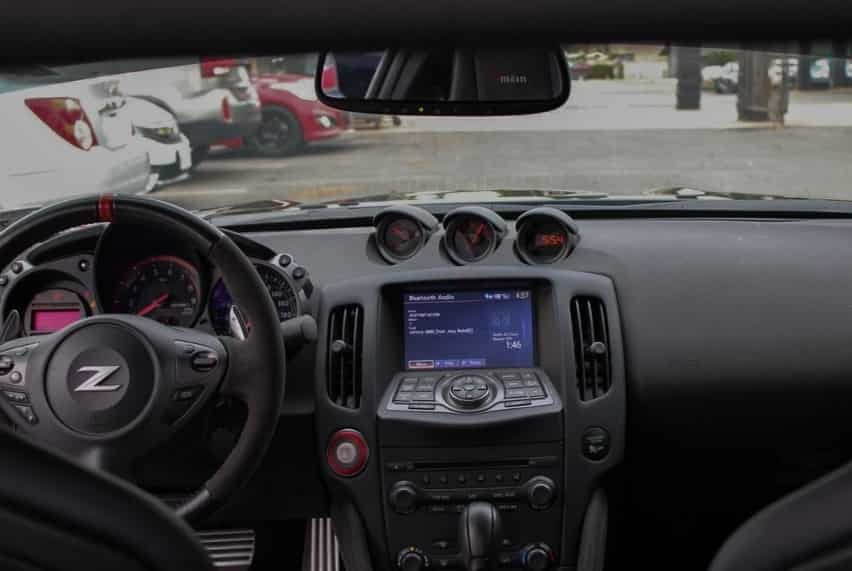
Does Nissan 370Z have Bluetooth? The short answer is yes, but the complete answer depends on the model year, trim level, factory audio system, and optional technology package. While many Nissan 370Z models include Bluetooth connectivity, not every version offers the same features. Some vehicles support only hands free phone calls, while others also allow wireless music streaming. This difference often surprises buyers who expect every Bluetooth equipped car to function the same way.
If you are shopping for a used Nissan 370Z or already own one, understanding its Bluetooth capabilities can save you time and frustration. Many drivers discover that their smartphone pairs successfully for phone calls but refuses to stream music. Others are unsure whether their vehicle even has factory Bluetooth because equipment varies significantly across different production years and trim levels.
This guide explains everything you need to know about Nissan 370Z Bluetooth compatibility from the first 2009 model through the final 2020 production year. You will learn which model years include Bluetooth, how different trim levels affect available features, how to pair an iPhone or Android device, and what to do if the system does not work correctly. You will also discover practical upgrade options if your 370Z lacks the Bluetooth functionality you want.
By the end of this guide, you will know exactly what Bluetooth features your Nissan 370Z supports and whether upgrading your factory system is the right solution for your driving needs.
Does Nissan 370Z Have Bluetooth?
Yes, the Nissan 370Z does have Bluetooth, but the available features depend on the model year, trim level, and factory installed audio system. Some models include Bluetooth for hands free phone calls only, while others also support wireless audio streaming. Because Nissan offered different technology packages throughout the production run, two vehicles from the same model year may not provide identical Bluetooth functions.
For most buyers, the biggest point of confusion is the difference between Bluetooth calling and Bluetooth audio. A vehicle may connect to your smartphone so you can make and receive calls through the speakers, yet it may not play music wirelessly. This limitation is common on older factory infotainment systems and often leads owners to believe that the Bluetooth system is malfunctioning when it is actually operating as designed.
If you are buying a used Nissan 370Z, always test both phone pairing and music playback before completing the purchase. Never assume that Bluetooth automatically includes media streaming. The original equipment, optional navigation package, premium audio system, and trim level all influence the available features.
The following sections explain Bluetooth availability for every Nissan 370Z model year, making it easier to identify what your vehicle offers before you spend money on repairs or upgrades.
Nissan 370Z Bluetooth Availability by Model Year
2009 Nissan 370Z Bluetooth Features
The 2009 Nissan 370Z marked the beginning of the model’s production and introduced a more modern cabin compared with its predecessor. However, Bluetooth availability was not consistent across the entire lineup. Buyers who selected the Base model generally received fewer technology features, while higher trim levels offered additional convenience and connectivity.
On many 2009 models, Bluetooth hands free calling was available only when the vehicle was equipped with the Touring trim or the optional navigation package. These versions included a factory system that allowed drivers to pair a compatible mobile phone for voice calls without taking their hands off the steering wheel. At the time, this feature was considered a premium convenience rather than standard equipment.
Wireless music streaming was a different story. Many early 2009 factory systems focused on phone communication and did not fully support Bluetooth audio streaming. As a result, owners often relied on the AUX input or USB connection to play music from their smartphones or portable media players. Drivers expecting modern wireless playback were sometimes disappointed because pairing a phone did not automatically enable music streaming.
If you are considering a used 2009 Nissan 370Z, inspect the factory head unit carefully. Check whether the vehicle includes navigation, verify that the steering wheel has dedicated phone controls, and test both calling and media playback with your smartphone. A successful phone connection does not necessarily confirm Bluetooth audio support.
2010 Nissan 370Z Bluetooth Features
The 2010 Nissan 370Z continued with a technology package similar to the previous model year, although availability still depended heavily on trim level and optional equipment. Nissan did not make Bluetooth standard across the entire range, which means buyers should verify the vehicle specifications instead of relying only on the model year.
Vehicles equipped with the Touring trim or factory navigation system typically offered Bluetooth hands free calling as part of the integrated infotainment package. This allowed drivers to answer incoming calls and communicate through the vehicle’s built in microphone and speakers, improving both convenience and safety during everyday driving.
Bluetooth audio streaming remained limited on many factory configurations. Some owners discovered that their phones paired successfully for calls but could not stream music because the original audio system did not support the necessary Bluetooth media profile. In these situations, the AUX input remained the most reliable option for listening to music while maintaining consistent sound quality.
Before purchasing a 2010 Nissan 370Z, verify the installed audio system and perform a complete Bluetooth test using your own smartphone. Confirm that both calling and music playback function as expected. This simple inspection can prevent unnecessary disappointment and help you determine whether an aftermarket Bluetooth upgrade will be needed.
2011 Nissan 370Z Bluetooth Features
The 2011 Nissan 370Z continued to offer Bluetooth on selected models rather than making it a standard feature across the lineup. Buyers who chose higher trim levels or vehicles equipped with the factory navigation system generally received better connectivity options than those who purchased the Base model. As a result, checking the original equipment remains essential when evaluating a used 2011 model.
Bluetooth hands free calling was available on many Touring models and on vehicles equipped with premium technology packages. Drivers could pair a compatible mobile phone, access their contacts, and answer calls through the factory audio system. Steering wheel mounted controls also made it easier to manage calls without taking attention away from the road.
Music streaming was more limited than many buyers expected. Some factory systems supported Bluetooth phone functions but did not include wireless audio playback. Owners who wanted to stream music often relied on the AUX input or a USB connection instead. This difference is one of the most common reasons why buyers become confused after pairing a modern smartphone.
If you are looking at a used 2011 Nissan 370Z, inspect the infotainment system before making a purchase. Open the Bluetooth menu, pair your phone, and test both calling and media playback. Spending a few minutes on this inspection can help you avoid unexpected upgrade costs later.
2012 Nissan 370Z Bluetooth Features
The 2012 Nissan 370Z maintained a similar technology package, although Bluetooth availability still depended on trim level and optional equipment. Nissan focused more on preserving the sports car driving experience than introducing major infotainment upgrades. Therefore, buyers should not assume every 2012 model includes the same wireless features.
Higher trims such as the Touring model were more likely to include factory Bluetooth for hands free communication. Vehicles equipped with navigation also offered improved connectivity compared with entry level versions. These systems made daily driving more convenient by allowing drivers to place and receive calls without handling their phones.
Bluetooth audio support continued to vary. Some owners enjoyed wireless music playback, while others discovered that their factory system only recognized phone calls. This difference depended on the original head unit rather than the model year alone. Because many used vehicles have been modified over time, it is also important to confirm whether the factory stereo has been replaced with an aftermarket unit.
Before buying a 2012 Nissan 370Z, verify the vehicle specifications, inspect the audio controls, and test Bluetooth using your own device. Confirm that your phone connects properly and that both voice calls and music playback work as expected.
2013 Nissan 370Z Bluetooth Features
The 2013 Nissan 370Z received several updates, including exterior styling revisions and changes to available equipment. Although the sports car retained its familiar driving characteristics, technology features became more attractive for buyers interested in convenience as well as performance.
Bluetooth remained available primarily on better equipped models. Touring trims and vehicles with factory navigation generally included hands free phone capability, making wireless communication easier during everyday driving. Drivers could pair compatible smartphones, store multiple contacts, and operate the system through voice commands or steering wheel controls.
Wireless music streaming became more common on certain configurations, although availability was still not universal. Buyers should remember that two vehicles built in the same year may include different factory audio systems depending on optional packages selected by the original owner. This is especially important in the used car market, where equipment can vary significantly.
Compatibility with modern smartphones is generally good for basic Bluetooth functions. However, newer versions of iOS and Android may occasionally experience pairing issues with older infotainment software. Restarting both the phone and the vehicle system often resolves minor connection problems.
2014 Nissan 370Z Bluetooth Features
The 2014 Nissan 370Z continued to offer Bluetooth connectivity on selected trims while maintaining the same performance focused character that made the model popular among enthusiasts. Nissan did not introduce a completely redesigned infotainment system, so Bluetooth functionality remained largely dependent on trim level and installed options.
Touring models were typically the best choice for buyers who wanted factory Bluetooth features. These vehicles often combined premium interior materials with improved technology, including hands free phone capability and enhanced audio equipment. Some versions also supported Bluetooth audio streaming, providing greater convenience for drivers who preferred wireless music.
Base models generally offered fewer technology features. Depending on the original configuration, owners might need to connect their devices through the AUX input instead of Bluetooth for music playback. Because many used vehicles have changed owners several times, it is also worth checking whether the original head unit has been replaced with an aftermarket system that adds additional wireless functions.
When inspecting a 2014 Nissan 370Z, verify every Bluetooth feature individually rather than assuming everything works together. Pair your smartphone, make a test call, stream music, and confirm that steering wheel controls respond correctly. A complete inspection provides a much clearer picture of the vehicle’s actual capabilities than simply checking whether Bluetooth appears in the settings menu.
2015 Nissan 370Z Bluetooth Features
The 2015 Nissan 370Z continued to provide Bluetooth connectivity on selected configurations, with availability depending on the trim level and factory installed technology package. By this stage of production, smartphone connectivity had become an important expectation for many drivers, but the 370Z remained focused primarily on performance rather than advanced infotainment technology.
Higher trims such as the Touring and Sport Tech models were more likely to include integrated Bluetooth features. These systems allowed drivers to connect compatible smartphones for hands free calling and, on certain configurations, wireless audio playback. The premium audio system and navigation package usually provided a more complete connectivity experience compared with the standard equipment found on entry level models.
One common issue among 2015 Nissan 370Z owners is confusion between Bluetooth calling and Bluetooth music streaming. A phone connection does not always mean that the vehicle can play music wirelessly. Some factory systems were designed mainly for communication, while music playback required an AUX cable, USB connection, or an aftermarket solution.
For buyers searching for a used 2015 Nissan 370Z, testing the actual Bluetooth performance is more important than relying only on the trim name. Pair your smartphone, check whether the vehicle recognizes media audio, and confirm that the microphone and speakers work correctly during calls.
2016 Nissan 370Z Bluetooth Features
The 2016 Nissan 370Z maintained a similar approach to technology, offering Bluetooth features through selected audio systems rather than making every connectivity option standard across the lineup. This model year continued to attract enthusiasts who valued driving performance, engine response, and handling more than advanced digital features.
Vehicles equipped with upgraded audio systems generally provided better Bluetooth functionality. Drivers could connect smartphones for hands free calling and use factory controls to manage phone functions. Some configurations also allowed wireless audio streaming, although the exact capability depended on the installed infotainment system.
Modern smartphone compatibility became a growing concern as mobile operating systems continued to evolve. While older Nissan Bluetooth systems could still perform basic functions, some owners experienced connection delays, failed pairing attempts, or inconsistent media playback with newer devices.
If your 2016 Nissan 370Z Bluetooth system does not work properly, start by deleting old paired devices and reconnecting your phone. Many issues are caused by outdated pairing information rather than a hardware failure. If problems continue, an aftermarket Bluetooth adapter or upgraded head unit may provide a more reliable long term solution.
2017 Nissan 370Z Bluetooth Features
The 2017 Nissan 370Z continued with the same performance oriented platform while offering practical technology features for daily driving. Bluetooth remained available on better equipped models, giving owners the ability to connect smartphones without using traditional wired connections for basic communication.
Touring and Sport Tech versions were generally the most attractive choices for drivers who wanted additional convenience features. These models often included enhanced audio systems, navigation options, and improved connectivity compared with the base configuration. However, buyers should always verify the exact equipment because factory options could vary.
Bluetooth calling was typically more reliable than wireless music streaming. This was common among many vehicles from this period because manufacturers were gradually transitioning toward newer smartphone integration systems. Owners who wanted modern streaming services, navigation apps, and voice assistants often needed aftermarket upgrades.
When purchasing a used 2017 Nissan 370Z, check the complete technology package rather than focusing only on performance specifications. A vehicle with the right audio system can provide a much better ownership experience, especially for drivers who spend significant time commuting.
2018 Nissan 370Z Bluetooth Features
The 2018 Nissan 370Z represented one of the later years of the model’s production cycle, but its infotainment technology still reflected an earlier generation of vehicle connectivity. Bluetooth was available on many properly equipped versions, although the system lacked some of the smartphone integration features found in newer vehicles.
Most equipped models allowed drivers to connect their phones for hands free calling. Depending on the factory audio system, Bluetooth audio streaming could also be available. However, buyers should confirm this function personally because equipment differences remained common between trims.
The main limitation of the 370Z technology system was not basic Bluetooth connectivity but the absence of newer features such as factory Apple CarPlay and Android Auto. For many owners, Bluetooth worked well enough for calls and simple audio playback, but drivers wanting a fully connected smartphone experience often chose aftermarket solutions.
A 2018 Nissan 370Z remains attractive for buyers who prioritize driving excitement and mechanical simplicity. However, checking the infotainment system before purchase ensures that the vehicle matches your expectations for modern connectivity.
2019 Nissan 370Z Bluetooth Features
The 2019 Nissan 370Z continued the tradition of combining classic sports car performance with basic modern convenience features. Bluetooth availability remained dependent on the selected trim level and factory equipment, meaning not every vehicle offered identical connectivity options.
Higher specification models typically provided better technology features, including Bluetooth phone connectivity and improved audio systems. Drivers could connect smartphones, manage calls through the vehicle controls, and enjoy a more convenient driving experience without handling their devices.
Despite being a relatively modern model year, the 370Z still used an older infotainment architecture compared with newer sports cars. This meant some owners wanted additional features such as wireless music apps, smartphone mirroring, and advanced navigation options.
For anyone considering a used 2019 Nissan 370Z, the best approach is a practical technology test. Connect your own phone, check call quality, test music playback, and verify that all controls operate correctly. This simple process provides confidence that the vehicle meets your daily driving needs.
2020 Nissan 370Z Bluetooth Features
The 2020 Nissan 370Z was the final production year of the model and represented the end of one of Nissan’s most recognizable modern sports cars. Although the vehicle continued to offer Bluetooth connectivity, its technology features showed the age of the platform compared with newer performance vehicles.
Most equipped versions provided Bluetooth hands free calling, while some configurations supported wireless audio playback through the factory system. However, advanced smartphone integration features were still limited. The 370Z did not include factory Apple CarPlay or Android Auto, which became increasingly common in newer vehicles.
For many enthusiasts, this limitation was not a major concern because the 370Z was purchased primarily for its naturally aspirated V6 engine, rear wheel drive layout, and engaging driving experience. Still, modern drivers often expect seamless smartphone connectivity, making Bluetooth capability an important consideration when evaluating ownership needs.
Owners who want a more connected experience can upgrade the factory system with an aftermarket head unit. These upgrades can add features such as Apple CarPlay, Android Auto, improved Bluetooth audio, and modern navigation while maintaining the vehicle’s usability.
When asking “Does Nissan 370Z have Bluetooth?” the answer for the final model years is generally yes, but the exact experience depends on the installed system. Testing the vehicle personally remains the most reliable way to confirm available features.
Nissan 370Z Bluetooth by Trim Level
The availability of Bluetooth in the Nissan 370Z depends not only on the model year but also on the trim level and factory options selected by the original buyer. Nissan offered several configurations throughout the production period, and each version provided a different balance between performance equipment, comfort features, and technology.
Understanding the differences between Nissan 370Z trims is important when shopping for a used model. Two vehicles from the same year can have completely different connectivity features depending on whether they were equipped with premium audio, navigation, or technology packages. The sections below explain how Bluetooth availability typically differs between the major Nissan 370Z trims.
Nissan 370Z Base Bluetooth Features
The Nissan 370Z Base model was designed for drivers who wanted the core sports car experience without additional luxury equipment. Because of its focus on performance and affordability, the Base trim generally included fewer technology features compared with higher versions.
Bluetooth availability on Base models depended heavily on the production year and optional equipment. Some Base vehicles offered basic phone connectivity, while others relied on traditional connections such as AUX input or USB for audio playback. Buyers should always verify the installed audio system instead of assuming that every Base model includes full Bluetooth functionality.
For drivers who only need occasional phone calls, a factory equipped Base model may provide enough connectivity. However, those who want wireless music streaming, smartphone integration, or premium audio performance may find the standard system limited.
Many Base owners choose aftermarket upgrades to improve daily usability. A Bluetooth adapter can provide basic wireless playback, while a modern head unit can add features such as Apple CarPlay, Android Auto, and improved media controls.
When inspecting a used Nissan 370Z Base, check the audio controls, test phone pairing, and confirm whether Bluetooth supports both calls and music. This simple evaluation helps determine whether the vehicle meets your technology expectations.
Nissan 370Z Sport Bluetooth Features
The Nissan 370Z Sport trim added performance focused upgrades while maintaining a balance between driving excitement and everyday usability. Although the Sport package primarily focused on handling improvements, brake upgrades, and chassis enhancements, some vehicles were also equipped with additional technology features depending on the selected options.
Bluetooth availability varied based on the factory audio system installed in the vehicle. Some Sport models offered Bluetooth phone connectivity through upgraded equipment, while others provided more basic entertainment systems. The trim name alone does not guarantee specific Bluetooth features.
For enthusiasts who purchased the Sport trim, performance was usually the main priority. However, many modern owners also expect convenient smartphone connectivity. This is why checking the exact factory configuration is important when buying a used Nissan 370Z Sport.
A well equipped Sport model can provide a good balance between driving performance and technology. If the original system lacks Bluetooth audio streaming, aftermarket solutions can easily improve the experience without affecting the vehicle’s performance characteristics.
Nissan 370Z Sport Tech Bluetooth Features
The Nissan 370Z Sport Tech trim was one of the more technology focused configurations available during the model’s production. It combined performance upgrades with additional convenience features, making it attractive for drivers who wanted both an engaging driving experience and improved daily usability.
Sport Tech models were commonly equipped with more advanced factory audio systems compared with lower trims. Depending on the model year, these vehicles were more likely to include Bluetooth hands free calling and enhanced connectivity features.
For many buyers, the Sport Tech trim provides a better ownership experience because it reduces the need for immediate technology upgrades. The combination of performance equipment and additional interior features makes it a popular choice in the used Nissan 370Z market.
However, it is still important to test the actual Bluetooth system before purchasing. A vehicle may have premium equipment but still experience issues caused by outdated software, previous modifications, or damaged components.
Drivers who want a Nissan 370Z that feels more complete for everyday use often consider the Sport Tech trim because it offers a strong combination of performance, comfort, and connectivity.
Nissan 370Z Touring Bluetooth Features
The Nissan 370Z Touring trim focused more heavily on comfort and premium features compared with the performance oriented versions. As a result, Touring models were generally among the best equipped options for buyers who wanted factory technology.
Many Touring models included upgraded audio systems, navigation options, and Bluetooth connectivity features. These systems were designed to provide a more convenient driving experience by allowing hands free calling and, depending on the equipment configuration, wireless audio playback.
The Touring trim is often preferred by owners who use their 370Z as a daily driver rather than only as a weekend sports car. Additional interior features combined with improved technology make long distance driving more comfortable and practical.
Despite having more equipment, buyers should still inspect the Bluetooth system carefully. Older factory infotainment systems can experience problems with newer smartphones, especially when attempting to use advanced media functions.
If you are searching for a used Nissan 370Z with reliable factory connectivity, the Touring trim is often one of the strongest choices. It provides a better chance of finding features that modern drivers expect while maintaining the classic sports car character of the 370Z.
Nissan 370Z NISMO Bluetooth Features
The Nissan 370Z NISMO represents the most performance focused version of the lineup. It was created for enthusiasts who wanted sharper handling, improved aerodynamics, and a more aggressive driving experience.
Because the NISMO trim focused primarily on performance enhancements, Bluetooth equipment depended on the specific model year and available factory options. Some versions included connectivity features similar to other higher trims, while others prioritized performance equipment over additional technology.
Many NISMO buyers are less concerned about infotainment features because the main attraction is the driving experience. The upgraded suspension, unique styling, and motorsport inspired character are the primary reasons enthusiasts choose this version.
However, modern owners still appreciate convenient smartphone connectivity. If a NISMO model does not provide the desired Bluetooth features, aftermarket upgrades can improve usability while preserving the vehicle’s performance focused identity.
When evaluating a used Nissan 370Z NISMO, inspect the complete vehicle rather than focusing only on the badge. Confirm the audio system, test Bluetooth functions, and check whether previous owners have installed aftermarket equipment.
The NISMO trim proves that the Nissan 370Z can offer different ownership experiences depending on configuration. Some owners prioritize technology and comfort, while others value pure driving performance above everything else.
Bluetooth Calling vs Bluetooth Audio Streaming
Many Nissan 370Z owners confuse Bluetooth calling with Bluetooth audio streaming. These two features work differently. A phone connection does not always mean the car can play music wirelessly.
Bluetooth hands free calling focuses on phone communication. It allows drivers to answer calls, make calls, and talk through the vehicle speakers. The system uses the built in microphone and audio system to create a safer driving experience.
Bluetooth audio streaming works for entertainment. It lets drivers play music, podcasts, and navigation sounds from a smartphone. This feature requires the vehicle to support Bluetooth audio profiles such as Advanced Audio Distribution Profile, also known as A2DP.
Some Nissan 370Z models support phone calls but do not support Bluetooth music playback. This situation often happens with older factory infotainment systems. These systems were designed when hands free calling was more common than wireless music streaming.
For example, a driver may connect an iPhone or Android phone successfully. The phone may show a Bluetooth connection. Calls may work perfectly. However, music apps such as Spotify or Apple Music may still play sound through the phone instead of the car speakers.
This does not always mean the Bluetooth system has a problem. The factory audio unit may simply lack Bluetooth audio streaming support. Understanding this difference helps owners avoid unnecessary repairs or upgrades.
How to Check If Your Nissan 370Z Supports Bluetooth Audio Streaming
You can check your Nissan 370Z Bluetooth features in several simple ways. The fastest method is to review the audio source menu.
First, connect your smartphone to the vehicle. Then open the audio settings. Look for an option called Bluetooth Audio or a similar media source. If you only see phone functions, your system may support calls only.
You can also test the connection with a music app. Open Spotify, Apple Music, or another audio application. Start playing a song and check the vehicle speakers. If the sound does not transfer, your system may not support Bluetooth music.
The owner’s manual can also provide useful information. It explains the features available for your specific audio system. However, many Nissan 370Z vehicles have changed owners over the years. Some cars also have aftermarket stereos. A direct test gives the most accurate answer.
Why Does My Nissan 370Z Bluetooth Connect But Not Play Music?
A Nissan 370Z can connect to a phone and still fail to play music. This issue has several possible causes.
The most common reason is limited Bluetooth support. Some factory systems handle phone calls but cannot stream audio. The phone connects correctly because the calling function works. The music function fails because the vehicle lacks the required technology.
Another common issue involves phone settings. Modern smartphones separate call audio and media audio. Your phone may allow calls while blocking media playback. Check your Bluetooth settings and make sure media audio is enabled.
The wrong audio source can also create confusion. Some drivers connect their phones but leave the stereo on radio or AUX mode. Select Bluetooth Audio manually if your vehicle supports it.
Old pairing information can cause connection problems too. Your phone and vehicle may store outdated Bluetooth data. Delete the old connection from both devices. Then create a new pairing connection.
New smartphones may also create compatibility issues with older Nissan 370Z systems. The vehicle hardware may work correctly but struggle with newer software. A simple reset often solves minor connection problems.
Why Bluetooth Audio Matters for Nissan 370Z Owners
Bluetooth audio streaming creates a more convenient driving experience. It removes the need for cables and allows drivers to access modern music services.
A Nissan 370Z owner can use Bluetooth audio to play music, podcasts, and navigation directions. This feature feels especially useful during daily driving. It keeps the cabin clean and reduces distractions.
However, factory Bluetooth systems have limitations. Older Nissan 370Z models may not offer the same experience as newer vehicles. Modern cars often include Apple CarPlay, Android Auto, and advanced voice controls.
Drivers who want a more connected experience can upgrade the factory system. An aftermarket head unit can add better Bluetooth performance, smartphone integration, and improved media controls.
Before upgrading, check your current Nissan 370Z equipment. Some owners only need a simple Bluetooth adapter. Others may benefit from a complete infotainment replacement.
Understanding the difference between Bluetooth calling and Bluetooth audio streaming helps Nissan 370Z owners make better decisions. It also explains why some vehicles connect to phones easily but cannot play wireless music.
How to Check Whether Your Nissan 370Z Has Bluetooth
Many Nissan 370Z owners want to know if their vehicle has Bluetooth before they try to connect a phone. The answer depends on the model year, trim level, and factory audio system. A quick inspection can help you identify the available features without visiting a dealership.
The easiest way to check Bluetooth availability is through the vehicle audio system. Start the Nissan 370Z and access the settings menu. Look for options related to phone connection, Bluetooth setup, or wireless devices. If the menu includes phone pairing features, your vehicle likely supports Bluetooth connectivity.
You can also check the steering wheel controls. Many Nissan 370Z models with Bluetooth include phone buttons or voice command controls. These buttons allow drivers to answer calls, end conversations, or access connected devices while driving.
The factory head unit provides another useful clue. Models with navigation systems or upgraded audio packages often include more advanced Bluetooth functions. Base models may have fewer connectivity options, especially in earlier production years.
Testing the system with your own smartphone gives the most accurate result. Turn on Bluetooth on your phone and search for available devices. If the Nissan system appears in the list, complete the pairing process and test the connection.
Do not stop after checking phone pairing. A successful connection only confirms that Bluetooth calling works. You should also test music playback if you want wireless audio streaming. Play a song from Spotify, Apple Music, or another media application to confirm whether the system supports Bluetooth audio.
How to Pair an iPhone With Nissan 370Z Bluetooth
Connecting an iPhone to a Nissan 370Z Bluetooth system usually takes only a few minutes. However, the exact menu names may differ depending on the model year and factory audio system.
Start by turning on the ignition and placing the vehicle in park. Open the Bluetooth settings on your iPhone and make sure Bluetooth is active. The phone needs to search for nearby devices before the Nissan system can complete the connection.
Next, open the Bluetooth setup menu in your Nissan 370Z. Select the option to add a new phone or connect a new device. The vehicle system should begin searching for available smartphones.
Select the Nissan Bluetooth system from your iPhone device list. The vehicle and phone may display a matching passcode. Confirm that both numbers match before completing the pairing process.
After the connection finishes, allow access to contacts and phone features if your iPhone requests permission. This step helps the vehicle display caller information and manage phone functions.
Test the connection by making a phone call. Check the microphone quality and speaker volume. If your Nissan 370Z supports Bluetooth audio streaming, open a music app and test wireless playback.
If the connection fails, remove old Bluetooth devices from both the phone and vehicle. Then restart the pairing process. Many connection problems happen because the system stores outdated device information.
How to Pair an Android Phone With Nissan 370Z Bluetooth
Android users can connect their phones to a Nissan 370Z Bluetooth system through a similar process. The main difference comes from the variety of Android devices and operating system versions available.
Begin by opening the Bluetooth settings on your Android phone. Turn Bluetooth on and keep the settings page open while you access the vehicle system.
Use the Nissan 370Z audio controls to open the Bluetooth menu. Choose the option that allows the vehicle to search for a new device. The system should display available phones within range.
Select the Nissan Bluetooth connection on your Android phone. Confirm the pairing code if the vehicle and phone show matching numbers. Complete the connection and allow access to contacts, calls, and media audio.
After pairing, test both phone calls and music playback. Android devices often separate call audio and media audio settings. If calls work but music does not, check your Bluetooth permissions and enable media audio.
Some older Nissan 370Z systems may experience compatibility issues with newer Android phones. These problems often involve software differences rather than hardware failures. Restarting the phone, deleting old pairings, and creating a new connection can solve many common issues.
Common Nissan 370Z Bluetooth Connection Problems
Nissan 370Z Bluetooth problems usually come from simple connection errors rather than major system failures. Understanding the common causes can help owners fix issues quickly.
One common problem occurs when the vehicle reaches its saved device limit. Older Nissan systems can store only a limited number of phones. Remove unused devices before connecting a new smartphone.
Another issue happens when a phone connects only for calls. The vehicle may recognize the smartphone, but media audio remains disabled. Check the phone Bluetooth settings and confirm that media playback has permission.
A weak or unstable connection can also result from outdated pairing data. Delete the Nissan 370Z connection from your phone. Remove your phone from the vehicle memory as well. Then complete a fresh pairing process.
Software updates can also affect compatibility. A smartphone update may change Bluetooth behavior. Older vehicle systems may need a new connection setup after major phone updates.
If basic troubleshooting does not solve the problem, inspect the factory audio unit. Previous owners may have installed aftermarket equipment or modified the wiring. These changes can affect Bluetooth performance and other audio functions.
Regular testing helps maintain a reliable connection. A properly working Nissan 370Z Bluetooth system should connect quickly, provide clear calls, and support available media features without frequent interruptions.
Can You Add Bluetooth to a Nissan 370Z?
Yes, you can add Bluetooth to a Nissan 370Z if your vehicle does not have the features you want. Many owners upgrade their factory system because older 370Z models may support phone calls but lack Bluetooth music streaming.
The right upgrade depends on your goals, budget, and current audio system. Some drivers only need a simple Bluetooth connection for music. Others want a complete modern experience with smartphone integration, navigation, and better sound control.
Before choosing an upgrade, check your existing Nissan 370Z audio system. Some vehicles already have basic Bluetooth hardware, while others require additional equipment. Understanding your current setup helps you avoid unnecessary expenses.
A simple Bluetooth adapter may solve the problem for many owners. However, drivers who want advanced features should consider replacing the factory head unit.
Bluetooth Adapter Options for Nissan 370Z
A Bluetooth adapter provides one of the easiest ways to add wireless audio to a Nissan 370Z. These devices connect to the existing audio system and allow a smartphone to send music through the vehicle speakers.
Many adapters work through the AUX input. The installation process usually takes only a few minutes. Drivers connect the adapter, pair their phone, and select the AUX source on the stereo.
This solution works well for owners who want affordable Bluetooth music without changing the factory appearance. It keeps the original dashboard design and avoids complex installation work.
However, Bluetooth adapters have some limitations. Sound quality depends on the adapter and the factory audio system. Some models also require charging through a USB port or power outlet.
An AUX Bluetooth adapter is a practical choice for Nissan 370Z owners who mainly want wireless music playback. It offers a simple solution without replacing the entire infotainment system.
Aftermarket Head Unit Upgrade for Nissan 370Z
A replacement head unit provides a more complete technology upgrade. This option can add Bluetooth audio, Apple CarPlay, Android Auto, touchscreen controls, and modern navigation features.
Many Nissan 370Z owners choose aftermarket systems because the original infotainment technology feels outdated compared with newer vehicles. A modern head unit creates a more connected driving experience while keeping the car enjoyable for daily use.
The installation process requires more planning than a simple adapter. Owners need to consider compatibility with the factory wiring, steering wheel controls, and premium audio systems.
Some Nissan 370Z models include Bose audio equipment. An aftermarket upgrade must work correctly with the existing amplifier and speakers. A poor installation can reduce sound quality or cause electrical issues.
A quality head unit upgrade can transform the interior experience. It allows drivers to use modern smartphone features while keeping the performance focused character of the 370Z.
Factory Style Bluetooth Integration Kits
Some owners prefer to keep the original Nissan 370Z appearance. A factory style integration kit can provide additional Bluetooth features without replacing the entire dashboard system.
These kits focus on improving connectivity while maintaining the original design. They can add Bluetooth audio streaming, hands free calling, and better smartphone compatibility.
This option works well for enthusiasts who value the classic interior layout of the 370Z. The vehicle keeps its original look while gaining useful modern features.
However, integration kits can cost more than basic Bluetooth adapters. Installation may also require professional knowledge, especially with vehicles that include premium audio systems.
Owners should compare the cost of an integration kit with a complete head unit upgrade. The best choice depends on whether originality or maximum technology matters more.
Adding Bluetooth to Nissan 370Z Without Replacing the Stereo
Many owners want Bluetooth upgrades without removing the factory stereo. This approach makes sense for drivers who like the original design and only need basic improvements.
A Bluetooth adapter provides the simplest solution. It allows wireless music playback while keeping the original equipment in place. The installation requires minimal effort and does not permanently change the vehicle.
Another option involves using a Bluetooth receiver with existing USB or AUX connections. These devices provide better convenience than traditional cables and work well for everyday driving.
However, owners should understand that these solutions cannot add every modern feature. A simple adapter will not provide Apple CarPlay, Android Auto, or advanced touchscreen controls.
Drivers who only need wireless audio should choose a simple solution. Drivers who want a complete technology upgrade should consider replacing the factory system.
Should You Upgrade the Nissan 370Z Bluetooth System?
The answer depends on how you use your vehicle. A weekend enthusiast may feel satisfied with basic Bluetooth calling. A daily driver may want stronger connectivity and easier access to music apps.
A Bluetooth upgrade makes sense if your current system cannot stream music, frequently loses connection, or lacks smartphone compatibility. It can improve convenience and make the Nissan 370Z easier to use every day.
Before spending money, identify your main problem. If you only need wireless music, a small adapter may solve the issue. If you want a modern cabin experience, a complete head unit upgrade provides better long term value.
The Nissan 370Z remains popular because of its driving character and mechanical simplicity. A thoughtful Bluetooth upgrade can improve daily comfort without changing the qualities that make the car enjoyable.
Choosing the right solution depends on your priorities. Whether you select a simple adapter or a full infotainment replacement, adding Bluetooth can make your Nissan 370Z feel more practical for modern driving.
Best Bluetooth Upgrade Options for Nissan 370Z
The best Bluetooth upgrade for a Nissan 370Z depends on your driving habits, budget, and current audio system. Older 370Z models may support Bluetooth calling but lack wireless music streaming. Some owners only need a simple solution for playing music. Others want a complete technology upgrade with smartphone integration.
Before choosing an upgrade, check your factory setup. The Nissan 370Z came with different audio systems across multiple model years and trim levels. A simple adapter may solve your problem if you only need Bluetooth audio. A complete head unit replacement works better if you want modern features.
An AUX Bluetooth adapter offers the easiest upgrade path. It connects to the factory AUX input and allows your smartphone to send music through the vehicle speakers. This option costs less and keeps the original interior design. However, it usually cannot add features like Apple CarPlay or Android Auto.
An aftermarket head unit provides a more advanced solution. It can add Bluetooth audio, touchscreen controls, smartphone integration, and improved navigation features. This option requires more installation work, but it creates a more modern driving experience.
Some Nissan 370Z owners prefer factory style integration kits. These systems improve Bluetooth performance while keeping the original dashboard appearance. They provide a good balance between technology and originality.
The right upgrade depends on your priorities. A simple adapter works well for basic wireless audio. A new head unit offers the best long term solution for drivers who want a modern Nissan 370Z experience.
Nissan 370Z Bluetooth Adapter Options
Bluetooth adapters provide an affordable way to improve Nissan 370Z connectivity without replacing the factory stereo. Many owners choose this option because it requires little installation and keeps the original equipment.
An AUX Bluetooth adapter is one of the most popular choices. It connects through the AUX input and transfers music from a smartphone to the vehicle speakers. Drivers can play songs, podcasts, and navigation instructions without using a cable.
This solution works well for Nissan 370Z models with limited factory Bluetooth features. It helps owners who can make phone calls through Bluetooth but cannot stream music. The installation process usually takes only a few minutes.
A USB Bluetooth receiver offers another option. It can provide a cleaner setup when the factory system supports USB audio functions. However, owners should check compatibility before buying because some USB ports only provide power.
An FM Bluetooth transmitter creates another simple solution. It sends audio through an unused radio frequency. This method works with almost any Nissan 370Z because it does not require changes to the factory audio system.
Each adapter type has advantages and limitations. AUX adapters usually provide better sound quality than FM transmitters. USB receivers can create a cleaner connection when compatible. FM transmitters offer the easiest installation.
For many Nissan 370Z owners, a Bluetooth adapter provides enough improvement for daily driving. It adds modern convenience while preserving the original character of the vehicle.
Nissan 370Z Aftermarket Stereo Upgrade
An aftermarket stereo upgrade provides the most complete Bluetooth improvement for a Nissan 370Z. This option replaces the factory head unit with a modern system that offers advanced connectivity features.
Many newer head units include Bluetooth audio, Apple CarPlay, Android Auto, touchscreen controls, and improved navigation options. These features allow drivers to access music apps, maps, and phone functions more easily.
The factory Nissan 370Z infotainment system works well for basic tasks, but it lacks many features that modern drivers expect. An aftermarket system can make the interior feel more current without affecting the vehicle’s performance.
However, installation requires careful planning. The replacement unit must work with the existing wiring, speakers, and steering wheel controls. Nissan 370Z models with Bose audio systems may need additional adapters to maintain proper sound quality.
A professional installation can prevent common problems. Incorrect wiring can affect audio performance or disable factory controls. Choosing compatible equipment helps create a reliable upgrade.
An aftermarket stereo costs more than a Bluetooth adapter. However, it provides the biggest improvement in daily usability. Drivers who use their Nissan 370Z every day often find this upgrade worthwhile.
For owners who want modern technology in a classic sports car, an aftermarket stereo offers the best combination of convenience and functionality.
Does the Nissan 370Z Have Apple CarPlay or Android Auto?
The Nissan 370Z does not offer factory Apple CarPlay or Android Auto on its original infotainment system. The model ended production in 2020, but its technology platform came from an earlier generation. During most of the 370Z production years, smartphone integration systems were not yet common in performance cars.
Many Nissan 370Z models include Bluetooth connectivity, but Bluetooth and smartphone integration serve different purposes. Bluetooth allows drivers to make calls and stream audio on compatible systems. Apple CarPlay and Android Auto provide deeper smartphone integration with apps, navigation, messages, and voice assistants.
For many owners, the lack of Apple CarPlay and Android Auto becomes noticeable during daily driving. Modern drivers often rely on Google Maps, Apple Maps, Spotify, and other smartphone applications. The original Nissan 370Z system cannot provide the same level of connection.
Fortunately, owners can add these features through an aftermarket head unit upgrade. Many replacement systems include Apple CarPlay, Android Auto, Bluetooth audio, touchscreen controls, and improved media options. These upgrades can transform the interior experience without changing the vehicle’s performance.
Before installing a new head unit, check your Nissan 370Z equipment. Some models include premium Bose audio systems or factory navigation. The replacement system must work with the existing components to maintain good sound quality and factory functions.
A Nissan 370Z remains attractive because of its engine, handling, and driving character. Adding Apple CarPlay or Android Auto helps owners enjoy modern technology while keeping the classic sports car experience.
Nissan 370Z Bluetooth Compatibility With Modern Smartphones
The Nissan 370Z can connect with many modern smartphones, but compatibility depends on the factory audio system and model year. Older systems may work well for basic phone calls but offer fewer features compared with newer vehicles.
Most Nissan 370Z Bluetooth systems support common smartphone functions. Drivers can connect an iPhone or Android device for hands free calling. Some models also support Bluetooth audio streaming for music and media playback.
However, newer smartphones can sometimes create connection issues with older vehicle systems. Software updates may change Bluetooth behavior. As a result, some owners experience failed pairing, connection drops, or limited media functions.
The first step in solving these problems is to remove old Bluetooth connections. Delete the Nissan 370Z from your phone and remove your phone from the vehicle memory. Then create a new connection from the beginning.
Owners should also check smartphone Bluetooth settings. Modern phones separate call audio and media audio. A phone may connect successfully while blocking music playback. Enabling media audio can solve many common problems.
The Nissan 370Z does not provide the same smartphone experience as newer cars. However, a properly working Bluetooth system can still provide reliable daily convenience. Drivers who need advanced features can upgrade the factory system with modern equipment.
Understanding your vehicle’s Bluetooth limits helps you choose the right solution. A simple setup may work for basic calls and music. A complete upgrade may provide the modern connectivity experience many drivers expect.
What to Check Before Buying a Used Nissan 370Z
Buying a used Nissan 370Z requires more than checking the engine and exterior condition. Technology features also affect the ownership experience. Bluetooth performance, audio equipment, and smartphone compatibility can make a big difference for daily driving.
Before purchasing a Nissan 370Z, test the factory Bluetooth system with your own smartphone. Do not rely only on the vehicle description or seller information. Connect your phone and check whether the system recognizes the device correctly.
Start with Bluetooth calling. Make a test call and listen for sound quality through the vehicle speakers. Check whether the built in microphone captures your voice clearly. A poor connection may indicate an audio system issue.
Next, test Bluetooth audio streaming. Some Nissan 370Z models support phone calls but do not support wireless music playback. Open a music application and confirm that audio plays through the car speakers.
You should also inspect the factory head unit. Check the display, buttons, navigation functions, AUX input, and USB connection. Previous owners may have installed aftermarket equipment, so verify that all components work correctly.
Pay attention to the trim level and optional packages. Touring and higher specification models often include better technology features than base versions. However, the exact equipment can vary between individual vehicles.
A proper inspection helps you understand the vehicle’s real condition. It also helps you estimate future upgrade costs. A Nissan 370Z with limited Bluetooth features may still be a great purchase, but you should know what technology you are getting.
Nissan 370Z Bluetooth Problems and Common Solutions
Nissan 370Z Bluetooth problems usually come from connection settings, outdated pairing information, or system limitations. Many issues do not require expensive repairs. Simple troubleshooting steps can often restore normal operation.
One common problem occurs when the phone connects but music does not play. This usually happens because the vehicle supports Bluetooth calling but not Bluetooth audio streaming. Check your factory system specifications before assuming a failure.
Another issue involves old paired devices. The Nissan 370Z can store previous phone connections, and too many saved devices can create conflicts. Remove unused devices and reconnect your current smartphone.
Phone settings can also cause connection problems. Modern smartphones control call audio and media audio separately. Make sure your device allows both functions through the Bluetooth connection.
A weak connection may come from outdated software or incompatible settings. Restart your phone and the vehicle system. Then create a new Bluetooth connection. This simple process solves many common problems.
Some owners experience issues after changing smartphones. Newer iPhones and Android devices may use updated Bluetooth standards. Older Nissan systems may not communicate perfectly with the latest software.
If basic troubleshooting does not solve the issue, inspect the factory audio system. Previous modifications, damaged wiring, or replacement stereos can affect Bluetooth performance.
Understanding common Nissan 370Z Bluetooth problems helps owners make better decisions. Many issues have simple solutions. Others may require an adapter or a complete infotainment upgrade.
Frequently Asked Questions About Nissan 370Z Bluetooth
Does every Nissan 370Z have Bluetooth?
Not every Nissan 370Z has the same Bluetooth features. Availability depends on the model year, trim level, factory audio system, and optional equipment.
Many Nissan 370Z models include Bluetooth for hands free phone calls. However, Bluetooth audio streaming may not appear on every version. Some older models can connect to a smartphone for calls but cannot play music wirelessly.
Before buying a used Nissan 370Z, check the specific vehicle configuration. Testing the system with your own phone provides the most accurate answer.
Can the Nissan 370Z play music through Bluetooth?
Some Nissan 370Z models can play music through Bluetooth, while others only support phone calls. The factory audio system determines which features are available.
If your vehicle supports Bluetooth audio streaming, you can play music from apps such as Spotify, Apple Music, and other media services. If it does not support this function, you may need an AUX connection, Bluetooth adapter, or aftermarket stereo upgrade.
Always test music playback separately from phone calls. A successful Bluetooth connection does not automatically mean the vehicle supports wireless audio.
Why does my Nissan 370Z Bluetooth connect but not play music?
This problem usually happens because the vehicle supports Bluetooth calling but not Bluetooth audio streaming. The phone connects correctly, but the factory system cannot receive media audio.
Other causes include incorrect phone settings, outdated pairing information, or the wrong audio source selection. Check your smartphone Bluetooth permissions and make sure media audio is enabled.
Removing the old connection and pairing the phone again can often solve the problem.
How do I connect my phone to Nissan 370Z Bluetooth?
Start by turning on Bluetooth on your smartphone. Then open the Bluetooth menu in your Nissan 370Z audio system.
Select the option to add a new device. Choose the Nissan Bluetooth system from your phone list and confirm the pairing code if necessary.
After connection, test both phone calls and music playback. Some systems require separate settings for calling and media functions.
Does Nissan 370Z have Apple CarPlay?
The Nissan 370Z does not include factory Apple CarPlay. The original infotainment system uses older technology that predates widespread smartphone integration.
Owners who want Apple CarPlay can install an aftermarket head unit. This upgrade can also add Android Auto, improved Bluetooth audio, and modern touchscreen features.
Can I add Bluetooth to an older Nissan 370Z?
Yes, you can add Bluetooth features to an older Nissan 370Z. The best solution depends on your current system and desired features.
A Bluetooth adapter provides a simple upgrade for wireless music. An aftermarket head unit offers a complete technology improvement with smartphone integration.
Many owners choose upgrades because they want modern convenience while keeping the Nissan 370Z driving experience.
Is Nissan 370Z Bluetooth compatible with iPhone and Android?
Most Nissan 370Z Bluetooth systems work with both iPhone and Android devices. However, compatibility depends on the vehicle system and smartphone software.
Older factory systems may have limited features with newer phones. Basic calling usually works better than advanced media functions.
If connection problems appear, remove old pairings and create a new Bluetooth connection.
How many phones can connect to Nissan 370Z Bluetooth?
The number of saved devices depends on the factory audio system. Different Nissan 370Z model years may support different numbers of paired phones.
If the system cannot connect to a new device, remove older saved phones from the memory. This often restores normal pairing functions.
Should I upgrade the Nissan 370Z Bluetooth system?
The answer depends on your driving needs. If you only need phone calls, the factory system may be enough.
If you want wireless music, smartphone apps, Apple CarPlay, or Android Auto, an upgrade provides a better experience.
A simple Bluetooth adapter works for basic improvements. A new head unit provides the most complete solution.
Understanding your Nissan 370Z Bluetooth features helps you choose the right upgrade and enjoy a better driving experience.
Conclusion: Does Nissan 370Z Have Bluetooth? Complete Guide Summary
So, does Nissan 370Z have Bluetooth? The answer is yes, but the available features depend on the model year, trim level, and factory audio system. Many Nissan 370Z models offer Bluetooth hands free calling, while some versions also support Bluetooth audio streaming.
Understanding the difference between these features helps owners avoid confusion. A phone connection does not always mean the vehicle can play music wirelessly. Older Nissan 370Z models may require an AUX connection, Bluetooth adapter, or aftermarket stereo upgrade for a better audio experience.
When buying a used Nissan 370Z, always test the Bluetooth system with your own smartphone. Check phone calls, music playback, audio controls, and the condition of the factory head unit. These simple checks can help you choose the right vehicle and avoid unexpected upgrade costs.
The Nissan 370Z remains a popular sports car because of its powerful V6 engine, engaging handling, and driver focused design. Adding modern Bluetooth features can make the ownership experience even better without changing the qualities that make the car special.
Whether you own an early model or the final production year, the right Bluetooth solution depends on your needs. A simple adapter may provide enough convenience, while a complete infotainment upgrade can bring modern smartphone features to your Nissan 370Z.
Do you own a Nissan 370Z? Share your model year and Bluetooth experience to help other owners understand what features their vehicle may offer.