
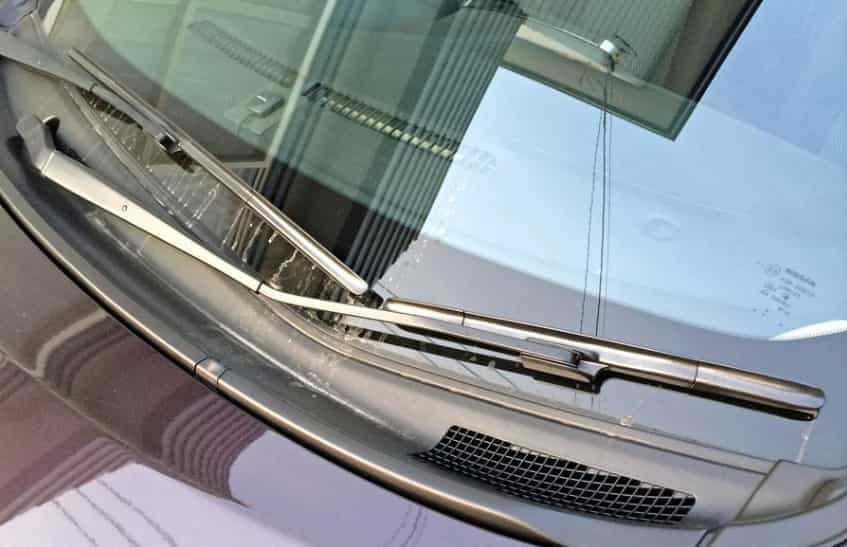
Few car maintenance jobs are easier than replacing worn windscreen wipers. If your Nissan Note wipers leave streaks, make squeaking noises, or fail to clear rain properly, it is time to install new blades. Poor visibility can quickly become a safety risk during heavy rain, especially when traffic spray and changing weather reduce your view of the road.
Learning how to change Nissan Note windscreen wipers takes only a few minutes. You do not need special tools or advanced mechanical skills. With the correct replacement blades, you can improve visibility, increase driving safety, and avoid paying for a simple workshop service.
Before you begin, check your Nissan Note model and confirm that the new blades match your vehicle. Blade lengths and connector types can vary between different model years and markets. Choosing compatible wiper blades will make the installation process much easier and help the new blades perform correctly.
This guide explains how to change Nissan Note windscreen wipers in 5 easy steps. You will also learn how to select the right replacement blades, avoid common installation mistakes, and keep your wipers working smoothly throughout the year. Follow each step carefully, and you will enjoy a clear windscreen whenever you drive in wet weather.
Signs Your Nissan Note Windscreen Wipers Need Replacing
Many drivers do not notice worn windscreen wipers until they drive through heavy rain. However, the blades often show clear warning signs long before they stop working properly. Regular inspections help you spot these problems early and keep your visibility at a safe level.
One of the most common signs is streaking across the windscreen. Instead of leaving a clean surface, the blades spread water and create blurred areas that make it harder to see the road. You may also hear squeaking or chattering as the rubber moves across the glass. This usually means the rubber has become hard, uneven, or contaminated with dirt.
Take a close look at the rubber edge whenever you clean your vehicle. Cracks, splits, or missing pieces reduce the blade’s ability to remove water. In some cases, the blade may lift away from the windscreen at higher speeds. This prevents full contact with the glass and leaves large sections uncleared during rain.
You should also replace the blades if they miss sections of the windscreen or leave water behind after each pass. Even a small unwiped area can reduce visibility when driving at night or during heavy rainfall.
Most Nissan Note owners replace their windscreen wipers every six to twelve months. However, the actual lifespan depends on the weather, driving conditions, and how often the wipers are used. If you notice any of these warning signs, replace the blades as soon as possible instead of waiting for the next service.
What You Need Before Starting
Preparing everything before you begin will save time and make the replacement process much easier. Most Nissan Note owners can complete this job without special tools. However, using the right equipment helps protect both the windscreen and the new wiper blades.
Start by buying replacement wiper blades that match your Nissan Note model. Check the model year, blade length, and connector type before making a purchase. Choosing the correct blades ensures a secure fit and smooth wiping performance.
Next, prepare a clean microfiber cloth and a quality windscreen cleaner. Cleaning the glass before installation removes dirt, road film, and other debris that can damage the new rubber edge. A clean windscreen also allows you to test the new blades more accurately after installation.
Place a folded towel or a thick cloth on the windscreen before lifting the wiper arms. This simple step protects the glass if a wiper arm slips from your hand. The metal arm can strike the windscreen with significant force and may cause expensive damage.
Finally, keep the installation instructions that come with the new wiper blades nearby. Different manufacturers may use slightly different adapter designs, even when the blades fit the same Nissan Note model. Reading the instructions first helps you complete the installation quickly and avoid unnecessary mistakes.
How To Choose the Correct Nissan Note Wiper Blades
Choosing the right wiper blades is the first step to a successful replacement. Even the best quality blades will not perform well if they do not match your Nissan Note. Before you buy a new set, take a few minutes to check your vehicle details.
Start by confirming the model year of your Nissan Note. Different generations may use different blade lengths and connector types. You should also check whether the replacement blades are designed for the driver side, passenger side, or rear window. These blades often have different sizes, so they are not always interchangeable.
Next, inspect the existing wiper blades on your vehicle. Compare the connector with the one supplied on the new blades. Most replacement kits include adapters for several fitting types, but not every adapter fits every Nissan Note. Choosing the correct connector ensures a secure installation and reliable performance.
If you are unsure about compatibility, use your vehicle registration or VIN when ordering replacement blades. Many automotive retailers provide a vehicle lookup tool that recommends blades designed for your exact model. This simple check helps prevent ordering the wrong parts and saves time during installation.
You should also consider the quality of the replacement blades. Premium blades often provide quieter operation, better contact with the windscreen, and longer service life. Although they usually cost more than standard blades, they can deliver better visibility in heavy rain and reduce the need for frequent replacements.
Park Safely and Prepare the Wiper Arms
Before you change your Nissan Note windscreen wipers, park the vehicle on a flat and stable surface. Switch off the engine and remove the key if necessary. This prevents the wipers from moving while you are working and helps you complete the job safely.
Take a folded towel or a thick cloth and place it on the lower part of the windscreen. This simple precaution protects the glass if a wiper arm slips from your hand. Although the task is straightforward, the metal arm can strike the windscreen with enough force to cause costly damage.
Carefully lift the driver side wiper arm away from the glass until it stays in the raised position. Repeat the same process for the passenger side if both blades need replacing. Hold each arm firmly as you lift it, and never allow it to snap back onto the windscreen.
Some Nissan Note models keep the wiper arms below the edge of the bonnet when they are not in use. If you cannot lift the arms normally, activate the vehicle’s service position by following the instructions in the owner’s manual. Once the arms move into the correct position, you can raise them safely and continue with the replacement.
Take a moment to inspect the wiper arms before removing the old blades. Check for signs of rust, loose joints, or visible damage. A damaged wiper arm can reduce blade contact with the windscreen and affect wiping performance, even after you install new blades.
Release and Remove the Old Wiper Blade
With the wiper arm in the raised position, locate the point where the blade connects to the arm. Most Nissan Note models use a hook style connector, although some versions may have a different fitting. Take a close look at the locking mechanism before you try to remove the blade.
Hold the wiper arm firmly with one hand and support the blade with the other. Press the release tab if your blade has one. Then slide the blade downward until it separates from the hook. If your Nissan Note uses a different connector, follow the instructions supplied with the replacement blades.
Do not force the blade if it does not move straight away. Check the locking clip again and make sure you have released it correctly. Applying too much force can damage the connector or bend the wiper arm, which may affect the performance of the new blade.
Once the old blade comes free, place it to one side and keep the wiper arm raised. Avoid leaving the metal arm unsupported, as it can fall onto the windscreen if you lose your grip. Taking a few extra seconds to handle the arm carefully will help protect the glass and make the installation process much smoother.
Before fitting the new blade, compare it with the old one. Check the overall length, connector design, and blade shape. A quick comparison helps you confirm that you have the correct replacement before moving on to the next step.
Attach the New Wiper Blade
Take the new wiper blade out of its packaging and remove any protective covers if they are fitted. Keep the rubber edge clean and avoid touching it with dirty hands. Dirt or grease can reduce wiping performance from the first use.
Align the new blade with the connector on the wiper arm. Make sure the adapter matches the fitting before you push the blade into place. Once the connector lines up correctly, slide or press the blade until you hear a clear click. This sound confirms that the locking mechanism has engaged.
After installing the blade, pull it gently to check that it is secure. The blade should stay firmly attached and move only where the connector allows. If it feels loose or comes away from the arm, remove it and install it again. Never continue if the blade does not lock correctly.
Repeat the same process for the second front wiper blade if you are replacing both at the same time. Work slowly and compare each blade with the one you removed. This helps you avoid fitting the wrong blade to the wrong side of the vehicle.
Before lowering the wiper arms, inspect both blades one final time. Check that each adapter sits in the correct position and that the rubber edge faces the windscreen. A quick inspection now can prevent poor wiping performance and save time later.
Lower the Wiper Arms and Replace the Rear Blade
Lower each front wiper arm slowly until the blade rests on the windscreen. Keep one hand on the arm throughout the movement. This simple habit protects the glass and prevents accidental damage.
If your Nissan Note has a rear window wiper, replace that blade before you finish the job. Lift the rear wiper arm carefully and examine the connector. The rear blade may use a different fitting from the front blades, so check the installation instructions before you remove it.
Press the release clip or unlock the connector, depending on the blade design. Slide the old blade away from the arm and set it aside. Next, align the new rear blade with the connector and push it into place until it locks securely. Give the blade a gentle pull to confirm that it is fully attached.
Lower the rear wiper arm slowly onto the glass. Make sure the blade sits flat against the rear window and moves freely. A correctly fitted rear wiper improves visibility when reversing and helps clear rain, dirt, and road spray more effectively.
Take a final look at all three wiper blades before moving to the next step. Check that every blade is secure, properly aligned, and ready for testing. A careful inspection now reduces the chance of problems when you switch on the wipers for the first time.
Test the New Nissan Note Windscreen Wipers
Start the engine and fill the windscreen with washer fluid before switching on the wipers. The fluid lubricates the glass and allows the new rubber blades to move smoothly. Avoid testing new blades on a dry windscreen because this can increase friction and shorten their lifespan.
Run the wipers through several wiping cycles at different speeds. Watch how each blade moves across the glass. A correctly installed blade should glide smoothly, clear water evenly, and return to its resting position without making unusual noises.
Pay close attention to the wiping pattern during the test. The blades should remove water without leaving streaks, missed areas, or patches of moisture. They should also stay in full contact with the windscreen from one side to the other. If you notice uneven wiping, stop the system and inspect the blade again.
Check that every connector remains secure after the test. A loose adapter can cause vibration, poor contact with the glass, or unexpected blade movement while driving. If necessary, remove the blade and install it again until it locks firmly into place.
Once everything works correctly, the replacement is complete. Your Nissan Note now has clean, properly fitted windscreen wipers that can provide clear visibility in wet weather. Regular inspections and timely blade replacement will help maintain reliable performance throughout the year.
Common Mistakes to Avoid
Replacing Nissan Note windscreen wipers is a simple task, but a few common mistakes can reduce their performance or even damage your vehicle. Avoiding these problems will help your new blades last longer and keep your windscreen clear in all weather conditions.
Buying the Wrong Wiper Blades
Many drivers buy replacement blades without checking the model year or connector type. This often leads to fitting problems and poor wiping performance. Always confirm that the new blades match your Nissan Note before making a purchase.
Letting the Wiper Arm Snap Back
Never release the wiper arm while it is raised. The metal arm can hit the windscreen with significant force and crack the glass. Hold the arm securely whenever you remove or install a blade.
Installing the Blade Incorrectly
Check that the adapter locks into place before lowering the wiper arm. A loose blade may vibrate, create noise, or come away from the arm during use. Always give the blade a gentle pull after installation to confirm that it is secure.
Forgetting to Remove the Protective Cover
Some replacement blades include a plastic cover that protects the rubber edge during shipping. Remove this cover before testing the new blades. Leaving it in place will prevent the blade from clearing water properly.
Testing the Blades on a Dry Windscreen
Always use washer fluid before switching on the new wiper blades. The fluid reduces friction and protects the rubber edge from unnecessary wear. It also allows you to check the wiping pattern under normal operating conditions.
Ignoring the Rear Wiper
Many drivers replace only the front blades and forget the rear wiper. However, the rear blade also wears over time. Replacing all worn blades at the same time helps maintain clear visibility and consistent performance in every direction.
How to Make Nissan Note Wiper Blades Last Longer
Good maintenance can extend the life of your Nissan Note windscreen wiper blades and improve their performance throughout the year. A few simple habits will help keep the rubber in good condition and reduce the need for frequent replacements.
Clean the windscreen on a regular basis. Dust, tree sap, road salt, and bird droppings can collect on the glass and wear the rubber edge more quickly. A clean windscreen allows the blades to move smoothly and clear water more effectively.
Wipe the rubber edge with a damp microfiber cloth every few weeks. This removes dirt and small particles that can cause streaks or scratching. Clean blades also provide quieter operation in wet weather.
Avoid using the wipers to remove ice or heavy snow from the windscreen. Clear the glass with an ice scraper or a soft brush before switching on the wipers. This simple step helps prevent damage to both the rubber edge and the wiper arms.
Keep the washer fluid reservoir topped up throughout the year. Washer fluid helps lubricate the glass, removes stubborn dirt, and reduces friction during every wiping cycle. It also improves visibility when driving in rain or on dusty roads.
Inspect the blades every few months for signs of wear. Replace them as soon as you notice cracks, split rubber, or uneven wiping. Early replacement helps maintain clear visibility and reduces the risk of poor performance during bad weather.
Parking in a garage or shaded area can also help protect the rubber from prolonged exposure to sunlight. Excessive heat and ultraviolet rays can cause the rubber to harden over time. Protecting the blades from harsh weather can increase their service life and keep them working efficiently for longer.
Frequently Asked Questions
Can I change Nissan Note windscreen wipers myself?
Yes. Most Nissan Note owners can replace their windscreen wipers without professional help. The job usually takes less than fifteen minutes if you have compatible replacement blades and follow the installation instructions carefully.
How often should I replace Nissan Note windscreen wipers?
Most drivers replace their windscreen wipers every six to twelve months. However, you should inspect the blades regularly and replace them as soon as they leave streaks, make noise, or fail to clear the windscreen effectively.
Are all Nissan Note wiper blades the same size?
No. Blade sizes can vary depending on the Nissan Note model year, generation, and market. Always check your vehicle specifications or use a trusted parts lookup tool before ordering replacement blades.
What type of connector does a Nissan Note use?
Many Nissan Note models use a hook style connector, while others may have a different fitting. Check the connector on your vehicle or read the instructions supplied with the replacement blades to confirm compatibility.
Why do my new wiper blades leave streaks?
Several factors can cause streaking after installation. The windscreen may still be dirty, the blade may not be locked into the connector correctly, or the replacement blade may not match your vehicle. Clean the glass, inspect the installation, and confirm that you have the correct blade.
Should I replace the rear wiper at the same time?
Yes. Replacing the rear wiper at the same time as the front blades helps maintain clear visibility in poor weather. It also ensures consistent wiping performance across every window.
Can I use any brand of replacement wiper blade?
You can choose from many reputable brands, but the blades must match your Nissan Note model and connector type. A high quality replacement blade often provides quieter operation, better contact with the windscreen, and a longer service life.
Conclusion
Learning how to change Nissan Note windscreen wipers is a simple way to improve driving safety and maintain clear visibility in every season. With the right replacement blades and a careful installation, you can complete the job at home in just a few minutes. You also save money while ensuring your wipers perform as expected in rain, snow, and other challenging weather conditions.
Remember to choose blades that match your Nissan Note model, inspect the wiper arms for damage, and test the new blades before driving. Regular maintenance and timely replacement will help prevent streaks, reduce noise, and extend the life of your windscreen wipers.
If you notice reduced wiping performance in the future, do not wait until visibility becomes a problem. Replace worn blades as soon as possible to keep your Nissan Note ready for safe and comfortable driving throughout the year.