
Regular oil changes help your Nissan Kicks deliver reliable performance and protect the engine from premature wear. However, many owners still see the oil maintenance reminder after completing an oil change. The system does not detect the service automatically. Instead, you need to reset the maintenance reminder through the vehicle information display.
Learning how to reset Nissan Kicks oil life is simple and only takes a few minutes. Once you complete the reset, the maintenance system starts a new service interval. As a result, you can track future oil changes more accurately and avoid unnecessary reminders every time you start the vehicle.
The oil maintenance reminder is different from the red oil pressure warning light. The reminder simply tracks scheduled maintenance. In contrast, the red oil pressure light warns you about a possible lubrication problem. If that warning appears, stop driving and inspect the vehicle before continuing.
This guide explains how to reset Nissan Kicks oil life for different model years with clear and practical instructions. You will also learn why the reminder sometimes stays on, how to solve common reset problems, and what mistakes you should avoid. By the end of this guide, you can reset the reminder with confidence and keep your maintenance schedule up to date.
How To Reset Nissan Kicks Oil Life Quickly
If you recently changed the engine oil and the maintenance reminder still appears, you need to reset the oil life manually. The reset only restarts the maintenance interval. It does not replace an oil change or fix engine related problems.
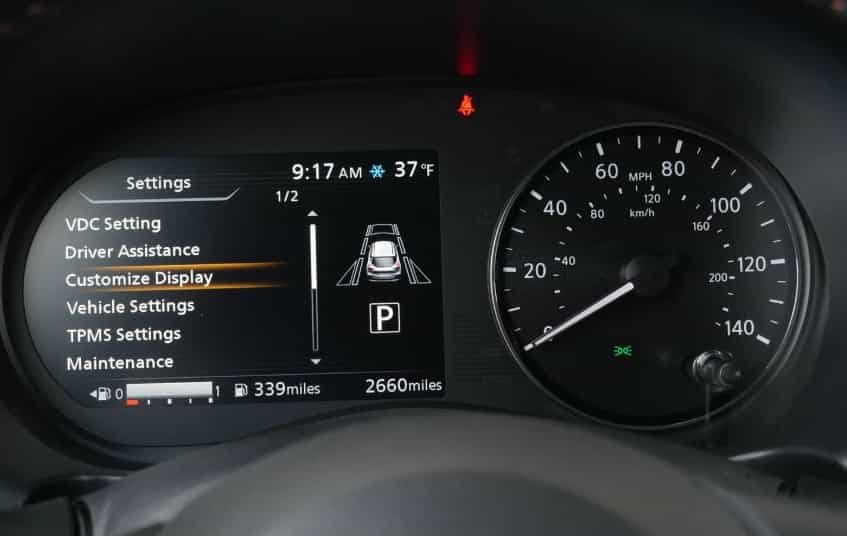
To begin, park your Nissan Kicks on a level surface and apply the parking brake. Turn the ignition to the ON position without starting the engine. Next, use the arrow buttons on the steering wheel to open the vehicle information display. Select Settings, open Maintenance, choose Oil and Filter, and then select Reset. Confirm your choice when the system asks for approval.
After the reset finishes, switch the ignition off and wait a few seconds before starting the vehicle again. Check the instrument cluster to confirm that the maintenance reminder has disappeared. If the message no longer appears, the system has successfully started a new maintenance interval.
The menu layout may look slightly different depending on the model year or trim level. For example, some Nissan Kicks models place the maintenance menu under Vehicle Settings, while others display it directly in the main settings menu. Even so, the reset procedure remains almost identical across most versions.
If the reminder stays on after the reset, repeat the process and make sure you selected the Oil and Filter option instead of another maintenance item. A quick restart often allows the instrument cluster to refresh the maintenance status. If the reminder still does not clear, continue reading the troubleshooting section later in this guide for additional solutions.
What the Nissan Kicks Oil Life Reminder Means
Many drivers assume the oil life reminder measures the actual condition of the engine oil. In reality, the system tracks the recommended maintenance interval based on the vehicle’s settings. When the reminder appears, it tells you that it is time to inspect or replace the engine oil according to the maintenance schedule.
The oil life reminder serves as a maintenance tool rather than a diagnostic system. It helps you keep track of regular service and reduces the chance of missing an important oil change. As a result, following the reminder can help protect the engine from unnecessary wear and maintain consistent performance over time.
It is also important to understand that the oil life reminder is different from the red oil pressure warning light. The maintenance reminder simply indicates that scheduled service is due. In contrast, the red oil pressure warning light signals that the engine may not have enough oil pressure to lubricate its internal components. If that warning light comes on while driving, stop the vehicle as soon as it is safe to do so and inspect the problem before continuing.
Another warning that often causes confusion is the check engine light. Unlike the oil life reminder, the check engine light can indicate a wide range of issues related to the engine, emissions system, or electronic controls. Resetting the oil life will not clear the check engine light because the two systems operate independently.
Understanding the difference between these dashboard indicators helps you respond correctly when a warning appears. Instead of resetting every message, identify the type of reminder first. This simple habit can prevent unnecessary repairs and help you keep your Nissan Kicks in excellent condition.
Before You Reset the Nissan Kicks Oil Life
Before you reset the Nissan Kicks oil life, make sure you complete the required maintenance first. The reset process only updates the vehicle maintenance system. It does not change the condition of the engine oil or improve engine protection.
The most important step is confirming that you already replaced the engine oil. Fresh oil helps reduce friction, remove heat and protect internal engine components. If you reset the reminder before changing the oil, you may lose track of the correct service interval and delay necessary maintenance.
You should also replace the oil filter when performing an oil change. The filter removes dirt, metal particles and other contaminants from the engine oil. A new filter allows the lubrication system to work more effectively and supports long term engine performance.
After completing the oil service, check the engine oil level before resetting the reminder. Park the Nissan Kicks on a flat surface and allow enough time for the oil to settle. An incorrect oil level can create additional maintenance issues that a simple reset cannot solve.
Before accessing the maintenance menu, turn off the engine and keep the vehicle safely parked. You should only use the dashboard controls when the vehicle is stationary. This allows you to focus on the reset process without distractions.
Finally, check your Nissan Kicks owner’s manual if the menu options look different from the instructions in this guide. Different model years, trim levels and markets may use slightly different dashboard displays. However, the basic reset process remains similar across most Nissan Kicks models.
How To Reset Nissan Kicks Oil Life on 2018 to 2024 Models
The Nissan Kicks from 2018 to 2024 uses a vehicle information display that allows drivers to manage several maintenance reminders. After completing an oil change, you can reset the oil life reminder through the dashboard controls. The process is simple and does not require special tools.
Start by turning the ignition to the ON position. Do not start the engine during this step. The dashboard needs power so you can access the vehicle information display and open the maintenance settings.
Next, use the steering wheel buttons to navigate through the display menu. Select the Settings option and press the OK button to open the available settings. From there, find the Maintenance section and select it.
Inside the maintenance menu, choose the Oil and Filter option. This section controls the reminder for engine oil and filter service. Select the reset option and confirm your choice when the vehicle asks you to continue.
After completing the reset, turn the ignition off and wait briefly. Start your Nissan Kicks again and check the instrument cluster. The oil maintenance reminder should disappear if the system accepted the new setting.
Some Nissan Kicks models from these years may display slightly different menu names. For example, certain trims may show maintenance options under a vehicle settings category instead of the main settings screen. However, the steps remain similar because the vehicle information display uses the same basic navigation system.
If the oil reminder still appears, check that you selected the oil and filter maintenance item. Many owners accidentally reset another service reminder, such as tire rotation or general maintenance. Selecting the correct maintenance category ensures that the Nissan Kicks oil life reset works properly.
How To Reset Nissan Kicks Oil Life on 2025 and Newer Models
Newer Nissan Kicks models may include an updated instrument display and a different menu layout compared with earlier versions. However, the purpose of the maintenance system remains the same. It helps drivers track scheduled services and reminds them when the vehicle needs attention.
To reset Nissan Kicks oil life on newer models, start by turning on the vehicle without starting the engine. The dashboard needs to activate the vehicle information display before you can access the maintenance settings.
Use the steering wheel controls to open the main menu on the instrument display. Navigate to the settings section and look for the maintenance options. Depending on the vehicle configuration, you may see labels such as Maintenance, Oil and Filter, or Engine Oil.
After opening the oil maintenance menu, select the reset option. The system may ask you to confirm the action before completing the process. Choose the confirmation option and allow the display a few seconds to update the maintenance interval.
Once the reset finishes, turn the ignition off and restart the Nissan Kicks. Check the dashboard to make sure the oil maintenance reminder no longer appears. This confirms that the vehicle has started a new maintenance tracking cycle.
If you cannot find the exact menu described above, do not worry. Nissan may change the display design between model years, trim levels and markets. In that case, check the owner’s manual for your specific vehicle or look for a similar maintenance section in the dashboard settings.
The main idea remains the same across Nissan Kicks models. You need to access the maintenance menu, select the oil service reminder and confirm the reset. Following this process keeps the maintenance system accurate after every completed oil change.
How To Reset the Nissan Kicks Oil Life With Steering Wheel Controls
The steering wheel controls play an important role when you reset Nissan Kicks oil life. Instead of using physical buttons on the dashboard, most Nissan Kicks models allow you to access the maintenance menu through the controls located near the steering wheel. This design helps drivers adjust vehicle settings without taking their attention away from the road.
Before starting the reset process, make sure the ignition is on and the vehicle is safely parked. The vehicle information display must be active so you can view the available settings. Once the screen turns on, you can begin navigating through the menu.
The arrow buttons help you move between different sections of the vehicle information display. Use these buttons to scroll through the available options until you find the settings menu. After locating the correct option, press the OK button to open the selected menu.
The OK button works as the main confirmation control during the reset process. You use it to enter the maintenance section, select the oil and filter reminder and confirm the reset request. Without confirming the final step, the system will keep the previous maintenance interval.
The back button allows you to return to the previous screen if you open the wrong menu. This feature helps you navigate through the display without restarting the entire process. If you accidentally select another maintenance category, simply return to the main menu and choose the correct oil service option.
Although the steering wheel controls may look slightly different between Nissan Kicks model years, their functions remain similar. The main goal is to access the maintenance settings, select the oil reminder and confirm the new interval. Understanding these controls makes the reset process faster and easier for any Nissan Kicks owner.
Why the Nissan Kicks Oil Life Will Not Reset
Sometimes, Nissan Kicks owners complete the reset process but the oil maintenance reminder still appears on the dashboard. This situation can happen for several reasons. In most cases, the issue comes from a simple menu selection error, an incomplete confirmation step or a temporary system problem.
One common reason is selecting the wrong maintenance item. The Nissan Kicks dashboard may include several service reminders, including oil, filter, tire rotation and other maintenance options. If you reset a different category, the oil reminder will continue to appear because the system did not receive the correct update.
Another possible cause is using the wrong ignition position. The vehicle information display needs enough power to access the full settings menu. If you only activate accessory mode or start the engine during the process, some menu options may not appear correctly.
The reset may also fail if you do not confirm the final step. Many Nissan Kicks models require you to select the reset option and approve the change before the system updates the maintenance interval. Simply opening the menu does not complete the reset.
A temporary electronic issue can also prevent the reminder from disappearing immediately. In this situation, turn the vehicle off, wait for a short period and restart the process. This allows the instrument cluster to refresh and may solve a minor software problem.
Low battery voltage can create unusual behavior with vehicle electronics. If the battery is weak, the dashboard system may not save new settings correctly. Checking the battery condition can help identify whether the electrical system affects the reset process.
If the Nissan Kicks oil life reminder remains after trying these solutions, check the owner’s manual or contact a qualified service professional. A technician can inspect the vehicle information system and identify problems that require additional diagnosis.
Before seeking professional help, repeat the reset process carefully and confirm each step. Most reset problems happen because of a small mistake during navigation rather than a serious vehicle issue.
What To Do If the Oil Warning Returns After Resetting It
After you reset Nissan Kicks oil life, the maintenance reminder should normally stay cleared until the next service interval. However, some drivers may notice an oil related warning return shortly after completing the reset. When this happens, you should identify the type of warning before taking any action.
The first step is checking whether the message is a maintenance reminder or an oil pressure warning. A maintenance reminder simply tracks scheduled service. It does not indicate an immediate engine problem. In contrast, an oil pressure warning can signal a serious lubrication issue that requires quick attention.
If the dashboard shows an oil pressure warning, turn off the engine as soon as it is safe to do so. Continuing to drive with low oil pressure can damage internal engine components. Check the oil level and inspect the vehicle for possible leaks before driving again.
You should also check whether the engine has the correct amount of oil. Low oil levels can happen because of an incomplete oil change, an incorrect refill amount or an oil leak. Use the recommended inspection method in your Nissan Kicks owner’s manual to confirm the oil level.
If the vehicle has enough oil and no visible leaks appear, check the maintenance menu again. Sometimes the system may still display another service reminder after you reset the oil and filter interval. Selecting the correct maintenance category can remove the remaining notification.
Another reason for a returning reminder is an incorrect reset procedure. For example, some owners reset the general maintenance reminder but leave the oil and filter reminder unchanged. Reviewing each maintenance option helps ensure that you updated the correct service interval.
If the warning continues after checking these areas, professional diagnosis may be necessary. A qualified technician can inspect the oil pressure system, sensors and electronic controls to find the exact cause.
Understanding the difference between a routine maintenance reminder and a serious oil warning helps you respond correctly. A reset can update the service counter, but it cannot repair mechanical problems or replace proper engine maintenance.
Can You Reset Nissan Kicks Oil Life Without Changing the Oil?
Technically, you can reset Nissan Kicks oil life without changing the engine oil. The maintenance menu allows you to restart the service counter at any time. However, resetting the reminder without completing an oil change is not a recommended practice.
The oil life reminder exists to help you track important maintenance intervals. When you reset the system early, you create an inaccurate service record. As a result, you may forget when the vehicle actually needs fresh oil in the future.
Old engine oil can lose its ability to protect internal components over time. It collects contaminants, becomes less effective at reducing friction and may increase engine wear. A reset cannot improve oil condition because it only changes the information stored in the vehicle system.
Some drivers reset the reminder because they want to remove the warning from the dashboard. While this may temporarily remove the notification, it can create a bigger problem later. Without an accurate maintenance record, you may delay necessary service and increase the risk of expensive engine repairs.
You should reset Nissan Kicks oil life only after completing the recommended oil and filter service. This approach keeps the maintenance system accurate and helps you follow the correct schedule. It also makes it easier to track service history if you plan to sell the vehicle in the future.
If you recently changed the oil but forgot to reset the reminder, you can complete the reset without performing another oil change. In this situation, the system only needs updated maintenance information. The key is making sure the actual service date and mileage remain accurate.
A proper maintenance routine combines regular oil changes with a correct reset procedure. The reset tells the vehicle when the next service interval begins, while the oil change protects the engine itself.
How Often Should Nissan Kicks Oil Be Changed?
The correct oil change interval for a Nissan Kicks depends on several factors, including the model year, engine type, driving conditions and the type of oil you use. Instead of following one fixed schedule for every vehicle, owners should check the maintenance recommendations for their specific Nissan Kicks model.
Many Nissan Kicks vehicles use modern engine oil designed to provide long lasting protection under normal driving conditions. However, the vehicle still requires regular oil changes to maintain engine performance. Fresh oil helps reduce friction, control heat and remove contaminants that build up during everyday driving.
Your driving habits can also affect how often you need an oil change. For example, frequent short trips, heavy traffic, long periods of idling and extreme temperatures can place additional stress on the engine oil. These situations may require more frequent maintenance compared with normal highway driving.
Severe driving conditions deserve special attention because the engine may not reach the ideal operating temperature during repeated short journeys. When this happens, moisture and contaminants can remain in the oil for longer periods. Regular inspections help ensure that the engine receives proper protection.
The type of oil also influences maintenance intervals. Synthetic oil usually provides better performance at extreme temperatures and maintains stability for longer periods compared with conventional oil. However, you should always use the oil specification recommended for your Nissan Kicks.
After completing an oil change, remember to reset Nissan Kicks oil life so the maintenance system can begin tracking the new service interval. A correct reset keeps the reminder accurate and helps you plan future maintenance more effectively.
Keeping a consistent oil change routine protects your investment and supports long term vehicle reliability. Regular maintenance also helps identify potential issues before they become expensive repairs.
Does Resetting Nissan Kicks Oil Life Delete Other Settings?
Many Nissan Kicks owners worry that resetting the oil life reminder may remove important vehicle settings. The good news is that the oil maintenance reset only updates the service interval information. It does not normally affect your personal settings or stored vehicle data.
When you reset Nissan Kicks oil life, the system changes the maintenance counter connected to the engine oil service reminder. The process tells the vehicle that you completed an oil change and starts a new tracking period. It does not erase information from other electronic systems.
Your radio settings, Bluetooth connections and saved preferences usually remain unchanged after an oil life reset. The same applies to many other vehicle features, such as trip information and personalized display settings. These systems operate separately from the maintenance reminder.
Some drivers believe disconnecting the battery can reset the oil life reminder. However, this method is unnecessary and may create additional inconvenience. Disconnecting the battery can affect stored settings and does not provide a reliable way to update the maintenance counter.
The Nissan Kicks uses different electronic modules to manage different vehicle functions. The maintenance system handles service reminders, while other modules control entertainment, communication and driving features. Because these systems work independently, an oil reset only affects the maintenance information.
If you recently changed the oil and need to update the reminder, use the proper dashboard reset procedure instead of attempting other methods. This approach keeps your vehicle settings intact and ensures the maintenance record remains accurate.
Understanding what the reset changes can make the process easier and less stressful. You can update the oil service reminder without worrying about losing your important Nissan Kicks settings.
Nissan Kicks Oil Life Reset Mistakes To Avoid
Resetting the oil life reminder on a Nissan Kicks is a simple process, but small mistakes can cause confusion. Many owners complete the reset incorrectly because they misunderstand how the maintenance system works. Avoiding these common errors helps you keep accurate service records and maintain your vehicle properly.
One common mistake is resetting the oil life before changing the engine oil. The reminder exists to track real maintenance intervals, not to remove a dashboard notification. If you reset the system too early, you may forget the actual oil change date and delay necessary service.
Another mistake is choosing the wrong maintenance option. The Nissan Kicks dashboard may include different reminders for oil, filters, tire rotation and other services. Selecting the wrong category will not reset the oil reminder because the system updates only the option you choose.
Some owners also confuse the oil maintenance reminder with the oil pressure warning light. These two indicators have different purposes. The maintenance reminder tracks scheduled service, while the oil pressure warning can indicate a serious engine lubrication problem.
Using instructions from a different Nissan model can create another problem. Nissan vehicles may share similar dashboard designs, but each model can use different menu layouts and control systems. Always follow instructions that match your Nissan Kicks model year and trim level.
Another mistake is turning off the vehicle before confirming the reset. The maintenance system needs your confirmation before it saves the new interval. If you exit the menu too quickly, the previous reminder may remain active.
Finally, some drivers ignore the owner’s manual when the dashboard does not match online instructions. Model updates can change menu names, display layouts and available settings. Checking the correct manual helps you find the exact procedure for your vehicle.
Avoiding these mistakes makes the Nissan Kicks oil life reset process faster and more reliable. A correct reset keeps your maintenance reminder accurate and helps you stay on schedule with future oil changes.
Frequently Asked Questions About Nissan Kicks Oil Life Reset
How do I reset the oil life on a Nissan Kicks?
You can reset Nissan Kicks oil life through the vehicle information display. Turn on the ignition, open the settings menu, select maintenance, choose the oil and filter option and confirm the reset. The exact menu names may vary slightly depending on the model year and trim level.
Why is my Nissan Kicks still showing an oil maintenance reminder?
The reminder may remain visible if you selected the wrong maintenance option or did not confirm the final reset step. Restarting the vehicle after completing the process can also help refresh the dashboard system.
Does Nissan Kicks oil life reset automatically after an oil change?
No, the Nissan Kicks maintenance reminder usually does not reset automatically after an oil change. The driver needs to update the maintenance counter manually through the dashboard settings.
Can I reset Nissan Kicks oil life without changing the oil?
Yes, the system allows you to reset the reminder without changing the oil. However, you should only do this if you already completed the oil service and forgot to update the maintenance counter. Resetting before an oil change can create an inaccurate maintenance schedule.
Will resetting Nissan Kicks oil life erase my vehicle settings?
No, resetting the oil life reminder does not normally delete personal settings. Features such as radio presets, Bluetooth connections and other stored preferences usually remain unchanged.
Is the Nissan Kicks oil life reset procedure the same for every model?
The basic process remains similar, but the dashboard layout can differ between model years, trim levels and markets. Newer vehicles may use different menu names or display designs compared with older models.
Can a Nissan dealer reset the oil life reminder?
Yes, a Nissan dealer or qualified automotive technician can reset the maintenance reminder during a service appointment. However, most owners can complete the process themselves using the vehicle controls.
What is the difference between oil life reminder and oil pressure warning?
The oil life reminder tracks scheduled maintenance and helps you remember when service is due. The oil pressure warning indicates a possible lubrication problem and may require immediate attention.
Why did the Nissan Kicks oil reminder come back after resetting?
The reminder may return if the reset did not save correctly, if you selected another maintenance category or if the vehicle has a separate active warning. Check the maintenance menu again and verify the correct service reminder.
Conclusion: How To Reset Nissan Kicks Oil Life Correctly
Knowing how to reset Nissan Kicks oil life helps you keep the vehicle maintenance system accurate after completing an oil change. The process is simple when you follow the correct dashboard menu sequence and confirm the reset properly.
The main steps include accessing the vehicle information display, opening the maintenance settings, selecting the oil and filter reminder and confirming the new service interval. While menu layouts may differ between model years, the basic process remains similar across most Nissan Kicks vehicles.
Remember that the oil life reset only updates the maintenance counter. It does not replace an engine oil change, repair mechanical issues or solve an oil pressure problem. Always complete the required maintenance before resetting the reminder to keep your service records accurate.
A proper maintenance routine combines regular oil changes with correct dashboard updates. By following the recommended schedule and understanding your Nissan Kicks maintenance system, you can support better engine performance and long term reliability.
If you recently completed an oil change, take a moment to reset the reminder and record the service date and mileage. Keeping these details updated makes future maintenance easier and helps you protect your Nissan Kicks for years to come.