
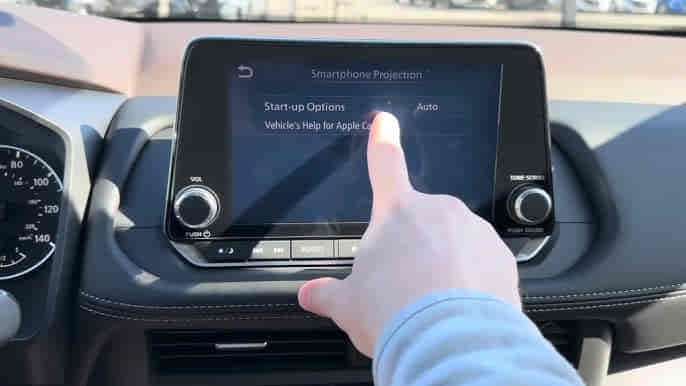
Apple CarPlay allows Nissan Altima drivers to integrate their iPhone with the vehicle’s infotainment system, providing convenient access to navigation, music, phone calls, messages, and Siri voice commands. When CarPlay stops working, drivers lose access to many of the connected features that make daily driving more convenient and safer.
Some Nissan Altima owners experience situations where their iPhone is not detected at all. Others encounter black screens, frozen interfaces, missing audio, failed Siri commands, or repeated connection interruptions. In many cases, these issues appear after an iOS update, NissanConnect software change, cable replacement, or smartphone configuration adjustment.
The Nissan Altima CarPlay system depends on multiple components working together correctly. The iPhone, Lightning cable, USB port, NissanConnect software, Siri functionality, and infotainment hardware must maintain stable communication throughout the connection process. If any part of this system fails, CarPlay may stop functioning entirely.
Fortunately, most Apple CarPlay issues are caused by software conflicts, connection problems, or configuration errors rather than hardware failure. Understanding the root cause makes troubleshooting significantly easier.
This guide explains the 10 most common reasons Nissan Altima CarPlay stops working and the solutions that restore reliable Apple CarPlay functionality.
What Are the Signs That Nissan Altima CarPlay Is Not Working?
The most common signs of CarPlay problems include failed iPhone detection, CarPlay not launching automatically, black screens, frozen displays, missing audio, delayed response times, and repeated connection interruptions.
Some drivers connect their iPhone but never see the CarPlay interface appear on the NissanConnect display. Others successfully launch CarPlay but experience touchscreen freezing, delayed navigation updates, or unexpected disconnections while driving.
Audio-related issues are also common. Navigation prompts, phone calls, Siri responses, and music playback may stop working despite the iPhone remaining connected. Some users report that CarPlay appears active while producing no sound through the vehicle speakers.
Another warning sign is inconsistent behavior. CarPlay may work normally one day and fail completely the next without any obvious hardware changes. This often indicates software conflicts or communication problems rather than physical component failure.
Understanding the exact symptom helps narrow the diagnostic process because display issues, connection failures, and audio problems typically originate from different areas of the CarPlay system.
Why Is Apple CarPlay Disabled on the iPhone or NissanConnect?
Apple CarPlay may stop working because it has been disabled on either the iPhone or the NissanConnect infotainment system. Since both devices must authorize CarPlay communication, disabling the feature on either side prevents successful connection.
On the iPhone, CarPlay settings can be affected by Screen Time restrictions, privacy controls, enterprise device management policies, or software updates. Drivers often assume CarPlay remains enabled because it worked previously, only to discover that settings have changed.
NissanConnect also contains smartphone integration settings that control CarPlay functionality. If CarPlay support is disabled within the infotainment menu, the vehicle will not recognize compatible iPhones even when they are connected correctly.
Software updates occasionally reset preferences automatically. Following an update, the system may require manual reactivation before CarPlay can function normally again.
Verifying that Apple CarPlay is enabled on both devices should always be the first troubleshooting step because configuration errors are among the simplest problems to resolve.
Why Is the Lightning Cable Damaged or Incompatible?
A damaged or incompatible Lightning cable is one of the most common reasons Nissan Altima CarPlay stops working. Although many cables can charge an iPhone successfully, not all support the high-speed data communication required for CarPlay.
Over time, Lightning cables experience wear from daily use. Repeated bending, twisting, and connection cycles gradually damage internal conductors. A cable may continue charging the phone while failing to transmit data reliably.
Low-quality third-party cables frequently create compatibility issues. Some charging cables lack full data-transfer capability, preventing NissanConnect from establishing proper communication with the iPhone.
Intermittent cable failures often produce confusing symptoms. CarPlay may connect successfully during some trips but disconnect repeatedly during others. Drivers frequently suspect software problems when the actual issue originates from a deteriorating cable.
Using a certified Apple MFi cable eliminates one of the most common CarPlay failure points and helps ensure stable communication between the iPhone and Nissan Altima.
Why Is the USB Port Not Transferring Data Properly?
The USB port is a critical part of the CarPlay communication chain because it transfers both power and data between the iPhone and NissanConnect. If the port cannot maintain reliable data communication, CarPlay may fail entirely.
Dust, dirt, moisture, and corrosion can interfere with electrical contacts inside the USB port. Even minor contamination may disrupt data transmission while still allowing the phone to charge normally.
Many Nissan Altima models include multiple USB ports, but only specific ports support Apple CarPlay. Connecting the iPhone to a charging-only port can prevent CarPlay from launching despite an apparently successful connection.
Connector wear may also contribute to intermittent problems. Loose USB connections can interrupt communication whenever vehicle vibration or road movement affects the cable.
Because CarPlay depends on uninterrupted data transfer, USB port integrity should always be evaluated when diagnosing connectivity issues.
Why Is Siri Disabled or Restricted?
Siri is a fundamental component of Apple CarPlay. If Siri is disabled, CarPlay may fail to initialize correctly or lose access to important functionality such as navigation, messaging, and hands-free communication.
Apple designed CarPlay around voice interaction to minimize driver distraction. Many CarPlay services rely directly on Siri to process commands and manage communication between the user and the iPhone.
Siri may become disabled through manual settings changes, parental controls, Screen Time restrictions, or corporate device management policies. Software updates can also modify Siri permissions unexpectedly.
When Siri-related issues occur, drivers may notice that CarPlay launches but voice commands fail. In more severe situations, CarPlay may refuse to start at all because required Siri services are unavailable.
Ensuring Siri is fully enabled and authorized remains an essential troubleshooting step when diagnosing CarPlay problems.
Why Is NissanConnect Software Outdated?
Outdated NissanConnect software can create Apple CarPlay compatibility problems because Apple updates iOS far more frequently than vehicle manufacturers update infotainment systems.
Every major iOS release introduces changes to communication protocols, security requirements, and CarPlay functionality. If NissanConnect software lacks support for these changes, compatibility conflicts may develop.
Older software versions may contain bugs affecting device detection, display rendering, touchscreen performance, audio routing, and connection stability. Manufacturers regularly release software updates to address these issues.
Many drivers first encounter problems immediately after updating their iPhone. CarPlay may have functioned normally before the update but suddenly stops working because the infotainment system is operating with outdated software.
Keeping NissanConnect updated improves compatibility, enhances system stability, and reduces the likelihood of recurring Apple CarPlay issues.
Why Did an iOS Update Break Apple CarPlay?
An iOS update can disrupt Apple CarPlay because Apple regularly modifies communication protocols, security standards, and smartphone integration requirements. While these updates improve functionality and security, they can temporarily create compatibility conflicts with NissanConnect.
Apple CarPlay depends on authentication records stored between the iPhone and the vehicle. After a major iOS update, these records may no longer match the updated operating system. NissanConnect may continue detecting the device, but the connection process can fail before CarPlay launches successfully.
Permission changes are another common cause. New iOS versions occasionally reset settings related to Siri, USB accessories, notifications, and CarPlay access. If these permissions become restricted during the update process, CarPlay functionality may stop working despite the iPhone remaining connected.
Software updates can also corrupt existing communication profiles. The iPhone may attempt to use updated security protocols while NissanConnect continues relying on outdated connection data, creating communication failures that prevent proper operation.
Removing the existing CarPlay connection and establishing a new pairing often resolves update-related problems because both devices generate fresh authentication credentials compatible with the latest software.
Why Is CarPlay Connected but the Screen Is Black?
A black screen is one of the most frustrating Apple CarPlay issues because the iPhone appears connected while the CarPlay interface fails to display on the Nissan Altima touchscreen.
In many cases, the connection itself remains active, but the infotainment system cannot properly render graphical information received from the iPhone. Communication occurs in the background, yet the display never loads correctly.
Software conflicts are one of the primary causes. Following an iOS update or NissanConnect software change, compatibility issues may prevent the display system from interpreting graphical instructions properly. As a result, the screen remains blank even though the connection is technically established.
Unstable USB communication can produce similar symptoms. If the Lightning cable or USB port interrupts data transmission during initialization, the infotainment system may receive incomplete display information and fail to launch the CarPlay interface.
Temporary system instability within NissanConnect can also affect display services. In these situations, restarting both the iPhone and infotainment system often restores normal operation without requiring additional repairs.
Because black screen issues are frequently software-related, troubleshooting should focus on communication and compatibility before considering hardware replacement.
Why Does Nissan Altima CarPlay Keep Disconnecting?
Repeated CarPlay disconnections usually indicate unstable communication between the iPhone and NissanConnect. A properly functioning CarPlay connection should remain active throughout the drive without interruption.
Damaged Lightning cables are among the most common causes. Internal wire damage can interrupt data transmission for fractions of a second, causing CarPlay to disconnect and reconnect repeatedly. The cable may continue charging the phone while failing to provide reliable data communication.
USB port wear can create similar problems. Loose connectors, contaminated contacts, and minor port damage may interrupt communication whenever vehicle movement affects the connection.
Software compatibility issues frequently contribute to connection instability. Outdated NissanConnect software, iOS bugs, and corrupted CarPlay profiles can disrupt communication sessions and trigger repeated reconnection attempts.
Background smartphone activity may also play a role. Battery optimization settings, application crashes, and competing wireless services occasionally interfere with CarPlay performance.
Most disconnection problems stem from communication instability rather than complete system failure, making systematic troubleshooting highly effective.
Why Does NissanConnect Need a System Reset?
A NissanConnect reset is often necessary because infotainment systems continuously store temporary files, cached communication records, and background processes that can interfere with Apple CarPlay functionality.
Over time, software conflicts may develop within these temporary resources. Device recognition, display rendering, audio routing, and touchscreen responsiveness can all be affected by corrupted or outdated information.
Many CarPlay issues originate from temporary software instability rather than hardware defects. Symptoms such as black screens, frozen interfaces, failed connections, and delayed responses often disappear after the system is refreshed.
A standard reset clears temporary memory and reloads essential system processes. This allows NissanConnect to rebuild communication channels and eliminate problematic background tasks.
Factory resets provide a more comprehensive solution by removing stored devices, user preferences, and CarPlay connection histories. This approach is particularly effective when corrupted connection data continues causing problems despite other troubleshooting efforts.
Resetting NissanConnect frequently resolves issues that appear severe but are actually caused by temporary software conflicts.
Why Could the Infotainment System Be Failing?
A failing infotainment system is a less common but more serious cause of Apple CarPlay problems. Because NissanConnect acts as the central hub for smartphone integration, hardware failures can affect every aspect of CarPlay operation.
The infotainment system manages device authentication, display processing, audio routing, touchscreen interaction, and communication with connected smartphones. When internal electronic components begin to fail, these functions may become unreliable.
Common symptoms include persistent black screens, repeated connection failures, touchscreen freezing, delayed responses, missing CarPlay options, and inability to detect compatible iPhones. These problems often persist despite software updates and connection resets.
Long-term exposure to heat, vibration, electrical fluctuations, and component aging can gradually affect infotainment hardware reliability. Although these systems are designed for durability, no electronic component lasts indefinitely.
Because infotainment replacement can be expensive, hardware failure should only be considered after eliminating software, cable, USB port, and configuration-related causes.
What Should You Do If Nissan Altima CarPlay Still Does Not Work?
If Apple CarPlay continues malfunctioning after basic troubleshooting, a structured diagnostic process becomes necessary. The objective is determining whether the issue originates from the iPhone, USB connection, software, or infotainment hardware.
The first step is verifying that both the iPhone and NissanConnect system are running the latest software versions. Compatibility mismatches remain one of the most common causes of CarPlay failures.
Testing a different Lightning cable is equally important. Using an Apple-certified MFi cable eliminates one of the most frequent sources of communication problems.
Connecting another iPhone can provide valuable diagnostic information. If a second device works normally, the issue likely resides within the original phone. If multiple devices fail, attention should shift toward NissanConnect or infotainment hardware.
Removing all existing CarPlay connections and creating a new setup often resolves persistent software conflicts by replacing outdated authentication records.
If standard troubleshooting procedures fail, professional diagnostics may be necessary to evaluate infotainment hardware and identify deeper communication faults.
Which Nissan Altima Model Years Report CarPlay Problems Most Often?
Apple CarPlay issues can affect any Nissan Altima equipped with smartphone integration technology, but reports are generally more common among vehicles operating older NissanConnect software versions.
Earlier CarPlay-equipped Altima models often experience compatibility challenges following major iOS updates. Apple frequently introduces new communication requirements that older infotainment software may not fully support.
Common complaints include device detection failures, delayed CarPlay startup, display rendering issues, and intermittent connectivity problems. In most cases, these concerns are software-related rather than the result of physical defects.
Newer Nissan Altima models benefit from improved processing power, enhanced USB communication systems, and stronger software support. However, they remain vulnerable to cable failures, software conflicts, and smartphone configuration issues.
Software version typically has a greater influence on CarPlay reliability than vehicle age. Vehicles running current NissanConnect software generally experience fewer connectivity problems.
How Can You Prevent Future Nissan Altima CarPlay Problems?
Preventing Apple CarPlay issues requires maintaining both the iPhone and NissanConnect system. Because CarPlay relies on continuous communication between multiple technologies, preventative maintenance significantly improves long-term reliability.
Keeping iOS and NissanConnect software updated is one of the most effective preventative measures. Software updates frequently include compatibility improvements, bug fixes, and communication enhancements.
Using high-quality MFi-certified Lightning cables reduces the likelihood of connection failures. Many recurring CarPlay problems originate from worn cables that can no longer maintain stable data transfer.
Regular inspection and cleaning of USB ports also improves reliability. Dust, debris, and corrosion can interfere with communication and gradually contribute to intermittent connection issues.
Rebuilding the CarPlay connection after major software updates helps synchronize authentication records and communication settings. This simple step often prevents compatibility conflicts before they become noticeable.
Consistent maintenance ensures reliable navigation, media playback, hands-free communication, messaging, and Siri functionality throughout vehicle ownership.
Read more: Nissan Leaf Not Charging
Conclusion
Nissan Altima CarPlay problems are most commonly caused by software conflicts, iOS updates, damaged Lightning cables, USB communication failures, outdated NissanConnect software, and corrupted connection profiles. Although these issues can interrupt navigation, media playback, and smartphone integration, most can be resolved without replacing hardware.
Successful troubleshooting begins by identifying the specific symptom. Connection failures, black screens, missing audio, and repeated disconnections often indicate different root causes. Understanding where the communication process breaks down simplifies diagnosis and repair.
Most Apple CarPlay issues can be corrected through software updates, cable replacement, USB port inspection, system resets, and rebuilding the connection between the iPhone and NissanConnect. Hardware-related failures remain relatively uncommon compared with communication and software issues.
By maintaining software compatibility, using quality accessories, and addressing connectivity problems early, Nissan Altima owners can enjoy reliable Apple CarPlay performance and avoid recurring interruptions.