
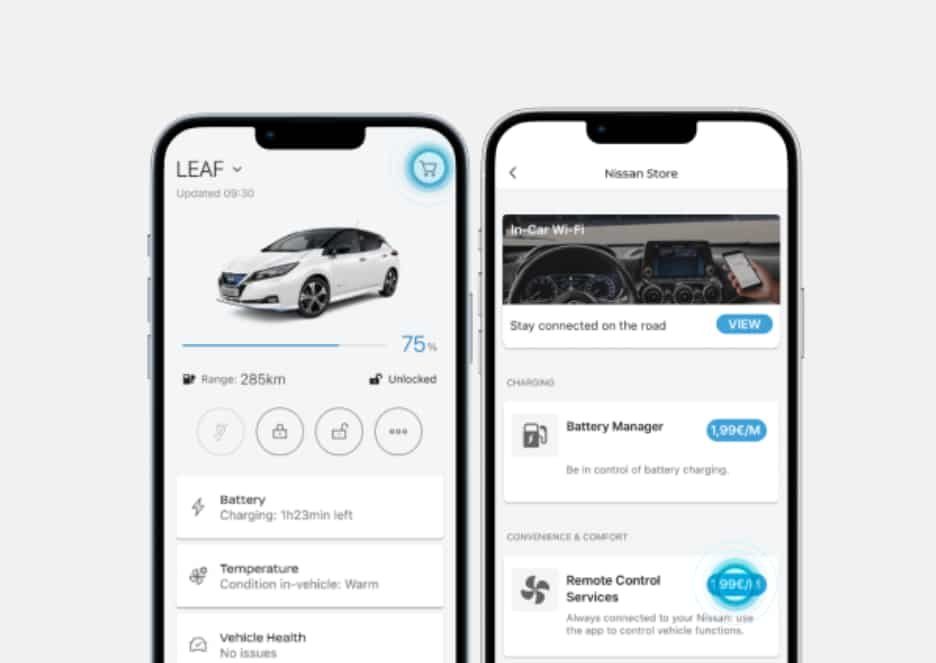
You can cancel your Nissan Connect subscription through your MyNISSAN account or by contacting Nissan Customer Support. The available method depends on your vehicle, subscription package, and location. Deleting the MyNISSAN app does not cancel your subscription. It also does not stop future renewal charges.
Before you cancel, check which Nissan Connect plan is active on your account. You should also review your renewal date and payment details. Some vehicles include extra services, such as in vehicle Wi Fi or SiriusXM. These services often use separate subscriptions. As a result, you may need to cancel them individually.
This guide explains the entire cancellation process step by step. You will learn how to identify your active plan and cancel it correctly. You will also discover how to confirm that automatic renewal has stopped. Finally, you will understand which connected features become unavailable after cancellation and what to do before selling your vehicle.
How Do You Cancel a Nissan Connect Subscription?
The easiest way to cancel a Nissan Connect subscription is through your MyNISSAN account. If your account does not show a cancellation option, contact Nissan Customer Support for assistance. The exact process depends on your vehicle, model year, and subscription package. However, the goal remains the same. You need to stop future renewals and confirm the final service date.
Start by signing in to your MyNISSAN account with the email linked to your vehicle. Next, choose the correct vehicle if your account contains more than one Nissan. Open the Connected Services or Subscription section to review your active plan. Check the renewal date, billing status, and package details before making any changes. This step helps you confirm that you are canceling the correct subscription.
When the cancellation option is available, follow the on-screen instructions and submit your request. Read the confirmation page carefully before you finish the process. Some subscriptions end immediately, while others remain active until the current billing period expires. After you complete the request, save the confirmation email or reference number for your records. This information can help if you need to dispute a future charge.
It is also important to understand that canceling a subscription is different from removing a vehicle or deleting the MyNISSAN app. Removing the app only deletes it from your phone. It does not affect your billing or subscription status. Likewise, removing a vehicle from your account does not always cancel every paid service. Always return to your account and verify that your subscription shows Canceled, Inactive, or Non-Renewing before considering the process complete.
What Should You Check Before Canceling Nissan Connect?
Before you cancel your Nissan Connect subscription, confirm that you are managing the correct account and vehicle. Many owners have more than one Nissan linked to the same profile. Choosing the wrong vehicle may prevent you from finding the active subscription. It can also lead to confusion about your billing status.
Next, review your current subscription details. Check whether you have a free trial, a monthly plan, or an annual subscription. You should also verify the next renewal date and confirm which payment method is attached to the account. These details help you understand when the cancellation takes effect and whether another payment is scheduled.
It is equally important to identify who bills your connected services. Nissan Connect is not always the only subscription associated with your vehicle. Some models include services such as an in vehicle Wi Fi hotspot or SiriusXM. These subscriptions often belong to different providers. Canceling Nissan Connect does not automatically cancel every connected service.
Take a moment to review your recent payment history before submitting a cancellation request. Look at your credit card statement or online banking record to identify the merchant name for each recurring charge. If you see charges from another provider, visit that provider’s account portal to review the subscription separately. This simple check reduces the risk of unexpected renewal charges after your Nissan Connect plan ends.
Finally, decide what you want to accomplish. Some owners only want to stop automatic renewal, while others want to end all connected services immediately. If you plan to sell or trade in your vehicle, you should also remove the vehicle from your account and clear your personal information from the infotainment system. Completing these steps protects your privacy and prepares the vehicle for its next owner.
How Do You Cancel Nissan Connect Through Your Nissan Account?
The fastest way to cancel a Nissan Connect subscription is through your MyNISSAN account. Most owners can manage their connected services from the Owner Portal or the MyNISSAN app. The available options depend on the vehicle model and subscription package. However, the overall process follows the same pattern.
Sign in using the email address linked to your Nissan account. After logging in, select the correct vehicle if more than one appears in your profile. Open the Connected Services or Subscription section to view your active plan. Review the package name, renewal date, and billing status before making any changes. This step confirms that you are managing the correct subscription.
When you locate the active plan, choose the available cancellation or unsubscribe option. Read the terms carefully before submitting your request. Some plans end immediately after cancellation, while others remain active until the current billing cycle expires. Once the request is complete, save the confirmation email or reference number. Keeping this record makes it easier to resolve future billing questions if they arise.
Do not assume the process is complete as soon as you submit the request. Return to the subscription page and verify that the status has changed to Canceled, Inactive, or Non Renewing. You should also confirm that no future renewal date appears on your account. If the subscription still shows as active after several hours, sign out and log in again. When the status does not change, contact Nissan Customer Support and ask them to verify that your cancellation request has been processed successfully.
How Do You Cancel Nissan Connect Through Customer Support?
You should contact Nissan Customer Support if you cannot cancel your subscription online. This option is also useful when the cancellation button does not appear in your account. Support representatives can verify your subscription and explain the available cancellation methods. They can also help if your vehicle is linked to the wrong account.
Prepare your account information before you contact support. Have your full name, account email, phone number, and Vehicle Identification Number ready. You should also know your vehicle model, model year, and the name of your Nissan Connect package. Providing complete information helps the representative locate your account more quickly and reduces unnecessary delays.
Explain that you want to cancel your Nissan Connect subscription and stop future renewal charges. Ask the representative to confirm the exact date when your subscription will end. You should also request written confirmation of the cancellation. An email confirmation or reference number provides proof that your request has been processed. Keep this information until at least one billing cycle has passed.
Before ending the conversation, verify that automatic renewal has been disabled. Ask whether any final payment is still scheduled and whether your plan remains active until the current billing period expires. If you notice another charge after the confirmed cancellation date, contact support again with your reference number and payment details. Having complete records makes it much easier to resolve billing issues and confirm that your subscription has been canceled successfully.
What Happens After You Cancel Nissan Connect?
Canceling your Nissan Connect subscription affects your connected services, but it does not change your vehicle’s basic functions. The exact impact depends on your model, subscription package, and region. In most cases, connected features remain available until the end of the current billing period. After that date, the services included in your subscription stop working automatically.
Most owners notice the biggest changes in their remote features. Services such as Remote Engine Start, Remote Door Lock and Unlock, Vehicle Health Reports, Maintenance Alerts, and Vehicle Locator may no longer be available after the subscription ends. If your vehicle includes additional premium connected services, those features may also stop working. The available functions vary by vehicle, so you should review your package details before canceling.
Your vehicle will continue to operate normally after the subscription expires. You can still drive the vehicle, use the physical key, connect your phone through Bluetooth, and access other standard features that do not require an active Nissan Connect subscription. Likewise, canceling Nissan Connect does not affect your vehicle warranty or routine maintenance schedule. It only removes access to the connected services included in your subscription plan.
After the cancellation becomes effective, sign in to your MyNISSAN account and confirm that the subscription status has changed. If any connected feature still appears active, allow some time for the system to update. However, if remote services continue to work long after the cancellation date or you lose features earlier than expected, contact Nissan Customer Support for clarification. Verifying your account status ensures that both your subscription and connected services reflect the correct information.
Can You Get a Refund After Canceling Nissan Connect?
A refund is not guaranteed after you cancel a Nissan Connect subscription. The final decision depends on your subscription terms, billing cycle, and the policies that apply in your region. In many cases, canceling a subscription prevents future renewal charges instead of refunding the current billing period. For this reason, you should review your subscription agreement before submitting a cancellation request.
The timing of your cancellation also affects the outcome. If you cancel before your next renewal date, you can usually avoid the next recurring payment. However, canceling after a new billing cycle begins may not qualify you for a partial refund. Some subscriptions continue until the end of the paid period, while others end according to the conditions listed in your service agreement. Understanding these terms helps you set realistic expectations before contacting support.
If you believe you qualify for a refund, gather all relevant account information before making your request. Keep your cancellation confirmation, payment receipt, billing date, account email, and Vehicle Identification Number available. Providing complete information allows the support team to review your request more efficiently. It also reduces the time needed to verify your account and payment history.
If a new charge appears after your confirmed cancellation date, contact Nissan Customer Support as soon as possible. Explain the situation and provide your confirmation number together with the payment details. Ask the representative to review the transaction and confirm whether the charge was processed correctly. If the issue remains unresolved after Nissan completes its investigation, you can then discuss the payment with your card issuer or billing provider. Following this order gives the service provider an opportunity to correct the problem before you request a formal payment dispute.
Do You Need to Cancel Wi Fi or SiriusXM Separately?
Yes, you may need to cancel these services separately. Canceling your Nissan Connect subscription does not automatically end every connected service linked to your vehicle. Some features rely on third party providers that manage their own billing and renewal process. Reviewing each subscription individually helps you avoid unexpected charges after your Nissan Connect plan ends.
Start by checking your recent payment history. Look at your credit card statement or online banking account to identify the company that processes each recurring charge. If you find payments from providers such as AT&T or SiriusXM, sign in to those accounts and review the subscription status. Each provider follows its own cancellation policy, so ending your Nissan Connect plan may not affect those services.
You should also check the documents you received when purchasing your vehicle. Some dealerships activate complimentary trials for services that continue as paid subscriptions after the trial expires. Others require you to enroll directly with the service provider. Knowing how each service was activated makes it easier to determine where you need to submit the cancellation request.
Before you finish the process, review every connected service associated with your vehicle. Confirm that Nissan Connect, in vehicle Wi Fi, satellite radio, and any other subscription show the correct status. This final review helps ensure that no recurring charges remain active. It also gives you confidence that every service has been canceled through the appropriate provider.
How Do You Cancel Nissan Connect Before Selling the Vehicle?
Canceling your Nissan Connect subscription is an important step before selling or trading in your vehicle. Ending the subscription prevents future billing and removes your access to connected services. However, this step alone does not remove your personal information from the vehicle. You should also disconnect the vehicle from your account before transferring ownership.
Begin by canceling any active Nissan Connect subscription linked to the vehicle. After the cancellation is confirmed, sign in to your MyNISSAN account and verify that the subscription no longer shows an active renewal date. Next, remove the vehicle from your account if you no longer own it. This action helps prevent remote access after the ownership transfer and prepares the account for your next Nissan vehicle.
Your infotainment system may still contain personal information even after the subscription ends. Check the system for saved home and work addresses, navigation history, paired mobile phones, contacts, call logs, and garage door settings. Delete this information before handing the vehicle to the next owner. If your vehicle supports a factory reset, complete that process after removing any personal files you want to keep.
Finally, confirm that you can no longer access the vehicle through the MyNISSAN app. The vehicle should no longer appear in your account, and remote features should no longer respond to your commands. Keep your cancellation confirmation and vehicle removal records for future reference. These documents can help resolve ownership or billing questions if they arise after the sale.
Why Can’t You Cancel Your Nissan Connect Subscription?
You may not see a cancellation option even if your subscription is active. This usually happens because of an account, billing, or ownership issue. In some cases, the subscription belongs to a different provider instead of Nissan. Identifying the cause first helps you choose the right solution.
Start by confirming that you signed in with the correct MyNISSAN account. The email address should match the account used when the connected services were activated. If you own multiple Nissan vehicles, make sure you selected the correct one before checking the subscription page. Choosing the wrong vehicle may prevent the active plan from appearing in your account.
Next, review your payment history to determine who manages the subscription. Some connected services are billed by third party providers rather than Nissan. If another company processes the recurring payment, you must cancel the subscription through that provider instead of the MyNISSAN account. Checking your billing records can save time and prevent unnecessary troubleshooting.
Ownership changes can also affect your ability to manage connected services. If the previous owner still controls the vehicle, your account may not have permission to modify the subscription. In this situation, contact Nissan Customer Support and provide proof of ownership. The support team can verify your account, update the vehicle association, and help you complete the cancellation process.
Technical issues may also prevent the cancellation page from loading correctly. Sign out of your account and sign in again before trying another browser or device. If the problem continues, contact Nissan Customer Support instead of creating a new account. Using multiple accounts for the same vehicle can make ownership verification more complicated and delay the cancellation process.
How Can You Confirm That Nissan Connect Has Been Canceled?
You should confirm your cancellation before assuming the process is complete. Submitting a cancellation request does not always end the subscription immediately. Some plans remain active until the current billing cycle expires. Checking your account status helps you avoid unexpected renewal charges and confirms that your request has been processed correctly.
Start by signing in to your MyNISSAN account and opening the subscription management page. Review the status of your Nissan Connect plan and look for clear indicators such as Canceled, Inactive, or Non Renewing. You should also confirm that no future renewal date appears on the account. If the subscription still shows as active, wait a short period and check again because system updates may take time to appear.
Next, verify that you received a confirmation email or reference number after submitting your request. Keep this information in a safe place until at least one billing cycle has passed. If you canceled through Nissan Customer Support, review the written confirmation to make sure it includes the service end date and states that automatic renewal has been disabled. These records provide valuable evidence if you need to question a future charge.
Finally, monitor your payment method after the expected renewal date. No additional Nissan Connect charge should appear once the cancellation becomes effective. You should also confirm that any separate services, such as in vehicle Wi Fi or SiriusXM, have been canceled if you no longer need them. Completing these final checks gives you confidence that every related subscription has been managed correctly and that no recurring payments remain active.
Conclusion
Canceling your Nissan Connect subscription is a straightforward process when you understand where your services are managed. The most important step is to cancel the active subscription through your MyNISSAN account or Nissan Customer Support instead of simply deleting the mobile app. You should also verify the cancellation status, save the confirmation details, and monitor your account until the current billing cycle ends.
Before you consider the process complete, review every connected service linked to your vehicle. Some subscriptions, including in vehicle Wi Fi or satellite radio, may use different providers and require separate cancellation. Checking each service individually helps you avoid unexpected charges and ensures that every recurring payment has been addressed.
If you plan to sell or trade in your Nissan, remove the vehicle from your account after the subscription has been canceled. You should also erase personal information stored in the infotainment system before transferring ownership. Taking these additional steps protects your privacy and prevents future access to your connected vehicle services.
Following the guidance in this article allows you to cancel your Nissan Connect subscription with confidence. It also helps you confirm that your billing has stopped, your connected services have ended as expected, and your account is ready for your next vehicle or subscription.