
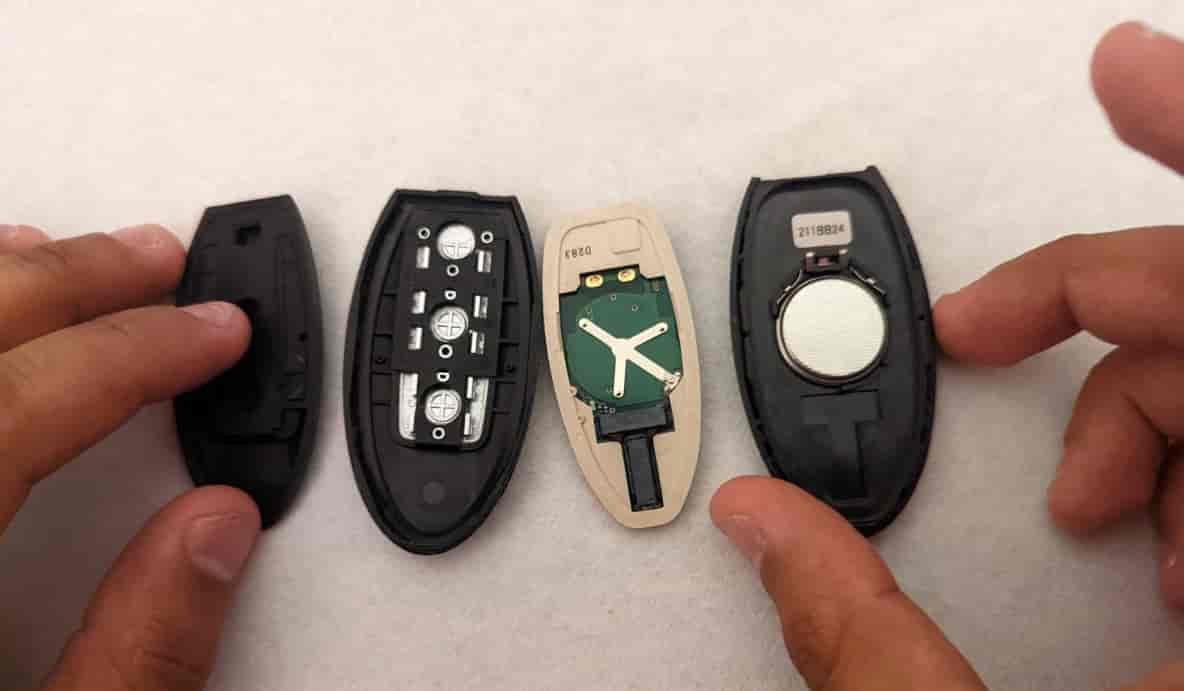
Modern Nissan vehicles use smart key systems that rely on a small internal battery to power remote locking, push-button start, and keyless entry functions. In most cases, a Nissan key fob battery lasts between 2 and 4 years before performance starts to decline. Common warning signs include shorter remote range, delayed door unlocking, weak signal detection, and dashboard key battery warnings.
The good news is that learning how to replace Nissan key fob battery is simple. Most Nissan key fobs use either a CR2032 or CR2025 coin battery, and the replacement process usually takes less than 10 minutes. You do not need advanced tools or mechanical experience to complete the job safely at home.
However, many drivers accidentally damage the plastic casing, install the battery upside down, or touch sensitive internal components during replacement. These mistakes can prevent the Nissan Intelligent Key from working correctly even after installing a new battery.
This guide explains the complete battery replacement process step by step. You will also learn which battery type your Nissan key uses, how to open the key fob safely, how to fix common problems after battery replacement, and how to extend the life of your Nissan key battery.
What Battery Does a Nissan Key Fob Use?
Most Nissan key fobs use either a CR2032 or CR2025 lithium coin battery. The correct battery depends on the Nissan model, production year, and Intelligent Key design. Newer Nissan vehicles such as the Altima, Rogue, Sentra, Pathfinder, and Maxima commonly use a CR2032 battery because it provides higher capacity and longer battery life.
Some older Nissan key fobs use a CR2025 battery instead. Although both batteries look similar, the CR2032 is thicker and stores more energy. Installing the wrong battery can prevent the key fob from closing properly or reduce signal strength.
The fastest way to confirm the correct battery type is to open the key fob and check the battery label directly. The battery code is printed on the top surface. Nissan owner manuals also list compatible battery specifications for each model.
Drivers should buy high-quality lithium batteries from trusted brands. Cheap batteries often lose voltage quickly and shorten key fob performance. In many cases, premium batteries last 2 to 4 years under normal daily use.
What Tools Do You Need to Replace a Nissan Key Fob Battery?
You only need 3 basic items to replace a Nissan key fob battery safely. Most drivers can complete the process at home without professional tools or mechanical experience.
The first item is the replacement battery itself. Most Nissan Intelligent Keys use either a CR2032 or CR2025 lithium coin battery. The second item is a small flathead screwdriver or plastic pry tool. This helps separate the key fob casing without damaging the plastic clips. The third item is a clean microfiber cloth or soft surface to protect the internal components while working.
Many Nissan key fobs can be opened without a screwdriver. After removing the emergency key, drivers can often use the small opening near the key slot to gently separate the casing halves. However, using excessive force may crack the plastic shell or damage the retaining clips.
Metal tools should be used carefully because they can scratch the casing or bend the battery contacts inside the key fob. Plastic trim tools are safer for modern smart keys because they reduce the risk of internal damage.
Before starting the replacement process, drivers should wash and dry their hands completely. Moisture, dirt, and skin oils can interfere with battery contact points and reduce signal performance.
How to Replace Nissan Key Fob Battery Step by Step?
Replacing a Nissan key fob battery usually takes less than 10 minutes. The process is simple if the battery is installed correctly and the internal components remain undamaged.
Start by locating the small release button on the back of the Nissan key fob. Press the button firmly and pull out the emergency mechanical key. Most Nissan Intelligent Keys contain a hidden metal key inside the casing for backup access.
Next, locate the small slot near the emergency key opening. Insert a flathead screwdriver or plastic pry tool into the slot carefully. Twist the tool gently until the key fob casing separates into two halves. Avoid applying too much pressure because the plastic clips can crack easily.
After opening the key fob, remove the old battery slowly. Most Nissan key fobs position the positive side facing upward. Before installing the new battery, check the battery orientation carefully. Installing the battery upside down is one of the most common reasons a Nissan key fob stops working after replacement.
Insert the new battery into the compartment and press it down gently until it sits securely under the retaining clips. Do not touch the battery surface excessively because skin oils can reduce electrical contact quality over time.
Align both halves of the key fob casing and press them together evenly until all clips snap back into place. Finally, reinsert the emergency key and test the remote locking, unlocking, and push-button start functions immediately.
If the Nissan key fob does not respond after battery replacement, reopen the casing and confirm that the battery contacts are aligned properly and the battery type matches the original specification.
How Long Does It Take to Replace a Nissan Key Fob Battery?
Most drivers can replace a Nissan key fob battery in 5 to 10 minutes. The exact time depends on the key fob design, battery accessibility, and whether the driver has the correct replacement battery ready before starting.
For beginners, the process may take slightly longer because separating the casing safely requires patience. Many first-time users worry about damaging the plastic shell or internal battery contacts. However, Nissan Intelligent Keys are designed for relatively simple battery access without advanced mechanical tools.
Professional battery replacement at a dealership or locksmith usually takes less than 15 minutes. In most cases, service centers charge between $10 and $50 depending on labor costs and battery quality. Some dealerships include battery replacement during routine maintenance visits.
Replacing the battery at home is significantly cheaper. A high-quality CR2032 or CR2025 battery often costs less than $10 for a multi-pack. Because of this, many Nissan owners prefer DIY replacement instead of paying dealership service fees.
Drivers should still work carefully during the process. Rushing can damage the retaining clips, battery terminals, or internal circuit board. Small mistakes often create additional troubleshooting problems after installation.
What Are the Signs of a Weak Nissan Key Fob Battery?
There are 5 common signs of a weak Nissan key fob battery. These warning symptoms usually appear gradually before the battery stops working completely.
The first sign is reduced operating range. Drivers may notice they need to stand much closer to the vehicle before the lock or unlock buttons respond. Weak battery voltage reduces signal strength between the Nissan Intelligent Key and the vehicle receiver.
The second sign is delayed button response. In many cases, the doors unlock several seconds after pressing the remote button. Push-button ignition systems may also react more slowly than normal.
The third sign is inconsistent performance. Sometimes the key fob works normally, while other times it fails completely. This happens because low battery voltage creates unstable signal transmission.
The fourth sign is a dashboard warning message. Many modern Nissan vehicles display alerts such as “Key Battery Low” or “No Key Detected” when battery power drops below normal operating levels.
The fifth sign is complete signal failure. At this stage, the Nissan key fob may stop locking, unlocking, or starting the vehicle remotely. However, drivers can still use the emergency mechanical key to access the car manually.
Most Nissan key fob batteries last between 2 and 4 years. Frequent remote use, extreme temperatures, and long-term storage inside the vehicle can drain the battery faster.
Why Is the Nissan Key Fob Not Working After Battery Replacement?
A Nissan key fob may stop working after battery replacement for 4 main reasons. The most common issue is incorrect battery installation.
Many drivers accidentally install the battery upside down. Nissan key fob batteries normally require the positive side facing upward. Incorrect orientation blocks electrical flow and prevents signal transmission entirely.
The second common issue is poor battery contact alignment. Small metal terminals inside the key fob must touch the battery surface correctly. If the contacts become bent during replacement, the key fob may lose power intermittently.
The third issue is battery compatibility. Installing the wrong battery type, such as using a CR2025 instead of a CR2032, can reduce voltage stability or prevent the casing from closing properly. Cheap low-quality batteries may also fail immediately despite being new.
The fourth issue is accidental internal damage. Excessive force while opening the casing can crack the circuit board, loosen internal components, or damage the transponder chip. In these situations, the Nissan Intelligent Key may require professional repair or replacement.
Most Nissan key fobs do not require reprogramming after a standard battery replacement. The remote memory usually remains stored inside the internal chip. However, if the vehicle still cannot detect the key after troubleshooting basic battery issues, the key fob may need diagnostic testing at a dealership or automotive locksmith.
Drivers should also inspect the battery compartment for dirt, corrosion, or moisture buildup. Even small contaminants can interrupt electrical contact and weaken remote signal performance.
How Can You Prevent Damage While Replacing a Nissan Key Battery?
Drivers can prevent Nissan key fob damage by following 5 simple safety practices during battery replacement. Most key fob problems happen because of excessive force, moisture exposure, or incorrect handling of internal components.
The first safety rule is to avoid forcing the casing open aggressively. Nissan Intelligent Keys contain small plastic retaining clips that can crack easily under pressure. Drivers should twist the pry tool gently instead of prying the casing apart forcefully.
The second rule is to avoid using sharp metal tools directly on internal components. Metal screwdrivers can scratch the circuit board or bend battery contact terminals. Plastic pry tools are safer because they reduce the risk of electrical damage.
The third rule is to keep the key fob dry during replacement. Even small amounts of moisture can interfere with electrical contacts and reduce signal reliability. Drivers should always work on a clean and dry surface indoors whenever possible.
The fourth rule is to avoid touching the battery terminals excessively. Skin oils and dirt can weaken electrical conductivity over time. Holding the battery by its outer edges helps preserve clean contact surfaces.
The fifth rule is to align the casing properly before snapping it closed. Misaligned casing clips can break if pressure is applied unevenly. Drivers should press around the edges slowly until all clips lock securely into position.
Careful handling extends the lifespan of both the Nissan key fob battery and the internal electronic components.
How Often Should You Replace a Nissan Key Fob Battery?
Most Nissan key fob batteries should be replaced every 2 to 4 years. Battery lifespan depends on driving habits, climate conditions, and how frequently the remote functions are used each day.
Drivers who use remote start, push-button ignition, and keyless entry multiple times daily usually experience faster battery drain. Smart key systems constantly communicate with the vehicle when nearby, which slowly reduces battery capacity over time.
Extreme temperatures also affect battery performance. Hot environments accelerate lithium battery degradation, while freezing temperatures temporarily weaken battery voltage and signal strength. Drivers living in very hot or cold regions often replace Nissan key batteries more frequently.
Leaving the key fob inside the vehicle overnight can also shorten battery life. In some Nissan models, the Intelligent Key system continues detecting nearby signals continuously, which increases unnecessary battery consumption.
Replacing the battery early helps prevent sudden key failure. Drivers should not wait until the key fob stops working completely. Weak batteries often create intermittent signal problems before total failure occurs.
Many Nissan owners replace the battery proactively every 2 years as part of regular vehicle maintenance. This reduces the risk of emergency lockout situations and improves daily key performance reliability.
Can You Drive a Nissan With a Dead Key Fob Battery?
Yes, drivers can still unlock and start most Nissan vehicles even if the key fob battery is completely dead. Nissan Intelligent Key systems include backup access methods for emergency situations.
The first backup feature is the hidden mechanical key inside the key fob. Drivers can press the release button and remove the emergency key manually. This key unlocks the driver-side door if remote entry stops working.
The second backup feature is Nissan’s emergency key detection system. Many Nissan push-button start vehicles can still detect the key fob through close-range radio communication even when the battery is weak or dead.
To start the vehicle, drivers should press the brake pedal and hold the Nissan key fob directly against the push-button ignition. In most models, the vehicle recognizes the transponder chip automatically and allows the engine to start normally.
This backup system works because the transponder chip inside the Nissan Intelligent Key does not rely entirely on battery power for emergency authentication. The vehicle can still detect the chip at very short distances.
However, a completely damaged key fob or internal chip failure may disable this emergency function. In these situations, drivers may need professional locksmith assistance or a replacement Nissan smart key.
Which Nissan Models Use Intelligent Key Systems?
Most modern Nissan vehicles use Intelligent Key systems for remote locking, push-button ignition, and keyless entry functions. Nissan introduced these smart key systems across multiple vehicle categories to improve convenience and vehicle security.
Popular Nissan models that commonly use Intelligent Keys include the Altima, Rogue, Sentra, Maxima, Murano, Pathfinder, Versa, Armada, and Frontier. Many newer models use CR2032 batteries because they provide longer operating life and stronger signal stability.
Some older Nissan vehicles use different key fob designs and battery types. Earlier models may use standard remote entry keys instead of full smart key systems. These older remotes sometimes require CR2025 batteries or alternative battery configurations.
Battery replacement steps remain similar across most Nissan Intelligent Key designs. Drivers usually remove the emergency key, separate the casing carefully, and replace the internal lithium coin battery manually.
Before purchasing a replacement battery, drivers should confirm the exact Nissan model year and key fob type. Even similar Nissan vehicles may use different battery specifications depending on trim level and production generation.
Owners who are unsure about compatibility can check the existing battery label directly or consult the Nissan owner manual for exact battery information.