Bluetooth problems in a Nissan Rogue typically fall into 5 categories: pairing failures, connection drops, audio playback issues, software conflicts, and hardware malfunctions. A Bluetooth connection may stop working suddenly after a phone update, a NissanConnect software issue, or a failed pairing process. In some cases, the phone appears connected but calls or music do not function correctly.
Because the Bluetooth system in a Nissan Rogue relies on communication between the vehicle’s infotainment system and a smartphone, even a minor software mismatch can disrupt the connection. For example, an iPhone iOS update may change Bluetooth permissions, while an Android update may alter device compatibility settings. Similarly, a full Bluetooth memory, corrupted pairing data, or an outdated NissanConnect version can prevent successful connections.
The good news is that most Bluetooth problems do not require dealership repairs. Many issues can be resolved by deleting old pairings, resetting the infotainment system, updating software, or reconnecting the phone correctly. Only a small percentage of cases involve a defective Bluetooth module or infotainment hardware.
This guide explains the 10 most common reasons Nissan Rogue Bluetooth stops working and provides a practical solution for each issue. By following the troubleshooting steps in order, most drivers can restore Bluetooth functionality within a few minutes.
What Are the Signs That Nissan Rogue Bluetooth Is Not Working?
The most common signs that Nissan Rogue Bluetooth is not working are pairing failures, missing devices during scanning, unexpected disconnections, audio playback problems, and hands-free calling issues. These symptoms indicate that communication between the NissanConnect system and the smartphone has been interrupted at either the software or hardware level.
A pairing failure occurs when the vehicle detects a phone but cannot complete the connection process. In many cases, the system displays an error message or continuously attempts to connect without success. This situation often develops after a smartphone operating system update, a corrupted Bluetooth profile, or a compatibility conflict between the phone and the infotainment system.
Another common symptom is a successful connection without functionality. The phone may appear in the NissanConnect device list, yet music streaming, contact synchronization, or voice calling does not work. This happens because Bluetooth consists of multiple communication profiles. Audio streaming, phone calls, and contact sharing operate independently. A connection may therefore appear active while one or more profiles fail to function correctly.
Frequent disconnections are also a strong indicator of Bluetooth problems. A stable Bluetooth connection should remain active throughout a drive. If the connection repeatedly drops every few minutes, the cause is often outdated software, interference from another paired device, or damaged Bluetooth data stored within the vehicle system.
Drivers may also notice longer connection times than normal. A Nissan Rogue that previously connected automatically within seconds may suddenly require manual pairing attempts each time the vehicle starts. This behavior frequently signals corrupted device memory or an overloaded Bluetooth storage database.
Recognizing these symptoms is important because each one points toward a different underlying cause. Identifying the exact behavior of the Bluetooth system makes troubleshooting faster and prevents unnecessary repairs.
Why Is Bluetooth Turned Off on Either the Vehicle or the Phone?
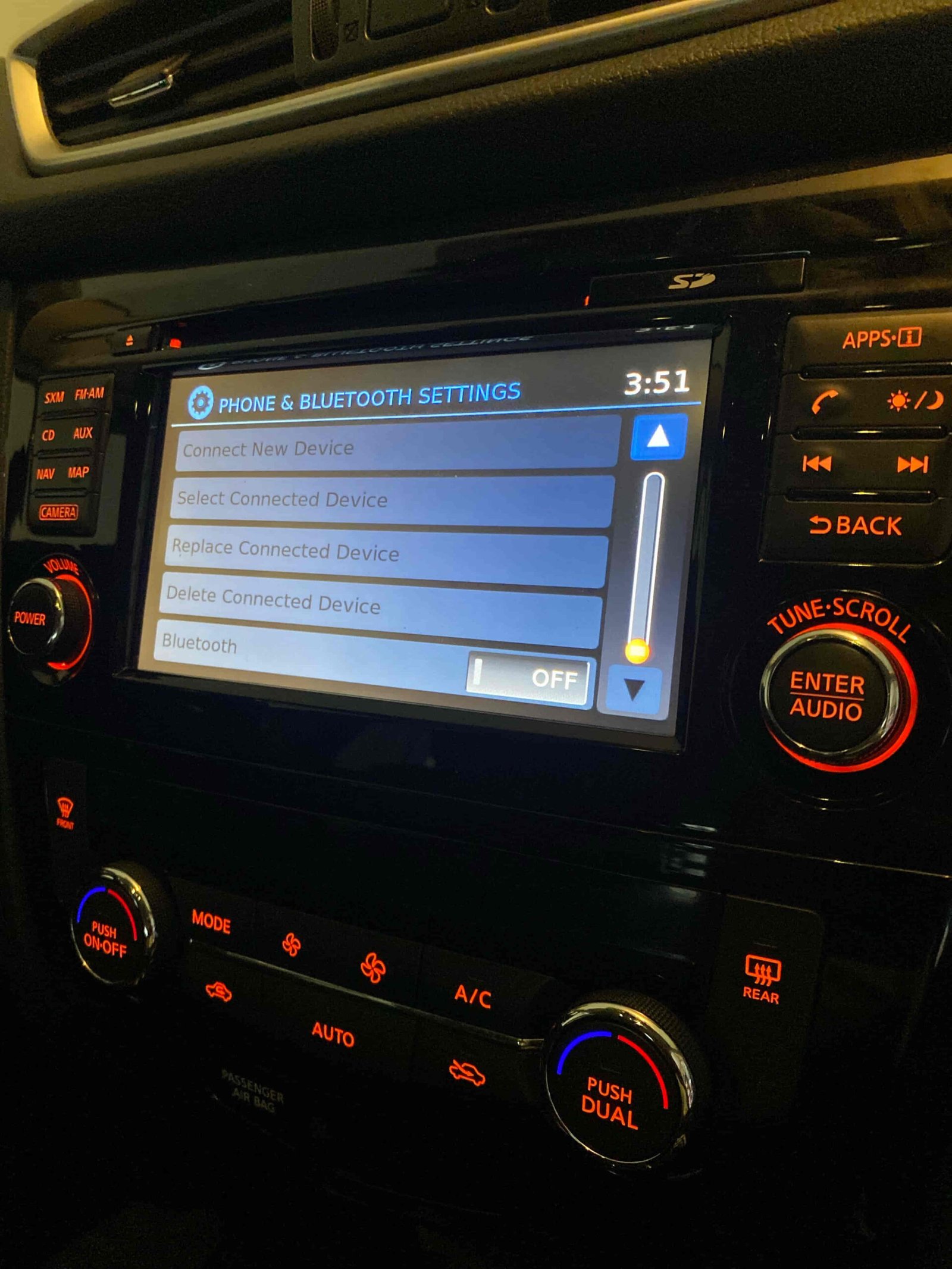
Bluetooth often stops working because the feature has been disabled on either the Nissan Rogue infotainment system or the connected smartphone. While this appears to be a simple issue, it remains one of the most common causes of Bluetooth connectivity failures.
The NissanConnect system relies on active Bluetooth broadcasting to discover and communicate with nearby devices. When Bluetooth is disabled inside the vehicle settings, the system becomes invisible to smartphones and cannot initiate a pairing request. Similarly, when Bluetooth is turned off on the phone, the vehicle cannot detect or reconnect to the device even if it was previously paired.
Modern smartphones can disable Bluetooth automatically under certain conditions. Battery optimization settings, power-saving modes, and software updates may alter Bluetooth permissions without the driver’s knowledge. After a major iOS or Android update, some users discover that Bluetooth permissions for vehicle connectivity have been reset or restricted.
The problem can also occur when location services are disabled. Certain Android devices require both Bluetooth and location permissions to remain active for device discovery. When location access is blocked, the phone may fail to locate the Nissan Rogue despite Bluetooth appearing enabled.
Another factor involves user profiles within NissanConnect. Some model years allow personalized driver settings that affect connected devices. If a profile change occurs, Bluetooth settings may revert to default configurations, causing the connection to disappear unexpectedly.
Verifying that Bluetooth remains enabled on both the vehicle and the smartphone should always be the first diagnostic step. Many connectivity issues that appear complex are resolved immediately once both systems are configured to communicate properly.
Why Is Your Phone Already Connected to Another Device?
A Nissan Rogue may fail to connect to Bluetooth because the smartphone is already maintaining an active connection with another device. Bluetooth technology prioritizes previously established connections, and many smartphones automatically reconnect to devices they recognize, including wireless earbuds, smartwatches, laptops, portable speakers, and other vehicles.
When a phone attempts to manage multiple Bluetooth relationships simultaneously, connection conflicts can occur. Although modern smartphones support multiple Bluetooth profiles, not every profile can operate with every device at the same time. A phone that is actively streaming audio to wireless headphones, for example, may refuse to establish a new media connection with the NissanConnect system. The vehicle may detect the phone, but pairing completion, audio playback, or hands-free calling can fail.
This issue becomes more common among drivers who regularly switch between several Bluetooth-enabled devices throughout the day. The phone continuously prioritizes the strongest or most recently used connection, which may prevent the Nissan Rogue from becoming the primary Bluetooth device. As a result, users often assume the vehicle’s Bluetooth system is malfunctioning when the actual cause originates from the smartphone.
Removing unused Bluetooth connections and disconnecting nearby devices often resolves the problem immediately. A clean Bluetooth environment allows the NissanConnect system to establish a stable connection without competing signals or profile conflicts.
Why Is Nissan Rogue Bluetooth Memory Full?
Nissan Rogue Bluetooth may stop working when the infotainment system reaches its storage limit for paired devices. Every NissanConnect system maintains an internal database that stores connection information, device names, authentication records, contact synchronization data, and user preferences. Once this memory becomes overloaded, the system may struggle to accept new devices or maintain stable connections.
Many drivers keep the same vehicle for years while changing phones multiple times. Old devices often remain stored within the system even though they are no longer used. Over time, these inactive entries accumulate and consume available memory resources. The result can be failed pairing attempts, slow device discovery, delayed automatic connections, and intermittent Bluetooth performance.
The issue is not limited to smartphones. Tablets, secondary phones, family members’ devices, and previously borrowed devices can all occupy space within the NissanConnect memory. Even if those devices are no longer present, their stored authentication data remains inside the infotainment system until manually removed.
A full Bluetooth database can also increase system processing time. Instead of establishing a direct connection with the current phone, the infotainment system must first scan and compare multiple stored records. This additional workload can slow the connection process and increase the likelihood of communication errors.
Deleting unused devices restores available memory and reduces unnecessary system overhead. Many Bluetooth connectivity issues disappear after clearing outdated records and pairing the primary smartphone again from scratch.
Why Has the Bluetooth Connection Become Corrupted?
A corrupted Bluetooth connection is one of the most common causes of persistent Nissan Rogue Bluetooth problems. Corruption occurs when the stored communication data between the vehicle and the smartphone becomes incomplete, outdated, or inconsistent. Once this happens, the two devices may recognize each other but fail to communicate properly.
Bluetooth pairing relies on authentication keys, communication profiles, permissions, and synchronization settings. When any of these elements become damaged, the connection may remain partially functional while specific features stop working. A driver may notice that phone calls work but music streaming does not, or that the device appears connected while contact synchronization repeatedly fails.
Software updates are a major contributor to pairing corruption. An iPhone or Android update can modify Bluetooth protocols, security requirements, or permission structures. The NissanConnect system may continue using older connection data that no longer matches the updated smartphone configuration. This mismatch creates communication failures even though both devices appear compatible.
Unexpected system interruptions can produce similar results. Battery failures, forced restarts, infotainment freezes, and interrupted software updates can leave incomplete Bluetooth records within the system. Once corrupted information is stored, the connection may repeatedly fail until the existing pairing data is removed.
Creating a completely new Bluetooth relationship is often the most effective solution. Removing the vehicle from the phone’s Bluetooth list and deleting the phone from NissanConnect forces both systems to generate new authentication credentials. This process eliminates outdated data and allows a clean communication channel to be established.
Why Is NissanConnect Software Outdated?
Outdated NissanConnect software can prevent Bluetooth devices from connecting correctly because the infotainment system depends on software compatibility to communicate with modern smartphones. As Apple and Google release new operating systems, Bluetooth standards, security requirements, and communication protocols continue to evolve. An older NissanConnect version may struggle to support these changes.
Software compatibility affects every aspect of Bluetooth performance, including device discovery, pairing authentication, audio streaming, voice calling, and contact synchronization. When the infotainment software falls behind current standards, users may experience connection failures, random disconnections, delayed pairing, or missing Bluetooth functions.
The problem becomes more noticeable after a smartphone receives a major operating system upgrade. A phone running a newer version of iOS or Android may introduce updated Bluetooth security mechanisms that the vehicle software does not fully recognize. Even though the phone itself functions normally, the connection between the smartphone and the Nissan Rogue becomes unstable.
Outdated software can also contain unresolved bugs. Manufacturers frequently release software updates to improve compatibility, fix connectivity issues, and enhance system stability. Vehicles operating on older software versions continue using code that may already have known Bluetooth-related issues.
Keeping NissanConnect updated helps maintain compatibility with newer smartphones and reduces the risk of recurring Bluetooth failures. Software updates not only improve connectivity but also strengthen overall infotainment performance, resulting in faster device recognition and more reliable wireless communication.
Why Did an iPhone or Android Update Break the Bluetooth Connection?
A smartphone operating system update can break a previously stable Nissan Rogue Bluetooth connection because software updates often modify communication protocols, security permissions, and device authentication requirements. Even when the update improves overall phone performance, it can unintentionally disrupt existing Bluetooth relationships with vehicle infotainment systems.
Modern Bluetooth connections rely on stored trust credentials between the phone and NissanConnect. When Apple or Google introduces new security frameworks, the updated device may reject older authentication data that was created before the update. As a result, the phone and vehicle continue to recognize each other but fail to establish a fully functional connection.
Permission changes are another common cause. New versions of iOS and Android frequently require users to approve additional Bluetooth, microphone, contact-sharing, or location permissions. If these permissions are restricted during or after the update process, NissanConnect may lose access to features that previously worked without interruption. This explains why some drivers can still make calls but cannot stream music, while others experience the opposite situation.
Software updates may also reset network configurations in the background. Bluetooth settings, cached connection records, and stored wireless preferences can become inconsistent after an operating system upgrade. The mismatch creates instability between the smartphone and the infotainment system, leading to pairing failures or repeated disconnections.
In most situations, deleting the existing Bluetooth connection and pairing the device again resolves the issue. Establishing a new connection allows both systems to exchange updated authentication information and align with the latest software requirements.
Why Is Bluetooth Connected but No Audio Is Playing?
A Nissan Rogue Bluetooth connection can appear successful while audio playback fails because Bluetooth audio streaming uses a different communication profile than device pairing. In other words, a phone may be connected to the vehicle while the media transmission channel remains inactive or improperly configured.
Bluetooth communication is divided into separate functions. One profile manages phone calls, another handles music streaming, and others support contacts, messages, and voice commands. If the audio profile encounters a configuration issue, the connection indicator may still show an active Bluetooth connection even though no sound is transmitted through the vehicle speakers.
Incorrect audio source selection is one of the most common causes. The NissanConnect system supports multiple audio inputs, including AM/FM radio, satellite radio, USB devices, Apple CarPlay, Android Auto, and Bluetooth Audio. If the infotainment system is set to the wrong source, music playback from the phone will not reach the speakers despite a successful Bluetooth connection.
Media permissions can create similar symptoms. Some smartphones restrict audio-sharing privileges after software updates or security changes. When media permissions are disabled, the phone maintains the Bluetooth connection but blocks audio transmission to external devices.
Application-specific settings may also contribute to the problem. Streaming platforms such as Spotify, Apple Music, YouTube Music, and Amazon Music maintain their own playback controls and output preferences. If the application is directing audio to another connected device, the Nissan Rogue will receive no audio signal.
When Bluetooth is connected but silent, the issue is usually related to media routing rather than a complete Bluetooth failure. Verifying audio source settings, media permissions, and playback destinations typically restores sound without requiring more advanced repairs.
Why Does Nissan Rogue Bluetooth Keep Disconnecting?
Repeated Bluetooth disconnections usually indicate an unstable communication environment rather than a complete system failure. A properly functioning Nissan Rogue Bluetooth connection should remain active throughout the entire drive. When the connection drops repeatedly, one or more factors are interfering with the wireless communication process.
Signal instability is a common cause. Bluetooth operates using short-range radio frequencies that can be disrupted by nearby wireless devices. Smartphones connected to smartwatches, wireless earbuds, fitness trackers, or other vehicle systems may experience increased communication conflicts that weaken connection stability.
Software inconsistencies also contribute significantly to intermittent disconnections. An outdated NissanConnect system, incompatible smartphone firmware, or partially corrupted Bluetooth records can interrupt the communication cycle. Instead of maintaining a continuous connection, the system repeatedly disconnects and reconnects as it attempts to recover from transmission errors.
Power management features frequently play a role as well. Many smartphones aggressively manage battery consumption by limiting background processes. When Bluetooth services are placed into low-power mode, the device may temporarily suspend communication with the vehicle. The driver experiences this behavior as random Bluetooth drops even though no obvious system error is displayed.
Environmental conditions can further affect connection quality. Excessive system load within the infotainment unit, overheating electronic components, and simultaneous operation of multiple wireless services may reduce Bluetooth reliability. Although these situations are less common, they become more likely in older infotainment systems.
Persistent disconnections should be treated as a warning sign of underlying software or communication issues. Addressing the root cause early helps prevent more severe connectivity problems from developing over time.
Why Does NissanConnect Need a System Reset?
A NissanConnect system reset is often necessary because temporary software errors can accumulate within the infotainment platform and interfere with Bluetooth functionality. Like any computer-based system, the infotainment unit continuously processes information, stores temporary data, and manages multiple communication channels simultaneously. Over time, this activity can lead to software instability.
Temporary glitches commonly affect Bluetooth discovery, pairing authentication, audio routing, and device synchronization. The system may stop recognizing previously paired devices, fail to complete new pairing requests, or freeze during the connection process. These symptoms frequently originate from software conflicts rather than hardware failures.
A reset clears temporary memory and forces the infotainment system to reload its operating environment. This process removes unstable background processes, refreshes communication services, and restores normal system operation. In many cases, Bluetooth functionality returns immediately after the restart because the underlying issue was related to cached data rather than permanent damage.
Factory resets provide a deeper level of recovery. While a standard restart clears temporary processes, a factory reset removes stored devices, user settings, and saved Bluetooth configurations. This approach is particularly effective when corrupted pairing records continue causing connection problems despite multiple troubleshooting attempts.
Resetting the system should be considered after basic troubleshooting steps have failed. It serves as an effective method for eliminating software-related issues before investigating more complex hardware concerns.
Why Could the Bluetooth Module Be Failing?
A failing Bluetooth module is one of the less common but more serious reasons Nissan Rogue Bluetooth stops working. Unlike software-related issues, hardware failures cannot usually be resolved through updates, resets, or re-pairing procedures.
The Bluetooth module functions as the communication bridge between the infotainment system and external devices. It handles wireless signal processing, device authentication, data transmission, and profile management. When this component begins to fail, the entire Bluetooth ecosystem becomes unreliable.
Several symptoms suggest a hardware-related problem. The vehicle may fail to detect any Bluetooth devices despite multiple troubleshooting attempts. Pairing requests may never appear on the smartphone. Existing connections may disappear completely after each restart. In more severe cases, the Bluetooth menu itself may become unavailable within NissanConnect.
Electronic component degradation is the most common cause of module failure. Exposure to heat, vibration, moisture, and long-term electrical stress can gradually reduce hardware performance. Although infotainment systems are designed for durability, electronic components naturally experience wear over time.
A defective Bluetooth module should only be suspected after software causes have been eliminated. Most Bluetooth issues originate from configuration problems, outdated software, or corrupted connection records. However, when all standard troubleshooting procedures fail, professional diagnostic testing becomes necessary to determine whether the hardware itself requires repair or replacement.
What Should You Do If Nissan Rogue Bluetooth Still Does Not Work?
If Nissan Rogue Bluetooth still does not work after basic troubleshooting, the next step is to systematically eliminate every possible software, compatibility, and hardware variable. Most persistent Bluetooth problems are not caused by a single failure. Instead, they result from multiple issues occurring simultaneously, such as outdated software combined with corrupted pairing records or smartphone settings that conflict with NissanConnect.
The first priority is confirming that both the smartphone and the infotainment system are running the latest available software versions. Bluetooth standards evolve continuously, and compatibility problems often emerge when one device receives updates while the other remains unchanged. A vehicle using older NissanConnect software may struggle to communicate with a smartphone running a recently released operating system.
The second step is creating an entirely new Bluetooth environment. Existing pairings should be removed from both the phone and the vehicle before establishing a fresh connection. This process forces both devices to generate new authentication credentials and eliminates the possibility that corrupted Bluetooth records are preventing communication.
Testing with a different smartphone can significantly accelerate diagnosis. If another phone connects successfully, the problem is likely related to the original device rather than the vehicle. If neither device connects, attention should shift toward NissanConnect software, infotainment hardware, or the Bluetooth module itself.
USB-based connectivity can also provide valuable diagnostic information. If Apple CarPlay or Android Auto functions normally through a wired connection while Bluetooth remains unavailable, the issue is likely isolated to the wireless communication system rather than the infotainment platform as a whole.
When all troubleshooting procedures fail, professional diagnostics become necessary. A dealership or qualified automotive electronics specialist can access diagnostic tools capable of identifying module failures, software faults, communication errors, and system-level problems that are not visible through standard user settings.
Read more: android auto nissan not working
Which Nissan Rogue Model Years Report Bluetooth Problems Most Often?
Bluetooth issues can occur in any Nissan Rogue model year, but reports are generally more common in vehicles equipped with older generations of NissanConnect technology. As smartphone operating systems become more advanced, older infotainment systems face greater compatibility challenges because they were designed around earlier Bluetooth standards.
Earlier Nissan Rogue models frequently experience pairing failures, delayed connections, contact synchronization errors, and intermittent audio streaming problems. These issues often stem from limitations in processing power, software architecture, and wireless communication capabilities compared with newer infotainment systems.
Vehicles produced during transitional technology periods may encounter unique challenges. During these years, manufacturers introduced updated infotainment platforms while smartphone manufacturers rapidly expanded Bluetooth functionality. As a result, some model years sit between older and newer technology standards, increasing the likelihood of compatibility inconsistencies.
Newer Nissan Rogue models generally provide improved Bluetooth stability because they benefit from updated NissanConnect platforms, faster processors, enhanced wireless communication protocols, and stronger software support. These improvements help maintain compatibility with modern iPhone and Android devices while reducing connection failures.
However, newer vehicles are not immune to Bluetooth problems. Software bugs, operating system updates, smartphone settings, and corrupted connection data can affect any model year. The difference is that newer systems typically offer better recovery mechanisms and receive software updates that address emerging compatibility concerns.
The age of the infotainment system often has a greater impact than the age of the vehicle itself. A well-maintained Nissan Rogue with updated software may provide more reliable Bluetooth performance than a newer vehicle operating with outdated system firmware.
How Can You Prevent Future Nissan Rogue Bluetooth Problems?
Preventing Nissan Rogue Bluetooth problems requires consistent maintenance of both the infotainment system and the connected smartphone. Bluetooth connectivity depends on ongoing compatibility between multiple software and hardware components. Maintaining that compatibility significantly reduces the likelihood of future connection failures.
Keeping NissanConnect software updated is one of the most effective preventive measures. Software updates frequently contain Bluetooth improvements, security enhancements, and compatibility fixes that address newly identified issues. An updated infotainment system is better equipped to communicate with evolving smartphone operating systems.
Regularly updating smartphones is equally important. Manufacturers continuously refine Bluetooth performance, resolve communication bugs, and improve device interoperability. Delaying updates for extended periods can create compatibility gaps that eventually affect vehicle connectivity.
Bluetooth memory management also plays a critical role. Removing unused devices prevents the NissanConnect database from becoming overloaded with outdated connection records. A streamlined device list allows the system to identify and connect to primary devices more efficiently.
Periodic reconnection can further improve reliability. After major software updates on either the vehicle or smartphone, creating a fresh Bluetooth pairing helps synchronize new security credentials and communication protocols. This simple step often prevents future connection instability before it develops.
Battery optimization settings deserve attention as well. Aggressive power-saving features can restrict Bluetooth processes in the background, increasing the risk of intermittent disconnections. Configuring smartphone settings to allow uninterrupted Bluetooth communication improves long-term stability.
Consistent maintenance transforms Bluetooth from a recurring source of frustration into a reliable daily convenience. Most connectivity problems develop gradually through outdated software, accumulated device records, and configuration conflicts. Addressing these factors proactively helps ensure a stable connection between Nissan Rogue and smartphone devices over the long term.
Conclusion
Nissan Rogue Bluetooth problems are usually caused by software conflicts, pairing issues, outdated NissanConnect versions, overloaded Bluetooth memory, or smartphone compatibility changes rather than permanent hardware failures. In most situations, the connection can be restored without replacing any components.
The most effective troubleshooting approach is to start with the simplest causes before investigating more advanced possibilities. Verifying Bluetooth settings, removing old pairings, clearing stored devices, updating software, and resetting NissanConnect resolve the majority of connectivity issues. These steps address the most common communication failures that occur between the vehicle infotainment system and modern smartphones.
Drivers should also recognize that Bluetooth connectivity depends on two systems working together. A perfectly functioning Nissan Rogue may still experience connection problems if an iPhone or Android device receives a software update, changes security permissions, or stores corrupted Bluetooth records. For this reason, troubleshooting should always include both the vehicle and the smartphone.
If Bluetooth continues to fail after software updates, re-pairing procedures, and system resets, professional diagnostics may be necessary to determine whether the Bluetooth module or infotainment hardware has developed a fault. Although hardware failures are less common, identifying them early can prevent unnecessary troubleshooting and restore full connectivity more quickly.
By understanding the 10 most common reasons Nissan Rogue Bluetooth stops working and applying the appropriate fix, drivers can resolve most connection issues, maintain reliable hands-free communication, and enjoy uninterrupted audio streaming during everyday driving.