
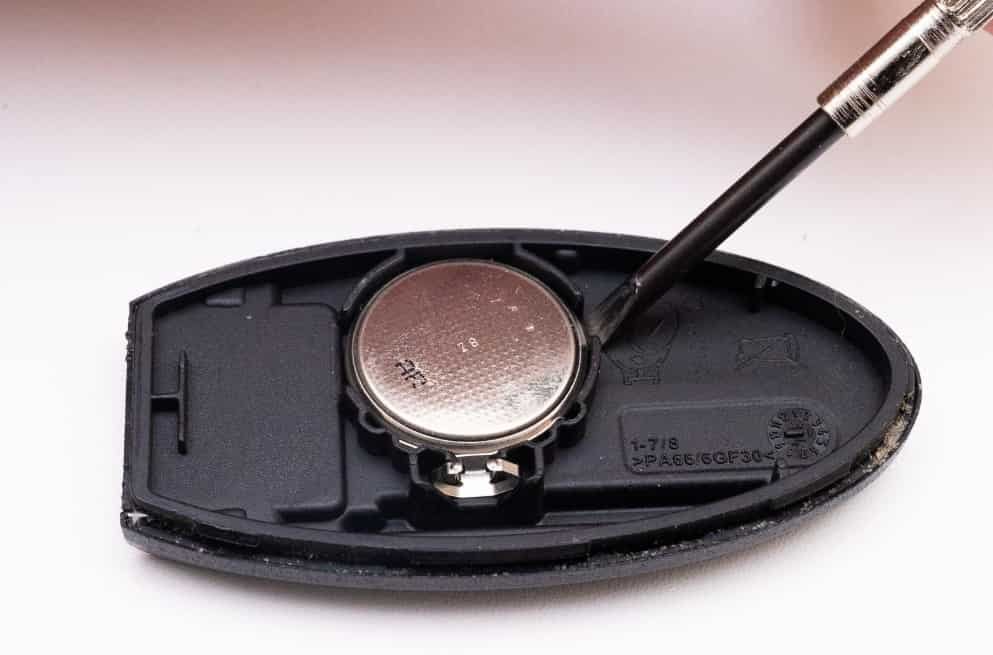
A dead Nissan key fob battery does not mean you need a new key. In most cases, you only need to replace the small battery inside the remote.
Nissan key fob battery replacement is a simple maintenance task. Most vehicle owners can complete it in a few minutes. You need the correct battery, a small tool, and the right replacement steps.
This guide shows you how to change battery in Nissan key fob correctly. You will learn how to identify the right battery type, open the key fob case, remove the old battery, and install the new one.
The process also explains common problems after battery replacement. These include incorrect battery placement, weak battery contact, and key fob connection issues. Following the correct steps helps protect the Nissan Intelligent Key components and keeps the remote entry system working properly.
Before replacing the battery, check your Nissan model and confirm the required battery type. Different Nissan key fob versions may use different lithium coin batteries, such as CR2025 or CR2032.
What Battery Does A Nissan Key Fob Use?
A Nissan key fob usually uses a small lithium coin battery. The most common battery types are CR2025 and CR2032 batteries. These batteries provide the power needed for the remote transmitter, buttons, and Nissan Intelligent Key functions.
The correct battery type depends on your Nissan key fob model. Different Nissan vehicles may use different key fob designs, even when they belong to the same vehicle generation. For example, a Nissan Rogue key fob may use a different battery size from a Nissan Altima or Nissan Sentra key fob.
You can find the correct battery type in three ways. First, remove the old battery and check the number printed on its surface. Second, review the vehicle owner’s manual for the recommended battery specification. Third, check the Nissan key fob design because some models have battery information inside the housing.
A CR2025 battery has a thickness of 2.5 mm, while a CR2032 battery has a thickness of 3.2 mm. Both batteries use lithium technology and provide 3 volts of power. However, they are not interchangeable in every Nissan key fob because the battery compartment size determines the correct fit.
Using the wrong battery can prevent the key fob from working properly. A battery that does not fit tightly may lose contact with the internal terminals, causing inconsistent remote signals. Always confirm the battery number before installing a replacement.
What Tools Do You Need To Change A Nissan Key Fob Battery?
Changing a Nissan key fob battery requires only a few basic tools. Most owners need a replacement lithium coin battery and a small flathead screwdriver or similar thin tool.
The screwdriver helps open the key fob housing without damaging the plastic case. Some Nissan key fob models include a small opening slot designed for this purpose. A soft cloth can also help protect the key fob surface from scratches during the process.
A new battery is the most important item for the replacement process. Choose a high quality CR2025 or CR2032 battery from a reliable manufacturer to ensure stable power output. Low quality batteries may lose charge faster and reduce the operating range of the Nissan key fob.
Before opening the key fob, prepare a clean workspace. Small components inside the remote, such as the battery contact points and rubber buttons, can move if the housing opens suddenly. Preparing the tools first makes the replacement process faster and reduces the risk of mistakes.
How Do You Change The Battery In A Nissan Key Fob Step By Step?
Changing a Nissan key fob battery requires six basic steps. The process starts with removing the mechanical key and ends with testing the remote functions. Most Nissan owners can complete the replacement without special automotive tools.
Remove The Mechanical Key From The Nissan Key Fob
The first step is removing the mechanical key from the key fob. Most Nissan Intelligent Key models include a small release latch on the back of the remote.
Press the release button and pull the mechanical key away from the key fob housing. Removing this key creates access to the opening point where you can separate the two halves of the remote case.
The mechanical key also helps identify the correct Nissan key fob design. Different Nissan models may use slightly different housing structures, but most follow the same basic replacement process.
Open The Nissan Key Fob Housing
The next step is opening the key fob case carefully. Insert a small flathead screwdriver into the opening slot and gently twist it to separate the housing.
Avoid using excessive force because the plastic clips inside the key fob can break. The internal components include the circuit board, battery contacts, and rubber button pad, which need protection during the replacement process.
Place the key fob halves on a clean surface after opening the case. This prevents small parts from moving or collecting dust during the battery change.
Remove The Old Battery And Install The New Battery
Remove the old battery from the compartment using the screwdriver or your fingers. Pay attention to the battery position before removing it because the new battery must face the same direction.
Install the replacement CR2025 or CR2032 battery with the correct polarity. The positive and negative sides must match the markings inside the key fob compartment. Incorrect placement prevents the remote from receiving power.
Press the new battery into position until it sits firmly in the battery holder. A loose battery connection can cause weak signals or intermittent key fob operation.
Close The Key Fob Case And Test The Remote
After installing the new battery, align the two halves of the key fob housing and press them together until they lock into place. Reinsert the mechanical key if your Nissan model uses one.
Test the key fob functions after replacement. Press the lock and unlock buttons near the vehicle to confirm that the remote sends signals correctly.
If the Nissan key fob does not respond, check the battery position first. A reversed battery, incorrect battery type, or poor contact between the battery and terminals are common causes of failure after replacement.
Replacing a Nissan key fob battery does not usually require programming. The existing remote connection remains stored in the vehicle system, so a correct battery installation normally restores normal operation.
What Battery Does A Nissan Key Fob Use?
A Nissan key fob uses a lithium coin battery to power the remote transmitter and Intelligent Key functions. The two most common battery types in Nissan key fobs are CR2025 and CR2032 batteries. Both batteries provide 3 volts of power, but they have different thickness levels and fit different key fob designs.
The correct battery depends on the specific Nissan key fob model. Nissan uses different Intelligent Key designs across vehicles such as the Nissan Rogue, Altima, Sentra, Pathfinder, and Murano. A CR2032 battery has a thickness of 3.2 mm, while a CR2025 battery has a thickness of 2.5 mm. This difference may seem small, but the battery compartment determines which option fits correctly.
You can identify the correct Nissan key fob battery by checking the old battery inside the remote. The battery surface usually shows a code such as CR2025 or CR2032. You can also check the Nissan owner’s manual because manufacturers list the recommended battery specification for each vehicle model.
Using the correct battery type helps the key fob maintain a stable connection with the vehicle. The battery supplies energy to the internal circuit board, which sends signals to the Nissan keyless entry system. If the battery does not fit tightly or provides incorrect power, the remote may respond slowly or stop working.
Before changing the Nissan key fob battery, confirm the battery number and inspect the compartment for dust or damaged contacts. A correct battery installation improves reliability and prevents common problems after replacement.
How Do You Change The Battery In A Nissan Key Fob Step By Step?
Changing a Nissan key fob battery is a simple process that most vehicle owners can complete at home. The replacement process involves opening the key fob housing, removing the old lithium coin battery, installing a new battery, and checking that the remote works correctly.
Start by removing the mechanical key from the Nissan key fob. Most Nissan Intelligent Key models include a small release latch on the back of the remote. Press the latch and pull the mechanical key away from the housing. This step exposes the opening area and allows you to separate the key fob case.
Next, open the Nissan key fob housing carefully. Insert a small flathead screwdriver into the opening slot and gently twist the tool to separate the two plastic sections. Avoid applying excessive pressure because the internal components include a circuit board, rubber buttons, and battery contact points that can become damaged.
After opening the case, remove the old battery and check its position. The battery has a positive side and a negative side, so the replacement battery must face the same direction. Install the new CR2025 or CR2032 battery firmly into the compartment until it sits securely against the contact points.
Close the key fob housing after installing the new battery. Press both sections together until they lock into place, then return the mechanical key if your model uses one. Test the lock, unlock, and panic buttons near your Nissan vehicle to confirm that the remote functions correctly.
A Nissan key fob normally does not require reprogramming after a battery replacement. The vehicle stores the existing key identification information, so installing the correct battery usually restores normal operation. If the remote still does not work, check the battery direction, battery quality, and contact points before considering additional repairs.
How Do You Know If A Nissan Key Fob Battery Needs Replacement?
A Nissan key fob battery needs replacement when the remote shows reduced performance, delayed responses, or inconsistent operation. The battery supplies power to the transmitter inside the key fob, and a weak battery reduces the strength and reliability of the signal sent to the vehicle.
The first sign of a weak Nissan key fob battery is a shorter operating range. A healthy key fob can lock or unlock the vehicle from a normal distance, but a weak battery requires you to move closer to the Nissan vehicle before the remote responds. This happens because the transmitter cannot produce the same signal strength when the battery voltage drops.
Another common sign is delayed button response. The vehicle may react slowly after you press the lock, unlock, or trunk button. In some cases, the Nissan key fob may require multiple button presses before the vehicle receives the signal. This inconsistent response usually indicates that the battery cannot provide stable power to the internal electronic components.
Some Nissan vehicles also display warning messages when the Intelligent Key battery becomes weak. Newer models may show an Intelligent Key warning on the dashboard to remind drivers that the remote battery requires attention. Replacing the battery before complete failure helps prevent situations where the keyless entry system stops working unexpectedly.
The lifespan of a Nissan key fob battery usually depends on usage habits, battery quality, and environmental conditions. Most lithium coin batteries last between one and three years under normal conditions. Frequent remote use, extreme temperatures, and long periods of signal transmission can reduce battery life.
Checking the key fob performance regularly helps identify battery problems early. Replacing a weak battery before it completely loses power keeps the Nissan Intelligent Key system reliable and prevents unnecessary troubleshooting.
Why Is My Nissan Key Fob Not Working After Battery Replacement?
A Nissan key fob may not work after battery replacement because of incorrect installation, poor battery contact, wrong battery type, or problems with the remote itself. Replacing the battery usually restores normal operation, but small installation errors can prevent the key fob from communicating with the vehicle.
The first issue to check is battery placement. A Nissan key fob battery has a positive side and a negative side, and the battery must match the polarity markings inside the compartment. If the battery faces the wrong direction, the key fob receives no power and the buttons will not respond.
The second possible cause is a poor connection between the battery and the internal terminals. Dust, corrosion, or a loose contact point can interrupt the electrical connection. Cleaning the contact area and ensuring the battery fits tightly inside the holder can restore proper function.
Using the wrong battery type can also cause problems. Nissan key fobs commonly use CR2025 or CR2032 lithium coin batteries, but the correct option depends on the specific remote design. A battery with the wrong size may not sit securely, which reduces power delivery to the transmitter.
A damaged key fob housing or internal circuit can create additional problems. Dropping the remote, exposing it to water, or applying too much force during opening can affect the electronic components inside. In these cases, a new battery will not solve the problem.
Most Nissan key fob battery replacements do not require programming. However, some situations may require key reprogramming, such as replacing a lost remote or using a new key fob. Before seeking professional service, check the battery position, battery type, and contact points because these are the most common causes of failure after replacement.
Do You Need To Reprogram A Nissan Key Fob After Changing The Battery?
You usually do not need to reprogram a Nissan key fob after changing the battery. Replacing the battery only restores power to the existing remote and does not remove the connection between the key fob and the vehicle. The Nissan Intelligent Key system stores the remote identification information inside the vehicle, so the same key fob normally works after installing a new battery.
The battery replacement process only affects the power source inside the remote. It does not erase the electronic code that allows the Nissan key fob to communicate with the vehicle. After installing a new CR2025 or CR2032 battery, most owners only need to test the lock, unlock, and trunk buttons to confirm normal operation.
However, some situations require Nissan key fob programming. A replacement remote needs programming before the vehicle can recognize it. Programming may also become necessary if the vehicle loses communication with the key fob because of an electronic fault, damaged internal components, or a system reset.
The symptoms of a programming issue are different from a weak battery problem. A weak battery usually causes shorter operating distance, slow responses, or inconsistent button performance. A programming problem usually causes complete failure, where the vehicle does not recognize the remote even after installing a new battery.
The programming process depends on the Nissan model and key system. Some older Nissan vehicles allow owners to enter programming mode through a specific ignition sequence, while newer Nissan Intelligent Key systems often require professional diagnostic equipment.
Before attempting reprogramming, check the basic replacement factors first. Confirm the battery type, verify the battery direction, and inspect the contact points inside the key fob. Most post-replacement problems come from installation mistakes rather than a lost key connection.
How Long Does A Nissan Key Fob Battery Last?
A Nissan key fob battery usually lasts between one and three years under normal driving conditions. The exact lifespan depends on how often you use the remote, the battery quality, the vehicle environment, and the amount of signal communication between the key fob and the vehicle.
Frequent use is one of the main factors that reduces battery life. Every time you press the lock, unlock, trunk, or panic button, the key fob activates its internal transmitter to send a signal. Drivers who use remote functions several times each day may notice battery performance decline faster than drivers who use the key fob less frequently.
Battery quality also affects how long a Nissan Intelligent Key battery can operate. High quality CR2025 and CR2032 lithium coin batteries usually provide more stable power output than low quality alternatives. A lower quality battery may lose voltage faster, which can reduce the key fob range and create inconsistent responses.
Temperature conditions can also influence battery performance. Cold weather can reduce lithium battery efficiency because chemical reactions inside the battery slow down at lower temperatures. Extremely hot environments can also affect battery durability by accelerating battery degradation.
You can extend Nissan key fob battery life by avoiding unnecessary button presses and replacing the battery before it completely fails. Keeping the key fob away from extreme heat, moisture, and physical damage also protects the internal electronic components.
A regular battery check helps prevent unexpected remote failure. If your Nissan key fob shows signs such as reduced operating distance, delayed response, or intermittent connection, replacing the battery early is the most practical solution.
Can You Change A Nissan Key Fob Battery Yourself?
You can change a Nissan key fob battery yourself without professional assistance in most cases. The process requires only a replacement lithium coin battery and a small tool to open the key fob housing. A correct battery replacement restores power to the remote and allows the Nissan Intelligent Key system to continue operating normally.
The key steps include identifying the correct battery type, opening the key fob carefully, installing the new battery with the correct polarity, and testing the remote functions. Most Nissan key fob models use CR2025 or CR2032 batteries, but owners should confirm the correct specification for their specific vehicle model before replacement.
Replacing the battery yourself also helps avoid unnecessary service costs. A weak key fob battery does not require a new remote or vehicle repair in most situations. Understanding common problems, such as incorrect battery placement or poor battery contact, helps owners solve basic issues quickly.
If a Nissan key fob still does not work after installing a new battery, check the battery type, installation direction, and internal contacts first. Professional assistance may become necessary if the remote has internal damage or requires programming.
A Nissan key fob battery replacement is a simple maintenance task that supports reliable vehicle access. With the correct battery and proper replacement steps, Nissan owners can maintain their keyless entry system and avoid unexpected remote failure.